By default, our agents automatically decorate your application logs with important New Relic metadata and forward those logs to New Relic. For more on how this feature works and what agent versions have it enabled, see APM logs in context.
We give you the option to manage the forwarding of your logs to New Relic at an account level. This can be useful for these reasons:
To comply with your organization's policies.
For security and compliance reasons, you want to control which logs are forwarded.
You want to avoid unnecessary data ingest costs.
The design of system resources doesn't allow for the increased overhead of the logs transfer function.
Note that if an APM agent has high-security mode enabled, this disables application log forwarding.
Options to manage automatic logging settings
You can disable (or re-enable) automatic log forwarding across your entire account via the APM log settings UI or the API. You can also enable or disable log collection for specific agents via agent configuration.
Important
Server-side configuration for application log forwarding is currently only supported by the Java agent (version 8.19.0 or later). For more information, see Server-side agent configuration.
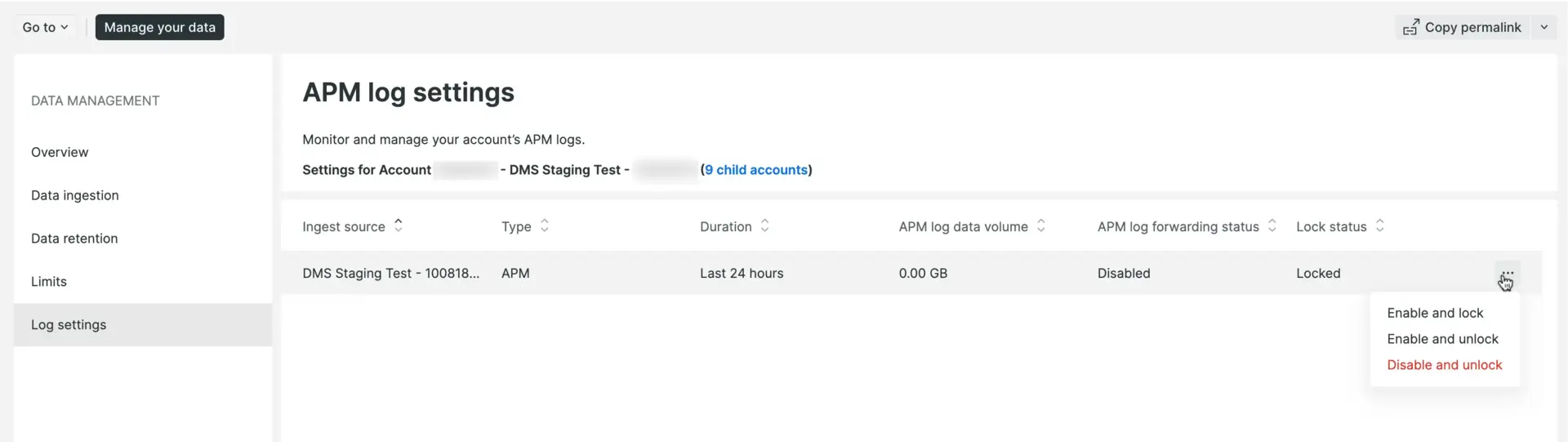
In the Data management UI, the Log settings UI page is where you can enable or disable APM logs (both log decoration and log forwarding) for an account.
For organizations with a parent/child account structure, how this works can vary. More details on parent/child account settings are below.
Parent account settings
At the parent account level, you can choose to enable or disable APM log forwarding. Any child accounts that have not made their own changes from the default setting (enabled) will automatically inherit any changes made from the parent account. Child accounts that have applied their own changes will not be affected by parent account changes.
Parent accounts can also choose to lock or unlock APM log forwarding settings. Locking forces all child accounts to inherit the parent account's enabled or disabled setting, regardless of whether they had previously updated their own enabled or disabled setting. Unlocking allows child accounts to override the parent account's enabled or disabled setting.
Child account settings
At the child account level, you can enable or disable log forwarding as long as the parent account has not locked this setting. When the parent account locks APM log forwarding, a child account will inherit the parent account's enabled or disabled setting and be unable to make any changes.
From the user menu in the New Relic UI, click Manage your data > Log settings.
Click the ellipsis ... menu at the right side of the account's row.
Click the confirmation button to enable or disable and lock or unlock automatic logging (parent accounts) or enable or disable only (child accounts).
After you disable via the New Relic UI, it may take several minutes for the agent to restart and stop automatic log forwarding.
Use the dataManagementUpdateFeatureSettings in NerdGraph API explorer: one.newrelic.com > All capabilities > Apps > NerdGraph API explorer. Refer to the populated example and related documentation in the GraphiQL UI.
When you disable or enable via the NerdGraph API, changes should take effect immediately.
Query example:
{
actor{
account(id:YOUR_ACCOUNT_ID_){
dataManagement{
featureSettings{
enabled
key
name
locked
}
}
}
}
}
Mutation example:
Use this mutation to update each account individually.
mutation{
dataManagementUpdateFeatureSettings(
accountId:YOUR_ACCOUNT_ID
setting:{
enabled:false
locked:true
featureSetting:{key:"apm_log_forwarding"}
}
){
enabled
key
name
locked
}
}
If you want to disable automatic log forwarding for some agents and enable it for others, you can adjust each agent's client-side configuration settings. The agents will never instrument the log data in the first place; instead, they will completely remove the logs. You will need to use client-side configuration if you need to lower overhead.
Client-side configuration settings work completely independently of server-side configuration. The config setting to disable auto logging takes precedence even if the server-side configuration takes precedence for the agent (like Ruby) in other situations. Only the agents that read the changed config file will be impacted.
Important
Note that disabling log forwarding doesn't affect logging metrics, which are displayed on the Logs chart on the APM Summary page. For more detail, see Log metrics.
For more on the log forwarding configuration options, see the procedures for a specific agent:
If you need assistance with updating multiple accounts (for example, a parent account with multiple child accounts), contact your New Relic account representative. If you do not have an account rep, get support at support.newrelic.com.
When automatic log forwarding is disabled via API or UI, all language agents that can send logs by default will have logging turned off going forward for that account.
Turning off logs means no log data will be forwarded; all other aspects of log inspection remain the same. To completely disable all logging related activity in the agent, change the agent's client-side configuration to disable logs.
There will be no change in data ingest, but log data ingest will drop. For more information about managing your data in New Relic, see our data ingest documentation.