뉴렐릭에서 팀에 엔티티를 할당하는 것은 명확한 소유권을 확립하고 효과적인 협업을 가능하게 하는 데 핵심입니다. 자동화된 태그 기반 할당 또는 수동 방법을 통해 소유권을 정의할 수 있습니다.
태그로 소유권 자동화
엔티티 소유권을 할당하는 가장 간단하고 효율적인 방법 중 하나는 에이전트 설정 파일에 레이블(태그)을 직접 적용하는 것입니다.
당신의 에이전트 설정 파일에 태그를 지정하세요
특정 팀을 소유한 팀을 지정하려면 에이전트 설정에 팀 레이블을 추가하는 것부터 시작하세요. 예를 들어 저항 에이전트에서는 다음을 추가할 수 있습니다.
<labels>team:Backend</labels>이 태그는 엔티티를 "백앤드" 팀과 연결합니다.
팀에 엔티티 할당 자동화
각 팀에 태그 할당을 자동화하려면:
- All Capabilities > Teams > Automation 로 이동하세요.
- 엔티티 소유권 기능을 활성화하세요. 활성화되면 뉴렐릭은 팀 태그가 일치하는 모든 대상을 해당 팀에 자동으로 할당합니다.
(선택 사항) 팀 별칭 사용
조직에서 동일한 팀에 대해 다른 식별자를 사용하는 경우(예: "백앤드" 및 "BE"), 일관성을 보장하기 위해 별칭을 구성할 수 있습니다. 이렇게 하려면:
해당 팀의 팀 허브 페이지를 엽니다.
설정 섹션으로 이동하세요.
대체 태그 값을 동일한 팀에 매핑하는 별칭을 추가합니다. 별칭이 설정되면 "team:Backend" 또는 "team:BE"로 태그된 엔티티는 모두 "백앤드" 팀에 할당됩니다.
팁
소유권을 나타내는 수집된 다른 태그를 사용할 수도 있습니다. 이는 추가적인 유연성을 제공하며 조직의 현재 태그 규칙과 부합하도록 보장합니다.
수동으로 소유권을 지정합니다
소유권을 나타내도록 태그를 설정하지 않은 경우 다음 위치에서 수동으로 소유권을 할당할 수 있습니다.
팀 허브 페이지에서
팀 허브에서 소유권을 할당하려면 다음 단계를 따르세요.
팀 허브 페이지로 이동하여 '엔티티 관리'를 클릭합니다.
할당할 엔티티를 선택하세요.
저장 을 클릭합니다.
엔티티 페이지에서
모든 엔티티의 요약 페이지 헤더에서 직접 소유자를 할당할 수도 있습니다.
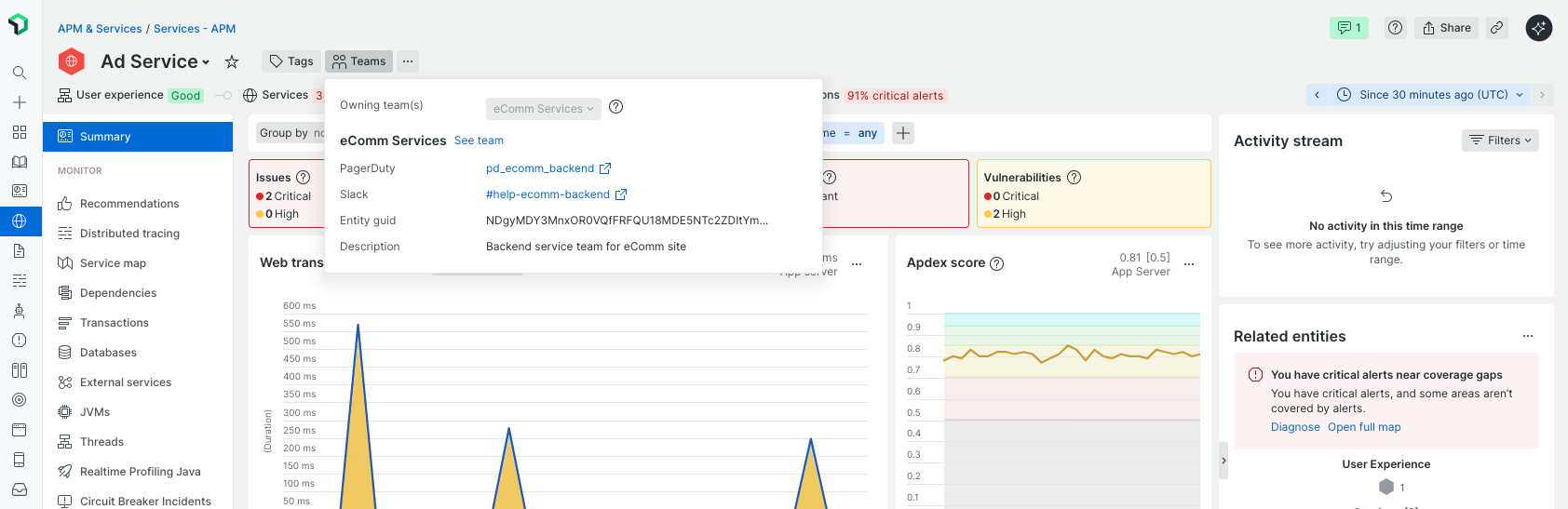
카탈로그에서
팀에 아직 연결되지 않은 소유권이 없는 카탈로그 항목에 소유권을 할당할 수 있습니다.