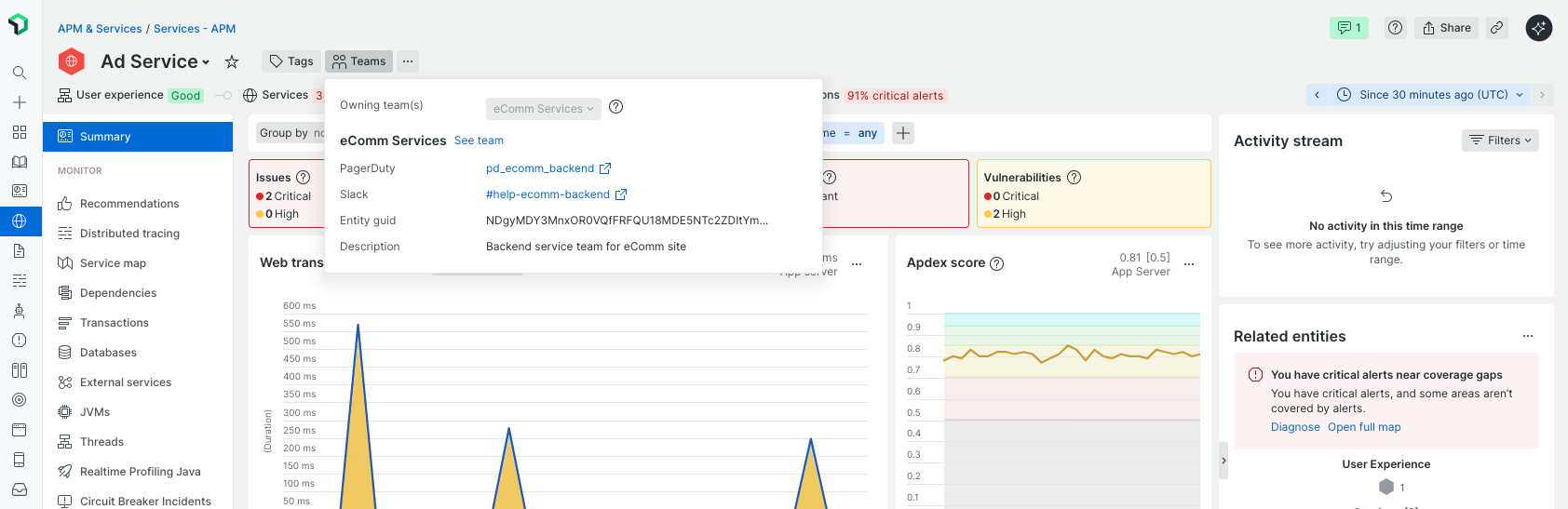
Assigning entities to teams in New Relic is key to establishing clear ownership and enabling effective collaboration. You can define ownership through automated tag-based assignment or manual methods.
Automate ownership with tags
One of the simplest and most efficient ways to assign entity ownership is by applying labels (tags) directly in your agent configuration files.
Tag entities in your agent configuration file
Start by adding a team label to your agent configuration to specify which team owns a given entity.
For example, in a Java agent, you can add:
<labels>team:Backend</labels>
This tag associates the entity with the "Backend" team.
Automate entity assignment to teams
To automate the assignment of tagged entities to their respective teams:
Go to All Capabilities > Teams > Automation.
Enable the Entity ownership feature.
Once enabled, New Relic will automatically assign any entity with a matching team tag to the corresponding team.
New Relic assigns ownership automatically for the entity types listed below, identified by their domain and type. An entity of any other type can still be assigned manually.
Domain
Entity type
AIOPS
CONDITION
AIOPS
DESTINATION
AIOPS
POLICY
AIOPS
WORKFLOW
APM
APPLICATION
BROWSER
APPLICATION
BROWSER
MICRO_FRONTEND
EXT
CLOUDFLARE_HOST
EXT
COREDNS
EXT
IBMMQQUEUE
EXT
KEY_TRANSACTION
EXT
MERAKI_DEVICE
EXT
PIXIE_REDIS
EXT
SAP_JOB
EXT
SAP_RFCDEST
EXT
SAP_TRANSACTION
EXT
SERVICE
EXT
SERVICE_LEVEL
INFRA
AWSALB
INFRA
AWSALBTARGETGROUP
INFRA
AWSAPIGATEWAYAPI
INFRA
AWSAPIGATEWAYSTAGE
INFRA
AWSAUTOSCALINGGROUP
INFRA
AWSBACKUP
INFRA
AWSCERTIFICATEMANAGER
INFRA
AWSCLOUDFRONTDISTRIBUTION
INFRA
AWSCLOUDWATCHMETRICSTREAM
INFRA
AWSDMSHOST
INFRA
AWSDMSREPLICATIONTASK
INFRA
AWSDYNAMODBGLOBALSECONDARYINDEX
INFRA
AWSDYNAMODBREGION
INFRA
AWSDYNAMODBTABLE
INFRA
AWSEBSVOLUME
INFRA
AWSEC2SECURITYGROUP
INFRA
AWSECRREPOSITORY
INFRA
AWSECSCLUSTER
INFRA
AWSECSCONTAINERINSTANCE
INFRA
AWSECSSERVICE
INFRA
AWSEFSFILESYSTEM
INFRA
AWSELASTICACHEREDISCLUSTER
INFRA
AWSELASTICACHEREDISNODE
INFRA
AWSELASTICACHEREDISREPLICATIONGROUP
INFRA
AWSELASTICACHEREDISSHARD
INFRA
AWSELASTICACHEVALKEYCLUSTER
INFRA
AWSELASTICACHEVALKEYNODE
INFRA
AWSELASTICSEARCHCLUSTER
INFRA
AWSELB
INFRA
AWSEVENTSRULE
INFRA
AWSKINESISDELIVERYSTREAM
INFRA
AWSKINESISSTREAM
INFRA
AWSKINESISSTREAMSHARD
INFRA
AWSKMSKEY
INFRA
AWSLAMBDAFUNCTION
INFRA
AWSLAMBDAFUNCTIONALIAS
INFRA
AWSLAMBDAREGION
INFRA
AWSMQQUEUE
INFRA
AWSMQTOPIC
INFRA
AWSMSKTOPIC
INFRA
AWSNATGATEWAY
INFRA
AWSNLB
INFRA
AWSNLBTARGETGROUP
INFRA
AWSRDSDBCLUSTER
INFRA
AWSRDSDBINSTANCE
INFRA
AWSROUTE53HEALTHCHECK
INFRA
AWSS3BUCKET
INFRA
AWSSESREGION
INFRA
AWSSNSTOPIC
INFRA
AWSSQSQUEUE
INFRA
AWSSTATESAPIUSAGE
INFRA
AWSSTATESSTATEMACHINE
INFRA
AWSTRUSTEDADVISORSERVICELIMIT
INFRA
AWSUSAGE
INFRA
AWSWAFV2WEBACL
INFRA
AWSWORKSPACES
INFRA
AZUREAPPSERVICEPLAN
INFRA
AZUREAPPSERVICEWEBAPP
INFRA
AZURECOSMOSDBCOLLECTION
INFRA
AZUREDISKSTORAGE
INFRA
AZUREFUNCTIONSAPP
INFRA
AZUREKEYVAULTVAULT
INFRA
AZURESERVICEBUSQUEUE
INFRA
AZURESERVICEBUSSUBSCRIPTION
INFRA
AZURESERVICEBUSTOPIC
INFRA
AZURESQLDATABASE
INFRA
AZURESTORAGEACCOUNT
INFRA
AZUREVIRTUALNETWORKS
INFRA
AZUREVIRTUALNETWORKSNETWORKINTERFACE
INFRA
AZUREVIRTUALNETWORKSPUBLICIPADDRESS
INFRA
AZUREVIRTUALNETWORKSSUBNET
INFRA
F5POOLMEMBER
INFRA
GCPBIGQUERYDATASET
INFRA
GCPBIGQUERYTABLE
INFRA
GCPCLOUDFUNCTION
INFRA
GCPDATAFLOWJOB
INFRA
GCPKUBERNETESNODE
INFRA
GCPPUBSUBSUBSCRIPTION
INFRA
GCPSTORAGEBUCKET
INFRA
GCPVIRTUALMACHINEDISK
INFRA
HOST
INFRA
IBMMQ_QUEUE
INFRA
KUBERNETESCLUSTER
INFRA
KUBERNETES_DAEMONSET
INFRA
KUBERNETES_DEPLOYMENT
INFRA
KUBERNETES_PERSISTENTVOLUME
INFRA
KUBERNETES_PERSISTENTVOLUMECLAIM
INFRA
KUBERNETES_STATEFULSET
INFRA
MONGODB_COLLECTION
INFRA
RABBITMQEXCHANGE
INFRA
RABBITMQQUEUE
INFRA
VSPHEREVM
INFRA
WIN_SERVICE
MOBILE
APPLICATION
NGEP
AGENT
NGEP
FLEET
NGEP
GIT_REPOSITORY
NR1
WORKLOAD
REF
REPOSITORY
SYNTH
MONITOR
SYNTH
SECURE_CRED
VIZ
DASHBOARD
(Optional) Use Team aliases
If your organization uses different identifiers for the same team (e.g., "Backend" and "BE"), you can configure aliases to ensure consistency. To do so:
Open the Team Hub page for the relevant team.
Go to the Settings section.
Add aliases that map alternative tag values to the same team.
With aliases in place, entities tagged with either "team:Backend" or "team:BE" will both be assigned to the "Backend" team.
Tip
You can also use any other ingested tags that represent ownership. This provides added flexibility and ensures alignment with your organization's current tagging conventions.
Manually assign ownership
If you don't have tags set up to represent ownership, you can manually assign ownership in the following places.
In Team hub page
To assign ownership from the Team Hub:
Go to the Team's hub page and click Entity management.
Select your entities you want to assign.
Click Save.
In entity pages
You can also assign an owner directly from any entity's summary page header.
In Catalogs
Ownership can be assigned to unowned catalog entries that are not yet linked to a team.