このガイドでは、SAP Business Technology プラットフォーム(BTP)からProcess インテグレーション Runtimeインスタンスのサービスキーを取得する方法を説明します。SAP Process Integrationの監視を設定するには、このサービスキーが必要になります。
前提条件
- 適切な権限でのBTP subaccountへのアクセス
- Spaceに関するBTP administratorからの確認と Grant-types
Process Integration Runtimeインスタンスの作成
BTP (Business Technology Platform) subaccountにログインします。
BTP cockpitで、Instances and Subscriptionsをクリックします。
右上のCreateをクリックします。
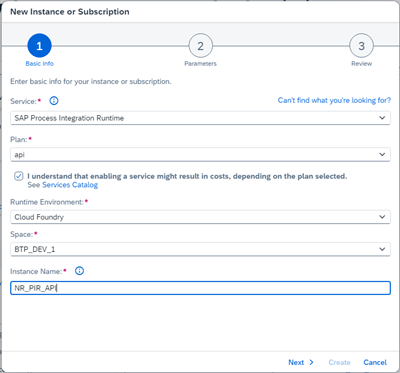
ポップアップ画面で以下を選択します。
Service: SAP Process Integration Runtime
Plan: API
cost disclaimerチェックボックスを選択します。
Runtime Environment: Cloud Foundry
Space:担当の BTP administrator
Instance Name: 組織の命名規則に従ってください
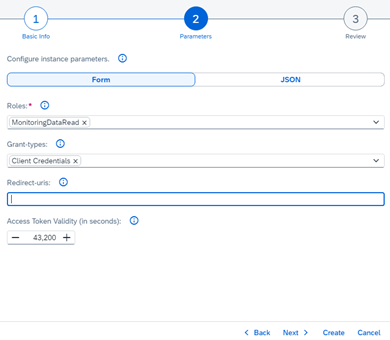
Nextをクリックし、次を選択します:
Roles:
MonitoringDataReadGrant-types:Default Client Credentials(他のタイプが使用される場合は、BTP administratorおよびセキュリティチームに確認してください)
Nextをクリックして詳細を確認します。
Createをクリックします。
サービスキーを生成してダウンロードする
インスタンスを作成したら、Instancesタブでサービスを見つけます。

新しく作成したインスタンスの行にある省略記号(
...)をクリックし、Create Service Keyを選択します。Service Key Nameを入力し、Key Type:
ClientId/Secretを選択します。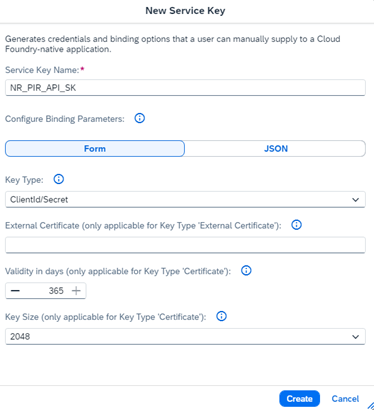
Createをクリックします。
service keyの行にある省略記号(
...)をクリックし、Downloadを選択します。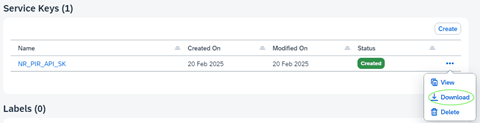
service key fileはJSON fileとしてダウンロードされます。安全に保管してください。監視セットアップを構成するには、このファイルからの資格情報が必要になります。