Esta guía le muestra cómo obtener una clave de servicio de la SAP Business Technology Platform (BTP) para la instancia de Process Integration Runtime. Necesitará esta clave de servicio para configurar el monitoreo de SAP Process Integration.
Requisitos previos
- Acceso a BTP subaccount con los permisos apropiados
- Confirmación de su BTP administrator sobre Space y Grant-types
Cree la instancia de Process Integration Runtime
Inicie sesión en el BTP (Business Technology Platform) subaccount.
En el BTP cockpit, haga clic en Instances and Subscriptions.
Haga clic en Create en la parte superior derecha.
En la pantalla emergente, seleccione:
Service: SAP Process Integration Runtime
Plan: API
Seleccione la casilla de verificación cost disclaimer .
Runtime Environment: Cloud Foundry
Space: Consulta con tu BTP administrator
Instance Name: siga la convención de nomenclatura de su organización
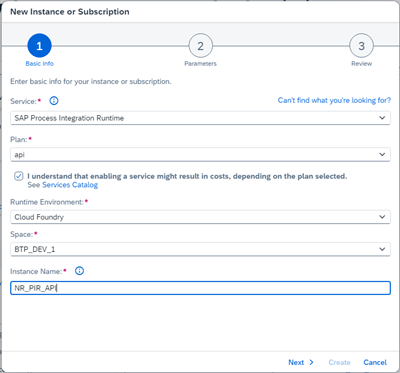
Haga clic en Next y luego seleccione:
Roles:
MonitoringDataReadGrant-types: Default Client Credentials (confirma con tu BTP administrator y equipo de seguridad si se usan otros tipos)
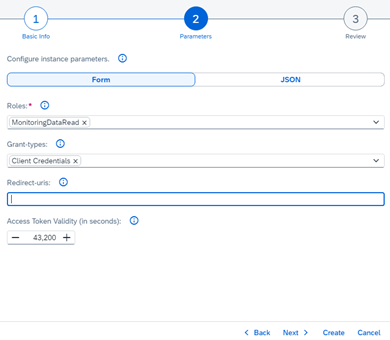
Haga clic en Next para revisar los detalles.
Haga clic en Create.
Generar y descargar la clave de servicio
Después de crear la instancia, ubique el servicio en la pestaña de Instances.

Haga clic en los puntos suspensivos (
...) en la fila de su instancia recién creada y luego seleccione Create Service Key.Ingrese un Service Key Name y seleccione Key Type:
ClientId/Secret.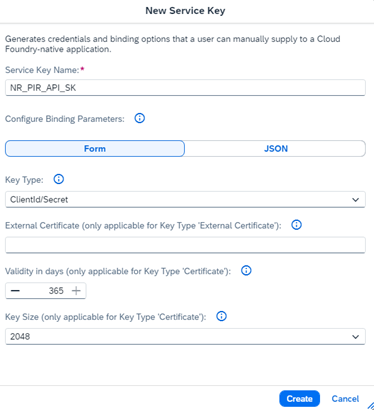
Haga clic en Create.
Haga clic en los puntos suspensivos (
...) en la fila de su service key y luego seleccione Download.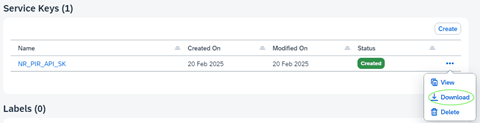
El service key file se descarga como un JSON file. Almacénelo de forma segura. Necesitará las credenciales de este archivo para configurar su entorno de monitoreo.