The Cost Overview page (formerly known as Cost Explorer) provides detailed cost analysis with drill-down functionality across multiple dimensions.
For a consolidated view of all your cloud spending with summary widgets, see the Intelligent summary page.
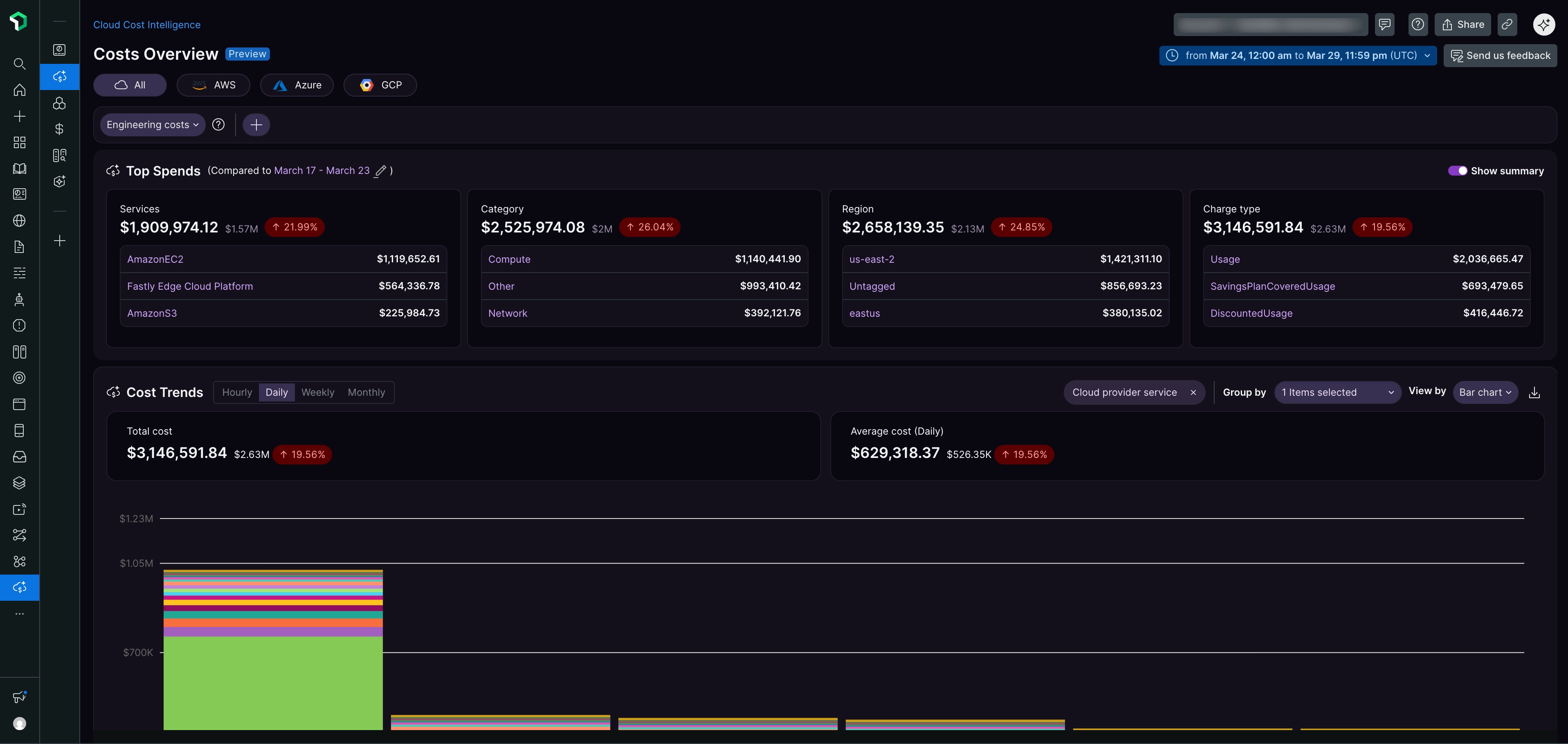
Cloud provider filters
To filter your cost data by cloud provider, select an option from the dropdown menu at the top left of the page:
- All: All cloud providers
- AWS: Amazon Web Services only
- Azure: Microsoft Azure only
- GCP: Google Cloud Platform only
Top Spends
The Top Spends widget helps you identify your highest cost areas. View costs broken down by:
- Service: Costs grouped by cloud service type (for example, AmazonEC2, Fastly Edge Cloud Platform, AmazonS3)
- Category: Costs organized by usage category (for example, Compute, Other, Network)
- Region: Costs by geographical region (for example, us-west-2, Untagged, eastus). "Untagged" indicates costs from resources without regional tags
- Charge type: Costs by billing category (for example, Usage, SavingsPlanCoveredUsage, DiscountedUsage)
Each dimension displays:
- Total cost amount
- Percentage change compared to the previous period (based on your selected date range)
- Top three items with their individual costs
- Show summary toggle to expand or collapse detailed views
Tip
Use the percentage change indicators to quickly identify services or regions with significant cost increases. Red indicators highlight areas where spending has grown compared to the previous period.
Cost Trends
The Cost Trends section provides time-based cost analysis with interactive charts and controls.
Chart controls
- View options: Switch between Hourly, Daily, Weekly, or Monthly views
- Group by: Select 1 to 3 dimensions to group cost data
- View by: Choose visualization format (availability depends on your group-by selections)
Understanding the data
- Total cost: Displays aggregate spending with percentage change
- Average cost: Displays daily average spending with percentage change
- Stacked bar chart: Visualizes cost distribution over time with color-coded segments for different services
Cost data table
Below the chart, a detailed table displays:
- Cloud provider service: Service name
- Total Cost: Aggregate spending amount (sortable)
- % of Spend: Percentage of total spending
- Compared Cost: Cost comparison with previous period
- Trend: Percentage change indicator with color coding (green for decrease, red for increase)
Visualization options
Group-by constraints:
- Minimum selection: 1 dimension
- Maximum selection: 3 dimensions
With single group-by selection:
- Bar chart: Displays cost data as vertical bars
- Line chart: Shows cost trends over time
- Tree chart: Hierarchical visualization of cost data
- Data table: Tabular view of cost data
With multiple group-by selections:
- Heat map: Color-coded visualization
- Data table: Tabular view of cost data
Drill-down functionality
Click any service (for example, AmazonEC2) in the cost data table to view detailed breakdowns by category, region, or charge type. Click again to see individual resource costs.
All service types support drill-down, including compute, network, and storage.
Filters and customization
The Cost Overview page supports filtering and customization options to help you focus on specific cost segments.
Date range selector
At the top-right of the page, use the date range selector to:
- Choose a predefined time period
- Set custom start and end dates
- View costs in your preferred timezone (UTC displayed by default)
Engineering costs filter
If your organization uses cost allocation tags, you can filter by the Engineering costs tag to narrow analysis to specific teams, projects, or cost centers tagged in your cloud environment.