Cloud Cost Intelligence provides visibility and management of cloud costs across all your cloud providers. It bridges the gap between cost visibility and infrastructure observability, offering a holistic view of your cloud expenditures.
As enterprises scale their cloud services rapidly, managing and tracking cloud expenses becomes increasingly complex. Cloud Cost Intelligence offers insights into your cost allocation, enabling you to identify potential savings opportunities. By matching cloud expenditures with actual usage, you can optimize budgets while supporting strategic growth initiatives, ensuring that every dollar invested contributes to your company's overall success.
To access Cloud Cost Intelligence, you need:
- An Advanced CCU SKU
- A full platform user license
- Access managed through Feature Control Manager
Choose your cloud provider below to start monitoring and optimizing your cloud costs:
Choose an integration scope
You can connect Cloud Cost Intelligence to a parent-level scope or to individual sub-scopes. The scope you select determines what cost data is ingested and how access is controlled in New Relic.
Connect to the parent account for AWS, management subscription for Azure, or billing account for GCP.
With this option, Cloud Cost Intelligence retrieves cost and usage data for the parent and all child accounts, subscriptions, or projects in a single integration. Data can be filtered by account, subscription, or project within New Relic.
Use this option when:
- Cost data from the entire organization should be available to all users of Cloud Cost Intelligence in the New Relic account
- You want centralized management of a single integration
Connect to an individual AWS member account, Azure subscription, or GCP project.
With this option, Cloud Cost Intelligence retrieves data only for the selected sub-scope. You can create multiple integrations, either within the same New Relic account or across different New Relic accounts.
Use this option when:
- You need to restrict cost data visibility based on a user's access to specific New Relic accounts
- Different teams or business units manage their own cloud costs independently
Key features
Intelligent summary
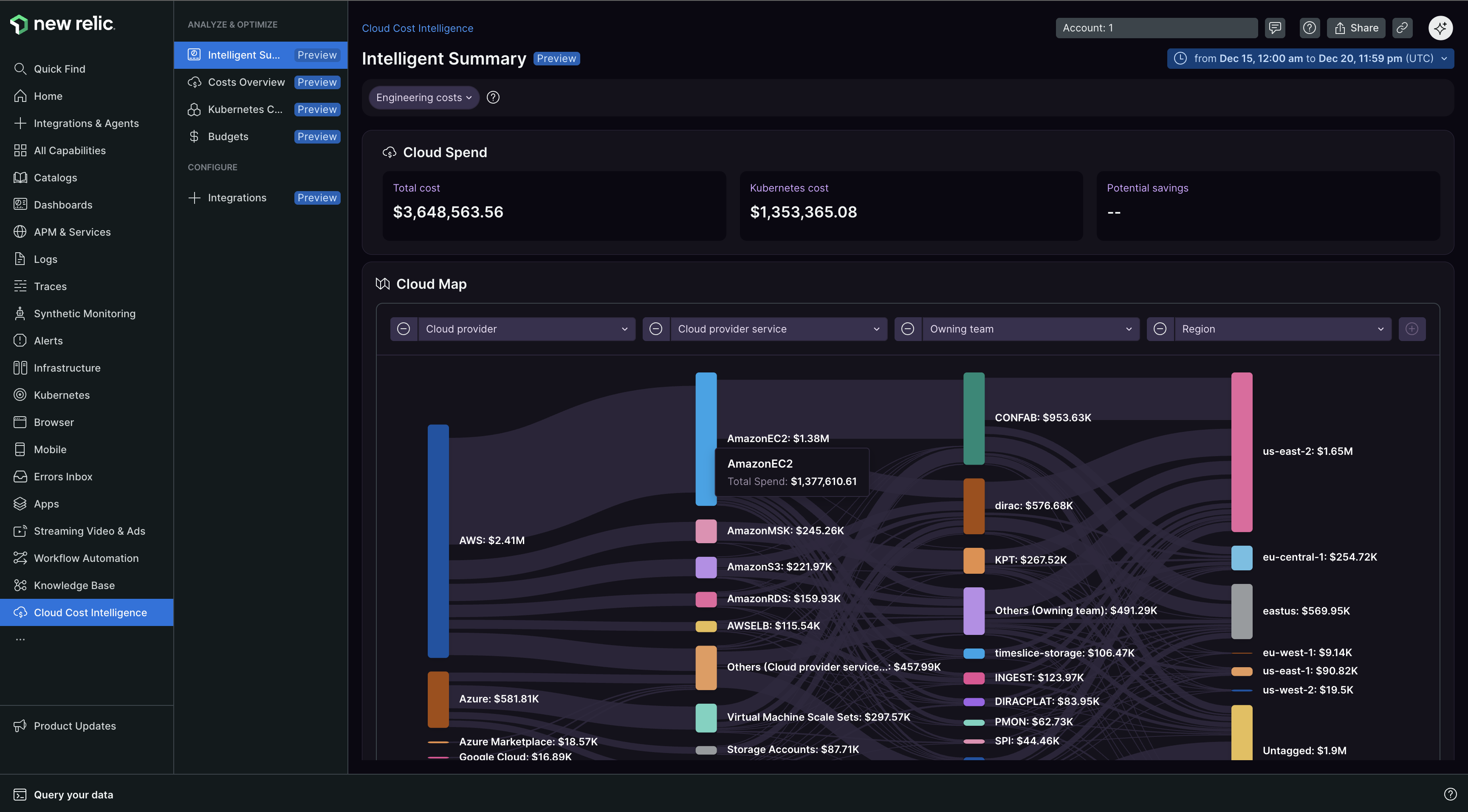
The Intelligent summary page is your primary landing page for Cloud Cost Intelligence. It displays all your cloud spending in one place, showing how costs move through your organization, broken down by services, teams, and regions. You can navigate the page and change views based on your needs.
Key features include:
- Sankey chart: Navigate dynamic Sankey chart visualizations to drill down into cost details
- Cost segregation: Costs segregated by services, teams, and regions
- Dynamic views: Switch between different view types (for example, accounts view)
- Breakdown by category: Cloud costs segmented by application, service, owning team, and region
- Trend analysis: Month-over-month cost trends, average costs, and top cost drivers
Cost overview
The Cost Overview page provides detailed cost analysis with drill-down functionality to explore costs across multiple dimensions, from service level down to individual resources.
Kubernetes cost allocation
View Kubernetes costs broken down by application name using New Relic telemetry data.
FinOps Agent
The FinOps Agent adds cost-focused conversational intelligence to CCI and is available in the Ask AI chat interface. Use it to:
- Ask questions about cost data and trends
- Get AI-generated weekly and month-to-date (MTD) spending summaries
- Detect cost anomalies
Important
The FinOps Agent is currently in preview. To enable it, see How do I access capabilities currently in preview?.
Cross-account data collection
Cloud Cost Intelligence can collect telemetry data from all New Relic accounts you have access to. Even if you use a single account for Cloud Cost Intelligence, data from all other accounts you can access can also be used to collect and insights in that account. Verify your account permissions align with your internal data access policies, and configure the same through Settings.
How it works
Data collection
After setup is complete, Cloud Cost Intelligence automatically accesses your cost and usage data from your designated object storage container. Our service can only retrieve reports after they have been exported to your storage container. Ensure the folder path prefix is configured correctly during setup.
Your cloud provider typically updates billing data several times a day. After initial setup, Cloud Cost Intelligence retrieves the latest report from your storage location on an hourly basis. The most recent cost data appears in our platform shortly after your provider publishes the update.
Billing file ingest: CCI pricing is based on the size of the billing export files your cloud provider (AWS, Azure, or GCP) publishes to your storage container. These files are imported into Cloud Cost Intelligence to build cost analysis and insights. For details, see Cloud Cost Intelligence pricing.
Your data privacy: Cost and Usage Reports contain data about your usage of cloud services and their costs, which should not include personal data. Ensure the data you send is free from personally identifiable information (PII) or sensitive information before adding the Cost and Usage Reports to your storage and before uploading to New Relic. Data deletion is not currently supported. We recommend not generating Cost and Usage Reports with PII or sensitive information.
Data retention: Data is retained for up to 3 years. After 2 years, data is moved to lower-cost storage with longer retrieval times.
Viewing access: Anyone with access to the New Relic account you select during installation can view all data within Cloud Cost Intelligence. Choose an account with suitable access privileges to match your RBAC and access policy requirements.
Data analysis and reporting
After retrieving Cost and Usage Report data, Cloud Cost Intelligence processes and analyzes this information to deliver actionable insights in its dashboards. Visualize the financial implications of your cloud usage, identifying cost drivers and potential areas for optimization.
Related topics
General settings
Configure Cloud Cost Intelligence settings and telemetry data
Manage integrations
View and manage your cloud provider account integrations
Analyze costs
Explore the Intelligent summary page to analyze your cloud spending
Pricing
Understand how Cloud Cost Intelligence usage and billing file ingest is priced
Frequently asked questions
Get answers to common questions, including how to access preview features