실시간 가시성과 안정적인 데이터 스트리밍을 위해 OpenTelemetry Collector로 아파치 Kafka 클러스터를 모니터하십시오. 이 공급업체 비종속 솔루션은 자체 호스팅 및 Kubernetes 환경 전반에 걸쳐 비용이 많이 드는 다운타임을 방지합니다.
Collector 옵션
뉴렐릭은 Kafka 모니터링을 위한 두 가지 OpenTelemetry Collector 배포판을 지원하며, 둘 다 동일한 설정 파일과 모델링 기능으로 동일한 기능을 제공합니다.
- NRDOT Collector (권장): 뉴렐릭이 배포하는 OpenTelemetry Collector 이며, 뉴렐릭의 지원을 받을 수 있습니다. 자세한 내용은 NRDOT Collector GitHub 저장소를 참조하세요.
- OpenTelemetry Collector: 업스트림 커뮤니티 배포판입니다. 자세한 내용은 OpenTelemetry Collector Contrib GitHub 저장소를 참조하세요.
귀사의 지원 및 운영 요구 사항에 가장 적합한 데이터 수집기를 선택한 다음, 환경 모니터링 설정을 진행하십시오.
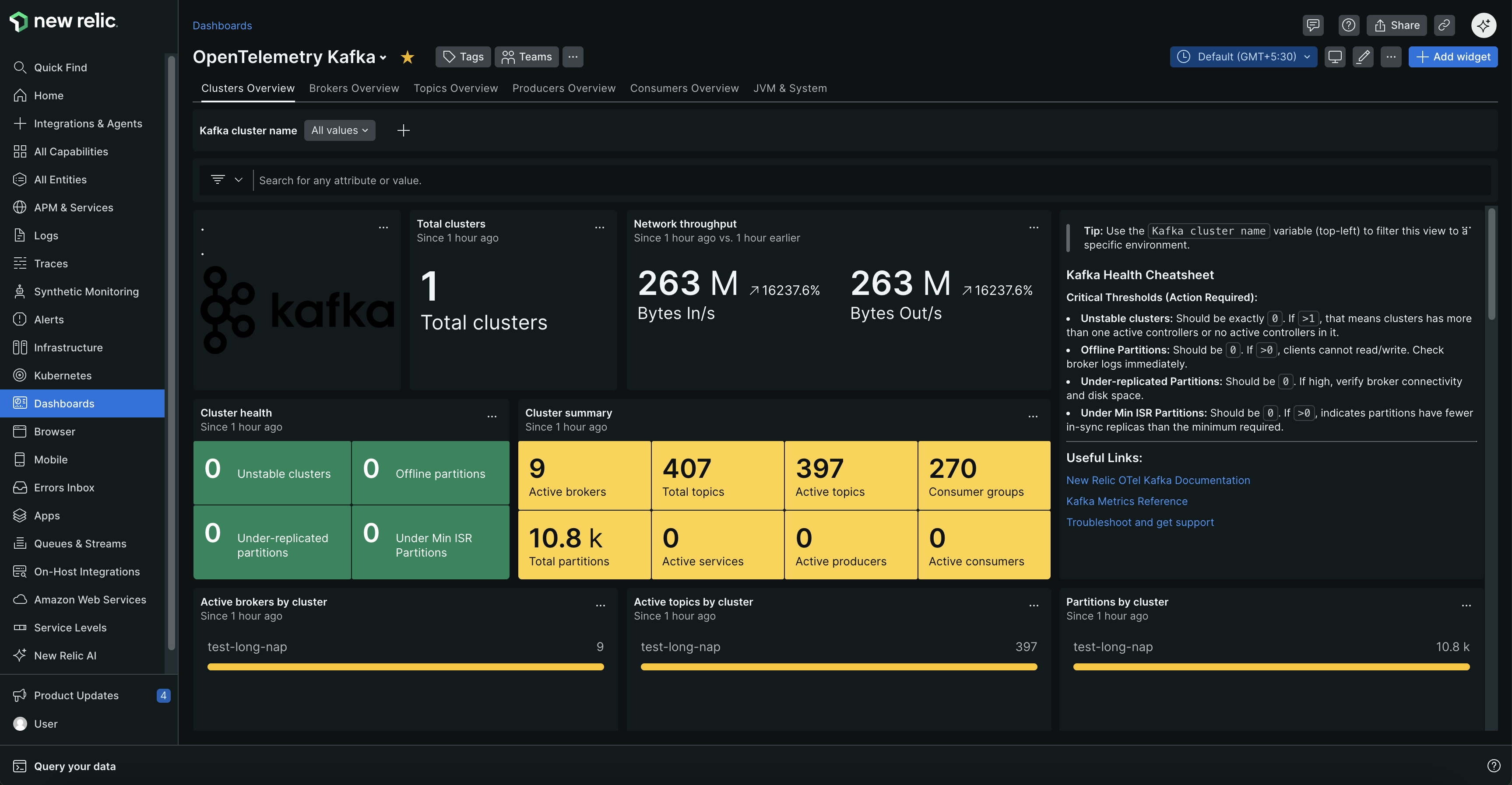
클러스터 상태, 브로커 상태, 주제 지표 및 소비자 그룹 성능을 보여주는 포괄적인 대시보드로 Kafka 클러스터를 모니터링하세요.
Kafka 모니터링이 필요한 이유는 무엇인가요?
- 장애 방지: 다운타임이 발생하기 전에 브로커 장애, 과소 복제된 파티션, 오프라인 토픽에 대한 알림을 받으세요.
- 성능 최적화: 데이터 처리 속도에 영향을 미치는 소비자 지연, 느린 생산자 및 네트워크 병목현상을 식별합니다.
- 용량 계획: 리소스 사용량, 메시지 전송률, 연결 수를 추적하여 선제적으로 확장하세요
- 데이터 무결성 보장: 데이터 손실을 방지하기 위해 복제 상태와 파티션 균형을 모니터하십시오.
일반적인 사용 사례
Kafka 모니터링은 비즈니스에 영향을 미치기 전에 문제를 파악하는 데 도움이 됩니다. 소비자 지연 급증이 실시간 대시보드를 위협하거나, 브로커 장애가 데이터 손실 위험을 초래하거나, 네트워크 병목현상이 핵심 데이터 파이프라인을 지연시킬 때 알림을 받으세요. 금융 거래, IoT 데이터 처리, 마이크로서비스 통신, 전자상거래 플랫폼 및 실시간 분석에 필수적입니다.
시작하다
모니터링을 시작하려면 Kafka 환경을 선택하세요. 각 설정 가이드에는 전제 조건, 설정 단계, 문제 해결, 해결 팁이 포함되어 있습니다.
작동 원리
수집기는 특수 구성 요소를 사용하여 성능 데이터를 지속적으로 수집합니다:
데이터 수집:
Kafka 지표 수신기: 클러스터 상태, 소비자 지연, 주제 지표 및 파티션 상태를 확인하기 위해 Kafka의 응답스트랩 포트에 연결합니다.
JMX 메트릭 수집: 다음을 통해 브로커 성능, JVM 데이터 및 운영 인사이트를 수집합니다:
- 자체 호스팅 Kafka: 브로커 JVM의 OTel 자바 에이전트 또는 Prometheus JMX Exporter
- Kubernetes(자체 관리형): init 컨테이너를 통한 OTel 자바 에이전트 또는 Prometheus JMX Exporter
- Kubernetes(Strimzi): Strimzi를 통한 Prometheus JMX Exporter
KafkaMetricsConfig
| OTel 자바 에이전트 | Prometheus JMX Exporter | |
|---|---|---|
| 아키텍처 | 푸시 기반 | 풀 기반 |
| 규약 | OTLP(gRPC 또는 HTTP) | HTTP 스크랩(기본 포트 9404) |
| 구성 | JMX 설정 파일(.yaml) | 메트릭 패턴이 포함된 YAML 설정 |
| 유효성 | 자체 호스팅, Kubernetes 자체 관리 | 자체 호스팅, Kubernetes 자체 관리, Kubernetes Strimzi |
주요 메트릭: 소비자 지연, 브로커 상태, 요청 비율, 네트워크 처리량, 파티션 복제 상태, 리소스 사용률 및 JVM 성능 데이터.
전체 이름, 설명 및 알림 권장 사항은 Kafka 참조를 확인하세요.
선택 사항: 애플리케이션 수준 모니터링을 추가합니다.
생산자 → 브로커 → 소비자에 이르는 완벽한 가시성을 위해 생산자 및 소비자 애플리케이션을 모니터링하세요.
추가: 요청 지연시간, 처리량 메트릭, 오류율 및 분산 트레이스.
설정: 제로 코드 Kafka 계측 을 위해 OpenTelemetry 자바 에이전트 를 사용하세요.
다음 단계
모니터링 설정:
설치 후: