OpenTelemetry Collector를 배포하여 메트릭을 수집하고 뉴렐릭으로 전달함으로써 Kubernetes에서 실행되는 자체 관리형 아파치 Kafka 클러스터를 모니터링하세요.
아키텍처
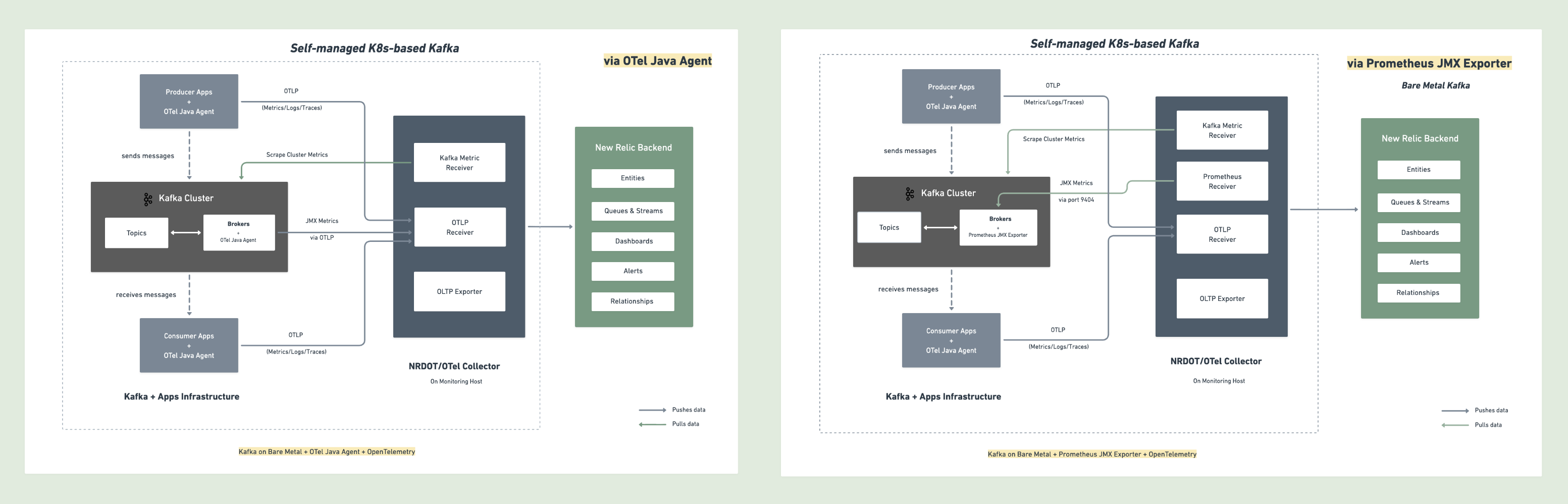
뉴렐릭은 자체 관리형 Kubernetes Kafka 모니터링을 위한 두 가지 접근 방식을 지원합니다: OpenTelemetry 자바 에이전트 또는 Prometheus JMX Exporter. 다음 다이어그램은 각 접근 방식에 대한 데이터 흐름을 보여줍니다.
설치 단계
다음 단계에 따라 브로커에 OpenTelemetry 자바 에이전트를 설치하고 수집기를 배포하여 메트릭과 로그를 수집하고 뉴렐릭으로 전송하여 포괄적인 Kafka 모니터링을 설정하십시오.
시작하기 전에
다음 사항을 확인하십시오:
- 뉴렐릭 계정
kubectl액세스 권한이 있는 쿠버네티스 클러스터- StatefulSet으로 배포된 Kafka
- Kafka StatefulSet을 수정하고 재배포할 수 있는 기능
구현하다, 배포하다 OpenTelemetry Collector
클러스터에 OpenTelemetry 수집기를 배포하십시오. 이 단계에서는 자바 에이전트가 각 브로커 파드에서 수집하는 JMX 메트릭을 정의하는 kafka-jmx-config ConfigMap도 생성합니다. 다음 단계에서 Kafka 브로커를 다시 시작하기 전에 수집기가 실행 중이어야 합니다.
1단계. 뉴렐릭 자격 증명 시크릿 생성
팁
다른 엔드포인트 설정에 대해서는 OTLP 엔드포인트 구성을 참조하세요.
2단계. 수집기 설정이 포함된 values.yaml 생성
NRDOT 및 OpenTelemetry 수집기 모두 동일한 설정을 사용합니다. 선호하는 수집기 이미지를 선택하세요:
고급 설정 옵션은 다음을 참조하세요:
3단계. Helm으로 OpenTelemetry Collector 설치
bash$helm repo add open-telemetry https://open-telemetry.github.io/opentelemetry-helm-charts$helm upgrade kafka-monitoring open-telemetry/opentelemetry-collector \>--install \>--namespace newrelic \>--create-namespace \>-f values.yaml4단계. 배포 확인
bash$# Check pod status$kubectl get pods -n newrelic -l app.kubernetes.io/name=opentelemetry-collector$$# View logs to verify metrics are being received from broker pods$kubectl logs -n newrelic -l app.kubernetes.io/name=opentelemetry-collector --tail=50
1단계. 뉴렐릭 자격 증명 시크릿 생성
팁
다른 엔드포인트 설정에 대해서는 OTLP 엔드포인트 구성을 참조하세요.
2단계. 매니페스트 파일 생성
NRDOT 및 OpenTelemetry 수집기는 모두 동일한 설정을 사용합니다. 컨테이너 이미지만 다릅니다. 또한 둘 다 Kafka 네임스페이스에 적용된 kafka-jmx-config ConfigMap이 필요합니다.
kafka-jmx-config.yaml생성 - 자바 에이전트용 JMX 메트릭 설정(Kafka 네임스페이스에 적용):
apiVersion: v1kind: ConfigMapmetadata:  name: kafka-jmx-config  namespace: kafka  # TODO: Replace with your Kafka namespacedata:  kafka-jmx-config.yaml: |    ---    rules:      # Per-topic custom metrics      - bean: kafka.server:type=BrokerTopicMetrics,name=MessagesInPerSec,topic=*        metricAttribute:          topic: param(topic)        mapping:          Count:            metric: kafka.prod.msg.count            type: counter            desc: The number of messages per topic            unit: "{message}"
      - bean: kafka.server:type=BrokerTopicMetrics,name=BytesInPerSec,topic=*        metricAttribute:          topic: param(topic)          direction: const(in)        mapping:          Count:            metric: kafka.topic.io            type: counter            desc: The bytes received or sent per topic            unit: By
      - bean: kafka.server:type=BrokerTopicMetrics,name=BytesOutPerSec,topic=*        metricAttribute:          topic: param(topic)          direction: const(out)        mapping:          Count:            metric: kafka.topic.io            type: counter            desc: The bytes received or sent per topic            unit: By
      # Cluster-level metrics      - bean: kafka.controller:type=KafkaController,name=GlobalTopicCount        mapping:          Value:            metric: kafka.cluster.topic.count            type: gauge            desc: The total number of global topics in the cluster            unit: "{topic}"
      - bean: kafka.controller:type=KafkaController,name=GlobalPartitionCount        mapping:          Value:            metric: kafka.cluster.partition.count            type: gauge            desc: The total number of global partitions in the cluster            unit: "{partition}"
      - bean: kafka.controller:type=KafkaController,name=FencedBrokerCount        mapping:          Value:            metric: kafka.broker.fenced.count            type: gauge            desc: The number of fenced brokers in the cluster            unit: "{broker}"
      - bean: kafka.controller:type=KafkaController,name=PreferredReplicaImbalanceCount        mapping:          Value:            metric: kafka.partition.non_preferred_leader            type: gauge            desc: The count of topic partitions for which the leader is not the preferred leader            unit: "{partition}"
      # Broker-level metrics      - bean: kafka.server:type=ReplicaManager,name=UnderMinIsrPartitionCount        mapping:          Value:            metric: kafka.partition.under_min_isr            type: gauge            desc: The number of partitions where the number of in-sync replicas is less than the minimum            unit: "{partition}"
      - bean: java.lang:type=Runtime        mapping:          Uptime:            metric: kafka.broker.uptime            type: gauge            desc: Broker uptime in milliseconds            unit: ms
      - bean: kafka.server:type=ReplicaManager,name=LeaderCount        mapping:          Value:            metric: kafka.broker.leader.count            type: gauge            desc: Number of partitions for which this broker is the leader            unit: "{partition}"
      # JVM metrics      - bean: java.lang:type=GarbageCollector,name=*        mapping:          CollectionCount:            metric: jvm.gc.collections.count            type: counter            unit: "{collection}"            desc: total number of collections that have occurred            metricAttribute:              name: param(name)
      - bean: java.lang:type=Memory        unit: By        prefix: jvm.memory.        dropNegativeValues: true        mapping:          HeapMemoryUsage.max:            metric: heap.max            desc: current heap usage            type: gauge          HeapMemoryUsage.used:            metric: heap.used            desc: current heap usage            type: gauge
      - bean: java.lang:type=Threading        mapping:          ThreadCount:            metric: jvm.thread.count            type: gauge            unit: "{thread}"            desc: Total thread count
      - bean: java.lang:type=OperatingSystem        prefix: jvm.        dropNegativeValues: true        mapping:          SystemCpuLoad:            metric: system.cpu.utilization            type: gauge            unit: '1'            desc: Recent CPU utilization for whole system (0.0 to 1.0)
      - bean: kafka.server:type=BrokerTopicMetrics,name=MessagesInPerSec        mapping:          Count:            metric: kafka.message.count            type: counter            desc: The number of messages received by the broker            unit: "{message}"
      - bean: kafka.server:type=BrokerTopicMetrics,name=TotalFetchRequestsPerSec        metricAttribute:          type: const(fetch)        mapping:          Count:            metric: &metric kafka.request.count            type: &type counter            desc: &desc The number of requests received by the broker            unit: &unit "{request}"
      - bean: kafka.server:type=BrokerTopicMetrics,name=TotalProduceRequestsPerSec        metricAttribute:          type: const(produce)        mapping:          Count:            metric: *metric            type: *type            desc: *desc            unit: *unit
      - bean: kafka.server:type=BrokerTopicMetrics,name=FailedFetchRequestsPerSec        metricAttribute:          type: const(fetch)        mapping:          Count:            metric: &metric kafka.request.failed            type: &type counter            desc: &desc The number of requests to the broker resulting in a failure            unit: &unit "{request}"
      - bean: kafka.server:type=BrokerTopicMetrics,name=FailedProduceRequestsPerSec        metricAttribute:          type: const(produce)        mapping:          Count:            metric: *metric            type: *type            desc: *desc            unit: *unit
      - beans:          - kafka.network:type=RequestMetrics,name=TotalTimeMs,request=Produce          - kafka.network:type=RequestMetrics,name=TotalTimeMs,request=FetchConsumer          - kafka.network:type=RequestMetrics,name=TotalTimeMs,request=FetchFollower        metricAttribute:          type: param(request)        unit: ms        mapping:          99thPercentile:            metric: kafka.request.time.99p            type: gauge            desc: The 99th percentile time the broker has taken to service requests
      - bean: kafka.network:type=RequestChannel,name=RequestQueueSize        mapping:          Value:            metric: kafka.request.queue            type: gauge            desc: Size of the request queue            unit: "{request}"
      - bean: kafka.server:type=BrokerTopicMetrics,name=BytesInPerSec        metricAttribute:          direction: const(in)        mapping:          Count:            metric: &metric kafka.network.io            type: &type counter            desc: &desc The bytes received or sent by the broker            unit: &unit By
      - bean: kafka.server:type=BrokerTopicMetrics,name=BytesOutPerSec        metricAttribute:          direction: const(out)        mapping:          Count:            metric: *metric            type: *type            desc: *desc            unit: *unit
      - beans:          - kafka.server:type=DelayedOperationPurgatory,name=PurgatorySize,delayedOperation=Produce          - kafka.server:type=DelayedOperationPurgatory,name=PurgatorySize,delayedOperation=Fetch        metricAttribute:          type: param(delayedOperation)        mapping:          Value:            metric: kafka.purgatory.size            type: gauge            desc: The number of requests waiting in purgatory            unit: "{request}"
      - bean: kafka.server:type=ReplicaManager,name=PartitionCount        mapping:          Value:            metric: kafka.partition.count            type: gauge            desc: The number of partitions on the broker            unit: "{partition}"
      - bean: kafka.controller:type=KafkaController,name=OfflinePartitionsCount        mapping:          Value:            metric: kafka.partition.offline            type: gauge            desc: The number of partitions offline            unit: "{partition}"
      - bean: kafka.server:type=ReplicaManager,name=UnderReplicatedPartitions        mapping:          Value:            metric: kafka.partition.under_replicated            type: gauge            desc: The number of under replicated partitions            unit: "{partition}"
      - bean: kafka.server:type=ReplicaManager,name=IsrShrinksPerSec        metricAttribute:          operation: const(shrink)        mapping:          Count:            metric: kafka.isr.operation.count            type: counter            desc: The number of in-sync replica shrink and expand operations            unit: "{operation}"
      - bean: kafka.server:type=ReplicaManager,name=IsrExpandsPerSec        metricAttribute:          operation: const(expand)        mapping:          Count:            metric: kafka.isr.operation.count            type: counter            desc: The number of in-sync replica shrink and expand operations            unit: "{operation}"
      - bean: kafka.server:type=ReplicaFetcherManager,name=MaxLag,clientId=Replica        mapping:          Value:            metric: kafka.max.lag            type: gauge            desc: The max lag in messages between follower and leader replicas            unit: "{message}"
      - bean: kafka.controller:type=KafkaController,name=ActiveControllerCount        mapping:          Value:            metric: kafka.controller.active.count            type: gauge            desc: Number of active controllers in the cluster            unit: "{controller}"
      - bean: kafka.controller:type=ControllerStats,name=LeaderElectionRateAndTimeMs        mapping:          Count:            metric: kafka.leader.election.rate            type: counter            desc: The leader election count            unit: "{election}"
      - bean: kafka.controller:type=ControllerStats,name=UncleanLeaderElectionsPerSec        mapping:          Count:            metric: kafka.unclean.election.rate            type: counter            desc: Unclean leader election count            unit: "{election}"
      # ── Additional metrics — remove this section to reduce data ingest ───────────
      - beans:          - kafka.network:type=RequestMetrics,name=TotalTimeMs,request=Produce          - kafka.network:type=RequestMetrics,name=TotalTimeMs,request=FetchConsumer          - kafka.network:type=RequestMetrics,name=TotalTimeMs,request=FetchFollower        metricAttribute:          type: param(request)        unit: ms        mapping:          Count:            metric: kafka.request.time.total            type: counter            desc: The total time the broker has taken to service requests          50thPercentile:            metric: kafka.request.time.50p            type: gauge            desc: The 50th percentile time the broker has taken to service requests          Mean:            metric: kafka.request.time.avg            type: gauge            desc: The average time the broker has taken to service requests
      - bean: kafka.log:type=LogFlushStats,name=LogFlushRateAndTimeMs        unit: ms        type: gauge        prefix: kafka.logs.flush.        mapping:          Count:            metric: count            unit: '{flush}'            type: counter            desc: Log flush count          50thPercentile:            metric: time.50p            desc: Log flush time - 50th percentile          99thPercentile:            metric: time.99p            desc: Log flush time - 99th percentile
      - bean: java.lang:type=GarbageCollector,name=*        mapping:          CollectionTime:            metric: jvm.gc.collections.elapsed            type: counter            unit: ms            desc: the approximate accumulated collection elapsed time in milliseconds            metricAttribute:              name: param(name)
      - bean: java.lang:type=ClassLoading        mapping:          LoadedClassCount:            metric: jvm.class.count            type: gauge            unit: "{class}"            desc: Currently loaded class count
      - bean: java.lang:type=Memory        unit: By        prefix: jvm.memory.        dropNegativeValues: true        mapping:          HeapMemoryUsage.committed:            metric: heap.committed            desc: Committed heap memory            type: gauge
      - bean: java.lang:type=OperatingSystem        prefix: jvm.        dropNegativeValues: true        mapping:          SystemLoadAverage:            metric: system.cpu.load_1m            type: gauge            unit: "{run_queue_item}"            desc: System load average (1 minute)          AvailableProcessors:            metric: cpu.count            type: gauge            unit: "{cpu}"            desc: Number of processors available          ProcessCpuLoad:            metric: cpu.recent_utilization            type: gauge            unit: '1'            desc: Recent CPU utilization for JVM process (0.0 to 1.0)          OpenFileDescriptorCount:            metric: file_descriptor.count            type: gauge            unit: "{file_descriptor}"            desc: Number of open file descriptors
- bean: java.lang:type=MemoryPool,name=* type: gauge unit: By metricAttribute: name: param(name) mapping: Usage.used: metric: jvm.memory.pool.used desc: Memory pool usage by generation Usage.max: metric: jvm.memory.pool.max desc: Maximum memory pool size CollectionUsage.used: metric: jvm.memory.pool.used_after_last_gc desc: Memory used after last GC3단계. 매니페스트 배포
$# Create namespace if it doesn't exist$kubectl create namespace newrelic --dry-run=client -o yaml | kubectl apply -f -$
$# Apply JMX ConfigMap to the Kafka namespace$kubectl apply -f kafka-jmx-config.yaml$
$# Apply collector ConfigMap$kubectl apply -f collector-configmap.yaml$
$# Apply Deployment and Service$kubectl apply -f collector-deployment.yaml
4단계. 배포 확인
$# Check pod status$kubectl get pods -n newrelic -l app=otel-collector$
$# View logs to verify metrics are being received from broker pods$kubectl logs -n newrelic -l app=otel-collector --tail=50자바 에이전트용 Kafka StatefulSet 구성
이제 수집기가 실행 중이므로, Kafka StatefulSet을 패치하여 OpenTelemetry 자바 에이전트 JAR을 다운로드하는 init 컨테이너를 추가한 다음, KAFKA_OPTS을(를) 통해 이를 Kafka 브로커 JVM에 연결합니다.
기존 Kafka StatefulSet 매니페스트에 다음 섹션을 추가합니다:
spec:  template:    spec:      # 1. Init container: downloads OTel Java agent JAR before Kafka starts      initContainers:        - name: download-otel-agent          image: busybox:latest          command:            - sh            - -c            - |              wget -O /otel-agent/opentelemetry-javaagent.jar \                https://github.com/open-telemetry/opentelemetry-java-instrumentation/releases/latest/download/opentelemetry-javaagent.jar          volumeMounts:            - name: otel-agent              mountPath: /otel-agent
      containers:        - name: kafka  # TODO: Replace with your Kafka container name          # 2. Attach OTel Java agent to the Kafka broker JVM          env:            - name: KAFKA_OPTS              value: >-                -javaagent:/otel-agent/opentelemetry-javaagent.jar                -Dotel.jmx.enabled=true                -Dotel.jmx.config=/jmx-config/kafka-jmx-config.yaml                -Dotel.resource.attributes=kafka.cluster.name=my-kafka-cluster                -Dotel.exporter.otlp.endpoint=http://otel-collector.newrelic.svc.cluster.local:4317                -Dotel.exporter.otlp.protocol=grpc                -Dotel.metrics.exporter=otlp                -Dotel.logs.exporter=otlp                -Dotel.instrumentation.runtime-telemetry.enabled=false                -Dotel.metric.export.interval=30000          volumeMounts:            - name: otel-agent              mountPath: /otel-agent            - name: jmx-config              mountPath: /jmx-config
# 3. Volumes: emptyDir for JAR, ConfigMap for JMX rules volumes: - name: otel-agent emptyDir: {} - name: jmx-config configMap: name: kafka-jmx-config # Deployed with the collector in the previous step팁
이전 단계에서 수집기와 함께 kafka-jmx-config ConfigMap이 배포되었습니다. otel.exporter.otlp.endpoint 값 http://otel-collector.newrelic.svc.cluster.local:4317 은(는) 수집기가 newrelic 네임스페이스에 서비스 이름 otel-collector(으)로 배포된다고 가정합니다. 다를 경우 실제 수집기 서비스 DNS와 일치하도록 업데이트하십시오.
업데이트된 StatefulSet을 적용하고 파드가 롤링될 때까지 기다립니다:
$kubectl apply -f kafka-statefulset.yaml$kubectl rollout status statefulset/kafka -n kafka # TODO: Replace with your StatefulSet name and namespace(선택사항) 제작자 또는 소비자를 위해
중요
언어 지원: 현재 OpenTelemetry 자바 에이전트를 사용한 Kafka 클라이언트 계측에는 자바 애플리케이션만 지원됩니다.
Kubernetes에서 실행되는 Kafka 생산자 및 소비자 애플리케이션에서 애플리케이션 수준의 텔레메트리를 수집하려면 해당 애플리케이션 파드에 OpenTelemetry 자바 에이전트를 추가하세요.
애플리케이션 배포에 init 컨테이너와 환경 변수를 추가합니다:
apiVersion: apps/v1kind: Deploymentmetadata:  name: kafka-producer-appspec:  template:    spec:      initContainers:      - name: download-otel-agent        image: busybox:latest        command:        - sh        - -c        - wget -O /otel-agent/opentelemetry-javaagent.jar https://github.com/open-telemetry/opentelemetry-java-instrumentation/releases/latest/download/opentelemetry-javaagent.jar        volumeMounts:        - name: otel-agent          mountPath: /otel-agent
      containers:      - name: app        image: your-kafka-app:latest        env:        - name: JAVA_TOOL_OPTIONS          value: >-            -javaagent:/otel-agent/opentelemetry-javaagent.jar            -Dotel.service.name=order-process-service            -Dotel.resource.attributes=kafka.cluster.name=my-kafka-cluster            -Dotel.exporter.otlp.endpoint=http://otel-collector.newrelic.svc.cluster.local:4317            -Dotel.exporter.otlp.protocol=grpc            -Dotel.metrics.exporter=otlp            -Dotel.traces.exporter=otlp            -Dotel.logs.exporter=otlp            -Dotel.instrumentation.kafka.experimental-span-attributes=true            -Dotel.instrumentation.messaging.experimental.receive-telemetry.enabled=true            -Dotel.instrumentation.kafka.producer-propagation.enabled=true            -Dotel.instrumentation.kafka.enabled=true            -Dotel.instrumentation.runtime-telemetry.enabled=false        volumeMounts:        - name: otel-agent          mountPath: /otel-agent
volumes: - name: otel-agent emptyDir: {}구성 매개변수
다음 표에서는 주요 설정 시위에 대해 설명합니다.
매개변수 | 설명 |
|---|---|
| 생산자 또는 소비자 애플리케이션의 고유한 이름으로 바꾸십시오. |
| 브로커 설정에 사용된 것과 동일한 클러스터 이름으로 교체하십시오. |
| 수집기 서비스의 실제 DNS 이름(
)으로 바꿉니다 |
자바 에이전트는 코드 변경 없이 즉시 사용 가능한 Kafka 계측 을 제공하여 요청 지연시간, 처리량 메트릭, 오류율 및 분산 트레이스를 캡처합니다. 고급 설정에 대해서는 Kafka 계측 문서를 참조하세요.
다음 단계에 따라 브로커 파드에 Prometheus JMX Exporter를 설치하고, 메트릭을 수집하여 뉴렐릭으로 전송하는 수집기를 배포하여 포괄적인 Kafka 모니터링을 설정하십시오.
시작하기 전에
다음 사항을 확인하십시오:
- 뉴렐릭 계정
kubectl액세스 권한이 있는 쿠버네티스 클러스터- 헤드리스 서비스(안정적인 파드 DNS 이름을 위해)와 함께 StatefulSet으로 배포된 Kafka
- Kafka StatefulSet을 수정하고 재배포할 수 있는 기능
JMX 메트릭 ConfigMap을 생성합니다.
수집할 Kafka 메트릭을 정의하는 JMX Exporter 설정이 포함된 ConfigMap을 생성합니다. 이 ConfigMap은 각 Kafka 브로커 파드에 마운트됩니다.
kafka-jmx-config.yaml(으)로 저장합니다. Kafka가 배포된 네임스페이스에 적용합니다:
apiVersion: v1kind: ConfigMapmetadata:  name: kafka-jmx-metrics  namespace: kafka  # TODO: Replace with your Kafka namespacedata:  kafka-metrics-config.yml: |    startDelaySeconds: 0    lowercaseOutputName: true    lowercaseOutputLabelNames: true
    rules:      # Cluster-level controller metrics      - pattern: 'kafka.controller<type=KafkaController, name=GlobalTopicCount><>Value'        name: kafka_cluster_topic_count        type: GAUGE
      - pattern: 'kafka.controller<type=KafkaController, name=GlobalPartitionCount><>Value'        name: kafka_cluster_partition_count        type: GAUGE
      - pattern: 'kafka.controller<type=KafkaController, name=FencedBrokerCount><>Value'        name: kafka_broker_fenced_count        type: GAUGE
      - pattern: 'kafka.controller<type=KafkaController, name=PreferredReplicaImbalanceCount><>Value'        name: kafka_partition_non_preferred_leader        type: GAUGE
      - pattern: 'kafka.controller<type=KafkaController, name=OfflinePartitionsCount><>Value'        name: kafka_partition_offline        type: GAUGE
      - pattern: 'kafka.controller<type=KafkaController, name=ActiveControllerCount><>Value'        name: kafka_controller_active_count        type: GAUGE
      # Broker-level replica metrics      - pattern: 'kafka.server<type=ReplicaManager, name=UnderMinIsrPartitionCount><>Value'        name: kafka_partition_under_min_isr        type: GAUGE
      - pattern: 'kafka.server<type=ReplicaManager, name=LeaderCount><>Value'        name: kafka_broker_leader_count        type: GAUGE
      - pattern: 'kafka.server<type=ReplicaManager, name=PartitionCount><>Value'        name: kafka_partition_count        type: GAUGE
      - pattern: 'kafka.server<type=ReplicaManager, name=UnderReplicatedPartitions><>Value'        name: kafka_partition_under_replicated        type: GAUGE
      - pattern: 'kafka.server<type=ReplicaManager, name=IsrShrinksPerSec><>Count'        name: kafka_isr_operation_count        type: COUNTER        labels:          operation: "shrink"
      - pattern: 'kafka.server<type=ReplicaManager, name=IsrExpandsPerSec><>Count'        name: kafka_isr_operation_count        type: COUNTER        labels:          operation: "expand"
      - pattern: 'kafka.server<type=ReplicaFetcherManager, name=MaxLag, clientId=Replica><>Value'        name: kafka_max_lag        type: GAUGE
      # Broker topic metrics (totals)      - pattern: 'kafka.server<type=BrokerTopicMetrics, name=MessagesInPerSec><>Count'        name: kafka_message_count        type: COUNTER
      - pattern: 'kafka.server<type=BrokerTopicMetrics, name=TotalFetchRequestsPerSec><>Count'        name: kafka_request_count        type: COUNTER        labels:          type: "fetch"
      - pattern: 'kafka.server<type=BrokerTopicMetrics, name=TotalProduceRequestsPerSec><>Count'        name: kafka_request_count        type: COUNTER        labels:          type: "produce"
      - pattern: 'kafka.server<type=BrokerTopicMetrics, name=FailedFetchRequestsPerSec><>Count'        name: kafka_request_failed        type: COUNTER        labels:          type: "fetch"
      - pattern: 'kafka.server<type=BrokerTopicMetrics, name=FailedProduceRequestsPerSec><>Count'        name: kafka_request_failed        type: COUNTER        labels:          type: "produce"
      - pattern: 'kafka.server<type=BrokerTopicMetrics, name=BytesInPerSec><>Count'        name: kafka_network_io        type: COUNTER        labels:          direction: "in"
      - pattern: 'kafka.server<type=BrokerTopicMetrics, name=BytesOutPerSec><>Count'        name: kafka_network_io        type: COUNTER        labels:          direction: "out"
      # Per-topic metrics (only appear after traffic flows)      - pattern: 'kafka.server<type=BrokerTopicMetrics, name=MessagesInPerSec, topic=(.+)><>Count'        name: kafka_prod_msg_count        type: COUNTER        labels:          topic: "$1"
      - pattern: 'kafka.server<type=BrokerTopicMetrics, name=BytesInPerSec, topic=(.+)><>Count'        name: kafka_topic_io        type: COUNTER        labels:          topic: "$1"          direction: "in"
      - pattern: 'kafka.server<type=BrokerTopicMetrics, name=BytesOutPerSec, topic=(.+)><>Count'        name: kafka_topic_io        type: COUNTER        labels:          topic: "$1"          direction: "out"
      # Request metrics      - pattern: 'kafka.network<type=RequestMetrics, name=TotalTimeMs, request=(Produce|FetchConsumer|FetchFollower)><>99thPercentile'        name: kafka_request_time_99p        type: GAUGE        labels:          type: "$1"
      - pattern: 'kafka.network<type=RequestChannel, name=RequestQueueSize><>Value'        name: kafka_request_queue        type: GAUGE
      - pattern: 'kafka.server<type=DelayedOperationPurgatory, name=PurgatorySize, delayedOperation=(.+)><>Value'        name: kafka_purgatory_size        type: GAUGE        labels:          type: "$1"
      # Controller stats      - pattern: 'kafka.controller<type=ControllerStats, name=LeaderElectionRateAndTimeMs><>Count'        name: kafka_leader_election_rate        type: COUNTER
      - pattern: 'kafka.controller<type=ControllerStats, name=UncleanLeaderElectionsPerSec><>Count'        name: kafka_unclean_election_rate        type: COUNTER
      # JVM Garbage Collection      - pattern: 'java.lang<name=(.+), type=GarbageCollector><>CollectionCount'        name: jvm_gc_collections_count        type: COUNTER        labels:          name: "$1"
      # JVM Memory      - pattern: 'java.lang<type=Memory><HeapMemoryUsage>max'        name: jvm_memory_heap_max        type: GAUGE
      - pattern: 'java.lang<type=Memory><HeapMemoryUsage>used'        name: jvm_memory_heap_used        type: GAUGE
      # JVM Threading and System      - pattern: 'java.lang<type=Threading><>ThreadCount'        name: jvm_thread_count        type: GAUGE
      - pattern: 'java.lang<type=OperatingSystem><>SystemCpuLoad'        name: jvm_system_cpu_utilization        type: GAUGE
      # Broker uptime      - pattern: 'java.lang<type=Runtime><>Uptime'        name: kafka_broker_uptime        type: GAUGE
      # Additional metrics — remove this section to reduce data ingest
      # Request latency: total count, 50th percentile, and average (99p kept above)      - pattern: 'kafka.network<type=RequestMetrics, name=TotalTimeMs, request=(Produce|FetchConsumer|FetchFollower)><>Count'        name: kafka_request_time_total        type: COUNTER        labels:          type: "$1"
      - pattern: 'kafka.network<type=RequestMetrics, name=TotalTimeMs, request=(Produce|FetchConsumer|FetchFollower)><>50thPercentile'        name: kafka_request_time_50p        type: GAUGE        labels:          type: "$1"
      - pattern: 'kafka.network<type=RequestMetrics, name=TotalTimeMs, request=(Produce|FetchConsumer|FetchFollower)><>Mean'        name: kafka_request_time_avg        type: GAUGE        labels:          type: "$1"
      # Log flush metrics      - pattern: 'kafka.log<type=LogFlushStats, name=LogFlushRateAndTimeMs><>Count'        name: kafka_logs_flush_count        type: COUNTER
      - pattern: 'kafka.log<type=LogFlushStats, name=LogFlushRateAndTimeMs><>50thPercentile'        name: kafka_logs_flush_time_50p        type: GAUGE
      - pattern: 'kafka.log<type=LogFlushStats, name=LogFlushRateAndTimeMs><>99thPercentile'        name: kafka_logs_flush_time_99p        type: GAUGE
      # JVM GC elapsed time      - pattern: 'java.lang<name=(.+), type=GarbageCollector><>CollectionTime'        name: jvm_gc_collections_elapsed        type: COUNTER        labels:          name: "$1"
      # JVM Memory heap committed      - pattern: 'java.lang<type=Memory><HeapMemoryUsage>committed'        name: jvm_memory_heap_committed        type: GAUGE
      # JVM class loading      - pattern: 'java.lang<type=ClassLoading><>LoadedClassCount'        name: jvm_class_count        type: GAUGE
      # Additional JVM OS metrics      - pattern: 'java.lang<type=OperatingSystem><>SystemLoadAverage'        name: jvm_system_cpu_load_1m        type: GAUGE
      - pattern: 'java.lang<type=OperatingSystem><>AvailableProcessors'        name: jvm_cpu_count        type: GAUGE
      - pattern: 'java.lang<type=OperatingSystem><>ProcessCpuLoad'        name: jvm_cpu_recent_utilization        type: GAUGE
      - pattern: 'java.lang<type=OperatingSystem><>OpenFileDescriptorCount'        name: jvm_file_descriptor_count        type: GAUGE
      # JVM Memory Pool      - pattern: 'java.lang<type=MemoryPool, name=(.+)><Usage>used'        name: jvm_memory_pool_used        type: GAUGE        labels:          name: "$1"
      - pattern: 'java.lang<type=MemoryPool, name=(.+)><Usage>max'        name: jvm_memory_pool_max        type: GAUGE        labels:          name: "$1"
- pattern: 'java.lang<type=MemoryPool, name=(.+)><CollectionUsage>used' name: jvm_memory_pool_used_after_last_gc type: GAUGE labels: name: "$1"팁
메트릭 사용자 지정: Prometheus JMX Exporter 예제 및 Kafka MBean 문서를 참조하여 패턴을 추가하거나 수정할 수 있습니다.
ConfigMap을 적용합니다.
$kubectl apply -f kafka-jmx-config.yamlJMX Exporter용 Kafka StatefulSet 구성
Kafka StatefulSet을 패치하여 Prometheus JMX Exporter JAR를 다운로드하는 init 컨테이너를 추가한 다음, KAFKA_OPTS을(를) 통해 Kafka 브로커 JVM에 연결하십시오.
1단계. 기존 Kafka StatefulSet 매니페스트에 다음 섹션을 추가합니다:
spec:  template:    spec:      # 1. Init container: downloads JMX Exporter JAR before Kafka starts      initContainers:        - name: download-jmx-exporter          image: busybox:latest          command:            - sh            - -c            - |              # Version 1.5.0 is the minimum required version. Check https://github.com/prometheus/jmx_exporter/releases/latest for newer releases.              JMX_EXPORTER_VERSION="1.5.0"              wget -O /prometheus-jmx/jmx_prometheus_javaagent.jar \                "https://github.com/prometheus/jmx_exporter/releases/download/${JMX_EXPORTER_VERSION}/jmx_prometheus_javaagent-${JMX_EXPORTER_VERSION}.jar"          volumeMounts:            - name: prometheus-jmx              mountPath: /prometheus-jmx
      containers:        - name: kafka  # TODO: Replace with your Kafka container name          # 2. Attach JMX Exporter as Java agent on port 9404          env:            - name: KAFKA_OPTS              value: "-javaagent:/prometheus-jmx/jmx_prometheus_javaagent.jar=9404:/jmx-config/kafka-metrics-config.yml"          # 3. Expose port 9404 for Prometheus scraping          ports:            - name: jmx-metrics              containerPort: 9404              protocol: TCP          volumeMounts:            - name: prometheus-jmx              mountPath: /prometheus-jmx            - name: jmx-config              mountPath: /jmx-config
# 4. Volumes: emptyDir for JAR, ConfigMap for metrics config volumes: - name: prometheus-jmx emptyDir: {} - name: jmx-config configMap: name: kafka-jmx-metrics # Must match the ConfigMap name from Step 22단계. 업데이트된 StatefulSet을 적용하고 파드가 롤링될 때까지 기다립니다:
$kubectl apply -f kafka-statefulset.yaml$kubectl rollout status statefulset/kafka -n kafka # TODO: Replace with your StatefulSet name and namespace3단계. 롤아웃이 완료되면 각 브로커 파드에 메트릭이 노출되는지 확인합니다:
$# Replace kafka-0 and kafka with your pod name and namespace$kubectl exec -n kafka kafka-0 -- curl -s http://localhost:9404/metrics | grep kafka_ | head -20중요
다중 브로커 클러스터: init 컨테이너 및 KAFKA_OPTS 설정은 StatefulSet의 모든 파드에 자동으로 적용됩니다. 롤아웃 후 각 브로커 파드가 메트릭을 노출하는지 확인합니다.
구현하다, 배포하다 OpenTelemetry Collector
클러스터에 OpenTelemetry Collector를 배포하십시오. 수집기는 정적 DNS 타겟을 사용하여 Kafka 브로커 파드를 스크랩하고 계측된 애플리케이션의 OTLP 데이터를 포트 4317 에서 수신 대기합니다.
Helm 설치 방법은 Kubernetes 에서 구현하다, 배포하다 OpenTelemetry Collector 에 권장되는 접근 방식입니다.
1단계. 뉴렐릭 자격 증명 시크릿 생성
팁
다른 엔드포인트 설정에 대해서는 OTLP 엔드포인트 구성을 참조하세요.
2단계. 수집기 설정이 포함된 values.yaml 생성
NRDOT 및 OpenTelemetry 수집기 모두 동일한 설정을 사용합니다. 선호하는 수집기 이미지를 선택하세요:
고급 설정 옵션에 대해서는 다음 수신기 설명서 페이지를 참조하십시오.
3단계. Helm으로 OpenTelemetry Collector 설치
bash$helm repo add open-telemetry https://open-telemetry.github.io/opentelemetry-helm-charts$helm upgrade kafka-monitoring open-telemetry/opentelemetry-collector \>--install \>--namespace newrelic \>--create-namespace \>-f values.yaml4단계. 배포 확인:
bash$# Check pod status$kubectl get pods -n newrelic -l app.kubernetes.io/name=opentelemetry-collector$$# View logs to verify metrics collection$kubectl logs -n newrelic -l app.kubernetes.io/name=opentelemetry-collector --tail=50포트
9404의 Kafka 브로커 파드에서 성공적으로 스크래핑되었음을 나타내는 로그가 표시되어야 합니다.
매니페스트 설치 방식은 Helm을 사용하지 않고도 Kubernetes 리소스를 직접 제어할 수 있도록 해줍니다.
1단계. 뉴렐릭 자격 증명 시크릿 생성
팁
다른 엔드포인트 설정에 대해서는 OTLP 엔드포인트 구성을 참조하세요.
2단계. 매니페스트 파일 생성
NRDOT 및 OpenTelemetry 수집기는 모두 동일한 설정을 사용합니다. 컨테이너 이미지만 다릅니다.
고급 설정 옵션에 대해서는 다음 수신기 설명서 페이지를 참조하십시오.
3단계. 매니페스트 배포
bash$# Create namespace if it doesn't exist$kubectl create namespace newrelic --dry-run=client -o yaml | kubectl apply -f -$$# Apply ConfigMap$kubectl apply -f collector-configmap.yaml$$# Apply Deployment (includes ServiceAccount)$kubectl apply -f collector-deployment.yaml4단계. 배포 확인:
bash$# Check pod status$kubectl get pods -n newrelic -l app=otel-collector$$# View logs to verify metrics collection$kubectl logs -n newrelic -l app=otel-collector --tail=50포트
9404의 Kafka 브로커 파드에서 성공적으로 스크래핑되었음을 나타내는 로그가 표시되어야 합니다.
(선택사항) 제작자 또는 소비자를 위해
중요
언어 지원: 자바 애플리케이션은 OpenTelemetry 자바 에이전트를 사용하여 기본적으로 Kafka 클라이언트 계측을 지원합니다.
Kafka 프로듀서 및 소비자 애플리케이션에서 애플리케이션 수준 텔레메트리를 수집하려면 init 컨테이너와 함께 OpenTelemetry 자바 에이전트를 사용하십시오:
apiVersion: apps/v1kind: Deploymentmetadata:  name: kafka-producer-appspec:  template:    spec:      initContainers:      - name: download-java-agent        image: busybox:latest        command:        - sh        - -c        - |          wget -O /otel-auto-instrumentation/opentelemetry-javaagent.jar \          https://github.com/open-telemetry/opentelemetry-java-instrumentation/releases/latest/download/opentelemetry-javaagent.jar        volumeMounts:        - name: otel-auto-instrumentation          mountPath: /otel-auto-instrumentation
      containers:      - name: app        image: your-kafka-app:latest        env:        - name: JAVA_TOOL_OPTIONS          value: >-            -javaagent:/otel-auto-instrumentation/opentelemetry-javaagent.jar            -Dotel.service.name=my-kafka-app            -Dotel.resource.attributes=kafka.cluster.name=my-kafka-cluster            -Dotel.exporter.otlp.endpoint=http://otel-collector.newrelic.svc.cluster.local:4317            -Dotel.exporter.otlp.protocol=grpc            -Dotel.metrics.exporter=otlp            -Dotel.traces.exporter=otlp            -Dotel.logs.exporter=otlp            -Dotel.instrumentation.kafka.experimental-span-attributes=true            -Dotel.instrumentation.messaging.experimental.receive-telemetry.enabled=true            -Dotel.instrumentation.kafka.producer-propagation.enabled=true            -Dotel.instrumentation.kafka.enabled=true            -Dotel.instrumentation.runtime-telemetry.enabled=false        volumeMounts:        - name: otel-auto-instrumentation          mountPath: /otel-auto-instrumentation
volumes: - name: otel-auto-instrumentation emptyDir: {}구성 매개변수
다음 표에서는 주요 설정 시위에 대해 설명합니다.
| 매개변수 | 설명 |
|---|---|
service.name | my-kafka-app 생산자 또는 소비자 애플리케이션에 대한 고유한 이름으로 바꾸십시오. |
kafka.cluster.name | my-kafka-cluster 수집기 설정에 사용된 것과 동일한 클러스터 이름으로 바꾸세요. |
otlp.endpoint | 엔드포인트 http://otel-collector.newrelic.svc.cluster.local:4317 은(는) 수집기가 newrelic 네임스페이스에 다음과 같이 배포되었다고 가정합니다 otel-collector |
자바 에이전트는 코드 변경 없이 즉시 사용 가능한 Kafka 계측 을 제공하여 요청 지연시간, 처리량 메트릭, 오류율 및 분산 트레이스를 캡처합니다. 고급 설정에 대해서는 Kafka 계측 문서를 참조하세요.
(선택 사항) Kafka 브로커 로그 전달
Kafka 브로커 로그를 수집하여 뉴렐릭으로 전송하려면, 수집기 설정에 filelog 수신기를 추가하세요.
데이터 찾기
몇 분 후 Kafka 데이터가 뉴렐릭에 나타납니다. 뉴렐릭 UI의 여러 뷰에서 Kafka 데이터를 탐색하는 방법에 대한 자세한 지침은 데이터 찾기 를 참조하세요.
다음 표는 각 신호 유형이 저장되는 위치를 요약합니다. 아래의 모든 쿼리에서 my-kafka-cluster 을(를) KAFKA_CLUSTER_NAME 값으로 바꾸십시오:
| 시그널 | 이벤트 유형 | 포함 사항 |
|---|---|---|
| 메트릭 | Metric | 브로커, 토픽, 파티션, 소비자 그룹 및 JVM 메트릭 |
| 로그 | Log | 생산자 및 소비자 애플리케이션의 로그(OTel 자바 에이전트를 통해) 및 자바 에이전트를 통해 수집된 브로커 로그 |
| 트레이스 | Span | 토픽 전반에 걸친 메시지당 publish 및 receive 작업을 포함하는 생산자 및 소비자 스팬 |
메트릭
브로커, 토픽, 파티션, 소비자 그룹 및 JVM 메트릭은 Metric 이벤트 유형에 저장됩니다:
FROM Metric SELECT * WHERE kafka.cluster.name = 'my-kafka-cluster' SINCE 30 minutes ago로그
OpenTelemetry 자바 에이전트로 계측된 생산자 및 소비자 애플리케이션의 로그와 브로커의 자바 에이전트를 통해 수집된 브로커 로그는 Log 이벤트 유형에 저장됩니다:
FROM Log SELECT * WHERE kafka.cluster.name = 'my-kafka-cluster' SINCE 30 minutes ago트레이스
토픽 전반의 메시지당 publish 및 receive 작업을 포함한 생산자 및 소비자 스팬은 Span 이벤트 유형에 저장됩니다:
FROM Span SELECT * WHERE kafka.cluster.name = 'my-kafka-cluster' SINCE 30 minutes ago예시
Kafka StatefulSet 매니페스트, Helm 값, OTel Collector 설정 및 샘플 생산자/소비자 애플리케이션이 포함된 완전한 작동 예제는 뉴렐릭 OpenTelemetry 예제 저장소에서 확인할 수 있습니다.
문제점 해결
다음 단계
- Kafka 메트릭 살펴보기 - 전체 메트릭 참조 자료를 확인하세요
- 맞춤형 대시보드 만들기 - Kafka 데이터에 대한 시각화 구축
- 알림 설정 ― 소비자 지연 및 과소 복제된 파티션과 같은 중요한 메트릭을 모니터합니다
관련 리소스
- 자체 호스팅 Kafka - 자체 호스팅(비 Kubernetes) 환경을 위한 Kafka 모니터링
- Kubernetes Strimzi - Kubernetes의 Strimzi 관리형 Kafka를 위한 Kafka 모니터링
- OpenTelemetry Java 에이전트 - OTel 자바 에이전트 공식 문서
- Prometheus JMX Exporter - Prometheus 형식으로 JMX 메트릭을 노출하는 자바 에이전트
- Prometheus 리시버 - Prometheus 메트릭 엔드포인트를 스크랩하기 위한 OTel Collector 리시버
- kafkametrics 수신기 - 소비자 지연 및 토픽 메트릭 수신기 문서