リアルタイムの可視性と信頼性の高いデータストリーミングのために、OpenTelemetry Collectorを使用してApache Kafkaクラスタをモニターします。このベンダーニュートラルなソリューションは、セルフホスト環境およびKubernetes環境全体でコストのかかるダウンタイムを防ぎます。
Collectorオプション
New Relic 、Kafka 監視用に 2 つのOpenTelemetry Collectorディストリビューションをサポートしており、どちらも同じ設定ファイルと監視機能による同一の機能を提供します。
- NRDOT Collector (推奨): New Relic のサポートが付いた、New Relic の OpenTelemetry Collector のディストリビューション。詳細については、 NRDOT Collector GitHub リポジトリを参照してください。
- OpenTelemetry Collector : アップストリーム コミュニティ ディストリビューション。詳細については、 OpenTelemetry Collector Contrib GitHub リポジトリを参照してください。
サポートと運用の要件に最適なコレクターを選択し、環境の監視の設定に進みます。
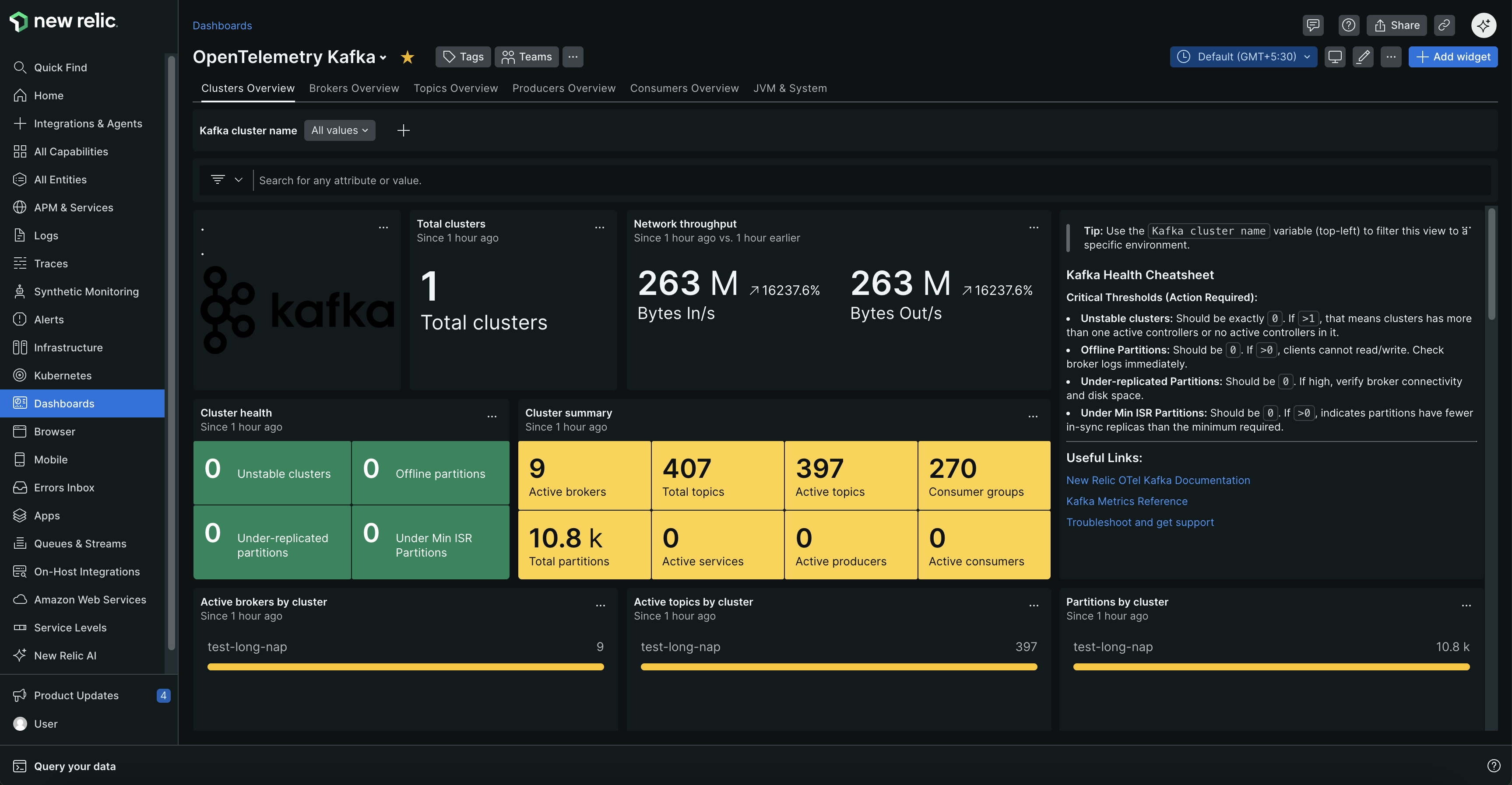
クラスタの健全性、ブローカーのステータス、トピックのメトリクス、および消費者グループのパフォーマンスを示す包括的なダッシュ ボードで Kafka クラスタを監視します。
なぜKafka監視なのか?
- 停止を防止: ダウンタイムが発生する前に、ブローカーの障害、レプリケーション不足のパーティション、オフライントピックに関するアラートを受け取ります
- パフォーマンスの最適化: データ処理速度に影響を与える消費者のラグ、遅いプロデューサー、ネットワークのボトルネックを特定します
- キャパシティ計画: リソース使用量、メッセージレート、接続数を追跡して、プロアクティブにスケーリングします
- データの整合性を確保: データ損失を防ぐために、レプリケーションの正常性とパーティションのバランスをモニターします
一般的な使用例
Kafka監視は、ビジネスに影響を与える前に問題を把握するのに役立ちます。消費者のラグの急増によってリアルタイムダッシュボードが脅かされたり、ブローカーの障害によってデータ損失のリスクが生じたり、ネットワークのボトルネックによって重要なデータパイプラインが遅延したりした場合に、アラートを受け取ります。金融取引、IoTデータ処理、マイクロサービス通信、Eコマースプラットフォーム、およびリアルタイム分析に不可欠です。
始めましょう
監視を開始するには、Kafka 環境を選択します。各セットアップ ガイドには、前提条件、設定手順、トラブルシューティングのヒントが含まれています。
使い方
コレクターは、専用のコンポーネントを使用してパフォーマンスデータを継続的に収集します:
データ収集:
Kafka メトリクス レシーバー: クラスタの健全性、消費者のラグ、トピック メトリクス、およびパーティションのステータスを取得するために、Kafka のブートストラップ ポートに接続します。
JMXメトリクス収集: 以下を介してブローカーのパフォーマンス、JVMデータ、および運用インサイトを収集します:
- セルフホスト型Kafka: ブローカーJVM上のOTel JavaエージェントまたはPrometheus JMX Exporter
- Kubernetes(セルフマネージド): initコンテナ経由のOTel JavaエージェントまたはPrometheus JMX Exporter
- Kubernetes(Strimzi): StrimziのPrometheus JMX Exporter経由
KafkaMetricsConfig
| OTel Javaエージェント | Prometheus JMX Exporter | |
|---|---|---|
| アーキテクチャー | プッシュベース | プルベース |
| プロトコル | OTLP(gRPCまたはHTTP) | HTTPスクレイプ(デフォルトポート9404) |
| 構成 | JMX設定ファイル(.yaml) | メトリクスパターンを含むYAML設定 |
| 入手方法 | セルフホスト、Kubernetesセルフマネージド | セルフホスト、Kubernetesセルフマネージド、Kubernetes Strimzi |
主要なメトリクス: 消費者ラグ、ブローカーの健全性、リクエスト率、ネットワークスループット、パーティションのレプリケーションステータス、リソース使用率、およびJVMパフォーマンスデータ。
メトリクスの完全な名前、説明、およびアラートの推奨事項については、 「Kafka メトリクス リファレンス」を参照してください。
オプション: アプリケーションレベルの監視を追加する
プロデューサー → ブローカー → 消費者までの完全な可視性を確保するために、プロデューサーおよび消費者アプリケーションをモニターします。
追加: リクエストレイテンシ、スループットメトリクス、エラー率、およびディストリビューティッド(分散)トレーシング。
セットアップ: ゼロコードのKafka計装 には、 OpenTelemetry Javaエージェント を使用します。
次のステップ
監視を設定します。
セットアップ後: