O monitoramento do Kafka oferece visibilidade em tempo real dos seus clusters Apache Kafka para garantir um streaming de dados confiável e evitar tempos de inatividade dispendiosos em sistemas distribuídos. Ao usar uma abordagem baseada em coletores, você obtém um monitoramento abrangente por meio de uma solução flexível e independente de fornecedor, que funciona em ambientes auto-hospedados e no Kubernetes com Strimzi.
Opções do coletor
A New Relic oferece suporte a duas distribuições do OpenTelemetry Collector para o monitoramento do Kafka, ambas oferecendo funcionalidades idênticas com os mesmos arquivos de configuração e recursos de monitoramento.
- NRDOT Collector (recomendado): Distribuição da New Relic do OpenTelemetry Collector com suporte da New Relic para assistência. Para mais informações, consulte o repositório do NRDOT Collector no GitHub.
- OpenTelemetry Collector: A distribuição da comunidade upstream. Para mais informações, consulte o repositório do GitHub do OpenTelemetry Collector Contrib.
Escolha o coletor que melhor atenda aos seus requisitos de suporte e operacionais, depois prossiga para configurar o monitoramento do seu ambiente.
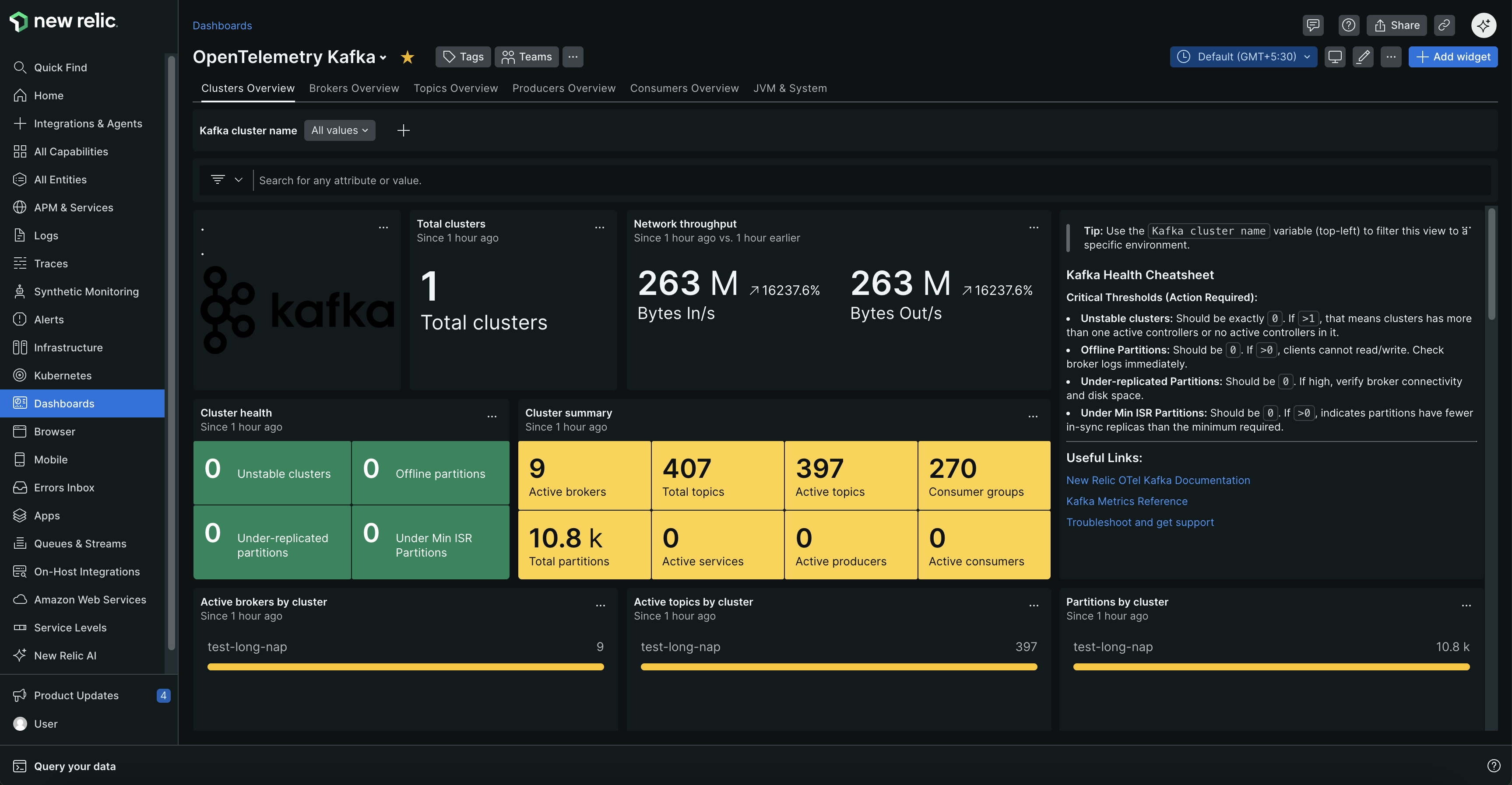
Monitore seus clusters Kafka com dashboards abrangentes que mostram a integridade do cluster, o status do broker, métricas de tópicos e o desempenho do grupo de consumidores.
Por que monitorar o Kafka?
- Evite interrupções - Receba alertas para falhas de broker, partições sub-replicadas e tópicos offline antes que causem tempo de inatividade
- Otimize o desempenho - Identifique o atraso do consumidor, produtores lentos e gargalos de rede que afetam a velocidade de processamento de dados
- Planejar a capacidade - Acompanhe o uso de recursos, taxas de mensagens e contagens de conexões para escalar proativamente
- Garantir a integridade dos dados - Monitore a integridade da replicação e o balanceamento de partições para evitar a perda de dados
Caso de uso comum
Se você está transmitindo transações financeiras, processando dados de sensores IoT ou lidando com a comunicação de microsserviços, o monitoramento do Kafka ajuda você a detectar problemas antes que eles afetem seus negócios. Seja alertado quando os picos de atraso do consumidor ameaçarem dashboards em tempo real, quando as falhas do broker colocarem em risco a perda de dados ou quando os gargalos da rede retardarem os pipelines de dados críticos. Este monitoramento é essencial para plataformas de e-commerce, sistemas de análise em tempo real e qualquer aplicativo em que atrasos ou falhas na entrega de mensagens possam afetar a experiência do usuário ou as operações comerciais.
Iniciar
Escolha seu ambiente Kafka para começar a monitorar. Cada guia de configuração inclui pré-requisitos, etapas de configuração e dicas de solução de problemas.
Como funciona
O monitoramento do Kafka funciona implantando um coletor junto ao seu cluster Kafka para coletar continuamente dados de desempenho. O coletor usa vários componentes especializados para capturar métricas abrangentes de diferentes partes da sua infraestrutura Kafka.
Coleta de dados:
Receptor de métricas do Kafka: Conecta-se à porta de bootstrap do Kafka para saúde do cluster, lag do consumidor, métricas de tópicos e status da partição
Coleta de métricas JMX (desempenho do broker, dados da JVM e insights operacionais):
- Kafka auto-hospedado: O OpenTelemetry Java Agent com configuração JMX personalizada é executado como um agente Java anexado aos brokers do Kafka, enviando métricas via OTLP para o receptor OTLPdo coletor
- Kubernetes (Strimzi): O Prometheus JMX Exporter com configuração personalizada da New Relic expõe métricas na porta 9404, coletadas pelo receptor Prometheusdo coletor
O que você obtém: As principais métricas incluem lag do consumidor, integridade do broker, taxas de requisição, vazão de rede, status de replicação de partição, utilização de recursos e dados de desempenho da JVM.
Para obter nomes de métricas completos, descrições e recomendações de alerta, consulte Referência de métricas do Kafka.
Opcional: Adicionar monitoramento no nível do aplicativo
A configuração de monitoramento acima rastreia a integridade e o desempenho do seu cluster Kafka. Para obter uma imagem completa de como os dados fluem pelo seu sistema, você também pode monitorar os aplicativos que enviam e recebem mensagens do Kafka.
O monitoramento de aplicativos adiciona:
- Latências de solicitação de seus aplicativos para o Kafka
- Métricas de throughput no nível do aplicativo
- Taxas de erro e rastreamentos distribuídos
- Visibilidade completa de produtores → corretores → consumidores
Configuração rápida: Use o Agente OpenTelemetry Java para instrumentação Kafka sem código. Para configuração avançada, consulte a documentação de instrumentação do Kafka.
Próximos passos
Pronto para começar a monitorar seus clusters Kafka?
Configure o monitoramento:
- Kafka auto-hospedado - Monitore o Kafka em execução em máquinas físicas ou virtuais
- Kubernetes com Strimzi - Monitore o Kafka implantado no Kubernetes
Após a configuração:
- Encontre e consulte seus dados - Navegue pela interface do New Relic e escreva consultas NRQL
- Explore as métricas do Kafka - Referência completa de métricas com recomendações de alerta