General settings are the core configuration options for the Java agent, including license key, application name, logging, proxy, and high security mode.
The newrelic.yml file has separate sections for different environments:
Test
Development
Staging
Production (default)
New Relic applies settings in the common section to each of these environments. You can select other environments as the default by setting the newrelic.environment system property to the environment name.
If you edit newrelic.yml, be careful to conform to the YAML format. Use a YAML validator to ensure the syntax is accurate before using the file with New Relic's Java agent, and follow these rules:
Java agent newrelic.yml
Requirements
Format
YML files are case sensitive.
Indentations
All indentations must be in increments of two characters. Other indentations will result in an Unable to parse configuration file error upon agent startup.
Use the same level of indentation for data in the same section of the file.
Indent any sub-sections by an additional two spaces.
Changes to file
You must restart your JVM host process for changes to take effect.
Exception: Property changes to log_level and audit_mode do not require a restart. Property changes under circuit breaker don't require a restart.
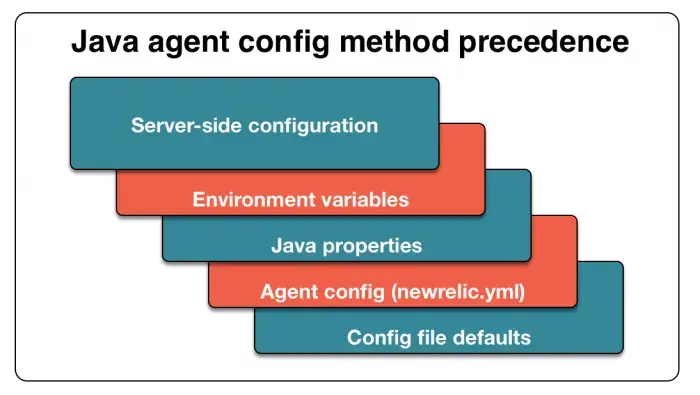
Configuration settings precedence
To override any setting in the config file, use a system property override. In certain environments, environment variables can also be used to override both the config file and the system properties. The environment variables primarily exist to support Heroku. When used, server-side configuration overrides all other configuration settings.
With the Java agent, server-side configuration overrides all other settings. Environment variables override Java system properties. Java properties override user configuration settings in your newrelic.yml file. User settings override the newrelic.yml default settings.
Configuring the Java extensions directory
The Java agent reads the configuration files on process startup. To identify the directory where the files are located, either create a new or specify an existing extensions directory:
To create the extensions directory:
Navigate to the directory where newrelic.jar and newrelic.yml are located. Create a directory named extensions.
In newrelic.yml, check that the property extensions.dir is not set.
To use an existing Java extensions directory:
In your newrelic.yml file, locate the common section.
Use the property extensions.dir to specify the location of the file.
General configuration settings
Set these options in the common section. To override any of these options, use a newrelic.config prefixed system property.
Type
String
Default
(none)
This setting is required. You must specify the license key associated with your New Relic account. This key binds your agent's data to your account in the New Relic service.
Type
String
Default
(none)
This setting is required. Defines the application name used to report data to New Relic.
If enable_auto_app_naming is false, the agent reports all data to this application. Otherwise, the agent reports only background tasks (transactions for non-web applications) to this application.
To report data to more than one application, separate the application names with a semicolon. For example, to report data to My Application and My Application 2 use this:
Flag to enable the agent. Use this setting to force the agent to run or not run.
Type
Float
Default
1.0
The apdex_t threshold in seconds for the application's Apdex score. For Java agent versions 1.2.008 or higher, the apdex_t value is set in the UI and the value in newrelic.yml is ignored.
Type
Integer
Default
(none)
Number to differentiate JVMs for the same app on the same machine. New Relic uses host/port for uniqueness, so you can distinguish the JVMs by putting a switch like this into the startup arguments for each JVM:
-Dnewrelic.config.appserver_port=8081
Once you have used appserver_port to name the JVMs and restart them, you should be able to see them individually in the dropdown and in the profiling interface.
重要
This is only a change for New Relic; it doesn't actually affect the port on which the host communicates in any way.
Type
Boolean
Default
false
Enables plain text logging of all data sent to New Relic to the agent logfile. This setting is dynamic, so running agents will notice changes to newrelic.yml without a JVM restart.
Type
String
Value Format
/path/to/ca/cert/bundle.pem
Specifies a path to a custom SSL certificate bundle that will be used by the agent to establish a secure connection to New Relic. If your custom SSL certificate bundle doesn't include certificates that are sufficient to connect to New Relic then you'll need to merge the required certs into your custom certificate bundle.
重要
Our implementation of the Java Flight Recorder that is currently bundled with the Java agent uses the Telemetry SDK. Specifying a ca_bundle_path will not update the certificate our JFR option uses to connect to New Relic. If you are using a custom truststore and would like to use the Java agent JFR implementation, then you'll need to add the required certs into your custom truststore.
Type
String
Default
NONE
If multiple addresses are detected during the connect cycle for a data store, this setting determines which address the agent will choose:
NONE: The agent returns an empty address. This is the default behavior.
FIRST: Use the first address detected.
LAST: Use the last address detected.
This config exists in Java agent version 8.25.0+.
Type
Boolean
Default
false
Enables the reporting of data separately for each web app. Set to true to enable support for auto app naming. The name of each web app is detected automatically and the agent reports data separately for each one. This provides a finer-grained performance breakdown for web apps in New Relic.
Enables component-based transaction naming. Set to true to enable component-based transaction naming. Set to false to use the URI of a web request as the name of the transaction. For more information, see Naming web transactions.
注意
Unless you implement API calls to name your transactions, disabling auto-transaction naming is very likely to cause Metric grouping issues.
Type
Boolean
Default
true
Enables all instrumentation using an @Trace annotation. Disabling this causes @Trace annotations to be ignored.
Event ingest URI used by some agent features. Defaults to the US production ingest endpoint. Can be manually configured to send events to other ingest endpoints (for example, EU production: https://insights-collector.eu01.nr-data.net/v1/accounts/events).
FedRAMP compliant customers should use the FedRAMP compliant endpoint: https://gov-insights-collector.newrelic.com/v1/accounts/events
Type
String
Default
(none)
Defines the location of the optional extensions directory. If this property is not set, the agent will look for a subdirectory named extensions in the same directory as newrelic.jar and newrelic.yml.
Type
Boolean
Default
false
In order for high security to be enabled, this property must be set to true and the high security property in the New Relic user interface must be enabled. Enabling high security means SSL is turned on, request and message queue parameters are not collected, and queries cannot be sent to New Relic in their raw form.
重要
As of Java agent 3.48.0, SSL is enabled by default and the config option to disable it has been deprecated. As of Java agent 4.0.0, the ability to disable SSL has been removed.
Type
String
Default
(none)
Provides the ability to configure a FedRAMP compliant endpoint for the agent to use, with the value gov-collector.newrelic.com.
Type
String
Default
(none)
A valid Insert API Key for your account. This is not currently used by the agent.
Note that this option now enables tags, which replaced the label feature. You can still query your historical labels. Multiple tags can be attached by using a semicolon as a separator as follows:
In rare cases, a memory leak could occur with instrumentation that uses the legacy async API to track the lifecycle
of async servlets or Jetty Continuations. The memory leak would manifest as leaked transactions that were suspended
but never resumed. This configuration acts as a workaround to prevent such a scenario from occurring. It is
advised to only enable this workaround when encountering such a memory leak.
Type
Integer
Default
30
Limits the number of lines the agent collects from each stack trace. Increasing this value may impact performance, because it increases the amount of memory the agent uses and the amount of data sent to New Relic.
Metric ingest URI used by some agent features. Defaults to the US production ingest endpoint. Can be manually configured to send metrics to other ingest endpoints (example EU production URI: https://metric-api.eu.newrelic.com/metric/v1).
FedRAMP compliant customers should use the FedRAMP compliant endpoint: https://gov-metric-api.newrelic.com/metric/v1
Type
String
Default
(none)
The proxy host through which to connect to the New Relic collector. If a proxy is used, the host setting is required. Other proxy settings are optional.
Type
String
Default
(none)
The password for proxy authentication. If a proxy is used, the host setting is required. Other proxy settings are optional. The username and password settings will be used to authenticate to Basic Auth challenges from a proxy server.
重要
The Java agent supports Basic (clear text) authentication.
Type
String
Default
8080
The proxy host port number. If a proxy is used, the host setting is required. Other proxy settings are optional.
Type
String
Default
(none)
The username for proxy authentication, such as Basic (clear text) authentication. If a proxy is used, the host setting is required. Other proxy settings are optional. The username and password settings will be used to authenticate to Basic Auth challenges from a proxy server.
Type
String
Default
(none)
The proxy scheme used. Setting proxy_scheme: "https" will allow the agent to connect through proxies using the HTTPS scheme.
Type
Boolean
Default
false
Whether errors are reported for Reactor Netty. Default is false. If set to true, Reactor Netty errors will be reported.
Notice, default was changed to false as of Java agent 6.5.0.
Type
Boolean
Default
false
Enable delayed JVM shutdown to give the agent a chance to send latest metric data to New Relic before JVM shutdown.
Type
Integer
Default
60
The number of seconds after which the agent will use the send_data_on_exit setting.
Type
Boolean
Default
true
Enable reporting of JVM settings to New Relic.
Type
Boolean
Default
true
When set to true, JVM properties will be sent to New Relic.
Type
Boolean
Default
true
Requires connections to the New Relic collector to go over SSL.
The agent communicates with New Relic via HTTPS by default, and New Relic requires HTTPS for all traffic to and the New Relic REST API.
This work is done asynchronously to the threads that process your application code, so response times will not be directly affected by this change.
重要
As of Java agent 3.48.0, SSL is enabled by default and the config option to disable it has been deprecated. As of Java agent 4.0.0, the ability to disable SSL has been removed.
Type
Boolean
Default
false
Enable the agent to connect the New Relic collector immediately upon app startup.
For more concise transaction trace details, the agent does not report Scala Futures as transaction segments, and those Futures do not contribute to the transaction's total time.
Enabling scala_futures_as_segments increases your overhead. If you want Scala Futures to report as transaction segments so you can view them in a transaction trace, you can enable it:
scala_futures_as_segments:
enabled:true
Type
Boolean
Default
true
When the exclusive time of a segment is less than 2% of the total transaction time, the metric for that method call will be aggregated under Java/other.
Setting trim_stats to false will disable this behavior, allowing metrics to be individually displayed.
trim_stats:false
Environment variables
Environment variables take the highest precedence and override the system properties and yml config settings.
To set environment variables, use the export VARNAME=value command.
To permanently set environment variables, add the export line to a file such as ~/.bashrc or ~/.bash_profile.
You can override any setting from a system property or in the newrelic.yml by setting an environment variable. The environment variable corresponding to a given setting in the config file is the setting name prefixed by NEW_RELIC with all dots (.) and dashes (-) replaced by underscores (_). For example, the environment variable for the log_level setting is NEW_RELIC_LOG_LEVEL.
For settings nested in sections, prepend the section name to the setting name. For example:
The configuration above would convert to the following environment variable: NEW_RELIC_CLASS_TRANSFORMER_COM_NEWRELIC_INSTRUMENTATION_KAFKA_CLIENTS_SPANS_0_11_0_0_ENABLED
You can override any setting in the newrelic.yml file by setting a system property. The system property corresponding to a given setting in the config file is the setting name prefixed by newrelic.config. For example, the system property for the log_level setting is newrelic.config.log_level.
For settings nested in sections, prepend the section name to the setting name. For example, the system property for the enabled setting in the transaction_tracer section is newrelic.config.transaction_tracer.enabled.
In addition to overriding configuration settings, the agent recognizes these system properties:
Type
Boolean
Default
(none)
Starting from agent version 8.7.0, if set to true and the Agent is running with JBoss EAP / Wildfly,
this will prevent the agent from requiring any class under the package javax.management to be loaded by the system classloader.
This is added to help fix application startup issues with JBoss Modules when the J2EE/Jakarta Management API is used.
More information is provided in the JBoss / Wildfly troubleshooting doc.
Type
Boolean
Default
(none)
Expiramental flag that allows the agent to run with unsupported java versions.
Type
String
Default
(none)
Set a display name to decorate the "host:port" label in the New Relic UI. Requires Java agent 3.17 or higher.
Type
String
Default
(none)
String containing a fully qualified path to the newrelic configuration file. If empty, the agent assumes newrelic.yml is in the same directory as newrelic.jar.
Type
Boolean
Default
(none)
Enable debug logging.
Type
String
Default
(none)
String containing the environment configuration for the agent to use.
Type
String
Default
(none)
String containing the home directory of agent. This defaults to the same directory as the agent jarfile.