Cette traduction automatique est fournie pour votre commodité.
En cas d'incohérence entre la version anglaise et la version traduite, la version anglaise prévaudra. Veuillez visiter cette page pour plus d'informations.
Les paramètres généraux sont les options de configuration de base pour l’agent Java, incluant la clé de licence, le nom de l’application, le logging, le proxy, et le mode haute sécurité.
Le fichier newrelic.yml comporte des sections distinctes pour différents environnements :
Test
Développement
Simulation
Production (par défaut)
New Relic applique les paramètres de la section common à chacun de ces environnements. Vous pouvez sélectionner d’autres environnements par défaut en définissant la propriété système newrelic.environment sur le nom de l’environnement.
Si vous éditez newrelic.yml, veillez à respecter le format YAML. Utilisez un validateur YAML pour vous assurer que la syntaxe est exacte avant d'utiliser le fichier avec l'agent Java de New Relic et suivez ces règles :
Java agent newrelic.yml
Requirements
Format
Les fichiers YML sont sensibles à la casse.
Indentations
Toutes les indentations doivent être incrémentées de deux caractères. D’autres indentations entraîneront une erreur Unable to parse configuration file au démarrage de l’agent.
Utilisez le même niveau d’indentation pour les données de la même section du fichier.
Indentez chaque sous-section de deux espaces supplémentaires.
Modifications apportées au fichier
Vous devez redémarrer votre processus hôte JVM pour que les modifications prennent effet.
Exception: Les modifications de propriété apportées à log_level et audit_mode ne nécessitent pas de redémarrage. Les modifications de propriété sous disjoncteur ne nécessitent pas de redémarrage.
Priorité des paramètres de configuration
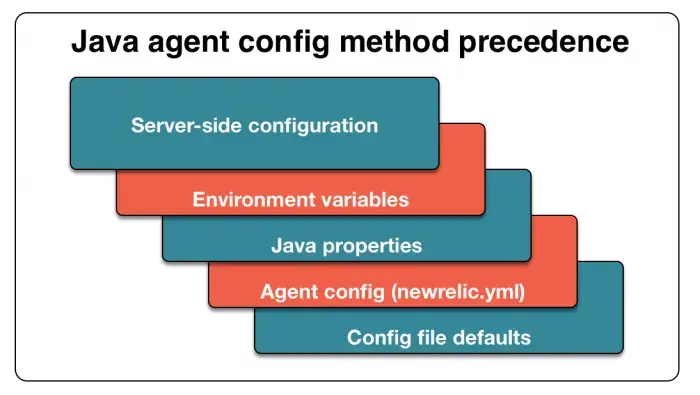
Pour remplacer un paramètre dans le fichier de configuration, utilisez un remplacement de propriété système. Dans certains environnements, les variables d’environnement peuvent également être utilisées pour remplacer à la fois le fichier de configuration, et les propriétés système. Les variables d’environnement existent principalement pour prendre en charge Heroku. Lorsqu’elle est utilisée, la configuration côté serveur remplace tous les autres paramètres de configuration.
Avec l'agent Java, la configuration côté serveur remplace tous les autres paramètres. Les variables d’environnement remplacent les propriétés du système Java. Les propriétés Java remplacent les paramètres de configuration utilisateur dans votre fichier newrelic.yml . Les paramètres utilisateur remplacent les paramètres par défaut newrelic.yml .
Configuration du répertoire des extensions Java
L'agent Java lit les fichiers de configuration au démarrage du processus. Pour identifier le répertoire dans lequel se trouvent les fichiers, créez un nouveau répertoire d'extensions ou spécifiez un répertoire d'extensions existant :
Pour créer le répertoire des extensions :
Accédez au répertoire où se trouvent newrelic.jar et newrelic.yml . Créez un répertoire nommé extensions.
Dans newrelic.yml, vérifiez que la propriété extensions.dir n'est pas définie.
Pour utiliser un répertoire d’extensions Java existant :
Dans votre fichier newrelic.yml, recherchez la section common .
Utilisez la propriété extensions.dir pour spécifier l’emplacement du fichier.
Paramètres de configuration générale
Définissez ces options dans la section common. Pour remplacer l'une de ces options, utilisez une propriété système préfixée par newrelic.config.
Type
Chaîne
Défaut
(aucun)
Ce paramètre est required. Vous devez spécifier la clé de licence associée à votre compte New Relic. Cette clé lie les données de votre agent à votre compte dans le service New Relic.
Type
Chaîne
Défaut
(aucun)
Ce paramètre est required. Définit le nom de l'application utilisé pour signaler les données à New Relic.
Si enable_auto_app_naming est faux, l'agent signale toutes les données à cette application. Dans le cas contraire, l'agent signale uniquement les tâches d'arrière-plan (transactions pour les applications non Web) à cette application.
Pour signaler des données à plusieurs application, séparez les noms application par un point-virgule. Par exemple, pour signaler des données à My Application et My Application 2 utilisez ceci :
Drapeau pour activer l'agent. Utilisez ce paramètre pour forcer l’agent à s’exécuter ou non.
Type
Virgule flottante
Défaut
1.0
Le seuil apdex_t en secondes pour le score Apdex de l'application. Pour les versions agent Java 1.2.008 ou supérieures, la valeur apdex_t est définie dans l'UI et la valeur dans newrelic.yml est ignorée.
Type
Entier
Défaut
(aucun)
Numéro permettant de différencier les JVM pour la même application sur la même machine. New Relic utilise l'hôte/port pour l'unicité, vous pouvez donc distinguer les JVM en plaçant un commutateur comme celui-ci dans les arguments de démarrage de chaque JVM :
-Dnewrelic.config.appserver_port=8081
Une fois que vous avez utilisé appserver_port pour nommer les JVM et les redémarrer, vous devriez pouvoir les voir individuellement dans la liste déroulante et dans l'interface de profilage.
Important
Il s'agit uniquement d'un changement pour New Relic ; cela n'affecte en rien le port sur lequel l'hôte communique.
Type
Booléen
Défaut
false
Active le logging en texte brut de toutes les données envoyées à New Relic dans le fichier log de l'agent. Ce paramètre est dynamique, donc l'agent en cours d'exécution remarquera les modifications apportées à newrelic.yml sans redémarrage JVM .
Type
Chaîne
Format de valeur
/path/to/ca/cert/bundle.pem
Spécifie un chemin vers un ensemble de certificats SSL personnalisé qui sera utilisé par l'agent pour établir une connexion sécurisée à New Relic. Si votre ensemble de certificats SSL personnalisé n'inclut pas de certificats suffisants pour vous connecter à New Relic, vous devrez fusionner les certificats requis dans votre ensemble de certificats personnalisé.
Important
Notre implémentation de Java Flight Recorder actuellement fournie avec l'agent Java utilise le SDK de télémétrie. La spécification d'un ca_bundle_path ne mettra pas à jour le certificat que notre option JFR utilise pour se connecter à New Relic. Si vous utilisez un truststore personnalisé et souhaitez utiliser l'implémentation JFR de l'agent Java, vous devrez ajouter les certificats requis dans votre truststore personnalisé.
Type
Chaîne
Défaut
NONE
Si plusieurs adresses sont détectées lors du cycle de connexion à un magasin de données, ce paramètre détermine l'adresse que l'agent choisira :
NONEL'agent renvoie une adresse vide. Il s'agit du comportement par défaut.
FIRST: Utilisez la première adresse détectée.
LAST: Utilisez la dernière adresse détectée.
Cette configuration existe dans la version 8.25.0 et suivantes de l'agent Java.
Type
Booléen
Défaut
false
Permet la création de rapports de données séparément pour chaque application Web. Définissez sur true pour activer la prise en charge de la dénomination automatique des applications. Le nom de chaque application Web est détecté automatiquement et l'agent rapporte les données séparément pour chacune d'elles. Cela fournit une répartition plus précise des performances des applications Web dans New Relic.
Permet la dénomination des transactions basée sur les composants. Définissez sur true pour activer la dénomination des transactions basée sur les composants. Définissez sur false pour utiliser l’URI d’une requête Web comme nom de la transaction. Pour plus d'informations, voir Nommage des transactions Web.
Prudence
À moins que vous n'implémentiez l'appel d'API pour nommer vos transactions, la désactivation de la dénomination automatique des transactions est très susceptible de provoquer des problèmes de regroupement métrique.
Type
Booléen
Défaut
true
Active toute instrumentation utilisant une annotation @Trace. La désactivation de cette option entraîne l'ignorance de @Trace annotations.
Événement ingest URI utilisé par certaines fonctionnalités agent. La valeur par défaut est le point de terminaison d'ingestion de production américain. Peut être configuré manuellement pour envoyer l'événement à un autre point de terminaison d'ingestion (par exemple, production UE : https://insights-collector.eu01.nr-data.net/v1/accounts/events).
Définit l'emplacement du répertoire des extensions facultatives. Si cette propriété n'est pas définie, l'agent recherchera un sous-répertoire nommé extensions dans le même répertoire que newrelic.jar et newrelic.yml.
Type
Booléen
Défaut
false
Pour que la haute sécurité soit activée, cette propriété doit être définie sur true et la propriété de haute sécurité dans l'interface utilisateur New Relic doit être activée. L'activation de la haute sécurité signifie que SSL est activé, que les paramètres de demande et de fichier d'attente des messages ne sont pas collectés et que la requête ne peut pas être envoyée à New Relic sous sa forme brute.
Important
À partir de l'agent Java 3.48.0, SSL est activé par défaut et l'option de configuration permettant de le désactiver est obsolète. À partir de l'agent Java 4.0.0, la possibilité de désactiver SSL a été supprimée.
Notez que cette option active désormais la balise, qui a remplacé la fonctionnalité d'étiquette. Vous pouvez toujours interroger vos étiquettes historiques. Plusieurs balises peuvent être attachées en utilisant un point-virgule comme séparateur comme suit :
Dans de rares cas, une fuite de mémoire peut se produire avec instrumentation qui utilise l'legacy asynchrone API pour suivre le cycle de vie des servlets asynchrones ou des Jetty continuations . La fuite de mémoire se manifesterait par des transactions divulguées qui ont été suspendues mais jamais reprises. Cette configuration agit comme une solution de contournement pour empêcher qu'un tel scénario ne se produise. Il est conseillé d'activer cette solution de contournement uniquement en cas de fuite de mémoire.
Type
Entier
Défaut
30
Limite le nombre de lignes que l'agent collecte à partir de chaque trace d'appels. L’augmentation de cette valeur peut avoir un impact sur les performances, car elle augmente la quantité de mémoire utilisée par l’agent et la quantité de données envoyées à New Relic.
Métrique ingest URI utilisé par certaines fonctionnalités agent . La valeur par défaut est le point de terminaison d'ingestion de production américain. Peut être configuré manuellement pour envoyer des métriques à d'autres points de terminaison d'ingestion (exemple d'URI de production UE : https://metric-api.eu.newrelic.com/metric/v1).
L'hôte proxy via lequel se connecter au collecteur New Relic. Si un proxy est utilisé, le paramètre hôte est requis. Les autres paramètres proxy sont facultatifs.
Type
Chaîne
Défaut
(aucun)
Le mot de passe pour l'authentification proxy. Si un proxy est utilisé, le paramètre hôte est requis. Les autres paramètres proxy sont facultatifs. Les paramètres de nom d'utilisateur et de mot de passe seront utilisés pour s'authentifier auprès des défis d'authentification de base à partir d'un serveur proxy.
Important
L'agent Java prend en charge l'authentification de base (texte clair).
Type
Chaîne
Défaut
8080
Le numéro de port de l'hôte proxy. Si un proxy est utilisé, le paramètre hôte est requis. Les autres paramètres proxy sont facultatifs.
Type
Chaîne
Défaut
(aucun)
Le nom d'utilisateur pour l'authentification proxy, telle que l'authentification de base (texte clair). Si un proxy est utilisé, le paramètre hôte est requis. Les autres paramètres proxy sont facultatifs. Les paramètres de nom d'utilisateur et de mot de passe seront utilisés pour s'authentifier auprès des défis d'authentification de base à partir d'un serveur proxy.
Type
Chaîne
Défaut
(aucun)
Le schéma proxy utilisé. Le paramètre proxy_scheme: "https" permettra à l'agent de se connecter via des proxys en utilisant le schéma HTTPS.
Type
Booléen
Défaut
false
Si des erreurs sont signalées pour Reactor Netty. La valeur par défaut est faux. Si défini sur vrai, les erreurs Reactor Netty seront signalées.
Notez que la valeur par défaut a été modifiée sur false à partir de l'agent Java 6.5.0.
Type
Booléen
Défaut
false
Activez l’arrêt différé de la JVM pour donner à l’agent une chance d’envoyer les dernières données de métrique à New Relic avant l’arrêt de la JVM.
Type
Entier
Défaut
60
Le nombre de secondes après lequel l'agent utilisera le paramètre send_data_on_exit.
Type
Booléen
Défaut
true
Activer la création de rapports sur les paramètres JVM vers New Relic.
Type
Booléen
Défaut
true
Lorsqu'il est défini sur true, les propriétés JVM seront envoyées à New Relic.
Type
Booléen
Défaut
true
Nécessite des connexions au collecteur New Relic pour passer par SSL.
L'agent communique avec New Relic via HTTPS par défaut, et New Relic requiert HTTPS pour tout le trafic vers et l'API REST New Relic.
Ce travail est effectué de manière asynchrone par rapport aux threads qui traitent le code de votre application, de sorte que les temps de réponse ne seront pas directement affectés par ce changement.
Important
À partir de l'agent Java 3.48.0, SSL est activé par défaut et l'option de configuration permettant de le désactiver est obsolète. À partir de l'agent Java 4.0.0, la possibilité de désactiver SSL a été supprimée.
Type
Booléen
Défaut
false
Permettez à l'agent de connecter le collecteur New Relic immédiatement au démarrage de l'application.
Pour des détails de trace de transaction plus concis, l’agent ne signale pas les Futures Scala comme des segments de transaction, et ces Futures ne contribuent pas au temps total de la transaction.
L'activation de scala_futures_as_segments augmente vos frais généraux. Si vous souhaitez que Scala Futures génère des rapports sous forme de segments de transaction afin que vous puissiez les afficher dans une trace de transaction, vous pouvez l'activer :
scala_futures_as_segments:
enabled:true
Type
Booléen
Défaut
true
Lorsque le temps exclusif d'un segment est inférieur à 2 % du temps total de transaction, la métrique pour cet appel de méthode sera agrégée sous Java/other.
La définition de trim_stats sur false désactivera ce comportement, permettant aux métriques d'être affichées individuellement.
trim_stats:false
Variables d'environnement
Les variables d'environnement ont la plus haute priorité et remplacent les propriétés système et les paramètres de configuration YML.
Pour définir des variables d’environnement, utilisez la commande export VARNAME=value .
Pour définir de manière permanente les variables d'environnement, ajoutez la ligne d'exportation à un fichier tel que ~/.bashrc ou ~/.bash_profile.
Vous pouvez remplacer n’importe quel paramètre d’une propriété système ou dans newrelic.yml en définissant une variable d’environnement. La variable d'environnement correspondant à un paramètre donné dans le fichier de configuration est le nom du paramètre préfixé par NEW_RELIC avec tous les points (.) et les tirets (-) remplacés par des traits de soulignement (_). Par exemple, la variable d’environnement pour le paramètre log_level est NEW_RELIC_LOG_LEVEL.
Pour les paramètres imbriqués dans des sections, ajoutez le nom de la section au nom du paramètre. Par exemple:
La configuration ci-dessus se convertirait en la variable d'environnement suivante : NEW_RELIC_CLASS_TRANSFORMER_COM_NEWRELIC_INSTRUMENTATION_KAFKA_CLIENTS_SPANS_0_11_0_0_ENABLED
Vous pouvez remplacer n’importe quel paramètre du fichier newrelic.yml en définissant une propriété système. La propriété système correspondant à un paramètre donné dans le fichier de configuration est le nom du paramètre préfixé par newrelic.config. Par exemple, la propriété système pour le paramètre log_level est newrelic.config.log_level.
Pour les paramètres imbriqués dans des sections, ajoutez le nom de la section au nom du paramètre. Par exemple, la propriété système pour le paramètre enabled dans la section transaction_tracer est newrelic.config.transaction_tracer.enabled.
En plus de remplacer les paramètres de configuration, l'agent reconnaît ces propriétés système :
Type
Booléen
Défaut
(aucun)
À partir de la version agent 8.7.0, si elle est définie sur true et que l'agent s'exécute avec JBoss EAP / Wildfly, cela empêchera l'agent d'exiger qu'une classe sous le package javax.management soit chargée par le chargeur de classes système. Ceci est ajouté pour aider à résoudre les problèmes de démarrage d'application avec les modules JBoss lorsque l'API de gestion J2EE/Jakarta est utilisée. Plus d'informations sont fournies dans le document de dépannage JBoss / Wildfly.
Type
Booléen
Défaut
(aucun)
Drapeau expérimental qui permet à l'agent de s'exécuter avec des versions Java non prises en charge.
Type
Chaîne
Défaut
(aucun)
Définissez un nom d'affichage pour décorer l'étiquette « hôte : port » dans l'UI de New Relic . Nécessite l'agent Java 3.17 ou supérieur.
Type
Chaîne
Défaut
(aucun)
Chaîne contenant un chemin d'accès complet au fichier de configuration newrelic. Si vide, l'agent suppose que newrelic.yml se trouve dans le même répertoire que newrelic.jar.
Type
Booléen
Défaut
(aucun)
Activer le logging de débogage.
Type
Chaîne
Défaut
(aucun)
Chaîne contenant la configuration de l'environnement que l'agent doit utiliser.
Type
Chaîne
Défaut
(aucun)
Chaîne contenant le répertoire personnel de l'agent. La valeur par défaut est le même répertoire que le fichier jar de l'agent.