This guide shows you how to uninstall the New Relic ABAP component (NEWR) from your SAP central system. You might need to do this when decommissioning monitoring or before upgrading to a new version.
Caution
Uninstalling the New Relic ABAP component stops all monitoring data collection and removes the component from your SAP system. New Relic preserves your historical data, but does not collect new data after uninstallation. You cannot undo this action.
Prerequisites
- Administrator access to SAP system
- Access to client 000
- Backup of any custom configurations (if needed for future reinstallation)
Remove New Relic monitoring artifacts
Before you uninstall the ABAP component, clean up the monitoring artifacts on the central monitoring system:
- Stop and de-schedule any scheduled collection jobs that run
/NEWR/*programs. Use transactionSM37to find and cancel these jobs. - Remove any roles with names prefixed with
/NEWR/*. - In transaction
SM59, remove any RFC connections to the monitored systems that were created solely for New Relic data collection. You can identify these connections by the designated New Relic data collection login account or by referencing the New Relic data provider registry listing.
Uninstall the ABAP component
Follow these steps to uninstall the ABAP component from the central system:
- Log in to client 000.
- Enter transaction code
SAINT. - Click the Uninstallable Components tab.
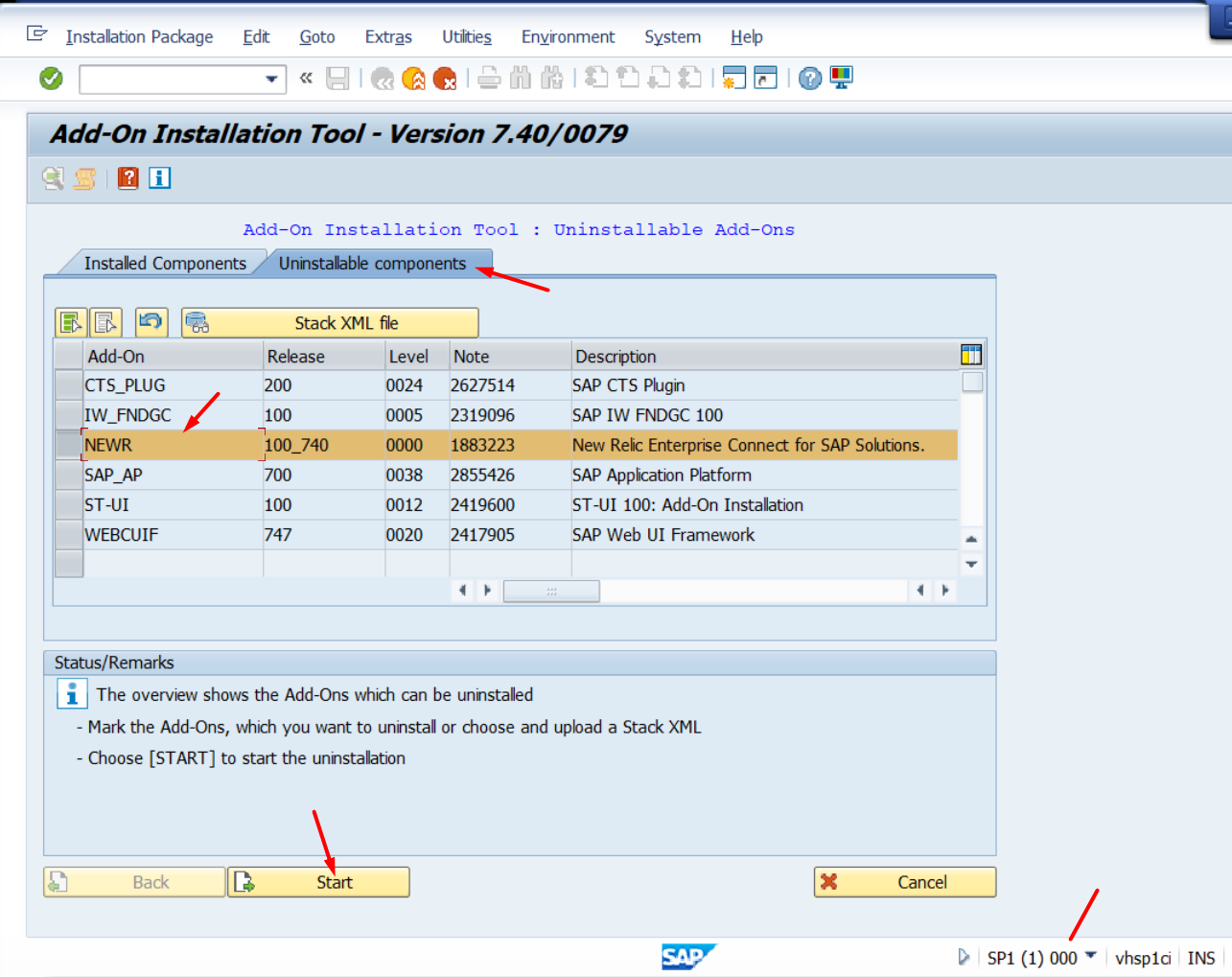
- Select the NEWR component and verify the version number matches your installed version.
- Click Start.
- Click the green checkmark to confirm on each subsequent screen.
- Click Finish when the process completes.
- Verify that the NEWR component no longer appears on the Installed Components tab.
Remove New Relic from monitored systems
The NEWR ABAP component is installed only on the central system, so monitored systems have no component to uninstall. To uninstall New Relic from a monitored system, remove the access created for data collection:
- In transaction
SU01, delete the designated New Relic ABAP user account used for data collection. - Remove the associated New Relic authorization role (names prefixed with
/NEWR/*).
Verify uninstallation
After completing the uninstall process:
- The NEWR component should no longer appear in the Installed Components tab
- Data collection jobs in transaction
SM37will no longer run - New Relic will stop receiving monitoring data from this system
Note: Historical monitoring data in New Relic will remain accessible. Only the data collection component is removed from the SAP system.