Esta guía le muestra cómo desinstalar el New Relic ABAP component (NEWR) de su sistema central de SAP. Es posible que necesite hacer esto al dar de baja el monitoreo o antes de actualizar a una nueva versión.
Advertencia
Desinstalar el New Relic ABAP component detiene toda la recopilación de datos de monitoreo y elimina el componente de su sistema SAP. New Relic conserva los datos históricos, pero no recopila datos nuevos después de la desinstalación. No puede deshacer esta acción.
Requisitos previos
- Acceso de administrador a SAP system
- Acceso a client 000
- Respaldo de cualquier configuración personalizada (si es necesario para una futura reinstalación)
Eliminar los artefactos de monitoreo de New Relic
Antes de desinstalar el ABAP component, limpie los artefactos de monitoreo en el sistema de monitoreo central:
- Detenga y desprograme cualquier trabajo de recopilación programado que ejecute
/NEWR/*programas. Utilice la transacciónSM37para buscar y cancelar estos trabajos. - Elimine cualquier rol con nombres que tengan el prefijo
/NEWR/*. - En la transacción
SM59, elimine cualquier RFC connections a los sistemas monitoreados que se haya creado exclusivamente para la recopilación de datos de New Relic. Puede identificar estas conexiones por la cuenta de inicio de sesión de recopilación de datos de New Relic designada o consultando la lista del registro de proveedores de datos de New Relic.
Desinstale el componente ABAP
Siga estos pasos para desinstalar el componente ABAP del sistema central:
- Inicie sesión en client 000.
- Ingrese el código de transacción
SAINT. - Haga clic en la pestaña Uninstallable Components .
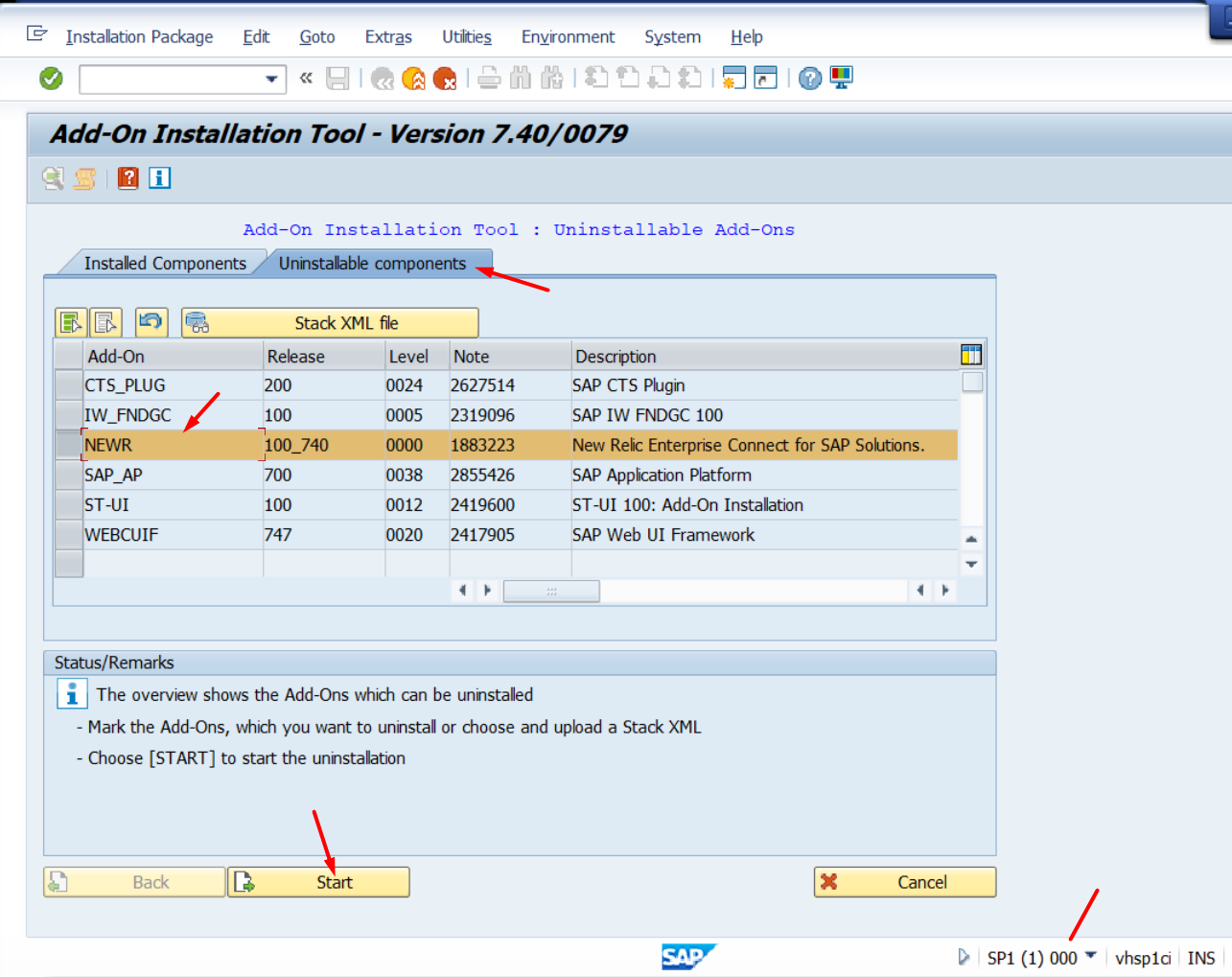
- Seleccione el componente NEWR y verifique que el número de versión coincida con su versión instalada.
- Haga clic en Start.
- Haga clic en la marca de verificación verde para confirmar en cada pantalla subsiguiente.
- Haga clic en Finish cuando se complete el proceso.
- Verifique que el componente NEWR ya no aparezca en la pestaña Installed Components.
Eliminar New Relic de los sistemas monitoreados
El componente ABAP NEWR se instala solo en el sistema central, por lo que los sistemas monitoreados no tienen ningún componente para desinstalar. Para desinstalar New Relic de un sistema monitoreado, elimine el acceso creado para la recopilación de datos:
- En la transacción
SU01, elimine el ABAP user account de New Relic designado que se utiliza para la recopilación de datos. - Elimine el rol de autorización de New Relic asociado (nombres con el prefijo
/NEWR/*).
Verificar la desinstalación
Después de completar el proceso de desinstalación:
- El componente NEWR ya no debería aparecer en la pestaña Installed Components
- Los trabajos de recopilación de datos en la transacción
SM37ya no se ejecutarán - New Relic dejará de recibir datos de monitoreo de este sistema
Nota: los datos históricos de monitoreo en New Relic permanecerán accesibles. Solo se elimina el componente de recopilación de datos del sistema SAP.