Important
This section applies only to versions of NRM4SAP before V3.0.
Scheduling collection jobs involves three primary stages: creating the variants for /NEWR/ABAP_COLLECTION_MANAGERN, creating the variants for RSBTONEJOB2, and scheduling the collection jobs.
Create variants for /NEWR/ABAP_COLLECTION_MANAGERN
- Use transaction
SE38to set up/NEWR/ABAP_COLLECTION_MANAGERN. - On the ABAP: Variants - Initial Screen, enter
/NEWR/ABAP_COLLECTION_MANAGERNin the Program field. - Select Variant and click Create.
- Follow these steps to update the values:
- Enter the variant name, e.g., TRACE_ONLY, and click Create.
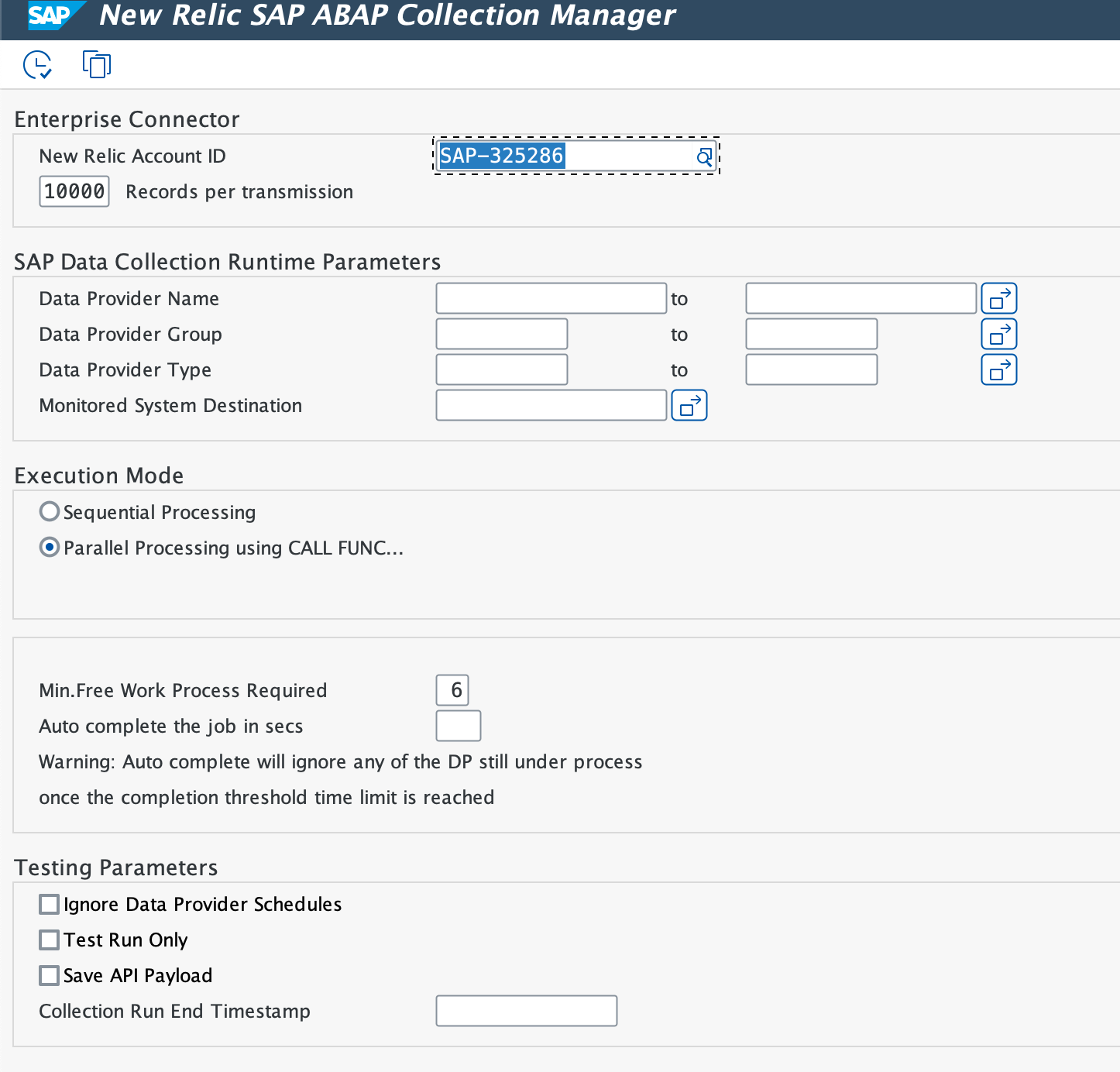
- Ensure the New Relic Account ID is auto-populated.
- Set Records per transmission to 10000. This controls the batch size: a value that's too small decreases efficiency, while a value that's too large can overwhelm the New Relic API ingestion.
- Click Multiple Selection (Active) to add data provider names.
- Add the following in Select Single Values:
NR.SAP.TRANSACTIONNR.SAP.TRANSACTION.COMPLETENR.SAP.SYSTEM.PROCESSNR_SAP_PROGRAMNR_SAP_WORKLOAD_COMPLETENR.SAP.WORKLOAD.COMPLETE
- Select Sequential Processing as the Execution Mode.
- If DIA WP ≥ 30, set to 6; otherwise, set to 3.
- Click Attributes, add a description, and click Save.
- Enter the variant name, e.g., IDOC_ONLY, and click Create.
- Ensure the New Relic Account ID is auto-populated.
- Set Records per transmission to 10000. This controls the batch size: a value that's too small decreases efficiency, while a value that's too large can overwhelm the New Relic API ingestion.
- Click Multiple Selection (Active) to add data provider names.
- Add the following in Select Single Values:
NR_SAP_IDOCNR_SAP_IDOC_COMPLETENR_SAP_IDOC_Configuration
- Select Sequential Processing as the Execution Mode.
- Click Attributes, add a description, and click Save.
- Enter the variant name, e.g., System, and click Create.
- Ensure the New Relic Account ID is auto-populated.
- Set Records per transmission to 10000. This controls the batch size: a value that's too small decreases efficiency, while a value that's too large can overwhelm the New Relic API ingestion.
- Click Multiple Selection (Active) to add data provider names.
- Add variants from TRACE and IDOC providers in Exclude Single Values.
- Select Parallel Processing as the Execution Mode.
- If DIA WP ≥ 30, set to 6; otherwise, set to 3.
- Click Attributes, add a description, and click Save.
Create variants for RSBTONEJOB2
Use the SAP utility program RSBTONEJOB2 to limit the collection manager job to a single active instance. This minimizes work-process consumption across both the monitoring and monitored systems.
- Use transaction
SE38to set upRSBTONEJOB2.
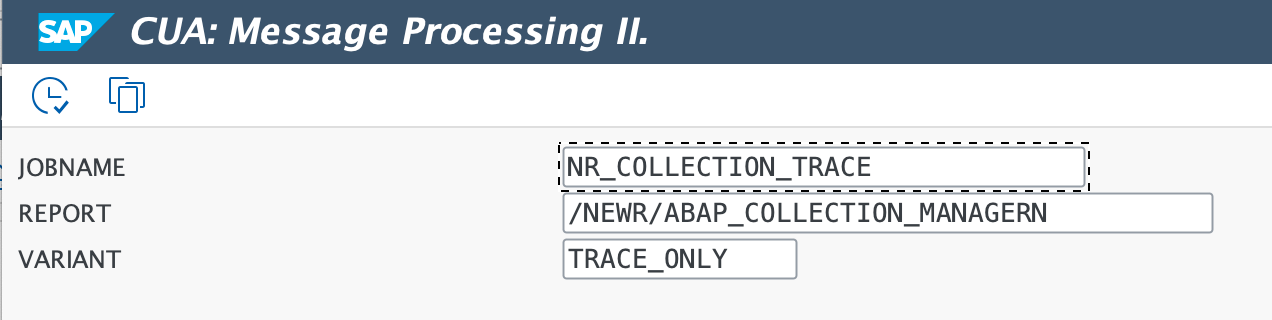
- Create variants with the following values:
Variant Name | Job Name | Program |
|---|---|---|
TRACE |
|
|
IDOC |
|
|
SYSTEM |
|
|
Schedule collection jobs
- Use transaction
SM36to schedule three jobs. - Enter the job name for each job and set the Job Class to C.
- Click Step, enter program name
RSBTONEJOB2, and specify the variant for each job. - Click Start Condition and set the start date and time. Check Periodic Job, then click Period Values > Other Period, and enter 5 for minutes.
Job name | Program | Variant | Running frequency |
|---|---|---|---|
|
| TRACE | Every 5 minutes |
|
| IDOC | Every 5 minutes |
|
| SYSTEM | Every 5 minutes |