중요
이 섹션은 V3.0 이전의 NRM4SAP 버전에만 적용됩니다.
수집 작업 예약에는 세 가지 주요 단계가 포함됩니다: /NEWR/ABAP_COLLECTION_MANAGERN에 대한 변형 생성, RSBTONEJOB2에 대한 변형 생성 및 수집 작업 예약.
/NEWR/ABAP_COLLECTION_MANAGERN에 대한 변형을 생성하십시오.
- 트랜잭션
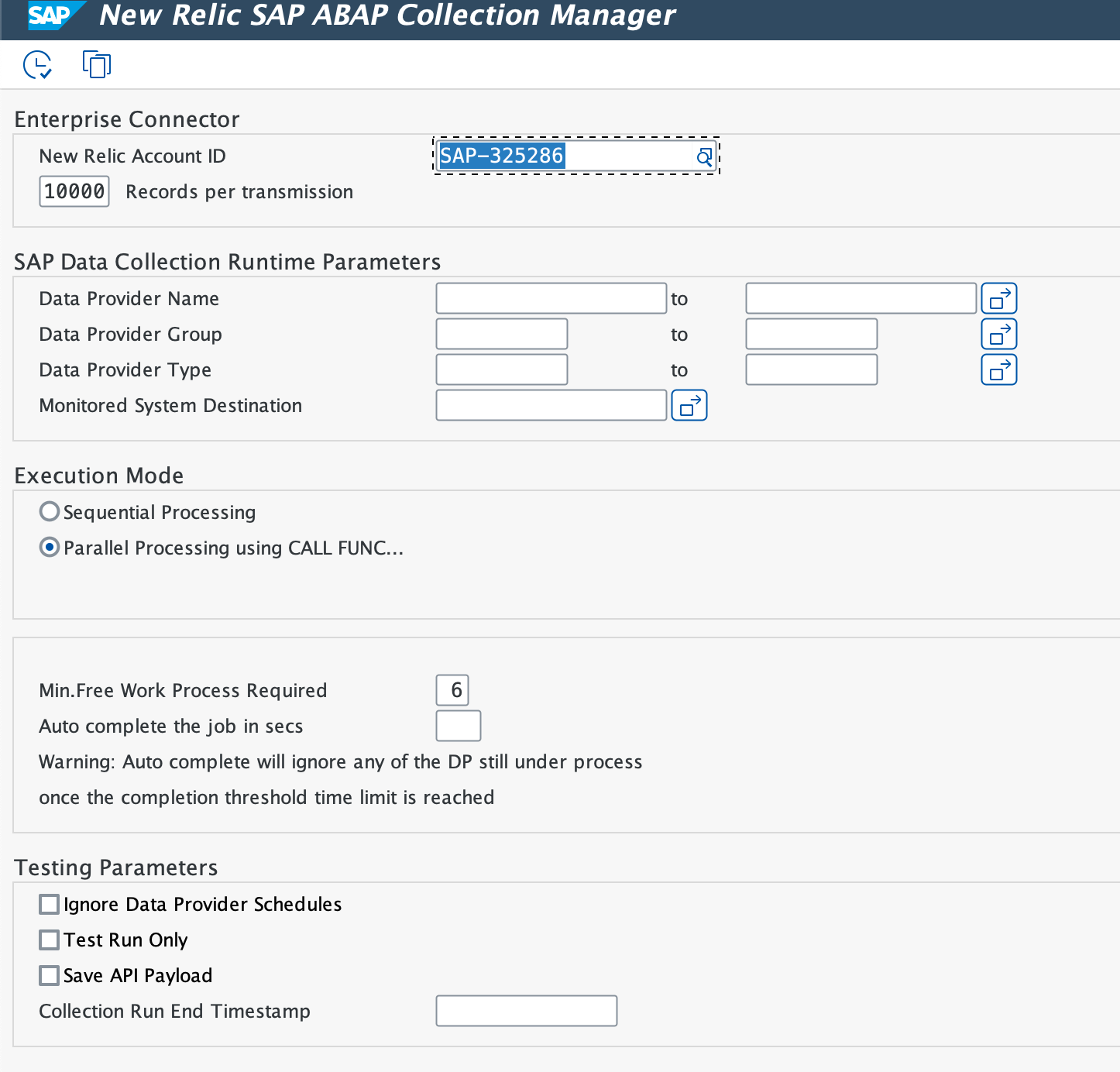
SE38을 사용하여/NEWR/ABAP_COLLECTION_MANAGERN을 설정합니다. - ABAP: Variants - Initial Screen에서 Program 필드에
/NEWR/ABAP_COLLECTION_MANAGERN을(를) 입력합니다. - Variant 선택하고 Create 클릭합니다.
- 값을 업데이트하려면 다음 단계를 따르십시오:
변형 이름(예: TRACE_ONLY)을 입력하고 Create을(를) 클릭합니다.
New Relic Account ID 이(가) 자동으로 채워지도록 하세요.
Records per transmission을 10000로 설정합니다. 이는 배치 크기를 제어합니다: 값이 너무 작으면 효율성이 감소하고, 값이 너무 크면 뉴렐릭 API 수집에 과부하가 걸릴 수 있습니다.
데이터 공급자 이름을 추가하려면 Multiple Selection (Active) 을 클릭하세요.
Select Single Values에 다음을 추가합니다:
NR.SAP.TRANSACTIONNR.SAP.TRANSACTION.COMPLETENR.SAP.SYSTEM.PROCESSNR_SAP_PROGRAMNR_SAP_WORKLOAD_COMPLETENR.SAP.WORKLOAD.COMPLETE
Execution Mode 로 Sequential Processing 선택합니다.
DIA WP ≥ 30이면 6로 설정하고, 그렇지 않으면 3로 설정합니다.
Attributes을(를) 클릭하고 설명을 추가한 다음 Save을(를) 클릭합니다.
변형 이름(예: IDOC_ONLY)을 입력하고 Create을(를) 클릭합니다.
New Relic Account ID 이(가) 자동으로 채워지도록 하세요.
Records per transmission을 10000로 설정합니다. 이는 배치 크기를 제어합니다: 값이 너무 작으면 효율성이 감소하고, 값이 너무 크면 뉴렐릭 API 수집에 과부하가 걸릴 수 있습니다.
데이터 공급자 이름을 추가하려면 Multiple Selection (Active) 을 클릭하세요.
Select Single Values에 다음을 추가합니다:
NR_SAP_IDOCNR_SAP_IDOC_COMPLETENR_SAP_IDOC_Configuration
Execution Mode 로 Sequential Processing 선택합니다.
Attributes을(를) 클릭하고 설명을 추가한 다음 Save을(를) 클릭합니다.
- 변형 이름(예: System)을 입력하고 Create을(를) 클릭합니다.
- New Relic Account ID 이(가) 자동으로 채워지도록 하세요.
- Records per transmission을 10000로 설정합니다. 이는 배치 크기를 제어합니다: 값이 너무 작으면 효율성이 감소하고, 값이 너무 크면 뉴렐릭 API 수집에 과부하가 걸릴 수 있습니다.
- 데이터 공급자 이름을 추가하려면 Multiple Selection (Active) 을 클릭하세요.
- Exclude Single Values에서 TRACE 및 IDOC 공급자의 변형을 추가합니다.
- Execution Mode 로 Parallel Processing 선택합니다.
- DIA WP ≥ 30이면 6로 설정하고, 그렇지 않으면 3로 설정합니다.
- Attributes을(를) 클릭하고 설명을 추가한 다음 Save을(를) 클릭합니다.
RSBTONEJOB2에 대한 변형을 만듭니다.
SAP 유틸리티 프로그램 RSBTONEJOB2을(를) 사용하여 컬렉션 관리자 작업을 단일 활성 인스턴스로 제한하십시오. 이는 모니터링 및 모니터 시스템 모두에서 작업 프로세스 소비를 최소화합니다.
- 트랜잭션
SE38을 사용하여RSBTONEJOB2을 설정합니다.
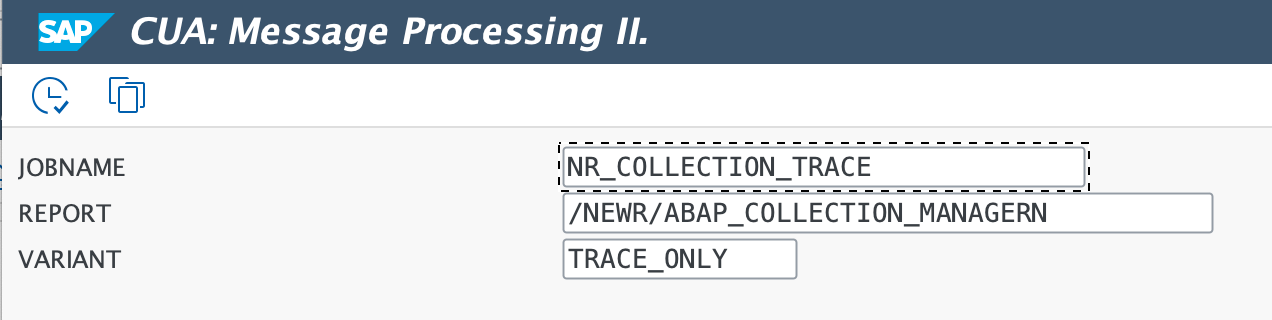
- 다음 값으로 변형을 만듭니다.
변형 이름 | 직책명 | 프로그램 |
|---|---|---|
트레이스 |
|
|
IDOC |
|
|
체계 |
|
|
일정 수집 작업
- 트랜잭션
SM36을 사용하여 세 개의 작업을 예약합니다. - 각 작업의 작업 이름을 입력하고 Job Class 을(를) C(으)로 설정합니다.
- Step 클릭하고, 프로그램 이름
RSBTONEJOB2입력하고, 각 작업에 대한 변형을 지정합니다. - Start Condition을(를) 클릭하고 시작 날짜와 시간을 설정하십시오. Periodic Job을(를) 확인한 다음 Period Values > Other Period을(를) 클릭하고 분에 5을(를) 입력하십시오.
직업 이름 | 프로그램 | 변종 | 실행 빈도 |
|---|---|---|---|
|
| 트레이스 | 5분마다 |
|
| IDOC | 5분마다 |
|
| 체계 | 5분마다 |