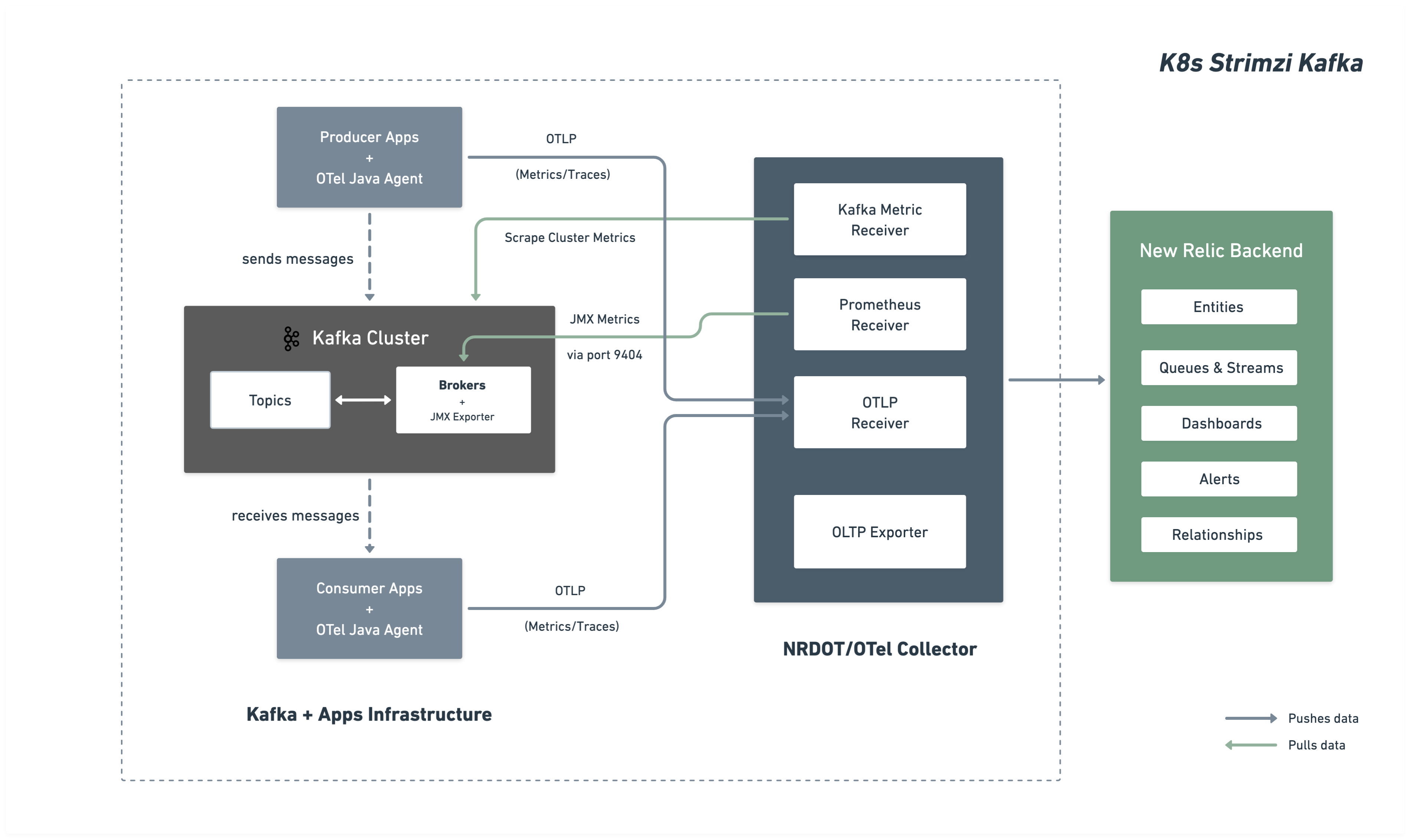
Monitor your Kafka cluster running on Kubernetes with Strimzi operator by deploying the OpenTelemetry Collector. The collector automatically discovers Kafka broker pods and collects comprehensive metrics.
Architecture
The following diagram illustrates the monitoring architecture and data flow to New Relic.
Installation steps
Follow these steps to set up monitoring for your Kafka cluster:
Before you begin
Ensure you have:
- A New Relic account with a
- Kubernetes cluster with kubectl access
- Kafka deployed via Strimzi operator
Configure Kafka cluster for Kafka JMX metrics
Configure your Strimzi Kafka cluster to expose Kafka JMX metrics via the Prometheus JMX Exporter. This configuration will be deployed as a ConfigMap and referenced by your Kafka cluster.
Create JMX metrics ConfigMap
Create a ConfigMap with JMX Exporter patterns that define which Kafka metrics to collect. Save as kafka-jmx-metrics-config.yaml:
apiVersion: v1kind: ConfigMapmetadata: name: kafka-jmx-metrics namespace: newrelicdata: kafka-metrics-config.yml: | startDelaySeconds: 0 lowercaseOutputName: true lowercaseOutputLabelNames: true
rules: # Cluster-level controller metrics - pattern: 'kafka.controller<type=KafkaController, name=GlobalTopicCount><>Value' name: kafka_cluster_topic_count type: GAUGE
- pattern: 'kafka.controller<type=KafkaController, name=GlobalPartitionCount><>Value' name: kafka_cluster_partition_count type: GAUGE
- pattern: 'kafka.controller<type=KafkaController, name=FencedBrokerCount><>Value' name: kafka_broker_fenced_count type: GAUGE
- pattern: 'kafka.controller<type=KafkaController, name=PreferredReplicaImbalanceCount><>Value' name: kafka_partition_non_preferred_leader type: GAUGE
- pattern: 'kafka.controller<type=KafkaController, name=OfflinePartitionsCount><>Value' name: kafka_partition_offline type: GAUGE
- pattern: 'kafka.controller<type=KafkaController, name=ActiveControllerCount><>Value' name: kafka_controller_active_count type: GAUGE
# Broker-level replica metrics - pattern: 'kafka.server<type=ReplicaManager, name=UnderMinIsrPartitionCount><>Value' name: kafka_partition_under_min_isr type: GAUGE
- pattern: 'kafka.server<type=ReplicaManager, name=LeaderCount><>Value' name: kafka_broker_leader_count type: GAUGE
- pattern: 'kafka.server<type=ReplicaManager, name=PartitionCount><>Value' name: kafka_partition_count type: GAUGE
- pattern: 'kafka.server<type=ReplicaManager, name=UnderReplicatedPartitions><>Value' name: kafka_partition_under_replicated type: GAUGE
- pattern: 'kafka.server<type=ReplicaManager, name=IsrShrinksPerSec><>Count' name: kafka_isr_operation_count type: COUNTER labels: operation: "shrink"
- pattern: 'kafka.server<type=ReplicaManager, name=IsrExpandsPerSec><>Count' name: kafka_isr_operation_count type: COUNTER labels: operation: "expand"
- pattern: 'kafka.server<type=ReplicaFetcherManager, name=MaxLag, clientId=Replica><>Value' name: kafka_max_lag type: GAUGE
# Broker topic metrics (totals) - pattern: 'kafka.server<type=BrokerTopicMetrics, name=MessagesInPerSec><>Count' name: kafka_message_count type: COUNTER
- pattern: 'kafka.server<type=BrokerTopicMetrics, name=TotalFetchRequestsPerSec><>Count' name: kafka_request_count type: COUNTER labels: type: "fetch"
- pattern: 'kafka.server<type=BrokerTopicMetrics, name=TotalProduceRequestsPerSec><>Count' name: kafka_request_count type: COUNTER labels: type: "produce"
- pattern: 'kafka.server<type=BrokerTopicMetrics, name=FailedFetchRequestsPerSec><>Count' name: kafka_request_failed type: COUNTER labels: type: "fetch"
- pattern: 'kafka.server<type=BrokerTopicMetrics, name=FailedProduceRequestsPerSec><>Count' name: kafka_request_failed type: COUNTER labels: type: "produce"
- pattern: 'kafka.server<type=BrokerTopicMetrics, name=BytesInPerSec><>Count' name: kafka_network_io type: COUNTER labels: direction: "in"
- pattern: 'kafka.server<type=BrokerTopicMetrics, name=BytesOutPerSec><>Count' name: kafka_network_io type: COUNTER labels: direction: "out"
# Per-topic metrics (only appear after traffic flows) - pattern: 'kafka.server<type=BrokerTopicMetrics, name=MessagesInPerSec, topic=(.+)><>Count' name: kafka_prod_msg_count type: COUNTER labels: topic: "$1"
- pattern: 'kafka.server<type=BrokerTopicMetrics, name=BytesInPerSec, topic=(.+)><>Count' name: kafka_topic_io type: COUNTER labels: topic: "$1" direction: "in"
- pattern: 'kafka.server<type=BrokerTopicMetrics, name=BytesOutPerSec, topic=(.+)><>Count' name: kafka_topic_io type: COUNTER labels: topic: "$1" direction: "out"
# Request metrics - pattern: 'kafka.network<type=RequestMetrics, name=TotalTimeMs, request=(Produce|FetchConsumer|FetchFollower)><>99thPercentile' name: kafka_request_time_99p type: GAUGE labels: type: "$1"
- pattern: 'kafka.network<type=RequestChannel, name=RequestQueueSize><>Value' name: kafka_request_queue type: GAUGE
- pattern: 'kafka.server<type=DelayedOperationPurgatory, name=PurgatorySize, delayedOperation=(.+)><>Value' name: kafka_purgatory_size type: GAUGE labels: type: "$1"
# Controller stats - pattern: 'kafka.controller<type=ControllerStats, name=LeaderElectionRateAndTimeMs><>Count' name: kafka_leader_election_rate type: COUNTER
- pattern: 'kafka.controller<type=ControllerStats, name=UncleanLeaderElectionsPerSec><>Count' name: kafka_unclean_election_rate type: COUNTER
# JVM Garbage Collection - pattern: 'java.lang<name=(.+), type=GarbageCollector><>CollectionCount' name: jvm_gc_collections_count type: COUNTER labels: name: "$1"
# JVM Memory - pattern: 'java.lang<type=Memory><HeapMemoryUsage>max' name: jvm_memory_heap_max type: GAUGE
- pattern: 'java.lang<type=Memory><HeapMemoryUsage>used' name: jvm_memory_heap_used type: GAUGE
# JVM Threading and System - pattern: 'java.lang<type=Threading><>ThreadCount' name: jvm_thread_count type: GAUGE
- pattern: 'java.lang<type=OperatingSystem><>SystemCpuLoad' name: jvm_system_cpu_utilization type: GAUGE
# Broker uptime - pattern: 'java.lang<type=Runtime><>Uptime' name: kafka_broker_uptime type: GAUGE
# Additional metrics — remove this section to reduce data ingest
# Request latency: total count, 50th percentile, and average (99p kept above) - pattern: 'kafka.network<type=RequestMetrics, name=TotalTimeMs, request=(Produce|FetchConsumer|FetchFollower)><>Count' name: kafka_request_time_total type: COUNTER labels: type: "$1"
- pattern: 'kafka.network<type=RequestMetrics, name=TotalTimeMs, request=(Produce|FetchConsumer|FetchFollower)><>50thPercentile' name: kafka_request_time_50p type: GAUGE labels: type: "$1"
- pattern: 'kafka.network<type=RequestMetrics, name=TotalTimeMs, request=(Produce|FetchConsumer|FetchFollower)><>Mean' name: kafka_request_time_avg type: GAUGE labels: type: "$1"
# Log flush metrics - pattern: 'kafka.log<type=LogFlushStats, name=LogFlushRateAndTimeMs><>Count' name: kafka_logs_flush_count type: COUNTER
- pattern: 'kafka.log<type=LogFlushStats, name=LogFlushRateAndTimeMs><>50thPercentile' name: kafka_logs_flush_time_50p type: GAUGE
- pattern: 'kafka.log<type=LogFlushStats, name=LogFlushRateAndTimeMs><>99thPercentile' name: kafka_logs_flush_time_99p type: GAUGE
# JVM GC elapsed time - pattern: 'java.lang<name=(.+), type=GarbageCollector><>CollectionTime' name: jvm_gc_collections_elapsed type: COUNTER labels: name: "$1"
# JVM Memory heap committed - pattern: 'java.lang<type=Memory><HeapMemoryUsage>committed' name: jvm_memory_heap_committed type: GAUGE
# JVM class loading - pattern: 'java.lang<type=ClassLoading><>LoadedClassCount' name: jvm_class_count type: GAUGE
# Additional JVM OS metrics - pattern: 'java.lang<type=OperatingSystem><>SystemLoadAverage' name: jvm_system_cpu_load_1m type: GAUGE
- pattern: 'java.lang<type=OperatingSystem><>AvailableProcessors' name: jvm_cpu_count type: GAUGE
- pattern: 'java.lang<type=OperatingSystem><>ProcessCpuLoad' name: jvm_cpu_recent_utilization type: GAUGE
- pattern: 'java.lang<type=OperatingSystem><>OpenFileDescriptorCount' name: jvm_file_descriptor_count type: GAUGE
# JVM Memory Pool - pattern: 'java.lang<type=MemoryPool, name=(.+)><Usage>used' name: jvm_memory_pool_used type: GAUGE labels: name: "$1"
- pattern: 'java.lang<type=MemoryPool, name=(.+)><Usage>max' name: jvm_memory_pool_max type: GAUGE labels: name: "$1"
- pattern: 'java.lang<type=MemoryPool, name=(.+)><CollectionUsage>used' name: jvm_memory_pool_used_after_last_gc type: GAUGE labels: name: "$1"Tip
Customize metrics: This ConfigMap includes comprehensive Kafka broker, topic, request, controller, and JVM metrics. You can add or modify patterns by referencing the Prometheus JMX Exporter examples and Kafka MBean documentation. Refer to the JMX Exporter rules documentation for additional configurations.
Important
Namespace requirement: The JMX metrics ConfigMap and your Kafka cluster must be in the same namespace. In this guide, both are deployed to the newrelic namespace.
Apply the ConfigMap:
$kubectl apply -f kafka-jmx-metrics-config.yamlUpdate Kafka cluster to use JMX Exporter
Update your Strimzi Kafka resource to reference the metrics ConfigMap:
apiVersion: kafka.strimzi.io/v1beta2kind: Kafkametadata: name: my-cluster namespace: newrelicspec: kafka: version: X.X.X metricsConfig: type: jmxPrometheusExporter valueFrom: configMapKeyRef: name: kafka-jmx-metrics key: kafka-metrics-config.yml # ...rest of your Kafka configurationApply the changes. Strimzi will perform a rolling restart of your Kafka brokers:
$kubectl apply -f kafka-cluster.yamlAfter the rolling restart completes, each Kafka broker will expose Prometheus metrics on port 9404.
Deploy OpenTelemetry Collector
Deploy the OpenTelemetry Collector to monitor your Kafka cluster. Choose your preferred installation method:
The Helm installation method is the recommended approach for deploying OpenTelemetry Collector in Kubernetes.
Create New Relic credentials secret
Create a Kubernetes secret containing your New Relic license key and OTLP endpoint. Choose the endpoint for your New Relic region:
Tip
For other endpoint configurations, see Configure your OTLP endpoint.
Create values.yaml with collector configuration
Create a values.yaml file that contains the complete OpenTelemetry Collector configuration. Both NRDOT and OpenTelemetry collectors use identical configuration and provide the same Kafka monitoring capabilities. Choose your preferred collector image:
For advanced configuration options, refer to these receiver documentation pages:
- Prometheus receiver documentation - Additional receiver configuration options
- Kafka metrics receiver documentation - Additional Kafka metrics configuration
Install OpenTelemetry Collector with Helm
Add the Helm repository and install the OpenTelemetry Collector using the values.yaml file:
$helm repo add open-telemetry https://open-telemetry.github.io/opentelemetry-helm-charts$helm upgrade kafka-monitoring open-telemetry/opentelemetry-collector \> --install \> --namespace newrelic \> --create-namespace \> -f values.yamlVerify the deployment:
$# Check pod status$kubectl get pods -n newrelic -l app.kubernetes.io/name=opentelemetry-collector$
$# View logs to verify metrics collection$kubectl logs -n newrelic -l app.kubernetes.io/name=opentelemetry-collector --tail=50
You should see logs indicating successful scraping from Kafka brokers on port 9404.
The manifest installation method provides direct control over Kubernetes resources without using Helm.
Create New Relic credentials secret
Create a Kubernetes secret containing your New Relic license key and OTLP endpoint. Choose the endpoint for your New Relic region:
Tip
For other endpoint configurations, see Configure your OTLP endpoint.
Create manifest files
Create the Kubernetes manifest files for your preferred collector. Both collectors use identical configuration - only the image differs.
Choose your collector option and create the three required files:
For advanced configuration options, refer to these receiver documentation pages:
- Prometheus receiver documentation - Additional receiver configuration options
- Kafka metrics receiver documentation - Additional Kafka metrics configuration
Deploy the manifests
Apply the Kubernetes manifests to deploy the OpenTelemetry Collector:
$# Create namespace if it doesn't exist$kubectl create namespace newrelic --dry-run=client -o yaml | kubectl apply -f -$
$# Apply RBAC configuration$kubectl apply -f collector-rbac.yaml$
$# Apply ConfigMap$kubectl apply -f collector-configmap.yaml$
$# Apply Deployment$kubectl apply -f collector-deployment.yaml
Verify the deployment:
$# Check pod status$kubectl get pods -n newrelic -l app=otel-collector$
$# View logs to verify metrics collection$kubectl logs -n newrelic -l app=otel-collector --tail=50
You should see logs indicating successful scraping from Kafka brokers on port 9404.
(Optional) Instrument producer or consumer applications
Important
Language support: Java applications support out-of-the-box Kafka client instrumentation using the OpenTelemetry Java Agent.
To collect application-level telemetry from your Kafka producer and consumer applications, use the OpenTelemetry Java Agent.
Instrument your Kafka application
Use an init container to download the OpenTelemetry Java Agent at runtime:
apiVersion: apps/v1kind: Deploymentmetadata:  name: kafka-producer-appspec:  template:    spec:      initContainers:      - name: download-java-agent        image: busybox:latest        command:        - sh        - -c        - |          wget -O /otel-auto-instrumentation/opentelemetry-javaagent.jar \          https://github.com/open-telemetry/opentelemetry-java-instrumentation/releases/latest/download/opentelemetry-javaagent.jar        volumeMounts:        - name: otel-auto-instrumentation          mountPath: /otel-auto-instrumentation
      containers:      - name: app        image: your-kafka-app:latest        env:        - name: JAVA_TOOL_OPTIONS          value: >-            -javaagent:/otel-auto-instrumentation/opentelemetry-javaagent.jar            -Dotel.service.name=order-process-service            -Dotel.resource.attributes=kafka.cluster.name=my-cluster            -Dotel.exporter.otlp.endpoint=http://localhost:4317            -Dotel.exporter.otlp.protocol=grpc            -Dotel.metrics.exporter=otlp            -Dotel.traces.exporter=otlp            -Dotel.logs.exporter=otlp            -Dotel.instrumentation.kafka.experimental-span-attributes=true            -Dotel.instrumentation.messaging.experimental.receive-telemetry.enabled=true            -Dotel.instrumentation.kafka.producer-propagation.enabled=true            -Dotel.instrumentation.kafka.enabled=true        volumeMounts:        - name: otel-auto-instrumentation          mountPath: /otel-auto-instrumentation
volumes: - name: otel-auto-instrumentation emptyDir: {}Configuration notes:
- Replace
order-process-servicewith a unique name for your producer or consumer application - Replace
my-clusterwith the same cluster name used in your collector configuration - The endpoint
http://localhost:4317assumes the collector is running as a sidecar in the same pod or accessible via localhost
Tip
The configuration above sends telemetry to an OpenTelemetry Collector. If you need to send telemetry to the collector, deploy it as described in Step 3 with this configuration:
The Java Agent provides out-of-the-box Kafka instrumentation with zero code changes, capturing:
- Request latencies
- Throughput metrics
- Error rates
- Distributed traces
For advanced configuration, see the Kafka instrumentation documentation.
Find your data
After a few minutes, your Kafka metrics should appear in New Relic. See Find your data for detailed instructions on exploring your Kafka metrics across different views in the New Relic UI.
You can also query your data with NRQL:
FROM Metric SELECT * WHERE kafka.cluster.name = 'my-kafka-cluster'Troubleshooting
Next steps
- Explore Kafka metrics - View the complete metrics reference
- Create custom dashboards - Build visualizations for your Kafka data
- Set up alerts - Monitor critical metrics like consumer lag and under-replicated partitions