Preview
We're still working on this feature, but we'd love for you to try it out!
This feature is currently provided as part of a preview pursuant to our pre-release policies.
Monitor your OpenTelemetry collector health and performance with a dedicated APM UI experience. When your collector fails or misbehaves, it can cause a blackout of observability data, permanent data loss, or distorted insights. That's why we built Collector Observability—an APM experience tailored to the streaming work collectors perform. You can leverage the collector's internal telemetry to see at a glance how each component of your collector is performing, so you can spot issues before they impact your observability pipeline.
Set up collector monitoring
Billing
Your use of Collector Observability is billable during preview in accordance with your Order as applicable to the pricing model associated with your Account and as defined below.
The costs associated with this feature are determined by the following factors, as applicable to the pricing model associated with your Account:
Core Compute: The Summary page, measured in Core CCU is billable during preview. The Process page is not billable during preview.
Data Ingest: Additional data from the internal telemetry, measured in GB Ingested is billable during preview.
If this feature becomes generally available, your use will be billable in accordance with your Order.
Enable internal telemetry for your collector
By default, the collector doesn't emit its internal telemetry, so you'll need to enable it first.
Download the configuration file
$curl 'https://raw.githubusercontent.com/newrelic/nrdot-collector-releases/refs/heads/main/examples/internal-telemetry-config.yaml' \> --silent --output internal-telemetry-config.yamlSet environment variables
INTERNAL_TELEMETRY_NEW_RELIC_LICENSE_KEY: Ingest license key for the account internal telemetry should be sent to. This key can be different than the key the collector uses to send regular data to New Relic, i.e.NEW_RELIC_LICENSE_KEYin the example below.INTERNAL_TELEMETRY_SERVICE_NAME: Defaults tootel-collector, determines entity name in New RelicINTERNAL_TELEMETRY_OTLP_ENDPOINT: Defaults to UShttps://otlp.nr-data.net; if you are in EU, set this tohttps://otlp.eu01.nr-data.net
Run collector with merged configuration
In addition to the normal configuration for components and pipelines (in the following example --config=/etc/nrdot-collector/config.yaml), add a second --config argument which will merge both configurations:
$docker run \> -e INTERNAL_TELEMETRY_NEW_RELIC_LICENSE_KEY='...' \> -e NEW_RELIC_LICENSE_KEY='...' \> -e INTERNAL_TELEMETRY_SERVICE_NAME='demo-collector' \> -v './internal-telemetry-config.yaml:/etc/nrdot-collector/config-internal.yaml' \> newrelic/nrdot-collector:1.10.0 --config=/etc/nrdot-collector/config.yaml \> --config='/etc/nrdot-collector/config-internal.yaml'Important
The order of the --config arguments matters if you have preexisting configuration under the service::telemetry node.
The collector uses a 'last one wins' strategy on a node level when merging configurations and certain parts of the config (e.g. lists, leaf nodes) cannot be merged, so they get overwritten by the last --config argument.
Alternative (not recommended for production)
We don't recommend this for reliability reasons, but for testing purposes you can also reference the configuration directly and the collector will pull it on startup:
$docker run \> -e INTERNAL_TELEMETRY_NEW_RELIC_LICENSE_KEY='...' \> -e NEW_RELIC_LICENSE_KEY='...' \> -e INTERNAL_TELEMETRY_SERVICE_NAME='demo-collector' \> newrelic/nrdot-collector:1.10.0 --config=/etc/nrdot-collector/config.yaml \> --config='https://raw.githubusercontent.com/newrelic/nrdot-collector-releases/refs/tags/1.10.0/examples/internal-telemetry-config.yaml'Add entity tag
The tag newrelic.service.type: otel_collector acts as an opt-in to the experience at the UI level. Choose one of the following options:
- Option 1: Use the example configuration provided above which contains the configuration of Option 2.
- Option 2: Add argument
--config=yaml:service::telemetry::resource::newrelic.service.type: otel_collectorto collector. This adds the attribute as a resource attribute and New Relic does the tagging for you on ingest. If you remove this option, it will take one day for the tag to expire. - Option 3: Add tag via APM UI (top of the page, next to entity name). You can remove this via the UI as well to toggle back.
Customizing configuration
The default configuration exposes additional environment variables of the form INTERNAL_TELEMETRY_... to tweak common options such as detail levels and sampling. Refer to the configuration itself for more details.
We recommend using the default configuration to monitor your collector. However, you can modify the example configuration to meet your needs, such as reducing detail level, sampling or data collection rates. Refer to the official documentation for more details. Keep in mind that changes to the configuration may cause certain parts of the UI to not display data. Also refer to Limitations. The collector's internal telemetry configuration options change as the OTel community evolves. You have full control over your configuration, including whether to use the provided defaults.
Overhead considerations
Like all telemetry, the collector's internal telemetry increases your data ingest. The overhead depends on your workload and configuration. Here are the key factors to consider:
Metrics Creates constant overhead for the collector and all active components, regardless of throughput. Metrics are emitted at a constant interval (60 seconds by default). Any component can emit custom metrics, as indicated by the respective metadata.yaml, which may add to the overhead.
If you need to reduce the amount of metrics your collector emits, we recommend setting the metric level to normal, e.g. via the environment variable INTERNAL_TELEMETRY_METRICS_LEVEL in the example config, as only a subset of the detailed metrics are used by the UI and are typically metrics intended for fine-tuning performance or network issues, so you can re-enable them as needed.
Logs Has minimal impact during normal operation. Higher overhead can occur when error logs increase rapidly, but this is reduced because logs are sampled by default. The sampling algorithm allows a constant number of logs per defined interval and then samples at a static rate. Refer to service::telemetry::logs::sampling.
Traces Disabled by default due to:
- Limited maturity of traces. Not all components are instrumented, see this github issue.
- Unpredictable overhead that varies with workload and batching configuration from upstream agents and collectors.
- No adaptive sampling algorithm available. This makes it impossible to provide a universal sampling recommendation that doesn't risk unexpected costs for certain use cases.
When traces become more mature, they will provide valuable insight into how much time the collector spends processing data at the component level. To experiment with traces as they develop, set INTERNAL_TELEMETRY_TRACE_LEVEL=info and start with a low sampling rate such as INTERNAL_TELEMETRY_TRACE_SAMPLE_RATIO=0.001 (0.1%) while monitoring your ingest volume and adjusting as needed.
View your collector in the UI
Explore the internal telemetry in the APM UI
To view your collector's internal telemetry, navigate to APM & Services > Services - OpenTelemetry > your_collector_name to explore the collector's entity.
Depending on the components your collector uses, some charts might not be populated. For example, if you don't process logs in your collector, the charts related to that signal will be empty.
Summary page
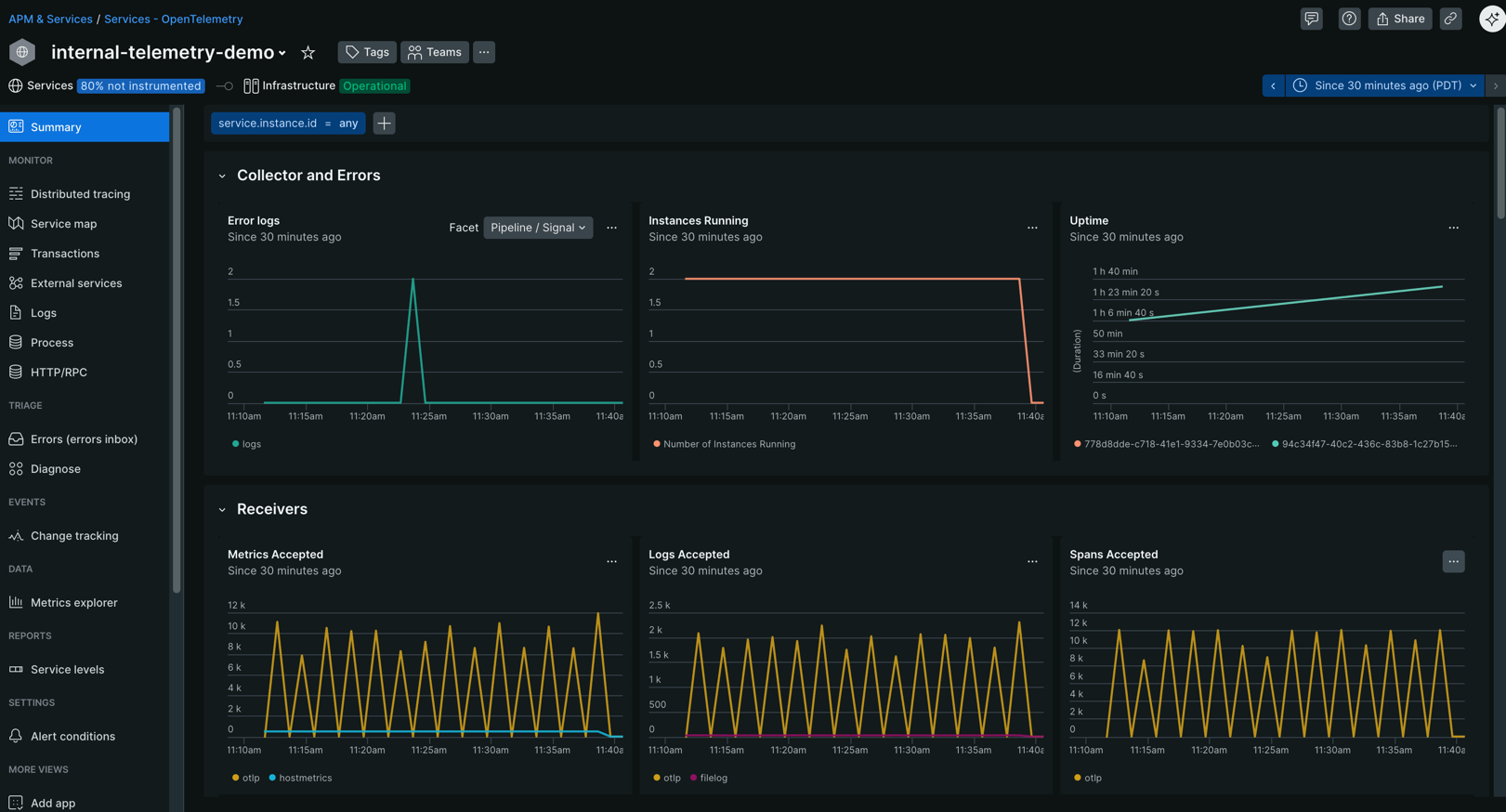
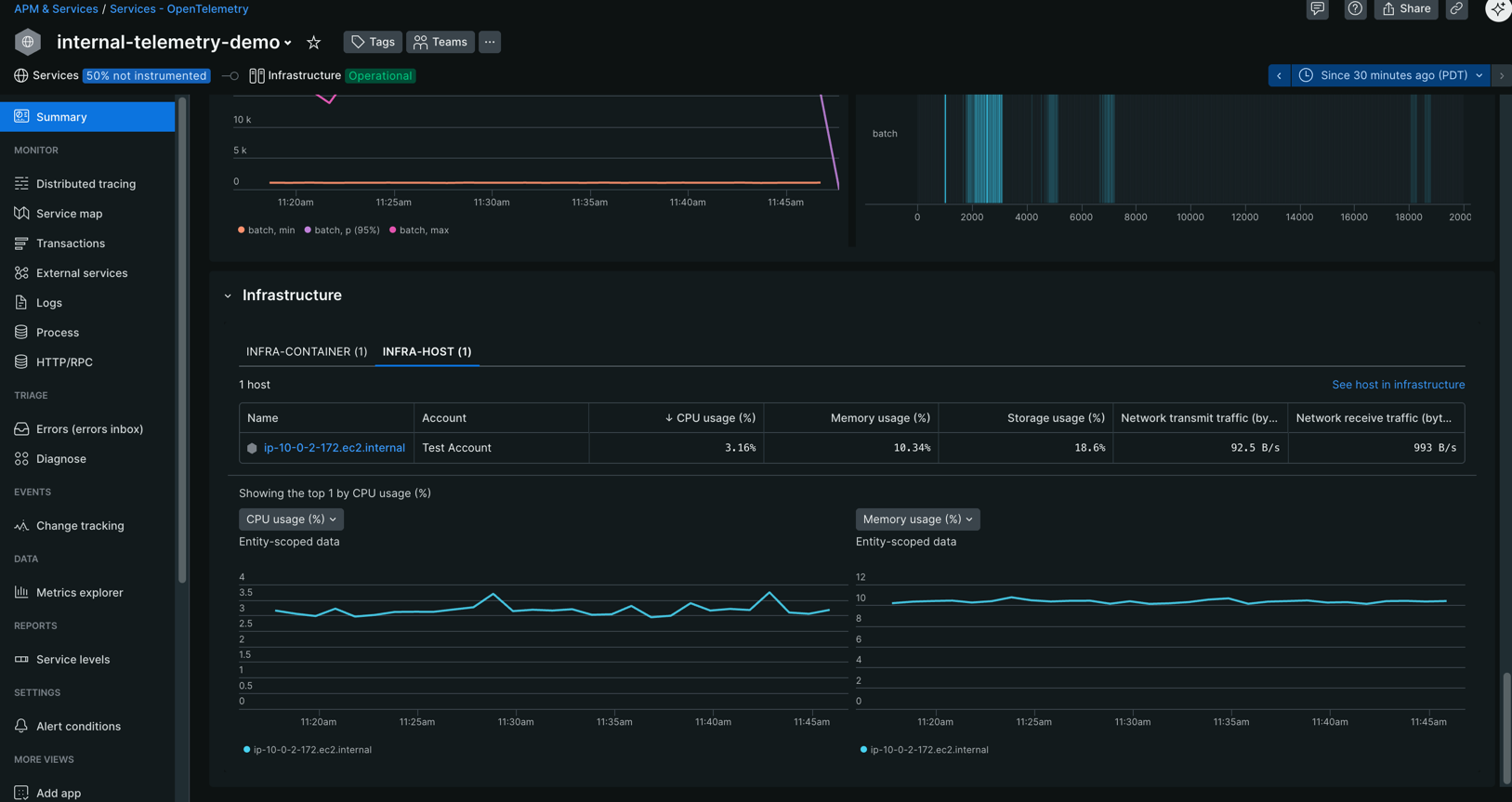
The Summary page gives you an overview of your collector's health and performance:
- Overall collector health metrics
- Charts for receivers, processors, exporters and batching (requires batchprocessor) behavior
- Dedicated chart for memorylimiter due to its unique failure mode
- Infrastructure relationships and metrics (if configured, see configuration examples)
Process page
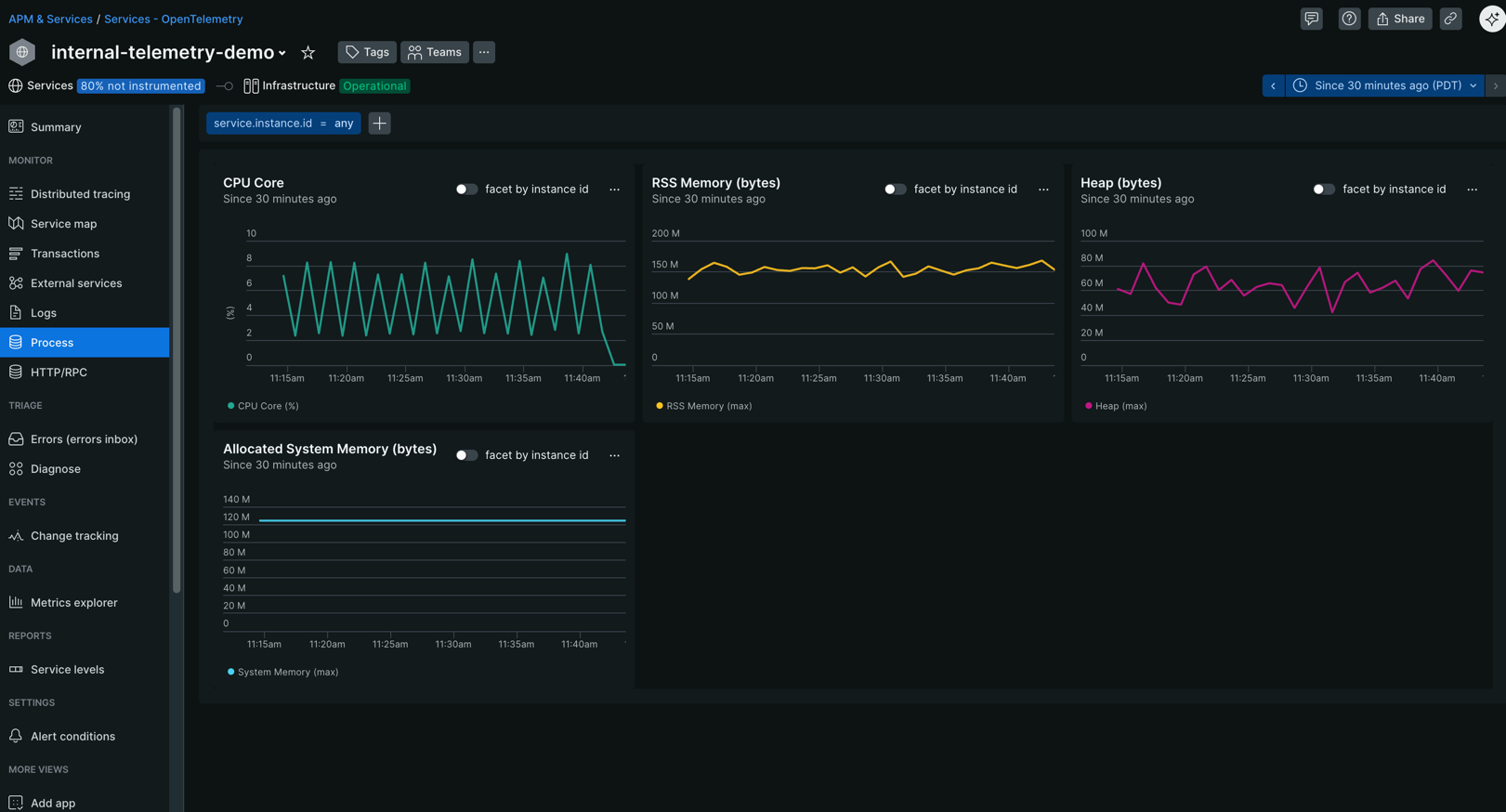
Track system-level resource consumption with the Process page:
- CPU utilization and trends
- Memory usage and patterns
- Process-level performance indicators
Configuration examples
This section contains examples of how the above step-by-step guide translates to different use cases involving the collector.
Simple collector with internal telemetry enabled
Minimal example of a collector running with docker compose.
Populate infrastructure relationships (optional, experimental)
As shown above, APM can show infrastructure metrics for the infrastructure the collector is running on but only if your infrastructure is instrumented and a relationship can be formed. The relationship is driven by additional attributes on the collector's internal telemetry. You can read more about this topic in our OTel documentation. The steps to set this up heavily depend on your exact infrastructure. For the common choice of Kubernetes we created an example that showcases how to achieve container-to-service relationships based on our OTel for Kubernetes solution.
Limitations
Collector telemetry isn't stable yet:
- The supported version of internal telemetry is implicitly defined by the core collector version we use to build NRDOT, see version of the otlpreceiver in manifest of nrdot-collector.
- If the emitted telemetry changes during Public Preview, we reserve the right to only support the most recent version.
Export format requirements: The collector UI expects telemetry in the format exported by the
otlpexporter. It doesn't support metrics exported via Prometheus.Custom component metrics: Internal telemetry that isn't listed in the internal telemetry documentation isn't supported yet. Custom or contrib components emit standard metrics but can also define their own metrics. We're still working on a way to help you get insights from those without writing custom dashboards.
Golden metrics for OTel containers: Not fully supported yet, which means some columns in the infrastructure panel might not be populated for containers.