OpenTelemetry Collectorデプロイして、Strimzi オペレーターを使用してKubernetes上で実行されている Kafka クラスターを監視します。 コレクターは、Kafka ブローカー Pod を自動的に検出し、包括的なメトリクスを収集します。
アーキテクチャー
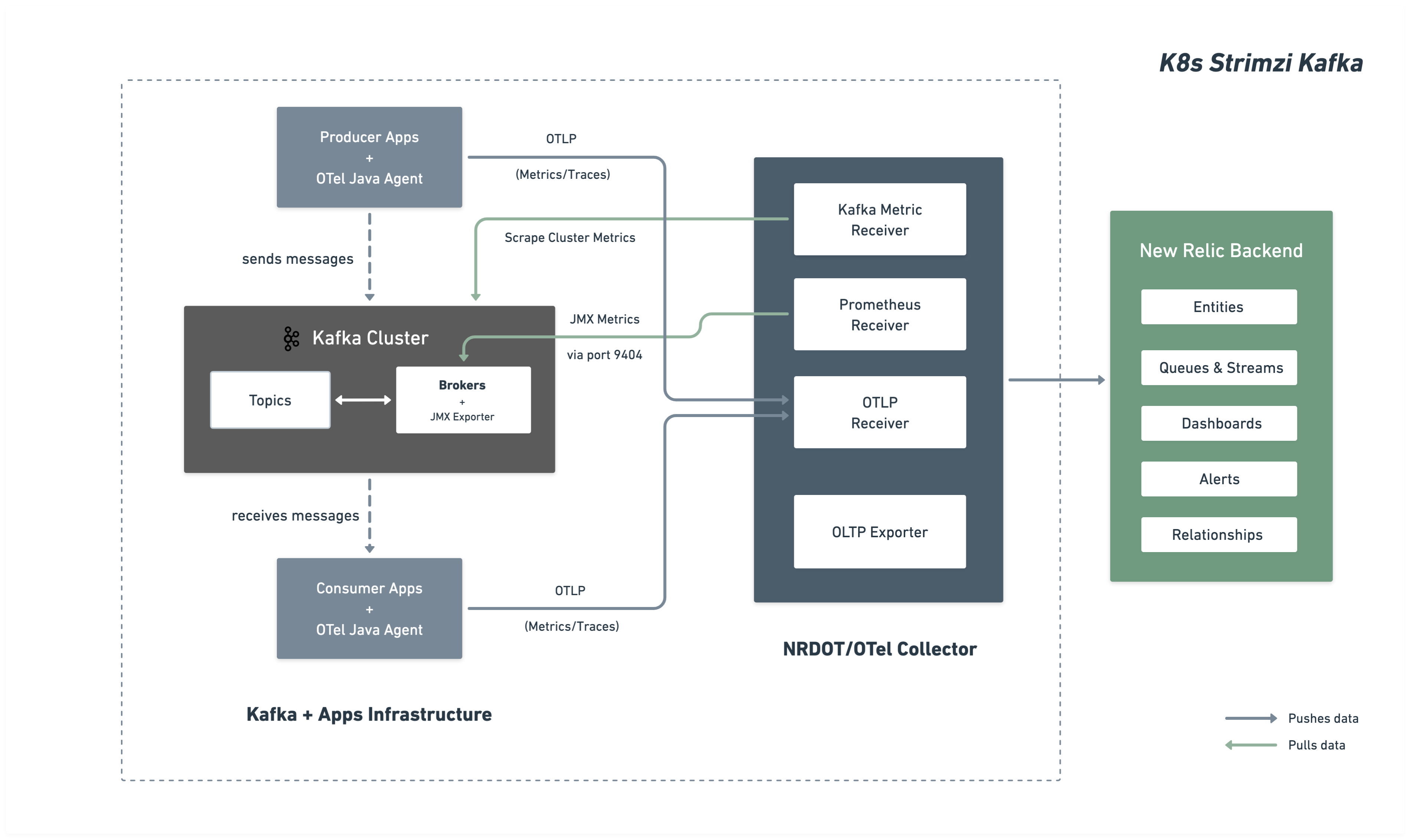
次の図は、監視アーキテクチャーとNew Relicへのデータの流れを示しています。
インストレーション手順
Kafka クラスターの監視を設定するには、次の手順に従います。
あなたが始める前に
以下のものを用意してください:
- New Relicアカウント
- kubectl アクセスを使用したKubernetesクラスター
- Strimzi オペレーター経由でデプロイされた Kafka
Kafka JMX メトリクス用に Kafka クラスターを構成する
Prometheus JMX Exporter を介して Kafka JMX メトリクスを公開するように Strimzi Kafka クラスタを構成します。 この設定は ConfigMap として展開され、Kafka クラスタによって参照されます。
JMX メトリクス ConfigMap の作成
どの Kafka メトリクスを収集するかを定義する JMX Exporter パターンを使用して ConfigMap を作成します。 kafka-jmx-metrics-config.yamlとして保存:
apiVersion: v1kind: ConfigMapmetadata: name: kafka-jmx-metrics namespace: newrelicdata: kafka-metrics-config.yml: | startDelaySeconds: 0 lowercaseOutputName: true lowercaseOutputLabelNames: true
rules: # Cluster-level controller metrics - pattern: 'kafka.controller<type=KafkaController, name=GlobalTopicCount><>Value' name: kafka_cluster_topic_count type: GAUGE
- pattern: 'kafka.controller<type=KafkaController, name=GlobalPartitionCount><>Value' name: kafka_cluster_partition_count type: GAUGE
- pattern: 'kafka.controller<type=KafkaController, name=FencedBrokerCount><>Value' name: kafka_broker_fenced_count type: GAUGE
- pattern: 'kafka.controller<type=KafkaController, name=PreferredReplicaImbalanceCount><>Value' name: kafka_partition_non_preferred_leader type: GAUGE
- pattern: 'kafka.controller<type=KafkaController, name=OfflinePartitionsCount><>Value' name: kafka_partition_offline type: GAUGE
- pattern: 'kafka.controller<type=KafkaController, name=ActiveControllerCount><>Value' name: kafka_controller_active_count type: GAUGE
# Broker-level replica metrics - pattern: 'kafka.server<type=ReplicaManager, name=UnderMinIsrPartitionCount><>Value' name: kafka_partition_under_min_isr type: GAUGE
- pattern: 'kafka.server<type=ReplicaManager, name=LeaderCount><>Value' name: kafka_broker_leader_count type: GAUGE
- pattern: 'kafka.server<type=ReplicaManager, name=PartitionCount><>Value' name: kafka_partition_count type: GAUGE
- pattern: 'kafka.server<type=ReplicaManager, name=UnderReplicatedPartitions><>Value' name: kafka_partition_under_replicated type: GAUGE
- pattern: 'kafka.server<type=ReplicaManager, name=IsrShrinksPerSec><>Count' name: kafka_isr_operation_count type: COUNTER labels: operation: "shrink"
- pattern: 'kafka.server<type=ReplicaManager, name=IsrExpandsPerSec><>Count' name: kafka_isr_operation_count type: COUNTER labels: operation: "expand"
- pattern: 'kafka.server<type=ReplicaFetcherManager, name=MaxLag, clientId=Replica><>Value' name: kafka_max_lag type: GAUGE
# Broker topic metrics (totals) - pattern: 'kafka.server<type=BrokerTopicMetrics, name=MessagesInPerSec><>Count' name: kafka_message_count type: COUNTER
- pattern: 'kafka.server<type=BrokerTopicMetrics, name=TotalFetchRequestsPerSec><>Count' name: kafka_request_count type: COUNTER labels: type: "fetch"
- pattern: 'kafka.server<type=BrokerTopicMetrics, name=TotalProduceRequestsPerSec><>Count' name: kafka_request_count type: COUNTER labels: type: "produce"
- pattern: 'kafka.server<type=BrokerTopicMetrics, name=FailedFetchRequestsPerSec><>Count' name: kafka_request_failed type: COUNTER labels: type: "fetch"
- pattern: 'kafka.server<type=BrokerTopicMetrics, name=FailedProduceRequestsPerSec><>Count' name: kafka_request_failed type: COUNTER labels: type: "produce"
- pattern: 'kafka.server<type=BrokerTopicMetrics, name=BytesInPerSec><>Count' name: kafka_network_io type: COUNTER labels: direction: "in"
- pattern: 'kafka.server<type=BrokerTopicMetrics, name=BytesOutPerSec><>Count' name: kafka_network_io type: COUNTER labels: direction: "out"
# Per-topic metrics (only appear after traffic flows) - pattern: 'kafka.server<type=BrokerTopicMetrics, name=MessagesInPerSec, topic=(.+)><>Count' name: kafka_prod_msg_count type: COUNTER labels: topic: "$1"
- pattern: 'kafka.server<type=BrokerTopicMetrics, name=BytesInPerSec, topic=(.+)><>Count' name: kafka_topic_io type: COUNTER labels: topic: "$1" direction: "in"
- pattern: 'kafka.server<type=BrokerTopicMetrics, name=BytesOutPerSec, topic=(.+)><>Count' name: kafka_topic_io type: COUNTER labels: topic: "$1" direction: "out"
# Request metrics - pattern: 'kafka.network<type=RequestMetrics, name=TotalTimeMs, request=(Produce|FetchConsumer|FetchFollower)><>99thPercentile' name: kafka_request_time_99p type: GAUGE labels: type: "$1"
- pattern: 'kafka.network<type=RequestChannel, name=RequestQueueSize><>Value' name: kafka_request_queue type: GAUGE
- pattern: 'kafka.server<type=DelayedOperationPurgatory, name=PurgatorySize, delayedOperation=(.+)><>Value' name: kafka_purgatory_size type: GAUGE labels: type: "$1"
# Controller stats - pattern: 'kafka.controller<type=ControllerStats, name=LeaderElectionRateAndTimeMs><>Count' name: kafka_leader_election_rate type: COUNTER
- pattern: 'kafka.controller<type=ControllerStats, name=UncleanLeaderElectionsPerSec><>Count' name: kafka_unclean_election_rate type: COUNTER
# JVM Garbage Collection - pattern: 'java.lang<name=(.+), type=GarbageCollector><>CollectionCount' name: jvm_gc_collections_count type: COUNTER labels: name: "$1"
# JVM Memory - pattern: 'java.lang<type=Memory><HeapMemoryUsage>max' name: jvm_memory_heap_max type: GAUGE
- pattern: 'java.lang<type=Memory><HeapMemoryUsage>used' name: jvm_memory_heap_used type: GAUGE
# JVM Threading and System - pattern: 'java.lang<type=Threading><>ThreadCount' name: jvm_thread_count type: GAUGE
- pattern: 'java.lang<type=OperatingSystem><>SystemCpuLoad' name: jvm_system_cpu_utilization type: GAUGE
# Broker uptime - pattern: 'java.lang<type=Runtime><>Uptime' name: kafka_broker_uptime type: GAUGE
# Additional metrics — remove this section to reduce data ingest
# Request latency: total count, 50th percentile, and average (99p kept above) - pattern: 'kafka.network<type=RequestMetrics, name=TotalTimeMs, request=(Produce|FetchConsumer|FetchFollower)><>Count' name: kafka_request_time_total type: COUNTER labels: type: "$1"
- pattern: 'kafka.network<type=RequestMetrics, name=TotalTimeMs, request=(Produce|FetchConsumer|FetchFollower)><>50thPercentile' name: kafka_request_time_50p type: GAUGE labels: type: "$1"
- pattern: 'kafka.network<type=RequestMetrics, name=TotalTimeMs, request=(Produce|FetchConsumer|FetchFollower)><>Mean' name: kafka_request_time_avg type: GAUGE labels: type: "$1"
# Log flush metrics - pattern: 'kafka.log<type=LogFlushStats, name=LogFlushRateAndTimeMs><>Count' name: kafka_logs_flush_count type: COUNTER
- pattern: 'kafka.log<type=LogFlushStats, name=LogFlushRateAndTimeMs><>50thPercentile' name: kafka_logs_flush_time_50p type: GAUGE
- pattern: 'kafka.log<type=LogFlushStats, name=LogFlushRateAndTimeMs><>99thPercentile' name: kafka_logs_flush_time_99p type: GAUGE
# JVM GC elapsed time - pattern: 'java.lang<name=(.+), type=GarbageCollector><>CollectionTime' name: jvm_gc_collections_elapsed type: COUNTER labels: name: "$1"
# JVM Memory heap committed - pattern: 'java.lang<type=Memory><HeapMemoryUsage>committed' name: jvm_memory_heap_committed type: GAUGE
# JVM class loading - pattern: 'java.lang<type=ClassLoading><>LoadedClassCount' name: jvm_class_count type: GAUGE
# Additional JVM OS metrics - pattern: 'java.lang<type=OperatingSystem><>SystemLoadAverage' name: jvm_system_cpu_load_1m type: GAUGE
- pattern: 'java.lang<type=OperatingSystem><>AvailableProcessors' name: jvm_cpu_count type: GAUGE
- pattern: 'java.lang<type=OperatingSystem><>ProcessCpuLoad' name: jvm_cpu_recent_utilization type: GAUGE
- pattern: 'java.lang<type=OperatingSystem><>OpenFileDescriptorCount' name: jvm_file_descriptor_count type: GAUGE
# JVM Memory Pool - pattern: 'java.lang<type=MemoryPool, name=(.+)><Usage>used' name: jvm_memory_pool_used type: GAUGE labels: name: "$1"
- pattern: 'java.lang<type=MemoryPool, name=(.+)><Usage>max' name: jvm_memory_pool_max type: GAUGE labels: name: "$1"
- pattern: 'java.lang<type=MemoryPool, name=(.+)><CollectionUsage>used' name: jvm_memory_pool_used_after_last_gc type: GAUGE labels: name: "$1"ヒント
メトリクスのカスタマイズ: この ConfigMap には、包括的な Kafka ブローカー、トピック、リクエスト、コントローラー、およびJVMメトリクスが含まれています。 Prometheus JMX エクスポーターの例とKafka MBean のドキュメントを参照して、パターンを追加または変更できます。追加の設定については、 JMX エクスポーターのルールのドキュメントを参照してください。
重要
ネームスペース要件: JMX メトリクス ConfigMap と Kafka クラスタは同じネームスペースに存在する必要があります。 このガイドでは、両方ともnewrelicネームスペースにデプロイされています。
ConfigMap を適用します。
$kubectl apply -f kafka-jmx-metrics-config.yamlJMX エクスポーターを使用するように Kafka クラスターを更新する
メトリクス ConfigMap を参照するように Strimzi Kafka リソースを更新します。
apiVersion: kafka.strimzi.io/v1beta2kind: Kafkametadata: name: my-cluster namespace: newrelicspec: kafka: version: X.X.X metricsConfig: type: jmxPrometheusExporter valueFrom: configMapKeyRef: name: kafka-jmx-metrics key: kafka-metrics-config.yml # ...rest of your Kafka configuration変更を適用します。Strimzi は Kafka ブローカーのローリング再起動を実行します。
$kubectl apply -f kafka-cluster.yamlローリング再起動が完了すると、各 Kafka ブローカーはポート9404で Prometheus メトリクスを公開します。
OpenTelemetry Collector をデプロイする
OpenTelemetry Collectorデプロイして、Kafka クラスタを監視します。 ご希望の設置方法を選択してください:
Helmメソッドは、 KubernetesのデプロイOpenTelemetry Collectorに推奨されるアプローチです。
New Relic 認証情報シークレットを作成する
New Relicライセンスキーと OTLP エンドポイントを含むKubernetesシークレットを作成します。 New Relic リージョンのエンドポイントを選択します。
ヒント
その他のエンドポイントの設定については、 「OTLP エンドポイントの設定」を参照してください。
コレクター設定を含む values.yaml を作成する
完全なOpenTelemetry Collector設定を含むvalues.yamlファイルを作成します。 NRDOT とOpenTelemetry Collector は両方とも同一の設定を使用し、同じ Kafka 監視機能を提供します。 ご希望のコレクター画像を選択してください:
高度な設定オプションについては、次の受信機のドキュメント ページを参照してください。
Prometheus レシーバーのドキュメント- 追加のレシーバー設定オプション
Kafka メトリクス受信機のドキュメント - 追加の Kafka メトリクス設定
Helm で OpenTelemetry Collector をインストールする
Helm リポジトリを追加し、values.yaml ファイルを使用して OpenTelemetry Collector をインストールします。
bash$helm repo add open-telemetry https://open-telemetry.github.io/opentelemetry-helm-charts$helm upgrade kafka-monitoring open-telemetry/opentelemetry-collector \>--install \>--namespace newrelic \>--create-namespace \>-f values.yamlデプロイメントを確認します。
bash$# Check pod status$kubectl get pods -n newrelic -l app.kubernetes.io/name=opentelemetry-collector$$# View logs to verify metrics collection$kubectl logs -n newrelic -l app.kubernetes.io/name=opentelemetry-collector --tail=50ポート 9404 上の Kafka ブローカーからのスクレイピングが成功したことを示すログが表示されます。
マニフェスト インストレーション メソッドは、 Helmを使用せずにKubernetesリソースを直接制御します。
New Relic 認証情報シークレットを作成する
New Relicライセンスキーと OTLP エンドポイントを含むKubernetesシークレットを作成します。 New Relic リージョンのエンドポイントを選択します。
ヒント
その他のエンドポイントの設定については、 「OTLP エンドポイントの設定」を参照してください。
マニフェストファイルを作成する
優先コレクター用の Kubernetes マニフェスト ファイルを作成します。どちらのコレクターも同じ設定を使用します - 画像のみが異なります。
コレクター オプションを選択し、必要な 3 つのファイルを作成します。
高度な設定オプションについては、次の受信機のドキュメント ページを参照してください。
Prometheus レシーバーのドキュメント- 追加のレシーバー設定オプション
Kafka メトリクス受信機のドキュメント - 追加の Kafka メトリクス設定
マニフェストをデプロイする
Kubernetes マニフェストを適用して OpenTelemetry Collector をデプロイします。
bash$# Create namespace if it doesn't exist$kubectl create namespace newrelic --dry-run=client -o yaml | kubectl apply -f -$$# Apply RBAC configuration$kubectl apply -f collector-rbac.yaml$$# Apply ConfigMap$kubectl apply -f collector-configmap.yaml$$# Apply Deployment$kubectl apply -f collector-deployment.yamlデプロイメントを確認します。
bash$# Check pod status$kubectl get pods -n newrelic -l app=otel-collector$$# View logs to verify metrics collection$kubectl logs -n newrelic -l app=otel-collector --tail=50ポート 9404 上の Kafka ブローカーからのスクレイピングが成功したことを示すログが表示されます。
(オプション) 計装プロデューサーまたは消費者アプリケーション
重要
言語サポート: Javaアプリケーションは、 OpenTelemetry Javaエージェントを使用した、すぐに使用できる Kafka クライアントの計装をサポートします。
Kafka プロデューサおよび消費者アプリケーションからアプリケーション レベルのテレメトリーを収集するには、 OpenTelemetry Javaエージェントを使用します。
Kafka アプリケーションを計装する
init コンテナを使用して、実行時にOpenTelemetry Javaエージェントをダウンロードします。
apiVersion: apps/v1kind: Deploymentmetadata:  name: kafka-producer-appspec:  template:    spec:      initContainers:      - name: download-java-agent        image: busybox:latest        command:        - sh        - -c        - |          wget -O /otel-auto-instrumentation/opentelemetry-javaagent.jar \          https://github.com/open-telemetry/opentelemetry-java-instrumentation/releases/latest/download/opentelemetry-javaagent.jar        volumeMounts:        - name: otel-auto-instrumentation          mountPath: /otel-auto-instrumentation
      containers:      - name: app        image: your-kafka-app:latest        env:        - name: JAVA_TOOL_OPTIONS          value: >-            -javaagent:/otel-auto-instrumentation/opentelemetry-javaagent.jar            -Dotel.service.name=order-process-service            -Dotel.resource.attributes=kafka.cluster.name=my-cluster            -Dotel.exporter.otlp.endpoint=http://localhost:4317            -Dotel.exporter.otlp.protocol=grpc            -Dotel.metrics.exporter=otlp            -Dotel.traces.exporter=otlp            -Dotel.logs.exporter=otlp            -Dotel.instrumentation.kafka.experimental-span-attributes=true            -Dotel.instrumentation.messaging.experimental.receive-telemetry.enabled=true            -Dotel.instrumentation.kafka.producer-propagation.enabled=true            -Dotel.instrumentation.kafka.enabled=true        volumeMounts:        - name: otel-auto-instrumentation          mountPath: /otel-auto-instrumentation
volumes: - name: otel-auto-instrumentation emptyDir: {}設定メモ:
order-process-serviceプロデューサーまたは消費者アプリケーションの一意の名前に置き換えます。my-clusterコレクター設定で使用されているのと同じクラスタ名に置き換えます。- エンドポイント
http://localhost:4317は、コレクターが同じポッド内のサイドカーとして実行されているか、ローカルホスト経由でアクセス可能であることを前提としています。
ヒント
上記の設定はテレメトリーをOpenTelemetry Collectorに送信します。 テレメトリーをコレクターに送信する必要がある場合は、ステップ 3の説明に従って、次の設定を使用してデプロイします。
Javaエージェントは、コード変更なしですぐに使用できる Kafka 計装を提供し、以下をキャプチャします。
- リクエストのレイテンシ
- スループット メトリクス
- エラー率
- 分散型トレース
高度な設定については、 Kafka 計装ドキュメントを参照してください。
データを検索する
数分後、Kafka メトリクスがNew Relicに表示されるはずです。 New Relic UI のさまざまなビューで Kafka メトリクスを探索する詳細な手順については、 「データの検索」を参照してください。
NRQL を使用してデータをクエリすることもできます。
FROM Metric SELECT * WHERE kafka.cluster.name = 'my-kafka-cluster'トラブルシューティング
次のステップ
- Kafka メトリクスを調べる- 完全なメトリクスリファレンスを見る
- カスタムダッシュボードの作成- Kafka データの視覚化を構築します
- アラートのセットアップ- 消費者のラグやレプリケーションが不十分なパーティションなどの重要なメトリクスを監視します