Una vez que haya agregado facetas a un nivel de servicio, podrá ver y analizar los datos de cumplimiento y del presupuesto de errores desglosados por esas facetas para identificar dónde están ocurriendo los problemas de rendimiento.
Ver resultados facetados
Para ver el cumplimiento y el presupuesto de errores para los valores de atributos individuales y sus combinaciones:
- Vaya a one.newrelic.com > All capabilities > Service Levels.
- Selecciona el nivel de servicio.
- Usa el desplegable View by group y el panel Group by para analizar los atributos que configuraste para la agrupación.
Ejemplo
Al agrupar por environment y region, el desplegable View by group y el panel Group by muestran datos de rendimiento para cada valor de atributo individual (todos los entornos, todas las regiones), así como para cada combinación de entorno y región:
| Valor de atributo | Cumplimiento | Presupuesto de errores restante |
|---|---|---|
| producción | 99.05 % | 48.5% |
| de prueba | 99.50 % | 60% |
| us-east-1 | 99.70 % | 72.5% |
| us-west-1 | 98.20% | 12% |
| producción, us-east-1 | 99,9% | 85% |
| producción, us-west-1 | 98.2 % | 12% |
| de prueba, us-east-1 | 99.5% | 60% |
Analiza tus datos
Utilice la vista facetada para filtrar y comparar datos de cumplimiento en diferentes segmentos.
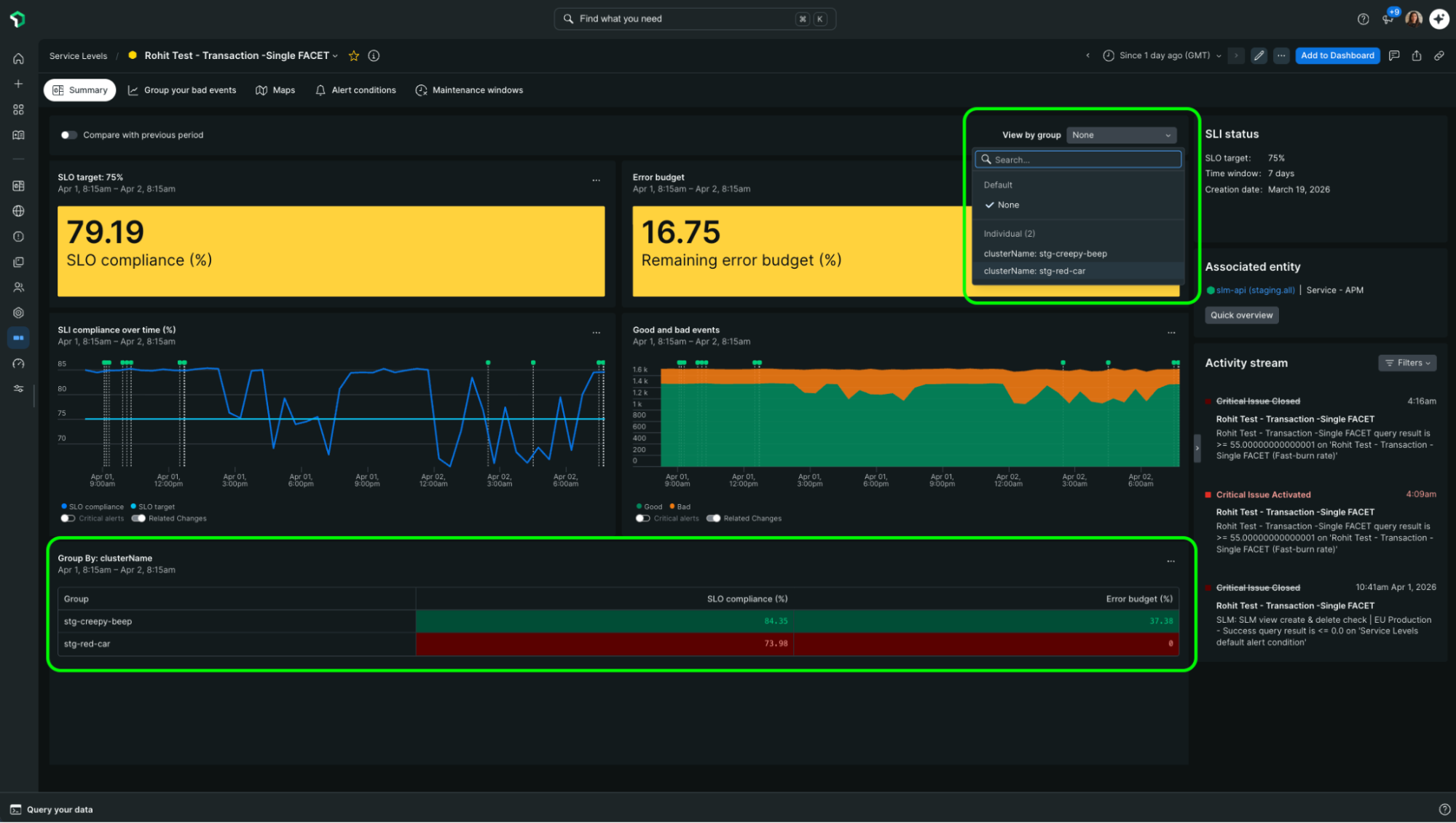
- Para ver datos de un segmento específico: Seleccione una faceta del desplegable en la parte superior de la página. Los gráficos principales se actualizan para mostrar datos solo para ese segmento, y aparece un gráfico Group SLO que muestra cómo se desempeña el grupo seleccionado en relación con el cumplimiento general.
- Para comparar atributos individuales frente a combinaciones: Cuando tenga dos facetas seleccionadas, utilice la vista individual para ver cada atributo por separado, o la vista combinada para ver las combinaciones de atributos.
- Para volver a la vista general: seleccione None en el desplegable.
Alertas por facetas
Puede crear alertas basadas en facetas específicas para asegurarse de que se le notifique cuando un segmento en particular falle.
Tipos de alerta admitidos:
- Alertas de cumplimiento de SLI
- Alertas de consumo rápido
- Alertas de consumo lento
No admitido:
Alertas de presupuesto de errores restante (estas permanecen disponibles solo a nivel agregado)
Temas relacionados
Facetar el cumplimiento del nivel de servicio y los presupuestos de errores
Aprenda qué son los niveles de servicio facetados y cómo funcionan.
Agregar facetas a un nivel de servicio
Aprenda a habilitar el facetado al crear o editar un nivel de servicio.
Alertando sobre nivel de servicio
Aprenda a crear alertas para sus niveles de servicio.