Monitor your self-hosted Apache Kafka cluster by installing the OpenTelemetry Collector directly on Linux hosts.
Architecture
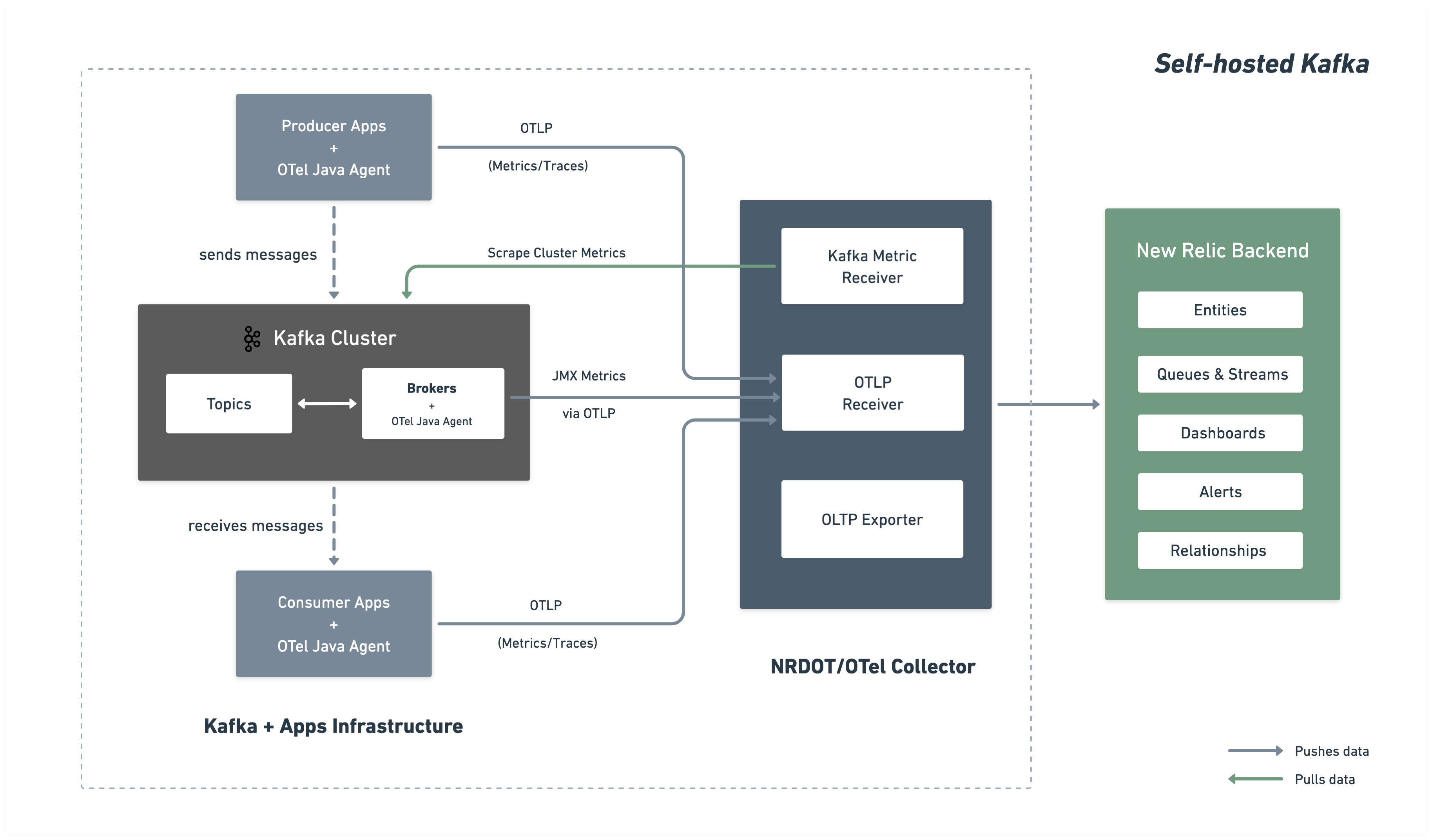
The following diagram illustrates the monitoring architecture and data flow to New Relic.
Installation steps
Follow these steps to set up comprehensive Kafka monitoring by installing the OpenTelemetry Java Agent on your brokers and deploying a collector to gather and send metrics to New Relic.
Before you begin
Ensure you have:
- A New Relic account with a
- Network access from the collector to Kafka bootstrap server port (typically 9092)
Download the OpenTelemetry Java Agent
The OpenTelemetry Java Agent runs as a Java agent attached to your Kafka brokers, collecting Kafka and JMX metrics and sending them via OTLP to the collector:
$# Create directory for OpenTelemetry components$mkdir -p ~/opentelemetry$
$# Download OpenTelemetry Java Agent$curl -L -o ~/opentelemetry/opentelemetry-javaagent.jar \> https://github.com/open-telemetry/opentelemetry-java-instrumentation/releases/latest/download/opentelemetry-javaagent.jarCreate JMX custom configuration
Create an OpenTelemetry Java Agent JMX configuration file to collect Kafka metrics from JMX MBeans.
Create the file ~/opentelemetry/jmx-custom-config.yaml with the following configuration:
---rules: # Per-topic custom metrics using custom MBean commands - bean: kafka.server:type=BrokerTopicMetrics,name=MessagesInPerSec,topic=* metricAttribute: topic: param(topic) mapping: Count: metric: kafka.prod.msg.count type: counter desc: The number of messages per topic unit: "{message}"
- bean: kafka.server:type=BrokerTopicMetrics,name=BytesInPerSec,topic=* metricAttribute: topic: param(topic) direction: const(in) mapping: Count: metric: kafka.topic.io type: counter desc: The bytes received or sent per topic unit: By
- bean: kafka.server:type=BrokerTopicMetrics,name=BytesOutPerSec,topic=* metricAttribute: topic: param(topic) direction: const(out) mapping: Count: metric: kafka.topic.io type: counter desc: The bytes received or sent per topic unit: By
# Cluster-level metrics using controller-based MBeans - bean: kafka.controller:type=KafkaController,name=GlobalTopicCount mapping: Value: metric: kafka.cluster.topic.count type: gauge desc: The total number of global topics in the cluster unit: "{topic}"
- bean: kafka.controller:type=KafkaController,name=GlobalPartitionCount mapping: Value: metric: kafka.cluster.partition.count type: gauge desc: The total number of global partitions in the cluster unit: "{partition}"
- bean: kafka.controller:type=KafkaController,name=FencedBrokerCount mapping: Value: metric: kafka.broker.fenced.count type: gauge desc: The number of fenced brokers in the cluster unit: "{broker}"
- bean: kafka.controller:type=KafkaController,name=PreferredReplicaImbalanceCount mapping: Value: metric: kafka.partition.non_preferred_leader type: gauge desc: The count of topic partitions for which the leader is not the preferred leader unit: "{partition}"
# Broker-level metrics using ReplicaManager MBeans - bean: kafka.server:type=ReplicaManager,name=UnderMinIsrPartitionCount mapping: Value: metric: kafka.partition.under_min_isr type: gauge desc: The number of partitions where the number of in-sync replicas is less than the minimum unit: "{partition}"
# Broker uptime metric using JVM Runtime - bean: java.lang:type=Runtime mapping: Uptime: metric: kafka.broker.uptime type: gauge desc: Broker uptime in milliseconds unit: ms
# Leader count per broker - bean: kafka.server:type=ReplicaManager,name=LeaderCount mapping: Value: metric: kafka.broker.leader.count type: gauge desc: Number of partitions for which this broker is the leader unit: "{partition}"
# JVM metrics - bean: java.lang:type=GarbageCollector,name=* mapping: CollectionCount: metric: jvm.gc.collections.count type: counter unit: "{collection}" desc: total number of collections that have occurred metricAttribute: name: param(name)
- bean: java.lang:type=Memory unit: By prefix: jvm.memory. dropNegativeValues: true mapping: HeapMemoryUsage.max: metric: heap.max desc: current heap usage type: gauge HeapMemoryUsage.used: metric: heap.used desc: current heap usage type: gauge
- bean: java.lang:type=Threading mapping: ThreadCount: metric: jvm.thread.count type: gauge unit: "{thread}" desc: Total thread count (Kafka typical range 100-300 threads)
- bean: java.lang:type=OperatingSystem prefix: jvm. dropNegativeValues: true mapping: SystemCpuLoad: metric: system.cpu.utilization type: gauge unit: '1' desc: Recent CPU utilization for whole system (0.0 to 1.0)
- bean: kafka.server:type=BrokerTopicMetrics,name=MessagesInPerSec mapping: Count: metric: kafka.message.count type: counter desc: The number of messages received by the broker unit: "{message}"
- bean: kafka.server:type=BrokerTopicMetrics,name=TotalFetchRequestsPerSec metricAttribute: type: const(fetch) mapping: Count: metric: &metric kafka.request.count type: &type counter desc: &desc The number of requests received by the broker unit: &unit "{request}"
- bean: kafka.server:type=BrokerTopicMetrics,name=TotalProduceRequestsPerSec metricAttribute: type: const(produce) mapping: Count: metric: *metric type: *type desc: *desc unit: *unit
- bean: kafka.server:type=BrokerTopicMetrics,name=FailedFetchRequestsPerSec metricAttribute: type: const(fetch) mapping: Count: metric: &metric kafka.request.failed type: &type counter desc: &desc The number of requests to the broker resulting in a failure unit: &unit "{request}"
- bean: kafka.server:type=BrokerTopicMetrics,name=FailedProduceRequestsPerSec metricAttribute: type: const(produce) mapping: Count: metric: *metric type: *type desc: *desc unit: *unit
- beans: - kafka.network:type=RequestMetrics,name=TotalTimeMs,request=Produce - kafka.network:type=RequestMetrics,name=TotalTimeMs,request=FetchConsumer - kafka.network:type=RequestMetrics,name=TotalTimeMs,request=FetchFollower metricAttribute: type: param(request) unit: ms mapping: 99thPercentile: metric: kafka.request.time.99p type: gauge desc: The 99th percentile time the broker has taken to service requests
- bean: kafka.network:type=RequestChannel,name=RequestQueueSize mapping: Value: metric: kafka.request.queue type: gauge desc: Size of the request queue unit: "{request}"
- bean: kafka.server:type=BrokerTopicMetrics,name=BytesInPerSec metricAttribute: direction: const(in) mapping: Count: metric: &metric kafka.network.io type: &type counter desc: &desc The bytes received or sent by the broker unit: &unit By
- bean: kafka.server:type=BrokerTopicMetrics,name=BytesOutPerSec metricAttribute: direction: const(out) mapping: Count: metric: *metric type: *type desc: *desc unit: *unit
- beans: - kafka.server:type=DelayedOperationPurgatory,name=PurgatorySize,delayedOperation=Produce - kafka.server:type=DelayedOperationPurgatory,name=PurgatorySize,delayedOperation=Fetch metricAttribute: type: param(delayedOperation) mapping: Value: metric: kafka.purgatory.size type: gauge desc: The number of requests waiting in purgatory unit: "{request}"
- bean: kafka.server:type=ReplicaManager,name=PartitionCount mapping: Value: metric: kafka.partition.count type: gauge desc: The number of partitions on the broker unit: "{partition}"
- bean: kafka.controller:type=KafkaController,name=OfflinePartitionsCount mapping: Value: metric: kafka.partition.offline type: gauge desc: The number of partitions offline unit: "{partition}"
- bean: kafka.server:type=ReplicaManager,name=UnderReplicatedPartitions mapping: Value: metric: kafka.partition.under_replicated type: gauge desc: The number of under replicated partitions unit: "{partition}"
- bean: kafka.server:type=ReplicaManager,name=IsrShrinksPerSec metricAttribute: operation: const(shrink) mapping: Count: metric: kafka.isr.operation.count type: counter desc: The number of in-sync replica shrink and expand operations unit: "{operation}"
- bean: kafka.server:type=ReplicaManager,name=IsrExpandsPerSec metricAttribute: operation: const(expand) mapping: Count: metric: kafka.isr.operation.count type: counter desc: The number of in-sync replica shrink and expand operations unit: "{operation}"
- bean: kafka.server:type=ReplicaFetcherManager,name=MaxLag,clientId=Replica mapping: Value: metric: kafka.max.lag type: gauge desc: The max lag in messages between follower and leader replicas unit: "{message}"
- bean: kafka.controller:type=KafkaController,name=ActiveControllerCount mapping: Value: metric: kafka.controller.active.count type: gauge desc: For KRaft mode, the number of active controllers in the cluster. For ZooKeeper, indicates whether the broker is the controller broker. unit: "{controller}"
- bean: kafka.controller:type=ControllerStats,name=LeaderElectionRateAndTimeMs mapping: Count: metric: kafka.leader.election.rate type: counter desc: The leader election count unit: "{election}"
- bean: kafka.controller:type=ControllerStats,name=UncleanLeaderElectionsPerSec mapping: Count: metric: kafka.unclean.election.rate type: counter desc: Unclean leader election count - increasing indicates broker failures unit: "{election}"
# ── Additional metrics — remove this section to reduce data ingest ───────────
# Request latency: total count, 50th percentile, and average (99p kept above) - beans: - kafka.network:type=RequestMetrics,name=TotalTimeMs,request=Produce - kafka.network:type=RequestMetrics,name=TotalTimeMs,request=FetchConsumer - kafka.network:type=RequestMetrics,name=TotalTimeMs,request=FetchFollower metricAttribute: type: param(request) unit: ms mapping: Count: metric: kafka.request.time.total type: counter desc: The total time the broker has taken to service requests 50thPercentile: metric: kafka.request.time.50p type: gauge desc: The 50th percentile time the broker has taken to service requests Mean: metric: kafka.request.time.avg type: gauge desc: The average time the broker has taken to service requests
- bean: kafka.log:type=LogFlushStats,name=LogFlushRateAndTimeMs unit: ms type: gauge prefix: kafka.logs.flush. mapping: Count: metric: count unit: '{flush}' type: counter desc: Log flush count 50thPercentile: metric: time.50p desc: Log flush time - 50th percentile 99thPercentile: metric: time.99p desc: Log flush time - 99th percentile
# GC elapsed time (cumulative collection time in ms) - bean: java.lang:type=GarbageCollector,name=* mapping: CollectionTime: metric: jvm.gc.collections.elapsed type: counter unit: ms desc: the approximate accumulated collection elapsed time in milliseconds metricAttribute: name: param(name)
# JVM class loading - bean: java.lang:type=ClassLoading mapping: LoadedClassCount: metric: jvm.class.count type: gauge unit: "{class}" desc: Currently loaded class count
# JVM heap committed (in addition to heap.used and heap.max) - bean: java.lang:type=Memory unit: By prefix: jvm.memory. dropNegativeValues: true mapping: HeapMemoryUsage.committed: metric: heap.committed desc: Committed heap memory type: gauge
# Additional JVM CPU and system metrics - bean: java.lang:type=OperatingSystem prefix: jvm. dropNegativeValues: true mapping: SystemLoadAverage: metric: system.cpu.load_1m type: gauge unit: "{run_queue_item}" desc: System load average (1 minute) - alert if > CPU count AvailableProcessors: metric: cpu.count type: gauge unit: "{cpu}" desc: Number of processors available ProcessCpuLoad: metric: cpu.recent_utilization type: gauge unit: '1' desc: Recent CPU utilization for JVM process (0.0 to 1.0) OpenFileDescriptorCount: metric: file_descriptor.count type: gauge unit: "{file_descriptor}" desc: Number of open file descriptors - alert if > 80% of ulimit
# JVM memory pool breakdown (by generation: G1 Old Gen, Eden, Survivor, etc.) - bean: java.lang:type=MemoryPool,name=* type: gauge unit: By metricAttribute: name: param(name) mapping: Usage.used: metric: jvm.memory.pool.used desc: Memory pool usage by generation (G1 Old Gen, Eden, Survivor) Usage.max: metric: jvm.memory.pool.max desc: Maximum memory pool size CollectionUsage.used: metric: jvm.memory.pool.used_after_last_gc desc: Memory used after last GC (shows retained memory baseline)Configure Kafka broker
Attach the OpenTelemetry Java Agent to your Kafka broker by setting the KAFKA_OPTS environment variable before starting Kafka.
Single broker example:
$OTEL_AGENT="$HOME/opentelemetry/opentelemetry-javaagent.jar"$JMX_CONFIG="$HOME/opentelemetry/jmx-custom-config.yaml"$
$nohup env KAFKA_OPTS="-javaagent:$OTEL_AGENT \>    -Dotel.jmx.enabled=true \>    -Dotel.jmx.config=$JMX_CONFIG \>    -Dotel.resource.attributes=broker.id=1,kafka.cluster.name=my-kafka-cluster \>    -Dotel.exporter.otlp.endpoint=http://localhost:4317 \>    -Dotel.exporter.otlp.protocol=grpc \>    -Dotel.metrics.exporter=otlp \>    -Dotel.metric.export.interval=30000" \>    bin/kafka-server-start.sh config/server.properties &
Important
Multi-broker clusters: For multiple brokers, use the same configuration with unique broker.id values (e.g., broker.id=1, broker.id=2, broker.id=3) in the -Dotel.resource.attributes parameter for each broker.
Create collector configuration
Create the main OpenTelemetry Collector configuration at ~/opentelemetry/kafka-config.yaml.
receivers:  # OTLP receiver for Kafka and JMX metrics from Java agents and application telemetry  otlp:    protocols:      grpc:        endpoint: "0.0.0.0:4317"
  # Kafka metrics receiver for cluster-level metrics  kafkametrics:    brokers: ${env:KAFKA_BOOTSTRAP_BROKER_ADDRESSES}    protocol_version: 2.0.0    scrapers:      - brokers      - topics      - consumers    collection_interval: 30s    # Exclude internal Kafka topics (prefixed with __) at the source    topic_match: "^[^_].*$"    metrics:      kafka.topic.min_insync_replicas:        enabled: true      kafka.topic.replication_factor:        enabled: true      kafka.partition.replicas:        enabled: false      kafka.partition.oldest_offset:        enabled: false      kafka.partition.current_offset:        enabled: false
processors:  batch/aggregation:    send_batch_size: 1024    timeout: 30s
  resourcedetection:    detectors: [env, ec2, system]    system:      resource_attributes:        host.name:          enabled: true        host.id:          enabled: true
  resource:    attributes:      - action: insert        key: kafka.cluster.name        value: ${env:KAFKA_CLUSTER_NAME}
  transform/remove_broker_id:    metric_statements:      # Remove broker.id from resource attributes for cluster-level metrics      - context: resource        statements:          - delete_key(attributes, "broker.id")
  transform/remove_extra_attributes:    metric_statements:      - context: resource        statements:          # Delete all attributes starting with "process."          - delete_matching_keys(attributes, "^process\\..*")          # Delete all attributes starting with "telemetry."          - delete_matching_keys(attributes, "^telemetry\\..*")          - delete_key(attributes, "host.arch")          - delete_key(attributes, "os.description")          - delete_key(attributes, "host.image.id")          - delete_key(attributes, "host.type")          - delete_matching_keys(attributes, "^cloud\\..*")          - delete_key(attributes, "service.instance.id") where IsMatch(attributes["service.name"], "^unknown_service:")          - delete_key(attributes, "service.name") where IsMatch(attributes["service.name"], "^unknown_service:")
  # Filter internal Kafka topics as a safety net (kafkametrics topic_match handles the receiver side)  filter/internal_topics:    metrics:      datapoint:        - 'attributes["topic"] != nil and IsMatch(attributes["topic"], "^__.*")'
  filter/include_cluster_metrics:    metrics:      include:        match_type: regexp        metric_names:          - "kafka\\.partition\\.offline"          - "kafka\\.(leader|unclean)\\.election\\.rate"          - "kafka\\.partition\\.non_preferred_leader"          - "kafka\\.broker\\.fenced\\.count"          - "kafka\\.cluster\\.partition\\.count"          - "kafka\\.cluster\\.topic\\.count"
  filter/exclude_cluster_metrics:    metrics:      exclude:        match_type: regexp        metric_names:          - "kafka\\.partition\\.offline"          - "kafka\\.(leader|unclean)\\.election\\.rate"          - "kafka\\.partition\\.non_preferred_leader"          - "kafka\\.broker\\.fenced\\.count"          - "kafka\\.cluster\\.partition\\.count"          - "kafka\\.cluster\\.topic\\.count"
  transform/des_units:    metric_statements:      - context: metric        statements:          - set(description, "") where description != ""          - set(unit, "") where unit != ""
  cumulativetodelta:
  metricstransform/kafka_topic_sum_aggregation:    transforms:      - include: kafka.partition.replicas_in_sync        action: insert        new_name: kafka.partition.replicas_in_sync.total        operations:          - action: aggregate_labels            label_set: [topic]            aggregation_type: sum
      - include: kafka.partition.replicas        action: insert        new_name: kafka.partition.replicas.total        operations:          - action: aggregate_labels            label_set: [topic]            aggregation_type: sum
  filter/remove_partition_level_replicas:    metrics:      exclude:        match_type: strict        metric_names:          - kafka.partition.replicas_in_sync
  groupbyattrs/cluster:    keys: [kafka.cluster.name]
  metricstransform/cluster_max:    transforms:      - include: "kafka\\.partition\\.offline|kafka\\.leader\\.election\\.rate|kafka\\.unclean\\.election\\.rate|kafka\\.partition\\.non_preferred_leader|kafka\\.broker\\.fenced\\.count|kafka\\.cluster\\.partition\\.count|kafka\\.cluster\\.topic\\.count"        match_type: regexp        action: update        operations:          - action: aggregate_labels            aggregation_type: max            label_set: []
exporters:  otlp/newrelic:    endpoint: ${env:NEW_RELIC_OTLP_ENDPOINT}    headers:      api-key: ${env:NEW_RELIC_LICENSE_KEY}    compression: gzip    timeout: 30s
service:  pipelines:    # Broker metrics pipeline (excludes cluster-level metrics)    metrics/broker:      receivers: [otlp, kafkametrics]      processors:        - resourcedetection        - resource        - filter/exclude_cluster_metrics        - filter/internal_topics        - transform/remove_extra_attributes        - transform/des_units        - cumulativetodelta        - metricstransform/kafka_topic_sum_aggregation        - filter/remove_partition_level_replicas        - batch/aggregation      exporters: [otlp/newrelic]
    # Cluster metrics pipeline (only cluster-level metrics, no broker.id)    metrics/cluster:      receivers: [otlp]      processors:        - resourcedetection        - resource        - filter/include_cluster_metrics        - transform/remove_broker_id        - transform/remove_extra_attributes        - transform/des_units        - cumulativetodelta        - groupbyattrs/cluster        - metricstransform/cluster_max        - batch/aggregation      exporters: [otlp/newrelic]
    # APM traces pipeline (producer + consumer spans via OTel Java Agent)    traces/apps:      receivers: [otlp]      processors: [resourcedetection, resource, batch/aggregation]      exporters: [otlp/newrelic]
# APM logs pipeline (producer + consumer logs via OTel Java Agent) logs/apps: receivers: [otlp] processors: [resourcedetection, resource, batch/aggregation] exporters: [otlp/newrelic]Set environment variables
Set the required environment variables before installing the collector:
$export NEW_RELIC_LICENSE_KEY="YOUR_LICENSE_KEY"$export KAFKA_CLUSTER_NAME="my-kafka-cluster"$export KAFKA_BOOTSTRAP_BROKER_ADDRESSES="localhost:9092"$export NEW_RELIC_OTLP_ENDPOINT="https://otlp.nr-data.net:4317" # US regionReplace:
YOUR_LICENSE_KEYwith your New Relic license keymy-kafka-clusterwith a unique name for your Kafka clusterlocalhost:9092with your Kafka bootstrap broker address(es). For multiple brokers, use comma-separated list:broker1:9092,broker2:9092,broker3:9092- OTLP endpoint: Uses
https://otlp.nr-data.net:4317(US region) orhttps://otlp.eu01.nr-data.net:4317(EU region). For other endpoint configurations, see Configure your OTLP endpoint
Install and start the collector
Choose between NRDOT Collector (New Relic's distribution) or OpenTelemetry Collector:
Tip
NRDOT Collector is New Relic's distribution of OpenTelemetry Collector with New Relic support for assistance.
Download and install the binary
Download and install the NRDOT Collector binary for your host operating system. The example below is for linux_amd64 architecture:
$# Set version and architecture$NRDOT_VERSION="1.9.0"$ARCH="amd64"  # or arm64$
$# Download and extract$curl "https://github.com/newrelic/nrdot-collector-releases/releases/download/${NRDOT_VERSION}/nrdot-collector_${NRDOT_VERSION}_linux_${ARCH}.tar.gz" \>  --location --output collector.tar.gz$tar -xzf collector.tar.gz$
$# Move to a location in PATH (optional)$sudo mv nrdot-collector /usr/local/bin/$
$# Verify installation$nrdot-collector --version
Important
For other operating systems and architectures, visit NRDOT Collector releases and download the appropriate binary for your system.
Start the collector
Run the collector with your configuration file to begin monitoring:
$nrdot-collector --config ~/opentelemetry/kafka-config.yamlThe collector will start sending Kafka metrics to New Relic within a few minutes.
Download and install the binary
Download and install the OpenTelemetry Collector Contrib binary for your host operating system. The example below is for linux_amd64 architecture:
$# Set version and architecture$# Check https://github.com/open-telemetry/opentelemetry-collector-releases/releases/latest for the latest version$OTEL_VERSION="<collector_version>"$ARCH="amd64"$
$# Download the collector$curl -L -o otelcol-contrib.tar.gz \>  "https://github.com/open-telemetry/opentelemetry-collector-releases/releases/download/v${OTEL_VERSION}/otelcol-contrib_${OTEL_VERSION}_linux_${ARCH}.tar.gz"$
$# Extract the binary$tar -xzf otelcol-contrib.tar.gz$
$# Move to a location in PATH (optional)$sudo mv otelcol-contrib /usr/local/bin/$
$# Verify installation$otelcol-contrib --version
For other operating systems, visit the OpenTelemetry Collector releases page.
Start the collector
Run the collector with your configuration file to begin monitoring:
$otelcol-contrib --config ~/opentelemetry/kafka-config.yamlThe collector will start sending Kafka metrics to New Relic within a few minutes.
(Optional) Instrument producer or consumer applications
Important
Language support: Currently, only Java applications are supported for Kafka client instrumentation using the OpenTelemetry Java Agent.
To collect application-level telemetry from your Kafka producer and consumer applications, use the OpenTelemetry Java Agent you downloaded in Step 1.
Start your application with the agent:
$java \> -javaagent:$HOME/opentelemetry/opentelemetry-javaagent.jar \> -Dotel.service.name="order-process-service" \> -Dotel.resource.attributes="kafka.cluster.name=my-kafka-cluster" \> -Dotel.exporter.otlp.endpoint=http://localhost:4317 \> -Dotel.exporter.otlp.protocol="grpc" \> -Dotel.metrics.exporter="otlp" \> -Dotel.traces.exporter="otlp" \> -Dotel.logs.exporter="otlp" \> -Dotel.instrumentation.kafka.experimental-span-attributes="true" \> -Dotel.instrumentation.messaging.experimental.receive-telemetry.enabled="true" \> -Dotel.instrumentation.kafka.producer-propagation.enabled="true" \> -Dotel.instrumentation.kafka.enabled="true" \> -jar your-kafka-application.jarReplace:
order-process-servicewith a unique name for your producer or consumer applicationmy-kafka-clusterwith the same cluster name used in your collector configuration
Tip
The configuration above sends telemetry to an OpenTelemetry Collector running on localhost:4317.
This allows you to customize processing, add filters, or route to multiple backends. For other endpoint configurations, see Configure your OTLP endpoint.
The Java Agent provides out-of-the-box Kafka instrumentation with zero code changes, capturing:
- Request latencies
- Throughput metrics
- Error rates
- Distributed traces
For advanced configuration, see the Kafka instrumentation documentation.
(Optional) Forward Kafka broker logs
To collect Kafka broker logs and send them to New Relic, configure the filelog receiver in your OpenTelemetry Collector.
Advanced: Customize metrics collection
You can add more Kafka metrics by extending the rules in jmx-custom-config.yaml:
- Learn about OpenTelemetry JMX Metrics configuration syntax
- Find available MBean names in the Kafka monitoring documentation
This allows you to collect any JMX metric exposed by Kafka brokers based on your specific monitoring needs.
Find your data
After a few minutes, your Kafka metrics should appear in New Relic. See Find your data for detailed instructions on exploring your Kafka metrics across different views in the New Relic UI.
You can also query your data with NRQL:
FROM Metric SELECT * WHERE kafka.cluster.name = 'my-kafka-cluster'Troubleshooting
Next steps
- Explore Kafka metrics - View the complete metrics reference
- Create custom dashboards - Build visualizations for your Kafka data
- Set up alerts - Monitor critical metrics like consumer lag and under-replicated partitions