Kafka 監視がOpenTelemetryで設定されると、メトリクスがNew Relicの複数の場所に表示されるようになります。 このガイドでは、データの場所と効果的なクエリの実行方法を説明します。
Kafkaデータに移動する
Kafka メトリクスは、New Relic プラットフォームの複数の場所に表示されます。それぞれ異なるユースケースに合わせて最適化されています。
1. エンティティエクスプローラー
最適な用途: 迅速なヘルスチェックとエンティティ関係
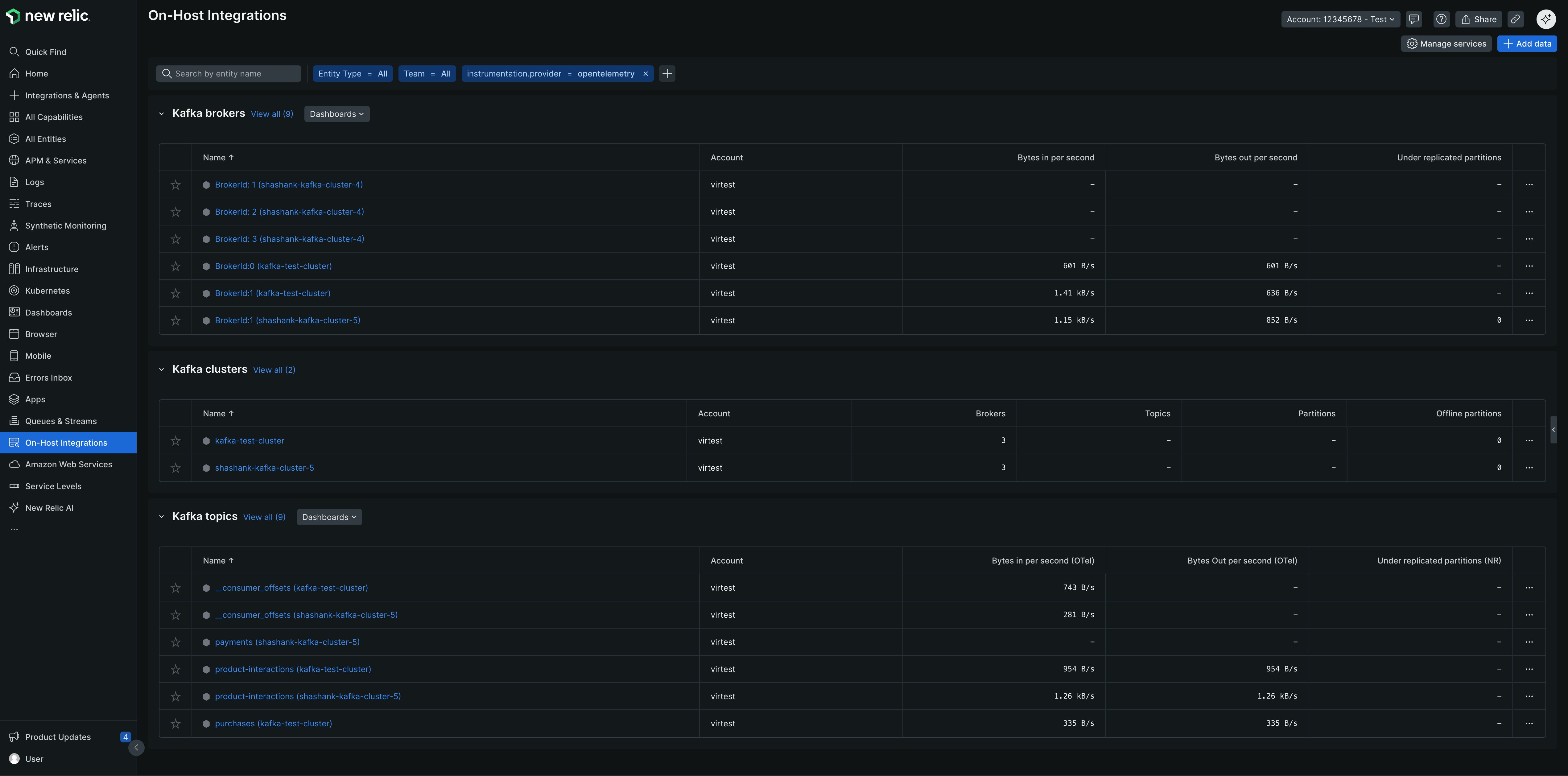
- に行く one.newrelic.com > All capabilities > On host integrations
- Kafka ブローカー、クラスター、トピックのエンティティ タイプを表示する
2. キューとストリーム
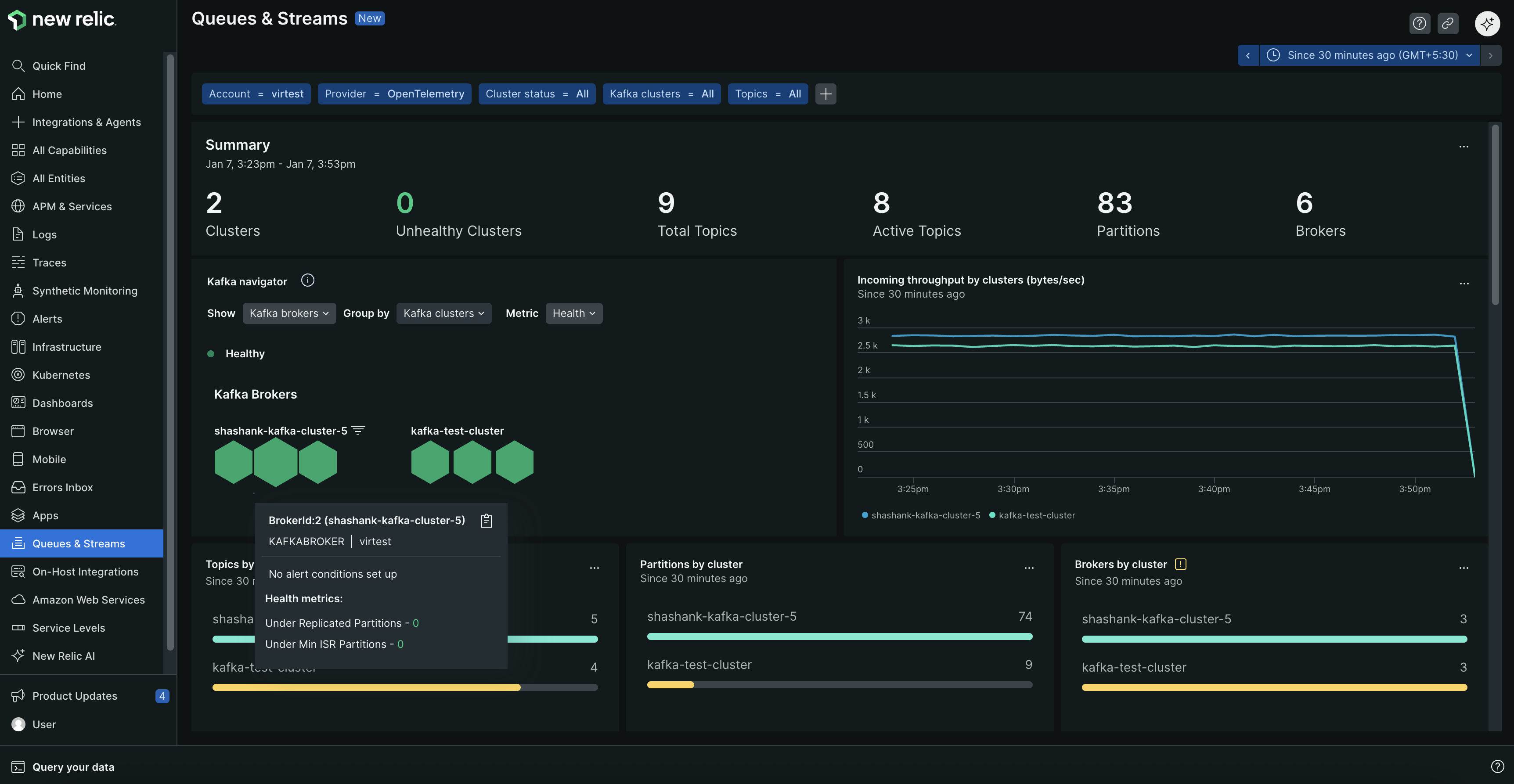
最適な用途: メッセージキューに重点を置いた監視
- に行く one.newrelic.com > All capabilities > Queues & Streams
provider=opentelemetryでフィルターし、Kafka をインストゥルメントしたアカウント行をクリックしてデータを表示します
/* ### 3. サードパーティ サービス 最適な用途: インテグレーション中心の監視 1. <DNT>**[one.newrelic.com](https\://one.newrelic.com) に移動します。 > All capabilities > Infrastructure > Third-party services**</DNT> 2. <DNT>**Kafka (OpenTelemetry)**</DNT> > <DNT>** OpenTelemetry Kafka**</DNT> <img title="OTel Kafka Third-party Services" alt="Kafka (OpenTelemetry) 統合を示すサードパーティ サービス ビュー" を選択します。 src="/images/infrastruction_screenshot-crop_otel-kafka-third-party-インテグレーション.webp" /> */
3. あらかじめ構築されたダッシュボード
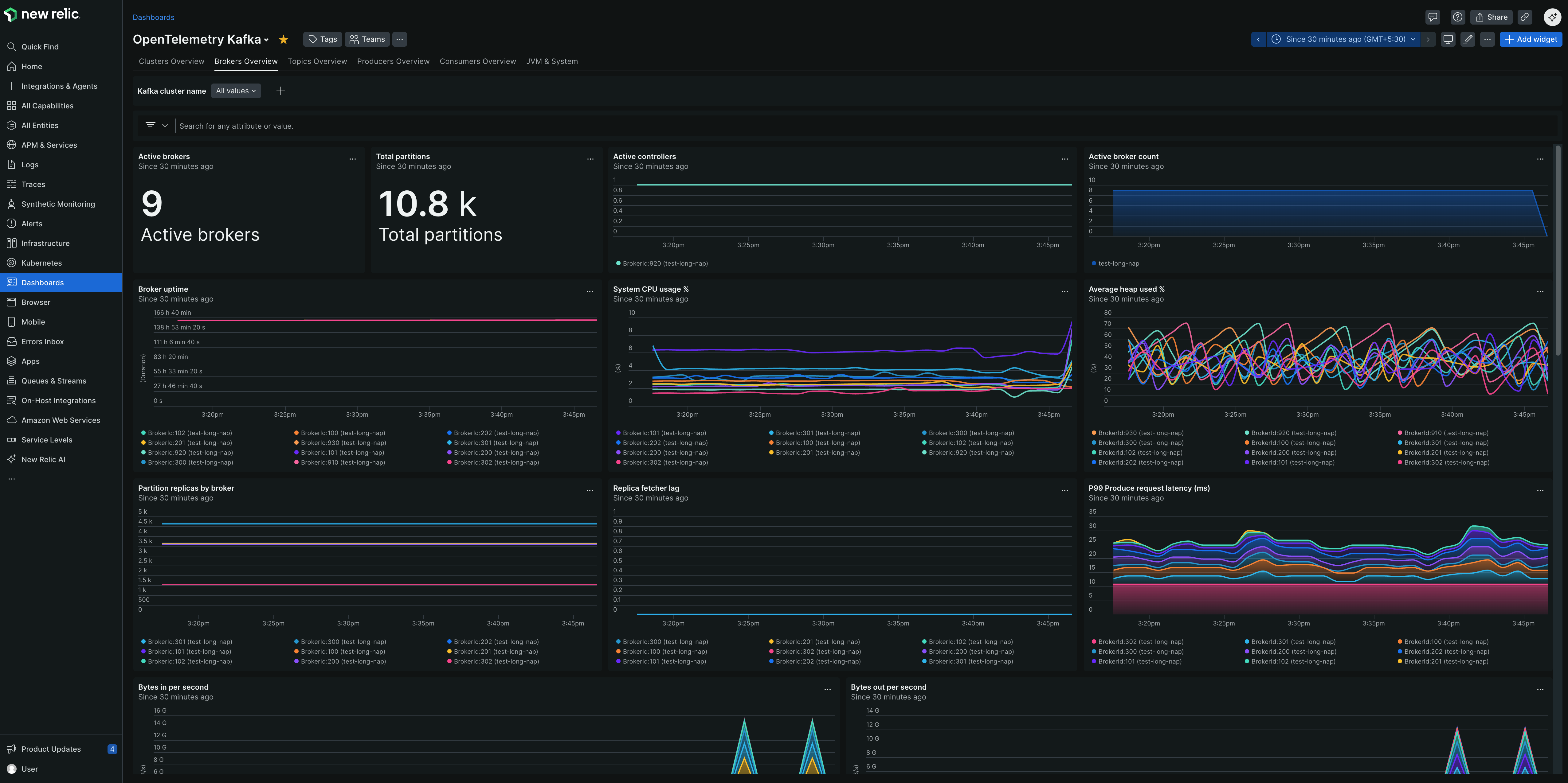
最適な用途: 包括的な監視と可視化
- に行く one.newrelic.com > Dashboards > Recommended dashboards (View all)
- 検索する "OpenTelemetry Kafka"
NRQL で Kafka データをクエリする
NRQLを使用して、Kafka データのカスタム クエリとダッシュボードを作成します。
すべての Kafka メトリクスを表示:
WHERE instrumentation.provider='opentelemetry'
AND kafka.cluster.name IS NOT NULL
モニター固有のクラスタ:
WHERE kafka.cluster.name = 'production-cluster'
AND instrumentation.provider='opentelemetry'
グループ別の消費者の遅れ:
FROM Metric SELECT latest(kafka.consumer_group.lag)
WHERE instrumentation.provider='opentelemetry'
SINCE 1 hour ago TIMESERIES
高い消費者ラグ集計:
FROM Metric SELECT max(kafka.consumer_group.lag)
WHERE instrumentation.provider='opentelemetry'
AND group = 'your-consumer-group'
アクティブなブローカー数:
FROM Metric SELECT latest(kafka.brokers)
WHERE instrumentation.provider='opentelemetry'
AND kafka.cluster.name = 'your-cluster'
複製不足のパーティション:
FROM Metric SELECT latest(kafka.partition.under_replicated)
WHERE instrumentation.provider='opentelemetry'
FACET broker.id SINCE 1 hour ago
トピック別のメッセージスループット:
FROM Metric SELECT rate(sum(kafka.prod.msg.count), 1 minute) as 'Messages/min'
WHERE instrumentation.provider='opentelemetry'
FACET topic SINCE 1 hour ago TIMESERIES
ブローカーによるネットワーク I/O:
FROM Metric SELECT rate(sum(kafka.network.io), 1 minute) as 'Bytes/min'
WHERE instrumentation.provider='opentelemetry'
FACET broker.id, direction SINCE 1 hour ago TIMESERIES
高度なクエリ
監視の焦点領域別に整理されたより包括的なクエリ例については、以下を参照してください。
高レベルのクラスター統計と健全性を取得します。
max(kafka.brokers) AS 'Active Brokers',
max(kafka.cluster.topic.count) AS 'Total Topics',
max(kafka.cluster.partition.count) AS 'Total Partitions',
latest(kafka.partition.offline) AS 'Offline Partitions'
WHERE kafka.cluster.name = 'production-cluster'
AND instrumentation.provider='opentelemetry'
個々のブローカーの健全性とリーダーシップを監視します。
latest(kafka.partition.under_replicated) AS 'Under-replicated Partitions',
latest(kafka.broker.leader.count) AS 'Leader Count',
latest(kafka.partition.count) AS 'Total Partitions'
WHERE kafka.cluster.name = 'production-cluster'
AND instrumentation.provider='opentelemetry'
トピックごとにメッセージ レートとデータ スループットを監視します。
rate(sum(kafka.prod.msg.count), 1 minute) AS 'Messages/min',
rate(filter(sum(kafka.topic.io), WHERE direction = 'in'), 1 minute) AS 'Bytes In/min',
rate(filter(sum(kafka.topic.io), WHERE direction = 'out'), 1 minute) AS 'Bytes Out/min'
WHERE kafka.cluster.name = 'production-cluster'
AND instrumentation.provider='opentelemetry'
消費者のグループラグと処理遅延を追跡します。
latest(kafka.consumer_group.lag_sum) AS 'Total Lag'
WHERE kafka.cluster.name = 'production-cluster'
AND instrumentation.provider='opentelemetry'
リクエストの処理時間とパフォーマンスを監視します。
latest(kafka.request.time.avg) AS 'Avg Latency',
latest(`kafka.request.time.99p`) AS '99th Percentile'
WHERE kafka.cluster.name = 'production-cluster'
AND instrumentation.provider='opentelemetry'
Kafka ブローカーのモニターJVM :
(latest(jvm.memory.heap.used) / latest(jvm.memory.heap.max)) * 100 AS 'Heap Usage %',
rate(sum(jvm.gc.collections.count), 1 minute) AS 'GC Count/min'
WHERE kafka.cluster.name = 'production-cluster'
AND instrumentation.provider='opentelemetry'
カスタムダッシュボードを作成する
複数のクエリを組み合わせて包括的な Kafka 監視ダッシュボードを作成します。
one.newrelic.comにアクセスしてください > Dashboards
クリック Create a dashboard
上記のNRQL書き込みを使用してウィジェットを追加します
ウィジェットをフォーカス領域別に整理します。
- Cluster健全性: ブローカー数、レプリケーション不足のパーティション、コントローラーのステータス
- 消費者のパフォーマンス: ラグ、スループット、グループメンバーシップ
- トピックメトリクス: メッセージレート、パーティション数、レプリケーションステータス
- リソース使用率: ネットワークI/O 、 JVMメトリクス、ディスク使用率
アラートの設定
ヒント
New Relic Kafka 用に事前構成された GoldenMetriks Araート を提供します。 新しいアラート条件を作成するときは、Guided mode → Host integrations → Kafka (ブローカー、クラスタ、またはトピック) を選択して、推奨されるテンプレートを表示します。
NRQL クエリを使用してカスタム アラートを作成することもできます。
消費者のラグが許容できる閾値を超えた場合:
latest(kafka.consumer_group.lag_sum)
WHERE kafka.cluster.name = 'production-cluster'
AND instrumentation.provider='opentelemetry'
推奨値: クリティカルな消費者グループのラグが 10,000 メッセージを超える場合。
パーティションがレプリケーションを失った場合の合計:
sum(kafka.partition.under_replicated)
WHERE kafka.cluster.name = 'production-cluster'
AND instrumentation.provider='opentelemetry'
推奨値: いずれかのパーティションがレプリケート不足 (> 0) になった場合。
パーティションがオフラインになったときにすぐに集計:
latest(kafka.partition.offline)
WHERE kafka.cluster.name = 'production-cluster'
AND instrumentation.provider='opentelemetry'
推奨値: いずれかのパーティションがオフラインになった場合 (> 0)、直ちに集計します。
パーティションが最小同期レプリカを下回る場合の合計:
latest(kafka.partition.under_min_isr)
WHERE kafka.cluster.name = 'production-cluster'
AND instrumentation.provider='opentelemetry'
推奨値: いずれかのパーティションが最小 ISR (> 0) を下回る場合。
ヒープ使用量が重要な場合の集計:
(latest(jvm.memory.heap.used) / latest(jvm.memory.heap.max)) * 100
WHERE kafka.cluster.name = 'production-cluster'
AND instrumentation.provider='opentelemetry'
推奨値: ヒープ使用量が継続的に 85% を超える場合。
リクエストの失敗率が高い場合にまとめます:
rate(sum(kafka.request.failed), 1 minute)
WHERE kafka.cluster.name = 'production-cluster'
AND instrumentation.provider='opentelemetry'
推奨値: 失敗率が総requestsの 1% を超える場合の合計。
汚れたリーダー選挙に関する集計 (ブローカーの失敗を示します):
rate(sum(kafka.unclean.election.rate), 1 minute)
WHERE kafka.cluster.name = 'production-cluster'
AND instrumentation.provider='opentelemetry'
推奨値: 汚れたリーダー選挙に関する集計 (> 0)。
次のステップ