Cette traduction automatique est fournie pour votre commodité.
En cas d'incohérence entre la version anglaise et la version traduite, la version anglaise prévaudra. Veuillez visiter cette page pour plus d'informations.
Nous travaillons toujours sur cette fonctionnalité, mais nous aimerions que vous l'essayiez !
Cette fonctionnalité est actuellement fournie dans le cadre d'un programme d'aperçu conformément à nos politiques de pré-sortie.
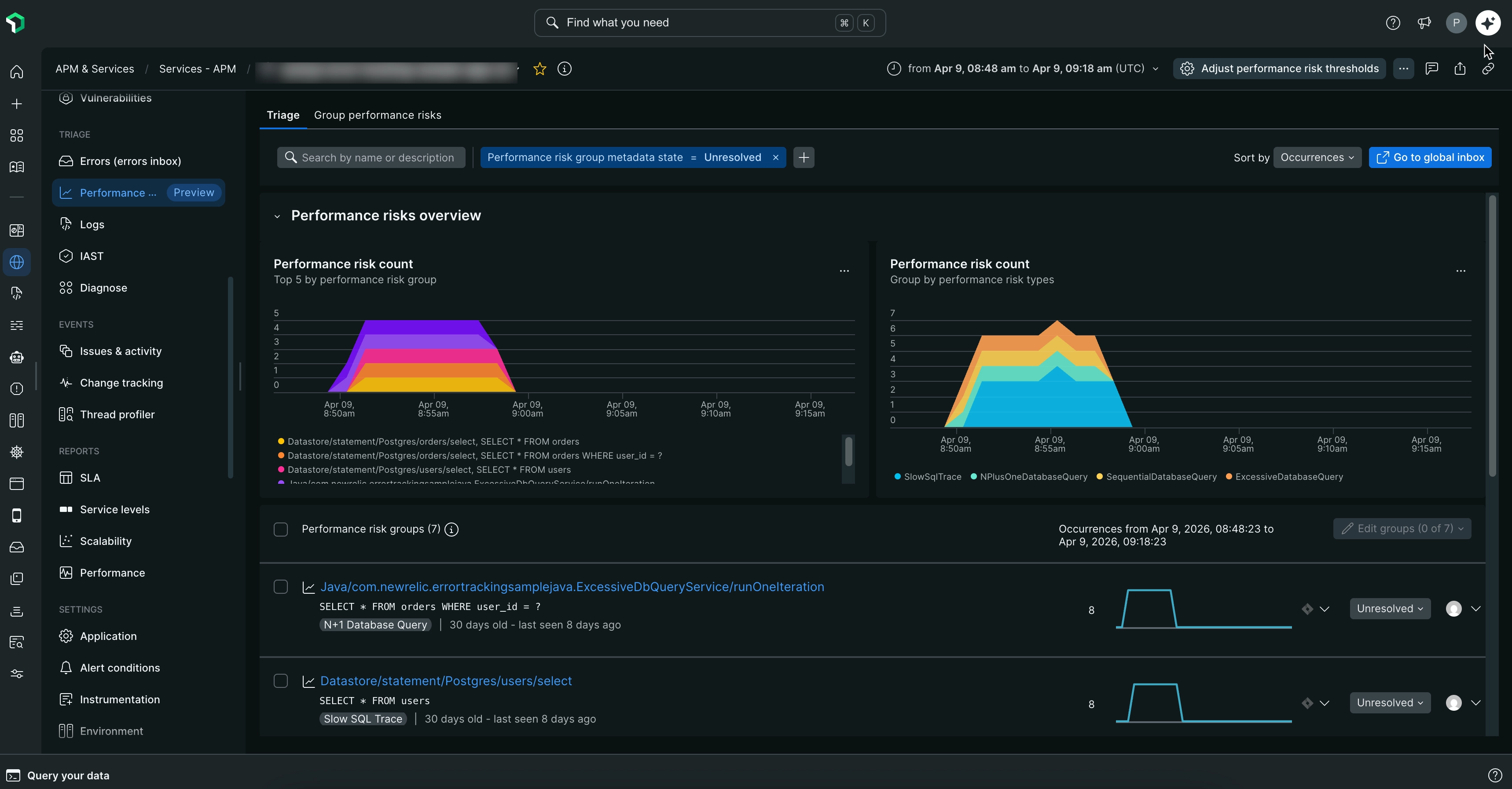
Performance Risks inbox ajoute une couche intelligente au-dessus des données télémétriques de New Relic, en analysant en continu vos applications pour détecter les problèmes de performances et en les signalant avant qu'ils ne dégénèrent en incidents de production. Il utilise des analyseurs intégrés pour détecter automatiquement les anomalies de performance à l’aide de seuils configurables, et regroupe les problèmes similaires afin que vous puissiez vous concentrer en priorité sur la résolution des problèmes les plus impactants.
Couverture et périmètre
Performance Risks inbox fournit un monitoring complet sur l'ensemble de votre stack applicative :
Services APM
Applications Browser
Workloads
Principaux avantages
Détection proactive des problèmes: identifier les problèmes de performances avant qu'ils ne dégénèrent en incidents de production
Réduction du délai moyen de résolution (MTTR): le regroupement intelligent vous aide à vous concentrer d’abord sur les problèmes les plus critiques
Productivité de l'ingénierie améliorée: consacrez moins de temps à l'analyse manuelle des performances et plus de temps à l'innovation
Meilleure fiabilité de l'application: traitez les risques de performance avant qu'ils n'affectent vos utilisateurs finaux
Comment fonctionne la boîte de réception Performance Risks ?
Performance Risks inbox utilise les analyseurs suivants pour détecter les problèmes de performance les plus courants :
Les requêtes de base de données lentes sont souvent la cause principale des problèmes de performances des applications et peuvent entraîner des problèmes en cascade sur l'ensemble de votre stack. L'analyseur identifie les requêtes de base de données qui prennent plus de temps que prévu à s'exécuter, ce qui peut avoir un impact significatif sur les temps de réponse de l'application et l'expérience utilisateur.
Ce que cela peut aider à détecter :
Requêtes SQL dépassant les seuils de performance
Opérations de base de données susceptibles de causer des goulots d’étranglement de l'application
Requêtes dont les performances se dégradent au fil du temps
Les requêtes N+1 peuvent augmenter de façon exponentielle la charge de la base de données et les temps de réponse à mesure que vos données augmentent, ce qui en fait un problème de performance critique à traiter au plus tôt. Cet analyseur détecte l’anti-modèle courant de requête N + 1 où une application exécute N requêtes au lieu d’une seule requête. Cela se produit généralement dans les frameworks ORM lors du chargement des données associées.
Ce que cela peut aider à détecter :
Requêtes de base de données répétées dans des boucles
Modèles de chargement de données inefficaces
Séquences de requêtes générées par l’ORM qui pourraient être optimisées
Des opérations de base de données excessives peuvent surcharger vos serveurs de base de données et créer des goulots d’étranglement de performance qui affectent l'ensemble de votre application. Cet analyseur monitore les applications qui effectuent un nombre anormalement élevé de connexions à la base de données ou de requêtes sur une période donnée, indiquant des inefficacités potentielles dans les modèles d'accès aux données.
Ce que cela peut aider à détecter :
Volumes de requêtes de base de données anormalement élevés
Modèles de traitement par lots inefficaces
Les opérations séquentielles de base de données représentent souvent des opportunités d'optimisation manquées qui peuvent améliorer considérablement les performances des applications avec des modifications relativement simples. Cet analyseur aide à identifier les situations où les opérations de base de données sont effectuées séquentiellement alors qu'elles pourraient être optimisées par la parallélisation ou le traitement par lots.
Ce que cela peut aider à détecter :
Opérations séquentielles de base de données qui pourraient être parallélisées
Opportunités manquées de traitement par lots
Modèles d'accès aux données inefficaces
Les charges HTTP volumineuses peuvent ralentir les transferts réseau, augmenter les coûts de bande passante, et avoir un impact négatif sur l'expérience utilisateur, en particulier sur les appareils mobiles ou les connexions réseau plus lentes. Cet analyseur monitore les requests et les réponses HTTP pour détecter les charges qui dépassent les seuils de taille optimaux.
Ce que cela peut aider à détecter :
requests ou réponses HTTP avec des charges volumineuses
Points de terminaison d'API renvoyant des données excessives
Modèles inefficaces de sérialisation ou de transfert de données
Les réponses HTTP lentes peuvent dégrader la réactivité de l'application, réduire le débit et frustrer les utilisateurs en attente de données ; particulièrement dans les workflows sensibles à la latence ou les régions avec une surcharge réseau plus élevée. Cet analyseur monitore les transactions HTTP pour détecter les temps de réponse qui dépassent les seuils de latence optimaux, ce qui peut signaler des problèmes de performances plus profonds dans l'ensemble de votre stack.
Ce que cela peut aider à détecter :
Réponses HTTP avec une latence élevée
Points de terminaison d'API avec des temps de réponse constamment lents
Traitement backend inefficace, modèles de requête, ou dépendances tierces contribuant aux ralentissements
Cas d'utilisation
Performance Risks inbox vous aide à traiter deux domaines clés : réduire les coûts d'infrastructure et améliorer les performances des applications. Voici des exemples de cas d'utilisation illustrant comment Performance Risks inbox peut traiter ces domaines.
Réduire les coûts d'infrastructure
Les modèles de code inefficaces entraînent une consommation inutile de ressources qui a un impact direct sur les coûts d'infrastructure :
Requêtes N+1: au lieu d’exécuter une seule requête optimisée, une application exécute une requête pour récupérer une liste, puis une requête distincte pour chaque élément de cette liste. À grande échelle, un utilisateur qui attend la fin de 100 requêtes de base de données — alors qu'une seule requête pourrait renvoyer le même résultat — augmente inutilement à la fois la charge de la base de données et l'utilisation des ressources.
Charges HTTP volumineuses: lorsqu'une application appelle une API volumineuse et envoie la réponse complète à chaque interaction utilisateur, les fournisseurs de cloud facturent la bande passante et le transfert de données de chaque appel, même lorsque ces données n'étaient pas requises pour l'interaction.
Améliorer les performances des applications
Les problèmes de performances affectent directement la vitesse et la réactivité de l'application :
Requêtes de base de données séquentielles: lorsqu'un utilisateur requests deux éléments de données sans rapport, l'application peut récupérer le premier et attendre qu'il soit terminé avant de récupérer le second — même si les deux requêtes sont indépendantes et pourraient s'exécuter en même temps. L'utilisateur attend plus longtemps que nécessaire un résultat qui aurait pu être renvoyé beaucoup plus rapidement.
Réponses HTTP lentes: lorsqu'un utilisateur interagit avec l'application et voit un état de chargement pendant une période prolongée, c'est souvent parce qu'une API sous-jacente n'est pas performante. L'utilisateur est forcé d'attendre une réponse lente avant que le résultat n'apparaisse.