Workload le ayuda a organizar, monitorear y solucionar problemas de toda su pila de tecnología al agrupar entidades relacionadas en unidades relevantes para el negocio. En lugar de monitorear docenas de servicios, hosts y aplicaciones por separado, la carga de trabajo le ofrece una vista unificada de todo lo que impulsa una función de negocio, un equipo o una experiencia del cliente específicos.
¿Por qué usar cargas de trabajo?
Las aplicaciones modernas abarcan múltiples servicios, hosts, bases de datos y dependencias de terceros. Workload resuelve el desafío de monitorear sistemas distribuidos y complejos mediante:
- Simplificando la observabilidad: Visualice la salud y el rendimiento de todo su stack en un solo lugar
- Acelerar la resolución de problemas: Identifique rápidamente qué componentes están causando problemas
- Mejorar la colaboración: Comparta el estado del sistema con los equipos sin requerir conocimientos técnicos profundos
- Alineación con los resultados del negocio: Agrupe las entidades por función de negocio, recorrido del cliente o responsabilidad del equipo
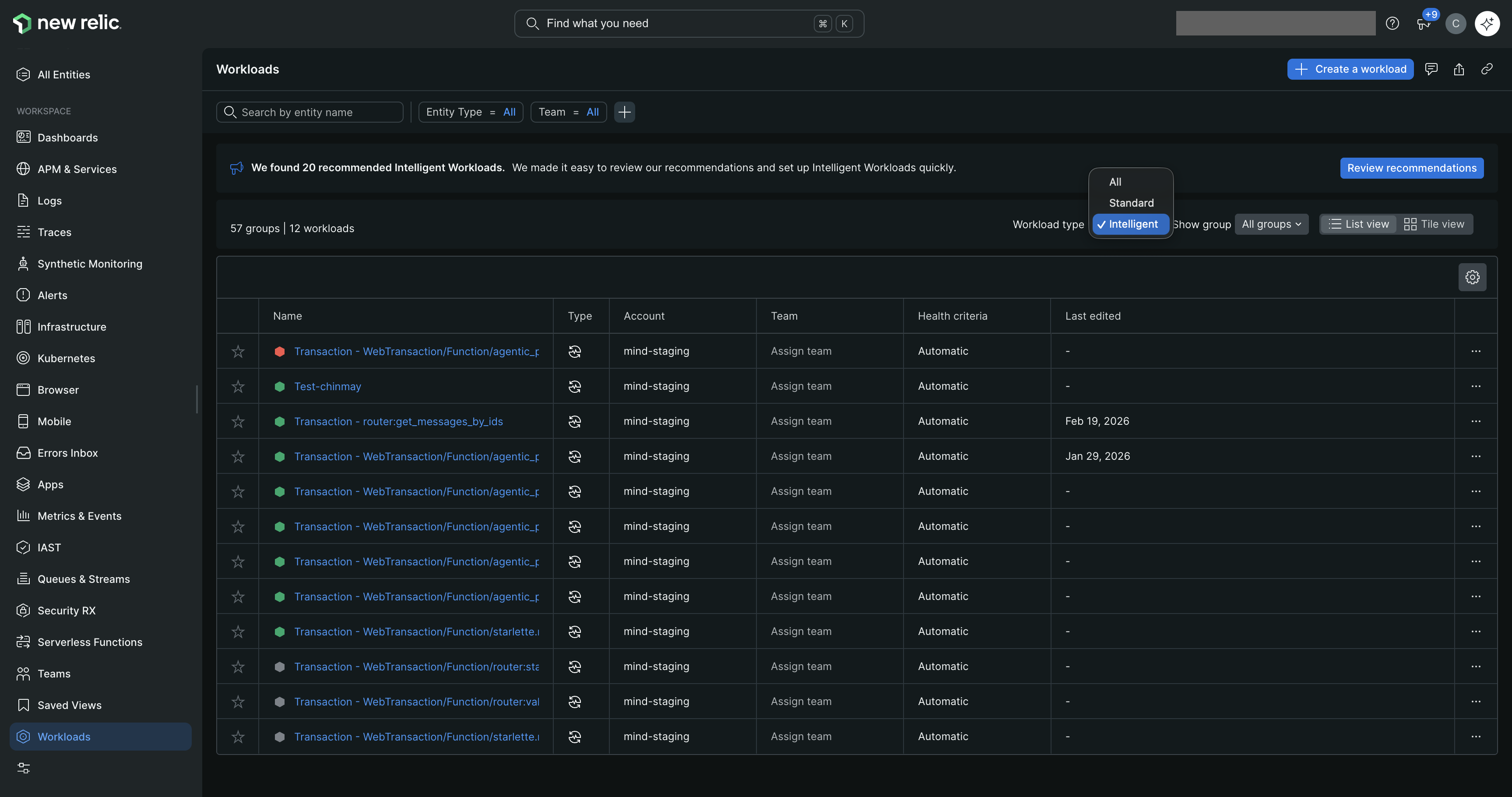
one.newrelic.com > All capabilities > Workloads: Workload proporciona una vista unificada de la salud del sistema en todas sus entidades monitoreadas.
Qué puede incluir en la carga de trabajo
Ambos tipos de cargas de trabajo pueden incluir:
- Cualquier entidad monitoreada por New Relic (aplicaciones, servicios, hosts, bases de datos, etc.)
- Dashboards
- Otras cargas de trabajo (útiles para estructuras de equipo complejas)
Las Standard workloads le permiten seleccionar manualmente estas entidades o definir consultas dinámicas.
Intelligent workloads incluyen automáticamente todas las entidades que participan en el flujo de transacciones seleccionado.
Tipos de carga de trabajo
New Relic ofrece dos tipos de cargas de trabajo, cada una diseñada para diferentes casos de uso:
Define manualmente qué entidades pertenecen a la carga de trabajo mediante consultas, etiquetas o seleccionando entidades específicas. La membresía se actualiza cuando sus consultas coinciden con nuevas entidades o las agrega o elimina manualmente.
Capacidades clave
Descubrimiento de entidades: Consultas manuales o basadas en etiquetas
Actualizaciones de membresía: Cuando las consultas coinciden con nuevas entidades o cambios manuales
Complejidad de la configuración: Simple - seleccione entidades o escriba consultas
Estado de salud: Reglas configurables
Alertas: Sobre el estado de la carga de trabajo
Importante
Esta función está actualmente en vista previa pública.
Descubre y rastrea automáticamente entidades a partir de trazas distribuidas de Transaction 360. La membresía se actualiza cada 5 minutos a medida que su sistema evoluciona, con información de IA y KPI personalizados disponibles.
Capacidades clave
Descubrimiento de entidades: Automático mediante Transaction 360
Actualizaciones de membresía: Cada 5 minutos automáticamente
Complejidad de la configuración: Requiere Transaction 360 y rastreo distribuido
Insights de IA: Proporciona análisis de rendimiento e investigación para las cargas de trabajo
KPIs personalizados: Defina y realice un seguimiento de KPIs personalizados basados en las necesidades únicas de su negocio
Estado de salud: Reglas configurables
Alertas: Sobre el estado de la carga de trabajo, los KPI y las métricas doradas de la carga de trabajo
Requisitos
Para usar Intelligent workload, necesita:
Transaction 360: Debe estar habilitado con rastreo distribuido en su cuenta de New Relic
Datos de trazas: Trazas distribuidas recientes para las transacciones que desea monitorear
Permisos: Capacidad para crear y administrar cargas de trabajo en su cuenta
Limitaciones
Solo infraestructura de AWS: No disponible en entornos de Azure; no disponible para clientes de FedRAMP debido a los requisitos de procesamiento de IA para obtener información de IA
Cuándo usar Carga de trabajo inteligente
La carga de trabajo inteligente es ideal para:
Transacciones de negocio críticas con arquitecturas dinámicas
Dependencias complejas donde la participación de la entidad cambia con frecuencia
Escenarios que requieren seguimiento de resultados de negocio con KPIs personalizados
Equipos que necesitan información impulsada por IA para una resolución de problemas más rápida
Sugerencia
¡Puede usar ambos tipos! Muchas organizaciones utilizan la carga de trabajo Estándar para la infraestructura y la carga de trabajo Inteligente para las transacciones de negocio críticas.