Security RX Cloud provides comprehensive, AI-generated remediation playbooks that guide you through fixing cloud misconfigurations using your preferred workflow. Instead of researching fixes across multiple sources, you get step-by-step instructions tailored to your tools and processes.
Problems remediation playbooks solve
Traditional cloud security tools often leave you with incomplete information when it comes to actually fixing issues:
- Research overhead: Time wasted looking up how to fix security misconfigurations across AWS documentation and security guides
- Context switching: Having to leave your security dashboard to research and implement fixes
- Workflow mismatch: Remediation guidance that doesn't match your team's preferred tools and processes
- Verification uncertainty: Not knowing how to confirm that a fix was properly implemented
- Incomplete fixes: Partial solutions that don't address the root cause of security issues
How Security RX Cloud remediation works
Security RX Cloud's remediation system provides complete, AI-generated playbooks that include:
Multiple workflow options
Every misconfiguration includes remediation instructions for different workflows, so you can choose the approach that fits your team's processes.
Production-ready code
All code snippets are production-ready and follow security best practices, reducing the risk of introducing new issues while fixing existing ones.
Verification steps
Each remediation playbook includes steps to verify that the fix was properly implemented and the security issue is resolved.
Remediation workflow options
Security RX Cloud provides remediation instructions for four different workflows, allowing you to choose the approach that best fits your team's processes and tools.
Console-based remediation
Best for: Quick fixes, one-off remediation, teams preferring graphical interfaces
The Console workflow provides step-by-step, numbered instructions for fixing misconfigurations using the AWS Management Console.
What you get:
- Sequential steps: Clear, numbered instructions that walk you through each click and selection
- Visual guidance: Screenshots and descriptions of what you'll see in the AWS console
- Error handling: Common issues you might encounter and how to resolve them
- Verification steps: How to confirm the fix was applied correctly
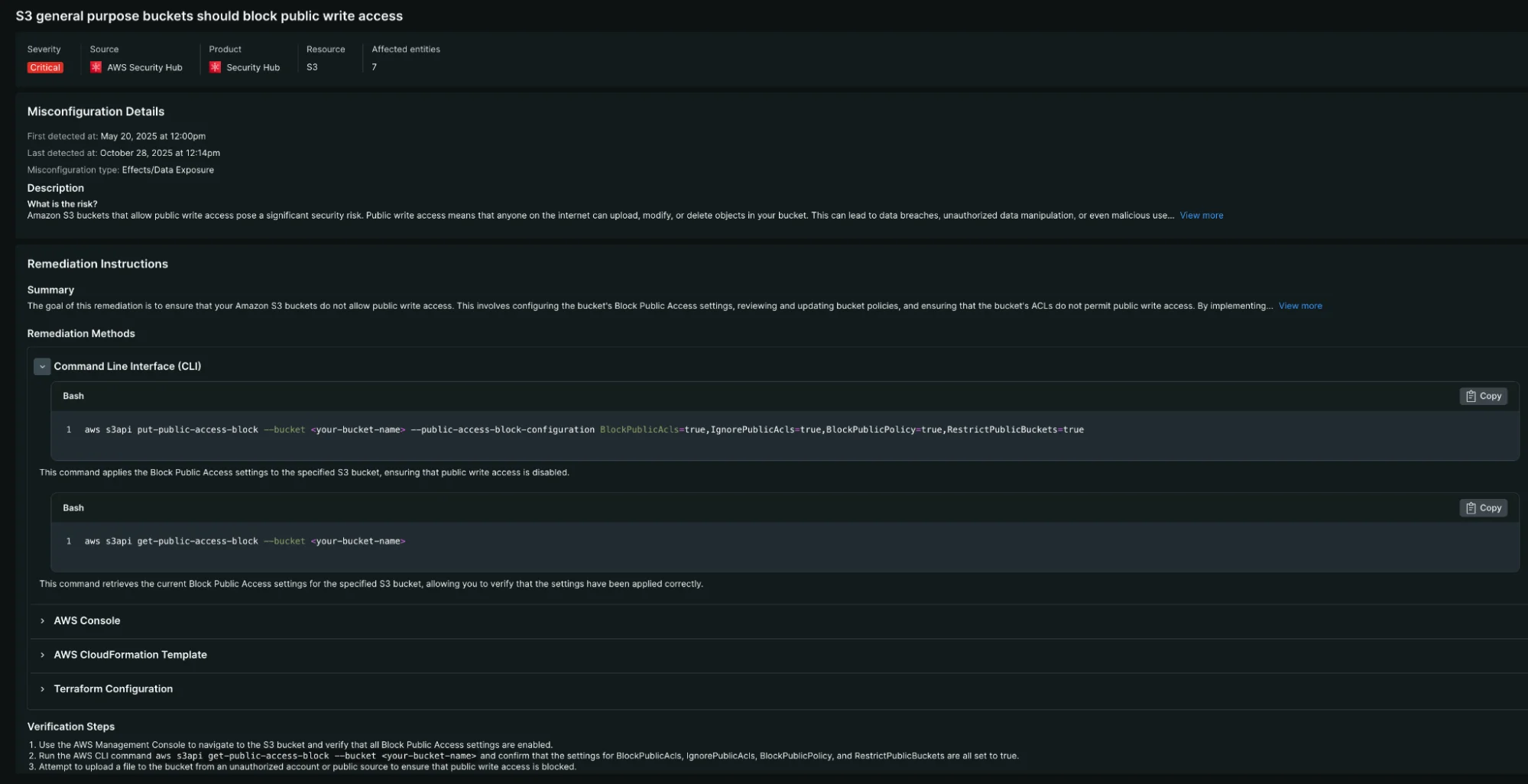
Example of detailed remediation guidance for an S3 bucket misconfiguration, showing multiple workflow options including Console, CLI, and verification steps.
Example use cases:
- Emergency fixes that need immediate implementation
- One-time configuration changes
- Teams new to infrastructure automation
- Development and testing environments
CLI-based remediation
Best for: Automation scripts, command-line-first teams, batch operations
The CLI workflow provides exact, copy-pasteable AWS CLI commands with detailed explanations.
What you get:
- Copy-pasteable commands: Ready-to-run AWS CLI commands with all necessary parameters
- Command explanations: Clear descriptions of what each command does and why it's necessary
- Parameter details: Explanation of command parameters and how to customize them for your environment
- Error handling: Common CLI errors and how to troubleshoot them
Example use cases:
- Scripted remediation across multiple resources
- Integration with existing automation tools
- Bulk fixes across multiple AWS accounts
- Teams comfortable with command-line interfaces
CloudFormation remediation
Best for: Infrastructure as Code workflows, preventing configuration drift, production environments
The CloudFormation workflow provides production-ready Infrastructure as Code templates that fix misconfigurations at the source.
What you get:
- Complete templates: Ready-to-deploy CloudFormation templates with proper resource definitions
- Parameter configuration: Customizable parameters for different environments and use cases
- Resource relationships: Proper dependencies and references between related resources
- Best practices: Templates follow AWS CloudFormation best practices and security guidelines
Example use cases:
- Production environment fixes that need to be permanent
- Preventing configuration drift by codifying correct configurations
- Teams using Infrastructure as Code for deployment and management
- Fixes that need to be replicated across multiple environments
Terraform remediation
Best for: Terraform-based infrastructure management, multi-cloud environments, DevOps workflows
The Terraform workflow provides Terraform code snippets that integrate with your existing Terraform configurations.
What you get:
- Terraform resources: Properly configured Terraform resource blocks with correct arguments
- Variable usage: Examples of how to parameterize configurations for different environments
- Provider requirements: Necessary provider configurations and version constraints
- State management: Guidance on importing existing resources if needed
Example use cases:
- Teams already using Terraform for infrastructure management
- Multi-cloud environments where Terraform provides consistency
- DevOps workflows that require infrastructure changes to go through version control
- Organizations with Terraform-based CI/CD pipelines
Remediation process workflow
1. Access misconfiguration details
Navigate to the specific misconfiguration you want to remediate:
- Go to one.newrelic.com > All capabilities > Security RX > Cloud
- Select Misconfigurations to view the detailed list
- Click on the specific misconfiguration you want to fix
2. Understand the issue
Before implementing fixes, review the misconfiguration details:
- Risk assessment: Why this misconfiguration matters and its potential impact
- Affected resources: Complete list of resources with this security finding
- Business context: How this issue relates to your applications and data
- Compliance implications: Whether this finding affects regulatory compliance
3. Choose your remediation workflow
Select the remediation tab that matches your preferred workflow:
- Console: For immediate, interactive fixes
- CLI: For command-line-based remediation
- CloudFormation: For Infrastructure as Code fixes
- Terraform: For Terraform-managed infrastructure
4. Implement the fix
Follow the step-by-step instructions provided for your chosen workflow:
- Copy the provided code: All code snippets are ready to use
- Customize parameters: Adjust any parameters for your specific environment
- Execute the fix: Implement the remediation following the provided steps
- Handle errors: Use the troubleshooting guidance if you encounter issues
5. Verify the fix
Every remediation playbook includes verification steps:
- Confirmation commands: CLI commands or console checks to verify the fix
- Expected results: What you should see if the fix was implemented correctly
- Troubleshooting: What to do if verification fails
- Monitoring: How to ensure the fix remains in place over time
Advanced remediation scenarios
Bulk remediation across resources
When the same misconfiguration affects multiple resources:
- CLI approach: Use AWS CLI with loops or scripts to apply fixes across multiple resources
- Infrastructure as Code: Update your templates to fix the issue across all affected resources
- Automation integration: Integrate remediation commands into your existing automation tools
Multi-account remediation
For organizations with multiple AWS accounts:
- Cross-account roles: Use the provided CLI commands with cross-account role assumptions
- Account-specific parameters: Customize the remediation for each account's specific configuration
- Centralized deployment: Use AWS Organizations or other centralized deployment tools
Environment-specific considerations
Different environments may require different approaches:
- Production: Prefer Infrastructure as Code approaches to ensure changes are tracked and reversible
- Development: Console or CLI approaches may be faster for non-critical environments
- Testing: Use remediation as an opportunity to test fixes before applying to production
Best practices for remediation
Security considerations
- Test fixes first: Apply fixes to development or testing environments before production
- Backup configurations: Take snapshots or backups before making changes
- Understand impact: Review how fixes might affect application functionality
- Monitor after changes: Watch for any unexpected behavior after implementing fixes
Process integration
- Change management: Include security remediation in your change management processes
- Documentation: Document what was fixed and why for future reference
- Team communication: Notify relevant teams about security fixes that might affect their services
- Continuous improvement: Use remediation patterns to improve your security practices
Automation opportunities
- Script common fixes: Automate frequently needed remediation tasks
- CI/CD integration: Include security fixes in your deployment pipelines
- Monitoring automation: Set up alerts to detect when misconfigurations reoccur
- Policy as code: Implement preventive controls to avoid future misconfigurations
Troubleshooting remediation issues
Common remediation challenges
- Permission errors: Ensure you have the necessary IAM permissions for the remediation actions
- Resource dependencies: Some fixes may require changes to related resources
- Timing issues: Some changes may take time to propagate across AWS services
- Validation failures: Resources may not immediately show as fixed due to polling delays
Getting help
If you encounter issues with remediation:
- Check prerequisites: Ensure you have the necessary permissions and access
- Review error messages: AWS error messages often provide specific guidance
- Consult AWS documentation: The remediation playbooks reference official AWS documentation
- Contact support: Reach out to New Relic support for platform-specific issues
Learn more about cloud misconfiguration prioritization to understand which issues to remediate first, and setup guides for configuring Security RX Cloud integration.