Monitore seu cluster Apache Kafka auto-hospedado instalando o OpenTelemetry Collector diretamente em hosts Linux.
Arquitetura
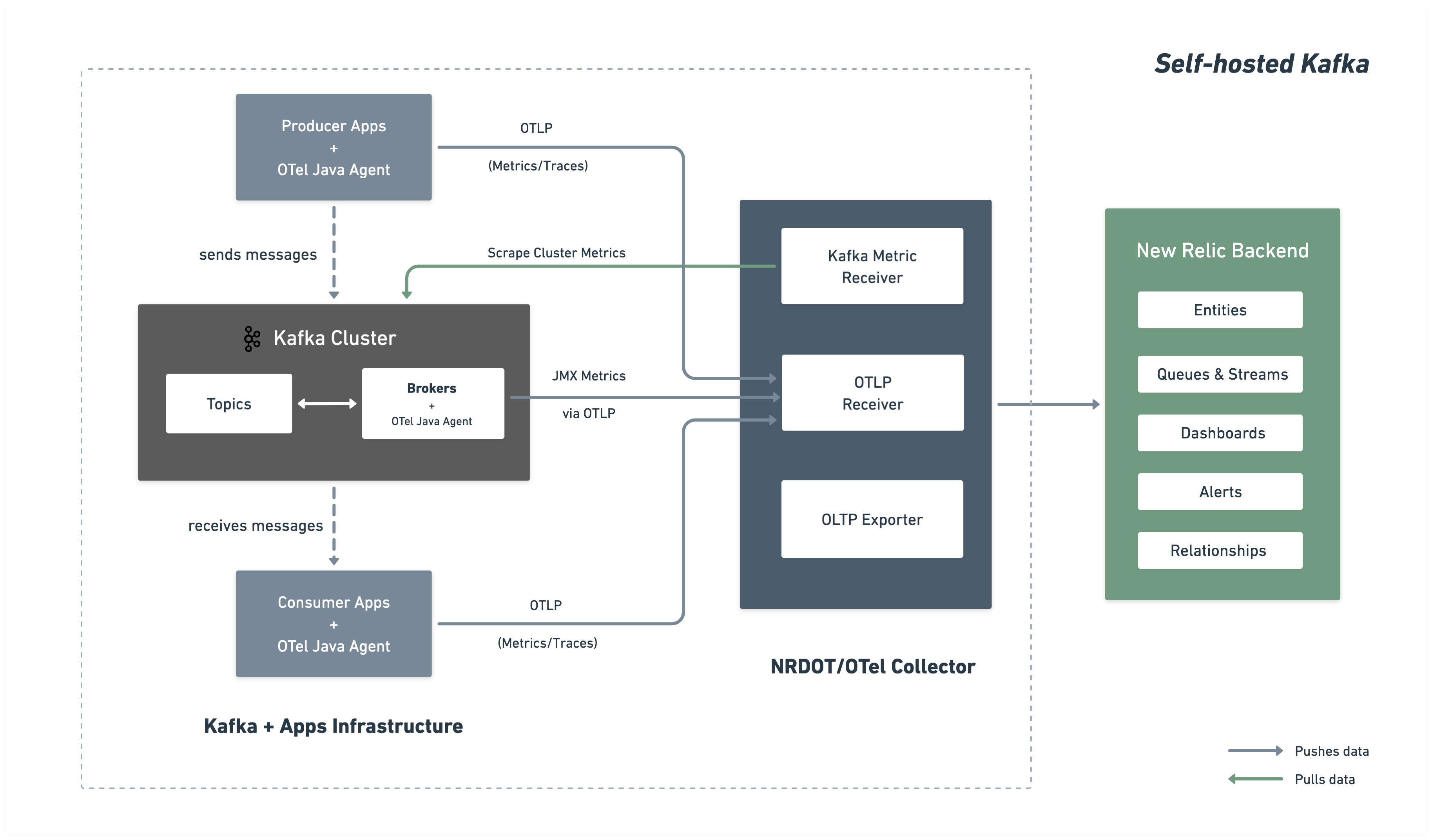
O diagrama a seguir ilustra a arquitetura de monitoramento e o fluxo de dados para o New Relic.
Etapas de instalação
Siga estas etapas para configurar o monitoramento abrangente do Kafka instalando o Agente Java do OpenTelemetry em seus brokers e implantando um coletor para reunir e enviar métricas para o New Relic.
Antes de você começar
Certifique-se de ter:
- Uma conta New Relic com uma
- Acesso de rede do coletor à porta do servidor de bootstrap do Kafka (tipicamente 9092)
Baixe o Agente Java do OpenTelemetry
O OpenTelemetry Java Agent é executado como um agente Java anexado aos seus brokers Kafka, coletando métricas do Kafka e JMX e enviando-as via OTLP para o coletor:
$# Create directory for OpenTelemetry components$mkdir -p ~/opentelemetry$
$# Download OpenTelemetry Java Agent$curl -L -o ~/opentelemetry/opentelemetry-javaagent.jar \> https://github.com/open-telemetry/opentelemetry-java-instrumentation/releases/latest/download/opentelemetry-javaagent.jarCriar configuração personalizada do JMX
Crie um arquivo de configuração JMX do agente Java do OpenTelemetry para coletar métricas do Kafka dos MBeans JMX.
Crie o arquivo ~/opentelemetry/jmx-custom-config.yaml com a seguinte configuração:
---rules: # Per-topic custom metrics using custom MBean commands - bean: kafka.server:type=BrokerTopicMetrics,name=MessagesInPerSec,topic=* metricAttribute: topic: param(topic) mapping: Count: metric: kafka.prod.msg.count type: counter desc: The number of messages per topic unit: "{message}"
- bean: kafka.server:type=BrokerTopicMetrics,name=BytesInPerSec,topic=* metricAttribute: topic: param(topic) direction: const(in) mapping: Count: metric: kafka.topic.io type: counter desc: The bytes received or sent per topic unit: By
- bean: kafka.server:type=BrokerTopicMetrics,name=BytesOutPerSec,topic=* metricAttribute: topic: param(topic) direction: const(out) mapping: Count: metric: kafka.topic.io type: counter desc: The bytes received or sent per topic unit: By
# Cluster-level metrics using controller-based MBeans - bean: kafka.controller:type=KafkaController,name=GlobalTopicCount mapping: Value: metric: kafka.cluster.topic.count type: gauge desc: The total number of global topics in the cluster unit: "{topic}"
- bean: kafka.controller:type=KafkaController,name=GlobalPartitionCount mapping: Value: metric: kafka.cluster.partition.count type: gauge desc: The total number of global partitions in the cluster unit: "{partition}"
- bean: kafka.controller:type=KafkaController,name=FencedBrokerCount mapping: Value: metric: kafka.broker.fenced.count type: gauge desc: The number of fenced brokers in the cluster unit: "{broker}"
- bean: kafka.controller:type=KafkaController,name=PreferredReplicaImbalanceCount mapping: Value: metric: kafka.partition.non_preferred_leader type: gauge desc: The count of topic partitions for which the leader is not the preferred leader unit: "{partition}"
# Broker-level metrics using ReplicaManager MBeans - bean: kafka.server:type=ReplicaManager,name=UnderMinIsrPartitionCount mapping: Value: metric: kafka.partition.under_min_isr type: gauge desc: The number of partitions where the number of in-sync replicas is less than the minimum unit: "{partition}"
# Broker uptime metric using JVM Runtime - bean: java.lang:type=Runtime mapping: Uptime: metric: kafka.broker.uptime type: gauge desc: Broker uptime in milliseconds unit: ms
# Leader count per broker - bean: kafka.server:type=ReplicaManager,name=LeaderCount mapping: Value: metric: kafka.broker.leader.count type: gauge desc: Number of partitions for which this broker is the leader unit: "{partition}"
# JVM metrics - bean: java.lang:type=GarbageCollector,name=* mapping: CollectionCount: metric: jvm.gc.collections.count type: counter unit: "{collection}" desc: total number of collections that have occurred metricAttribute: name: param(name)
- bean: java.lang:type=Memory unit: By prefix: jvm.memory. dropNegativeValues: true mapping: HeapMemoryUsage.max: metric: heap.max desc: current heap usage type: gauge HeapMemoryUsage.used: metric: heap.used desc: current heap usage type: gauge
- bean: java.lang:type=Threading mapping: ThreadCount: metric: jvm.thread.count type: gauge unit: "{thread}" desc: Total thread count (Kafka typical range 100-300 threads)
- bean: java.lang:type=OperatingSystem prefix: jvm. dropNegativeValues: true mapping: SystemCpuLoad: metric: system.cpu.utilization type: gauge unit: '1' desc: Recent CPU utilization for whole system (0.0 to 1.0)
- bean: kafka.server:type=BrokerTopicMetrics,name=MessagesInPerSec mapping: Count: metric: kafka.message.count type: counter desc: The number of messages received by the broker unit: "{message}"
- bean: kafka.server:type=BrokerTopicMetrics,name=TotalFetchRequestsPerSec metricAttribute: type: const(fetch) mapping: Count: metric: &metric kafka.request.count type: &type counter desc: &desc The number of requests received by the broker unit: &unit "{request}"
- bean: kafka.server:type=BrokerTopicMetrics,name=TotalProduceRequestsPerSec metricAttribute: type: const(produce) mapping: Count: metric: *metric type: *type desc: *desc unit: *unit
- bean: kafka.server:type=BrokerTopicMetrics,name=FailedFetchRequestsPerSec metricAttribute: type: const(fetch) mapping: Count: metric: &metric kafka.request.failed type: &type counter desc: &desc The number of requests to the broker resulting in a failure unit: &unit "{request}"
- bean: kafka.server:type=BrokerTopicMetrics,name=FailedProduceRequestsPerSec metricAttribute: type: const(produce) mapping: Count: metric: *metric type: *type desc: *desc unit: *unit
- beans: - kafka.network:type=RequestMetrics,name=TotalTimeMs,request=Produce - kafka.network:type=RequestMetrics,name=TotalTimeMs,request=FetchConsumer - kafka.network:type=RequestMetrics,name=TotalTimeMs,request=FetchFollower metricAttribute: type: param(request) unit: ms mapping: 99thPercentile: metric: kafka.request.time.99p type: gauge desc: The 99th percentile time the broker has taken to service requests
- bean: kafka.network:type=RequestChannel,name=RequestQueueSize mapping: Value: metric: kafka.request.queue type: gauge desc: Size of the request queue unit: "{request}"
- bean: kafka.server:type=BrokerTopicMetrics,name=BytesInPerSec metricAttribute: direction: const(in) mapping: Count: metric: &metric kafka.network.io type: &type counter desc: &desc The bytes received or sent by the broker unit: &unit By
- bean: kafka.server:type=BrokerTopicMetrics,name=BytesOutPerSec metricAttribute: direction: const(out) mapping: Count: metric: *metric type: *type desc: *desc unit: *unit
- beans: - kafka.server:type=DelayedOperationPurgatory,name=PurgatorySize,delayedOperation=Produce - kafka.server:type=DelayedOperationPurgatory,name=PurgatorySize,delayedOperation=Fetch metricAttribute: type: param(delayedOperation) mapping: Value: metric: kafka.purgatory.size type: gauge desc: The number of requests waiting in purgatory unit: "{request}"
- bean: kafka.server:type=ReplicaManager,name=PartitionCount mapping: Value: metric: kafka.partition.count type: gauge desc: The number of partitions on the broker unit: "{partition}"
- bean: kafka.controller:type=KafkaController,name=OfflinePartitionsCount mapping: Value: metric: kafka.partition.offline type: gauge desc: The number of partitions offline unit: "{partition}"
- bean: kafka.server:type=ReplicaManager,name=UnderReplicatedPartitions mapping: Value: metric: kafka.partition.under_replicated type: gauge desc: The number of under replicated partitions unit: "{partition}"
- bean: kafka.server:type=ReplicaManager,name=IsrShrinksPerSec metricAttribute: operation: const(shrink) mapping: Count: metric: kafka.isr.operation.count type: counter desc: The number of in-sync replica shrink and expand operations unit: "{operation}"
- bean: kafka.server:type=ReplicaManager,name=IsrExpandsPerSec metricAttribute: operation: const(expand) mapping: Count: metric: kafka.isr.operation.count type: counter desc: The number of in-sync replica shrink and expand operations unit: "{operation}"
- bean: kafka.server:type=ReplicaFetcherManager,name=MaxLag,clientId=Replica mapping: Value: metric: kafka.max.lag type: gauge desc: The max lag in messages between follower and leader replicas unit: "{message}"
- bean: kafka.controller:type=KafkaController,name=ActiveControllerCount mapping: Value: metric: kafka.controller.active.count type: gauge desc: For KRaft mode, the number of active controllers in the cluster. For ZooKeeper, indicates whether the broker is the controller broker. unit: "{controller}"
- bean: kafka.controller:type=ControllerStats,name=LeaderElectionRateAndTimeMs mapping: Count: metric: kafka.leader.election.rate type: counter desc: The leader election count unit: "{election}"
- bean: kafka.controller:type=ControllerStats,name=UncleanLeaderElectionsPerSec mapping: Count: metric: kafka.unclean.election.rate type: counter desc: Unclean leader election count - increasing indicates broker failures unit: "{election}"
# ── Additional metrics — remove this section to reduce data ingest ───────────
# Request latency: total count, 50th percentile, and average (99p kept above) - beans: - kafka.network:type=RequestMetrics,name=TotalTimeMs,request=Produce - kafka.network:type=RequestMetrics,name=TotalTimeMs,request=FetchConsumer - kafka.network:type=RequestMetrics,name=TotalTimeMs,request=FetchFollower metricAttribute: type: param(request) unit: ms mapping: Count: metric: kafka.request.time.total type: counter desc: The total time the broker has taken to service requests 50thPercentile: metric: kafka.request.time.50p type: gauge desc: The 50th percentile time the broker has taken to service requests Mean: metric: kafka.request.time.avg type: gauge desc: The average time the broker has taken to service requests
- bean: kafka.log:type=LogFlushStats,name=LogFlushRateAndTimeMs unit: ms type: gauge prefix: kafka.logs.flush. mapping: Count: metric: count unit: '{flush}' type: counter desc: Log flush count 50thPercentile: metric: time.50p desc: Log flush time - 50th percentile 99thPercentile: metric: time.99p desc: Log flush time - 99th percentile
# GC elapsed time (cumulative collection time in ms) - bean: java.lang:type=GarbageCollector,name=* mapping: CollectionTime: metric: jvm.gc.collections.elapsed type: counter unit: ms desc: the approximate accumulated collection elapsed time in milliseconds metricAttribute: name: param(name)
# JVM class loading - bean: java.lang:type=ClassLoading mapping: LoadedClassCount: metric: jvm.class.count type: gauge unit: "{class}" desc: Currently loaded class count
# JVM heap committed (in addition to heap.used and heap.max) - bean: java.lang:type=Memory unit: By prefix: jvm.memory. dropNegativeValues: true mapping: HeapMemoryUsage.committed: metric: heap.committed desc: Committed heap memory type: gauge
# Additional JVM CPU and system metrics - bean: java.lang:type=OperatingSystem prefix: jvm. dropNegativeValues: true mapping: SystemLoadAverage: metric: system.cpu.load_1m type: gauge unit: "{run_queue_item}" desc: System load average (1 minute) - alert if > CPU count AvailableProcessors: metric: cpu.count type: gauge unit: "{cpu}" desc: Number of processors available ProcessCpuLoad: metric: cpu.recent_utilization type: gauge unit: '1' desc: Recent CPU utilization for JVM process (0.0 to 1.0) OpenFileDescriptorCount: metric: file_descriptor.count type: gauge unit: "{file_descriptor}" desc: Number of open file descriptors - alert if > 80% of ulimit
# JVM memory pool breakdown (by generation: G1 Old Gen, Eden, Survivor, etc.) - bean: java.lang:type=MemoryPool,name=* type: gauge unit: By metricAttribute: name: param(name) mapping: Usage.used: metric: jvm.memory.pool.used desc: Memory pool usage by generation (G1 Old Gen, Eden, Survivor) Usage.max: metric: jvm.memory.pool.max desc: Maximum memory pool size CollectionUsage.used: metric: jvm.memory.pool.used_after_last_gc desc: Memory used after last GC (shows retained memory baseline)Configurar o broker do Kafka
Anexe o OpenTelemetry Java Agent ao seu broker Kafka definindo a variável de ambiente KAFKA_OPTS antes de iniciar o Kafka.
Exemplo de broker único:
$OTEL_AGENT="$HOME/opentelemetry/opentelemetry-javaagent.jar"$JMX_CONFIG="$HOME/opentelemetry/jmx-custom-config.yaml"$
$nohup env KAFKA_OPTS="-javaagent:$OTEL_AGENT \>    -Dotel.jmx.enabled=true \>    -Dotel.jmx.config=$JMX_CONFIG \>    -Dotel.resource.attributes=broker.id=1,kafka.cluster.name=my-kafka-cluster \>    -Dotel.exporter.otlp.endpoint=http://localhost:4317 \>    -Dotel.exporter.otlp.protocol=grpc \>    -Dotel.metrics.exporter=otlp \>    -Dotel.metric.export.interval=30000" \>    bin/kafka-server-start.sh config/server.properties &
Importante
Clusters com múltiplos brokers: Para múltiplos brokers, use a mesma configuração com valores únicos de broker.id (por exemplo, broker.id=1, broker.id=2, broker.id=3) no parâmetro -Dotel.resource.attributes para cada broker.
Criar configuração do coletor
Crie a configuração principal do OpenTelemetry Collector em ~/opentelemetry/kafka-config.yaml.
receivers:  # OTLP receiver for Kafka and JMX metrics from Java agents and application telemetry  otlp:    protocols:      grpc:        endpoint: "0.0.0.0:4317"
  # Kafka metrics receiver for cluster-level metrics  kafkametrics:    brokers: ${env:KAFKA_BOOTSTRAP_BROKER_ADDRESSES}    protocol_version: 2.0.0    scrapers:      - brokers      - topics      - consumers    collection_interval: 30s    # Exclude internal Kafka topics (prefixed with __) at the source    topic_match: "^[^_].*$"    metrics:      kafka.topic.min_insync_replicas:        enabled: true      kafka.topic.replication_factor:        enabled: true      kafka.partition.replicas:        enabled: false      kafka.partition.oldest_offset:        enabled: false      kafka.partition.current_offset:        enabled: false
processors:  batch/aggregation:    send_batch_size: 1024    timeout: 30s
  resourcedetection:    detectors: [env, ec2, system]    system:      resource_attributes:        host.name:          enabled: true        host.id:          enabled: true
  resource:    attributes:      - action: insert        key: kafka.cluster.name        value: ${env:KAFKA_CLUSTER_NAME}
  transform/remove_broker_id:    metric_statements:      # Remove broker.id from resource attributes for cluster-level metrics      - context: resource        statements:          - delete_key(attributes, "broker.id")
  transform/remove_extra_attributes:    metric_statements:      - context: resource        statements:          # Delete all attributes starting with "process."          - delete_matching_keys(attributes, "^process\\..*")          # Delete all attributes starting with "telemetry."          - delete_matching_keys(attributes, "^telemetry\\..*")          - delete_key(attributes, "host.arch")          - delete_key(attributes, "os.description")          - delete_key(attributes, "host.image.id")          - delete_key(attributes, "host.type")          - delete_matching_keys(attributes, "^cloud\\..*")          - delete_key(attributes, "service.instance.id") where IsMatch(attributes["service.name"], "^unknown_service:")          - delete_key(attributes, "service.name") where IsMatch(attributes["service.name"], "^unknown_service:")
  # Filter internal Kafka topics as a safety net (kafkametrics topic_match handles the receiver side)  filter/internal_topics:    metrics:      datapoint:        - 'attributes["topic"] != nil and IsMatch(attributes["topic"], "^__.*")'
  filter/include_cluster_metrics:    metrics:      include:        match_type: regexp        metric_names:          - "kafka\\.partition\\.offline"          - "kafka\\.(leader|unclean)\\.election\\.rate"          - "kafka\\.partition\\.non_preferred_leader"          - "kafka\\.broker\\.fenced\\.count"          - "kafka\\.cluster\\.partition\\.count"          - "kafka\\.cluster\\.topic\\.count"
  filter/exclude_cluster_metrics:    metrics:      exclude:        match_type: regexp        metric_names:          - "kafka\\.partition\\.offline"          - "kafka\\.(leader|unclean)\\.election\\.rate"          - "kafka\\.partition\\.non_preferred_leader"          - "kafka\\.broker\\.fenced\\.count"          - "kafka\\.cluster\\.partition\\.count"          - "kafka\\.cluster\\.topic\\.count"
  transform/des_units:    metric_statements:      - context: metric        statements:          - set(description, "") where description != ""          - set(unit, "") where unit != ""
  cumulativetodelta:
  metricstransform/kafka_topic_sum_aggregation:    transforms:      - include: kafka.partition.replicas_in_sync        action: insert        new_name: kafka.partition.replicas_in_sync.total        operations:          - action: aggregate_labels            label_set: [topic]            aggregation_type: sum
      - include: kafka.partition.replicas        action: insert        new_name: kafka.partition.replicas.total        operations:          - action: aggregate_labels            label_set: [topic]            aggregation_type: sum
  filter/remove_partition_level_replicas:    metrics:      exclude:        match_type: strict        metric_names:          - kafka.partition.replicas_in_sync
  groupbyattrs/cluster:    keys: [kafka.cluster.name]
  metricstransform/cluster_max:    transforms:      - include: "kafka\\.partition\\.offline|kafka\\.leader\\.election\\.rate|kafka\\.unclean\\.election\\.rate|kafka\\.partition\\.non_preferred_leader|kafka\\.broker\\.fenced\\.count|kafka\\.cluster\\.partition\\.count|kafka\\.cluster\\.topic\\.count"        match_type: regexp        action: update        operations:          - action: aggregate_labels            aggregation_type: max            label_set: []
exporters:  otlp/newrelic:    endpoint: ${env:NEW_RELIC_OTLP_ENDPOINT}    headers:      api-key: ${env:NEW_RELIC_LICENSE_KEY}    compression: gzip    timeout: 30s
service:  pipelines:    # Broker metrics pipeline (excludes cluster-level metrics)    metrics/broker:      receivers: [otlp, kafkametrics]      processors:        - resourcedetection        - resource        - filter/exclude_cluster_metrics        - filter/internal_topics        - transform/remove_extra_attributes        - transform/des_units        - cumulativetodelta        - metricstransform/kafka_topic_sum_aggregation        - filter/remove_partition_level_replicas        - batch/aggregation      exporters: [otlp/newrelic]
    # Cluster metrics pipeline (only cluster-level metrics, no broker.id)    metrics/cluster:      receivers: [otlp]      processors:        - resourcedetection        - resource        - filter/include_cluster_metrics        - transform/remove_broker_id        - transform/remove_extra_attributes        - transform/des_units        - cumulativetodelta        - groupbyattrs/cluster        - metricstransform/cluster_max        - batch/aggregation      exporters: [otlp/newrelic]
    # APM traces pipeline (producer + consumer spans via OTel Java Agent)    traces/apps:      receivers: [otlp]      processors: [resourcedetection, resource, batch/aggregation]      exporters: [otlp/newrelic]
# APM logs pipeline (producer + consumer logs via OTel Java Agent) logs/apps: receivers: [otlp] processors: [resourcedetection, resource, batch/aggregation] exporters: [otlp/newrelic]Definir variáveis de ambiente
Defina as variáveis de ambiente necessárias antes de instalar o coletor:
$export NEW_RELIC_LICENSE_KEY="YOUR_LICENSE_KEY"$export KAFKA_CLUSTER_NAME="my-kafka-cluster"$export KAFKA_BOOTSTRAP_BROKER_ADDRESSES="localhost:9092"$export NEW_RELIC_OTLP_ENDPOINT="https://otlp.nr-data.net:4317" # US regionSubstituir:
YOUR_LICENSE_KEYcom sua chave de licença New Relicmy-kafka-clustercom um nome exclusivo para seu cluster Kafkalocalhost:9092com o(s) endereço(s) do seu broker de bootstrap do Kafka. Para múltiplos brokers, use uma lista separada por vírgulas:broker1:9092,broker2:9092,broker3:9092- Endpoint OTLP: Usa
https://otlp.nr-data.net:4317(região dos EUA) ouhttps://otlp.eu01.nr-data.net:4317(região da UE). Para outras configurações de endpoint, consulte Configure seu endpoint OTLP
Instale e inicie o coletor
Escolha entre o NRDOT Collector (distribuição da New Relic) ou o OpenTelemetry Collector:
Dica
NRDOT Collector é a distribuição da New Relic do OpenTelemetry Collector com suporte da New Relic para assistência.
Baixe e instale o binário
Baixe e instale o binário do NRDOT Collector para o sistema operacional do host. O exemplo abaixo é para a arquitetura linux_amd64:
$# Set version and architecture$NRDOT_VERSION="1.9.0"$ARCH="amd64"  # or arm64$
$# Download and extract$curl "https://github.com/newrelic/nrdot-collector-releases/releases/download/${NRDOT_VERSION}/nrdot-collector_${NRDOT_VERSION}_linux_${ARCH}.tar.gz" \>  --location --output collector.tar.gz$tar -xzf collector.tar.gz$
$# Move to a location in PATH (optional)$sudo mv nrdot-collector /usr/local/bin/$
$# Verify installation$nrdot-collector --version
Importante
Para outros sistemas operacionais e arquiteturas, acesse NRDOT Collector releases e baixe o binário apropriado para o seu sistema.
Inicie o coletor
Execute o coletor com seu arquivo de configuração para iniciar o monitoramento:
$nrdot-collector --config ~/opentelemetry/kafka-config.yamlO coletor começará a enviar métricas do Kafka para o New Relic em alguns minutos.
Baixe e instale o binário
Baixe e instale o binário do OpenTelemetry Collector Contrib para o seu sistema operacional host. O exemplo abaixo é para a arquitetura linux_amd64:
$# Set version and architecture$# Check https://github.com/open-telemetry/opentelemetry-collector-releases/releases/latest for the latest version$OTEL_VERSION="<collector_version>"$ARCH="amd64"$
$# Download the collector$curl -L -o otelcol-contrib.tar.gz \>  "https://github.com/open-telemetry/opentelemetry-collector-releases/releases/download/v${OTEL_VERSION}/otelcol-contrib_${OTEL_VERSION}_linux_${ARCH}.tar.gz"$
$# Extract the binary$tar -xzf otelcol-contrib.tar.gz$
$# Move to a location in PATH (optional)$sudo mv otelcol-contrib /usr/local/bin/$
$# Verify installation$otelcol-contrib --version
Para outros sistemas operacionais, acesse a página de releases do OpenTelemetry Collector.
Inicie o coletor
Execute o coletor com seu arquivo de configuração para iniciar o monitoramento:
$otelcol-contrib --config ~/opentelemetry/kafka-config.yamlO coletor começará a enviar métricas do Kafka para o New Relic em alguns minutos.
(Opcional) Instrumente aplicações produtoras ou consumidoras
Importante
Suporte a linguagens: Atualmente, apenas aplicações Java são suportadas para a instrumentação do cliente Kafka usando o OpenTelemetry Java Agent.
Para coletar telemetria em nível de aplicação de seus aplicativos produtores e consumidores Kafka, use o Agente Java do OpenTelemetry que você baixou na Etapa 1.
Inicie seu aplicativo com o agente:
$java \> -javaagent:$HOME/opentelemetry/opentelemetry-javaagent.jar \> -Dotel.service.name="order-process-service" \> -Dotel.resource.attributes="kafka.cluster.name=my-kafka-cluster" \> -Dotel.exporter.otlp.endpoint=http://localhost:4317 \> -Dotel.exporter.otlp.protocol="grpc" \> -Dotel.metrics.exporter="otlp" \> -Dotel.traces.exporter="otlp" \> -Dotel.logs.exporter="otlp" \> -Dotel.instrumentation.kafka.experimental-span-attributes="true" \> -Dotel.instrumentation.messaging.experimental.receive-telemetry.enabled="true" \> -Dotel.instrumentation.kafka.producer-propagation.enabled="true" \> -Dotel.instrumentation.kafka.enabled="true" \> -jar your-kafka-application.jarSubstituir:
order-process-servicecom um nome exclusivo para seu aplicativo produtor ou consumidormy-kafka-clustercom o mesmo nome de cluster usado na configuração do coletor
Dica
A configuração acima envia telemetria para um OpenTelemetry Collector em execução em localhost:4317.
Isso permite que você personalize o processamento, adicione filtros ou direcione para vários back-ends. Para outras configurações de endpoint, consulte Configure seu endpoint OTLP.
O Java Agent fornece instrumentação Kafka pronta para uso com zero alterações de código, capturando:
- Latências de solicitação
- Métricas de throughput
- Taxas de erro
- Rastreamento distribuído
Para configuração avançada, consulte a documentação de instrumentação do Kafka.
(Opcional) Encaminhar logs do broker Kafka
Para coletar logs do broker Kafka e enviá-los para o New Relic, configure o receiver filelog no seu OpenTelemetry Collector.
Avançado: Personalizar a coleta de métricas
Você pode adicionar mais métricas do Kafka estendendo as regras em jmx-custom-config.yaml:
- Saiba mais sobre a sintaxe de configuração de métricas JMX do OpenTelemetry
- Encontre nomes de MBean disponíveis na documentação de monitoramento do Kafka
Isso permite que você colete qualquer métrica JMX exposta pelos brokers Kafka com base em suas necessidades específicas de monitoramento.
Encontre seus dados
Após alguns minutos, suas métricas Kafka devem aparecer no New Relic. Consulte Encontre seus dados para obter instruções detalhadas sobre como explorar suas métricas Kafka em diferentes visualizações na interface do usuário do New Relic.
Você também pode consultar seus dados com NRQL:
FROM Metric SELECT * WHERE kafka.cluster.name = 'my-kafka-cluster'Resolução de problemas
Próximos passos
- Explore as métricas do Kafka - Visualize a referência completa de métricas
- Criar dashboards personalizados - Crie visualizações para seus dados do Kafka
- Configurar alertas - Monitore métricas críticas como lag do consumidor e partições sub-replicadas