Included patch files
This V3.0 SP12 release contains one file:
- K-300SP12NEWR.SAR
Implementation procedures
Service pack installation and configuration
- Where to install: Deploy this service pack to client 000 of your Central Monitoring System.
- Configuration location: Perform all subsequent configuration tasks in the business client of your Central Monitoring System.
- Complete instructions: For step-by-step installation procedures, consult Installation Guide V3.0 (Appendix VIII: Install Service Pack) or Admin Guide V3.0 (Section: Install Service Pack).
Updates in this patch
SP12 is a collection of New Relic Notes addressing bug fixes and new features:
NR 1344
New parameter AIF_TABLES for NR_SAP_AIF_ERROR allows retrieving error messages from tables other than /AIF/STD_IDX_TBL.
NR 12-02
Fixes issues and adds new features for API-based data providers:
- Fixed code dump in
/NEWR/API_DATA_COLLECTORwhen API destination is not reachable - Fixed resource failure when extracting CALM Landscape Data
- Fixed resource failure when extracting BTP Message Processing Log
- Added validation for Service ID (LMSID) configured as CALL ID for all data providers under monitoring group CALM
- Added certificate validity check before calling Data Collection API
NR 12-03
Implements collection delay and fixed data collection window for the collection manager and testing by call ID in registry.
NR 12-05
Implements the following enhancements:
- Pagination support for data providers in CALM monitoring group
- New program parameter to allow RFC check program to check a single RFC destination
- Configuration to force data provider test only for a single call ID
Fixes the following issues:
- Blank call ID on collection manager output
- Credential validation issue for
NR_CF_AUDIT_EVENTS
NR 12-06
New data provider NR_SAP_ABAP_WS_COMPLETE collects ABAP web service events.
Additional bug fixes
In addition to the above notes, SP12 also fixes the following issues:
- Fixed timestamp issue with table retrieval data provider function modules
/NEWR/RFC_EVENTS_COLLECTORand/NEWR/RFC_EVENTS_COLLECTOR2 - Added Transaction ID to IDoc events to facilitate linking to trace records
Manual configuration updates
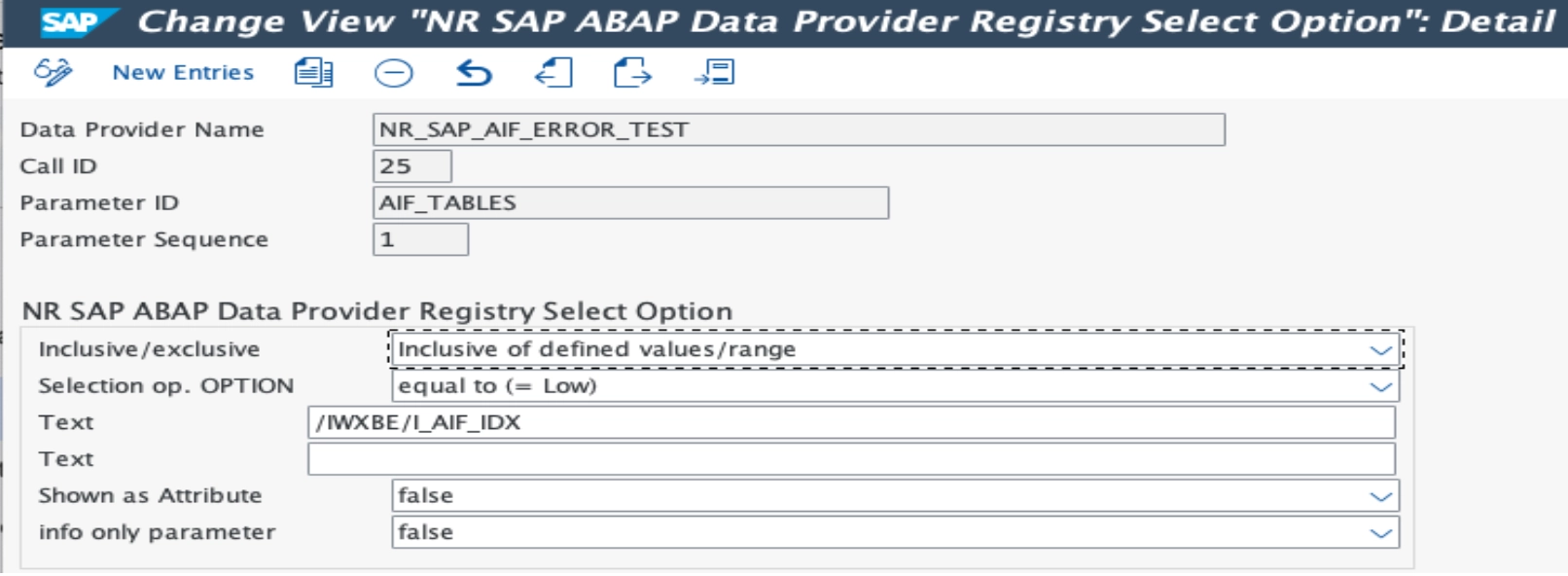
Add new parameter to NR_SAP_AIF_ERROR
To configure the new AIF_TABLES parameter:
- Apply the included transport to the Central Monitoring System.
- Go to transaction
/n/NEWR/REGISTRY. - Select data provider
NR_SAP_AIF_ERRORand click Configure. - Add parameter
AIF_TABLESand enter the table name specified in/AIF/T_IDX_TBLfor the configured namespace/interface/version combination.
팁
If AIF_TABLES is left blank or not specified, the index table defaults to the standard single index table /AIF/STD_IDX_TBL.
Configure collection delay and fixed collection window
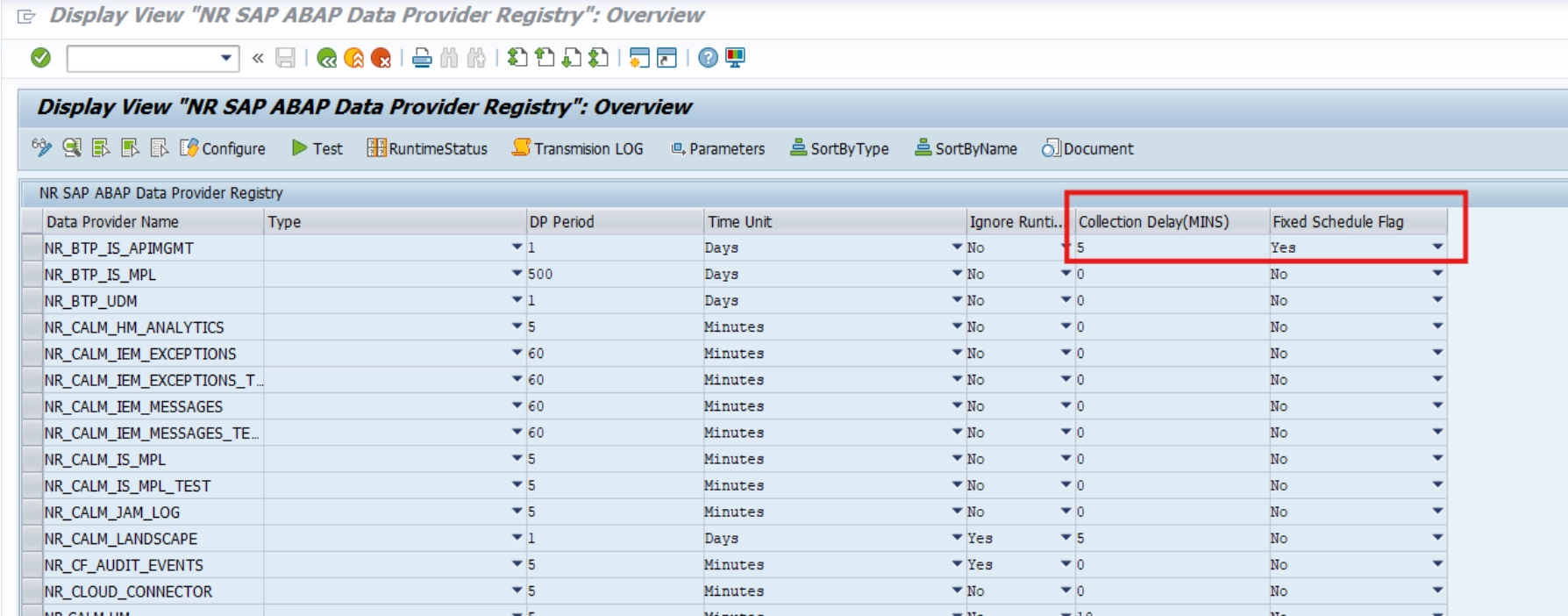
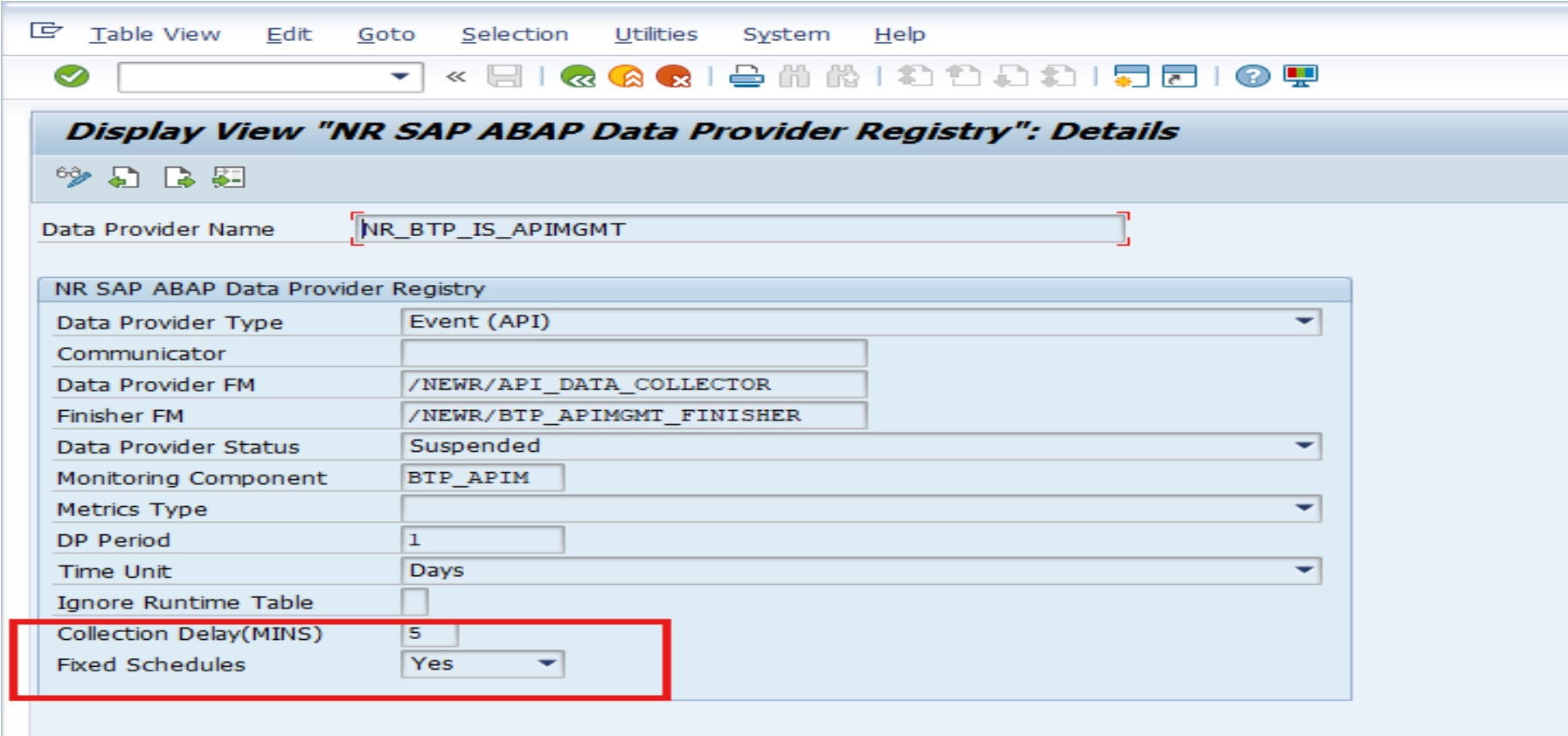
Two new configuration fields have been added to the Data Provider Registry to address data gaps caused by floating collection boundaries and database latency.
New fields in data provider registry:
- DATA_COLLECTION_DELAY: Specifies a purposeful delay in minutes to subtract from collection timestamps. This buffer ensures late-arriving data from database updates are captured before the collection window closes.
- FIXED_SCHEDULES: Flag to enable fixed collection periods. When set to
X, seconds are stripped from collection timestamps to create consistent, predictable collection windows.
How it works:
Fixed Schedules (FIXED_SCHEDULES = 'X'):
- Collection timestamps are normalized by removing seconds.
- Example: 12:12:23 becomes 12:12:00.
- Creates consistent, aligned collection boundaries across all collections.
Data Collection Delay (DATA_COLLECTION_DELAY > 0):
- Subtracts the specified delay in minutes from both start and end data collection timestamps.
- Shifts the collection window backward to capture missed database updates.
- Example: 2-minute delay changes 10:00:00 - 10:05:00 to 09:58:00 - 10:03:00.
New parameter on RFC check program
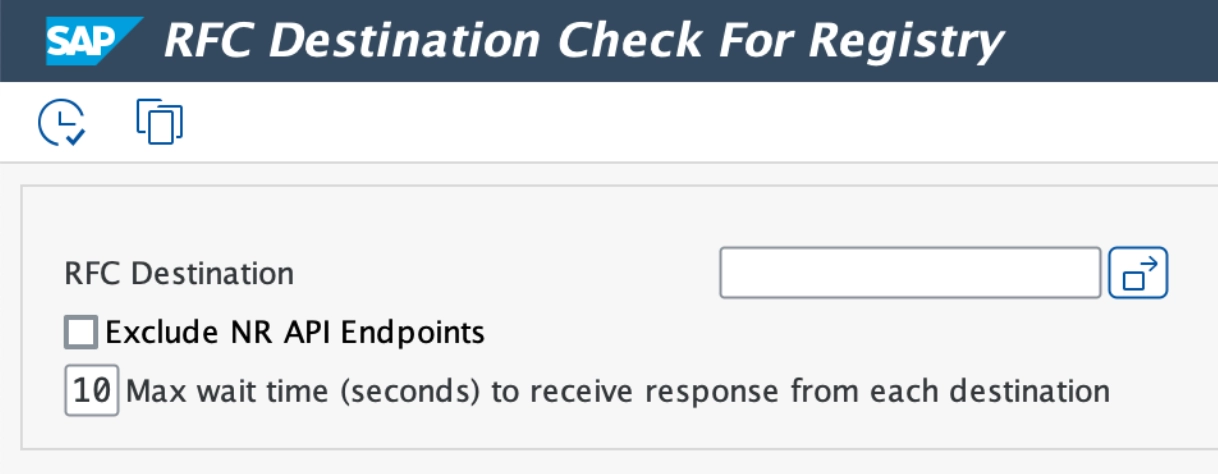
A new RFC Destination parameter has been added to the RFC check program /NEWR/REGISTRY_RFC_CHECK. This enables the program to check an individual RFC destination. If left blank, all configured RFC destinations will be checked.
Configuration parameter to set data provider test for a single call ID
To access global parameters:
- Go to menu
/n/NEWR/INSTALL. - Use menu path SAP Menu > Expert Mode > Installation Setups > Global Configuration.
- Or use transaction code
/n/NEWR/Config.
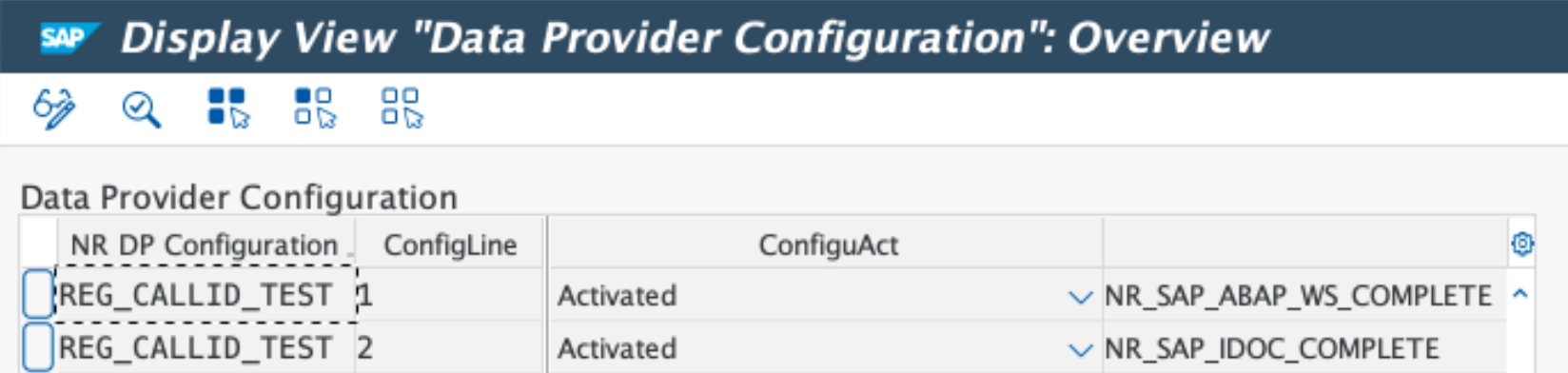
Configuration parameter: REG_CALLID_TEST
Parameter value: <DP name> (default delivered: NR_SAP_ABAP_WS_COMPLETE, NR_SAP_IDOC_COMPLETE)
New data providers for ABAP business systems
NR_SAP_ABAP_WS_COMPLETE
Processes web service message headers and data (tag) records in parallel across monitored systems without record limitations.
Configuration:
- Type: Event
- Communicator: N/A
- Data Provider Function:
/NEWR/WS_MESSAGES_ARFC - Data Provider RFC enabled: Yes
- Finisher Function:
/NEWR/WS_EVENTS_FINISHER - Monitoring Group:
SAP_APPL
Functional overview
This data provider comes pre-activated. Required parameters:
ADAPTER_TYPE- Purpose: Specify adapter type to be selected from ABAP web service message header. Filter option of function module
/SDF/IMA_DC_WS_ABAP. - Sign: Inclusive only
- Option: EQ
- Values: Table fields separated by
;, can be multiple lines
- Purpose: Specify adapter type to be selected from ABAP web service message header. Filter option of function module
DESTINATION- Purpose: Specify RFC destination
- Sign: Inclusive only
- Option: EQ
- Values: RFC destination
DPC_COLL_TIME- Purpose: Determine time interval
- Sign: Inclusive only
- Option: BT
- Values: System generated begin timestamp and end timestamp
IB_IF_NAME- Purpose: Receiver interface name to be selected from ABAP web service message header. Filter option of function module
/SDF/IMA_DC_WS_ABAP. - Sign: Inclusive only
- Option: EQ
- Values: Receiver interface names separated by
;, can be multiple lines
- Purpose: Receiver interface name to be selected from ABAP web service message header. Filter option of function module
IB_PARTY- Purpose: Receiver party to be selected from ABAP web service message header. Filter option of function module
/SDF/IMA_DC_WS_ABAP. - Sign: Inclusive only
- Option: EQ
- Values: Receiver party separated by
;, can be multiple lines
- Purpose: Receiver party to be selected from ABAP web service message header. Filter option of function module
JOIN_CONDITION- Purpose: Specify join records for table
/NEWR/JOIN_CONDfor further processing - Sign: Inclusive only
- Option: EQ
- Values: Display titles separated by
;, can be multiple lines
- Purpose: Specify join records for table
NR_ACCID- Purpose: Specify New Relic account ID
- Sign: Inclusive only
- Option: EQ
- Values: New Relic account ID
OB_IF_NAME- Purpose: Sender interface name to be selected from ABAP web service message header. Filter option of function module
/SDF/IMA_DC_WS_ABAP. - Sign: Inclusive only
- Option: EQ
- Values: Sender interface names separated by
;, can be multiple lines
- Purpose: Sender interface name to be selected from ABAP web service message header. Filter option of function module
OB_PARTY- Purpose: Sender party to be selected from ABAP web service message header. Filter option of function module
/SDF/IMA_DC_WS_ABAP. - Sign: Inclusive only
- Option: EQ
- Values: Sender parties separated by
;, can be multiple lines
- Purpose: Sender party to be selected from ABAP web service message header. Filter option of function module
SETTING_SWITCH- Purpose: Specify options used by distributed processing
- Sign: Inclusive only
- Option: EQ
- Values: Multiple options separated by
;to control the distributed process:- HEADONLY=
SPACE(default): Provides both header and TAG data (if TAG names are specified inTAG_LISTparameter).X: Only provides header data even if TAG names are specified inTAG_LISTparameter.
- FIRSTONLY=
X(default): The data provider extracts data exclusively from the first occurrence of each TAG listed inTAG_LISTparameter.SPACE: The data provider extracts data from all occurrences of each TAG listed inTAG_LISTparameter.
- FREE%=nn: Specify the percentage of the available Working Processes in the monitoring system to determine the Desired Free Working Processes Limitation:
- If the number of free Working Processes in the current monitoring system is equal to or greater than this Desired Free Working Processes Limitation, continue the distribution processing.
- Otherwise, wait 1 second and repeat the check above until either:
- The distribution processing can continue, or
- The total waiting time exceeds the specified Maximum Waiting Time (see
MWAIT#=nn).
- The default value for this option is 30(%).
- MINFT#=nn: Specify the Minimum Free Working Processes Limitation:
- If the Desired Free Working Processes counted by the monitoring system falls below this minimum threshold, the system will pause for 1 second before attempting further processing.
- The default value for this option is 3.
- MWAIT#=nn: Specify the maximum waiting time (in seconds).
- If the total waiting time (see
FREE%=nn) exceeds the specified maximum, the distribution process will be canceled to conserve system resources. - The default value for this option is 60.
- If the total waiting time (see
- MREC#=nnnnn: Specify the number limitation of the Web Service Message Header records retrieved each time when calling Function Module
/SDF/IMA_DC_WS_ABAP.- The default value for this option is 10000.
- JSEND#=nnnn: Specify the number limitation of the result attribute records sent to New Relic server each time.
- The default value for this option is 5000.
- USER=user: Specify the RFC user name for each monitored system to retrieve the total number of work processes currently used by that system. The
useris the SAP user ID. - DPWP#=nn: Specify the Maximum Working Processes Limitation.
- During distributed processing: If the number of free Working Processes in the current monitoring system is less than or equal to this maximum limit, continue the distributed processing.
- Otherwise, wait 1 second and then loop back to check again.
- Continue this loop until the distributed processing can proceed or the total waiting time exceeds the specified Maximum Waiting Time (
MWAIT#=nn). - Note: This check is only executed when the USER parameter is specified with non-initial values.
- The default value for this option is 8.
- HEADONLY=
STATE_GROUP- Purpose: Processing status group to be selected from ABAP web service message header. Filter option of function module
/SDF/IMA_DC_WS_ABAP. - Sign: Inclusive only
- Option: EQ
- Values: Processing status groups separated by
;, can be multiple lines
- Purpose: Processing status group to be selected from ABAP web service message header. Filter option of function module
SYS_ID- Purpose: Determine system ID
- Sign: Inclusive only
- Option: EQ
- Values: System ID
TAG_LIST- Purpose: Specify TAG names to be selected from ABAP web service message data and displayed as output in message data. Filter option of function module
/SDF/IMA_DC_WS_ABAP. - Sign: Inclusive only
- Option: EQ
- Values: Table fields separated by
;, can be multiple lines
- Purpose: Specify TAG names to be selected from ABAP web service message data and displayed as output in message data. Filter option of function module
USERNAME- Purpose: User names who created message to be selected from ABAP web service message header (
CREATED_BY). Filter option of function module/SDF/IMA_DC_WS_ABAP. - Sign: Inclusive only
- Option: EQ
- Values: User names separated by
;, can be multiple lines
- Purpose: User names who created message to be selected from ABAP web service message header (
Included patch files
This V3.0 SP11 release contains three files:
- K-300SP11NEWR.SAR
- _NEWR_DATA_PROVIDERV3.11.SAP
- _NEWR_COLLECTION_MANAGER.SAP
Implementation procedures
Service pack installation and configuration
- Where to install: Deploy this service pack to client 000 of your Central Monitoring System.
- Configuration location: Perform all subsequent configuration tasks in the business client of your Central Monitoring System.
- Complete instructions: For step-by-step installation procedures, consult Installation Guide V3.0 (Appendix VIII: Install Service Pack) or Admin Guide V3.0 (Section: Install Service Pack).
Updates in this patch
BTP monitoring related updates
NR_BTP_UDM: Provides SAP Usage Data Management events for SAP BTP. Gathers, stores, and makes usage information available for all services and applications across all regions in a cloud deployment for central analysis, reporting, and license auditing (Data Provider Type: Event).NR_CLOUD_CONNECTOR: Enhanced to include a new numerical attributeDAYS_TO_EXPIREfor the event tableNR_CLOUD_CONNECTOR_CERT. This attribute identifies remaining days before certificate expiration in Cloud Connector.- API-based data providers: Added certificate expiration checks in
/NEWR/API_DATA_COLLECTORdata provider function module. Compiles all certificates available in STRUST (under SSL Client Standard or SSL Client Anonymous) and matches them against the target host of the respective RFC destination. When a match is found, the valid-to date is checked. An error is thrown stating "The certificate is expired for the host <host_name>" when an expired certificate is detected during data provider execution.
S/4 HANA and ECC related updates
- HANA DB data providers: Enhanced
/NEWR/AGENT_HDBand/NEWR/AGENT_HDB_EVENTfunction modules to handle query statements that use aliases for table names. - Background RFC Q data provider: New data provider
NR.SAP.BGRFC.Qfor monitoring background RFC queues. - IDoc data provider: Updated
NR_SAP_IDOCto include partner IDoc ID. - System memory data provider: Updated
NR.SAP.SYSTEM.MEMORY.HEAP_USAGE- changed parameterMTE_CLASStoR3MemMgmtHeapAct. - Connection issue handling: Protection triggered by temporary connection issues no longer requires manual intervention to clear.
- HANA Sidecar support: Bug fix allows HANA Sidecar to be added as a monitored system without specifying the RFC destination.
- New Relic account parameter: Bug fix ensures the
NR_ACCIDparameter in New Relic data providers is not overridden when new monitored system configuration is generated.
Updated HANA data providers
NR.SAP.HDB.METRICS: Enhanced to include two new data points:
NUM_CONNECTIONS: Shows number of connections by statusTHREADCNT: Shows active thread counts
New HANA data providers
NR_SAP_HDB_BACKUP_BROKEN: Captures HANA backup history broken information (Event)NR_SAP_HDB_BLKED_TRANS: Provides snapshots of HANA blocked transactions (Event)NR_SAP_HDB_LICENSES: Monitors HANA license information (Event)NR_SAP_HDB_LONG_TRANS: Tracks long running transactions (Event)NR_SAP_HDB_PWD_EXPIRE: Shows users with expiring passwords (Event)NR_SAP_HDB_THREADS: Captures long running thread information (Event)
Bug fixes
- RFC check program: Updated
/NEWR/REGISTRY_RFC_CHECKwith improved functionality. - Payload data gap: Fixed bug causing data gaps in payload data for data provider
NR_SAP_ABAP_WS. - Expensive statement traces: Fixed issue where expensive statement spans were not shown in New Relic traces for programs accessing HANA database.
Manual configuration updates
Upgrade from SP10 to SP11 with existing CloudALM data providers
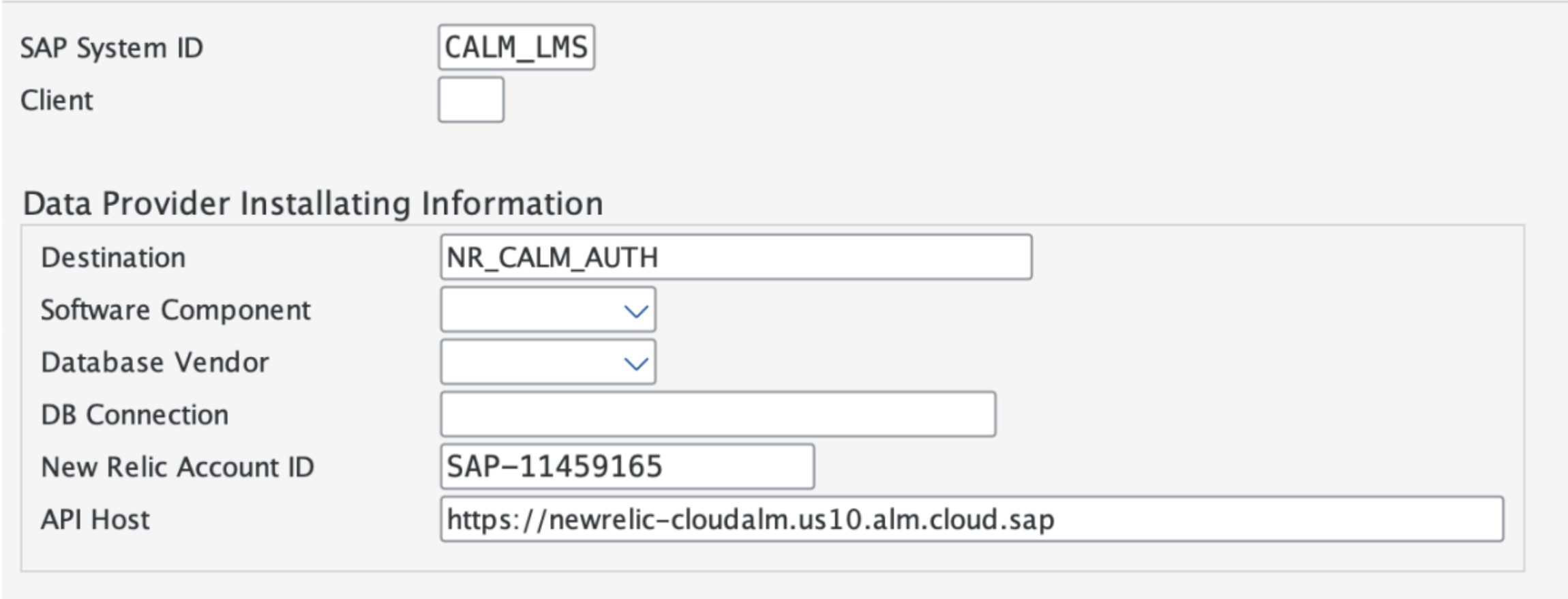
If CloudALM-based data providers are configured in SP10, add a new CALM_LMS system to monitored systems after upgrading to SP11. During upgrade, after completing "Copy Template Tables from Client 000", proceed to "Define the Monitored Systems" and add:
Field | Value |
|---|---|
SAP System ID | CALM_LMS |
Client | Leave blank |
Destination | RFC Destination used for CALM data provider authentication |
Software Component | Leave blank |
Database Vendor | Leave blank |
DB Connection | Leave blank |
New Relic Account ID | New Relic account to send data to |
API Host | API host used for CALM data providers |
중요
Select Monitoring Group CALM_LMS for this monitored system.
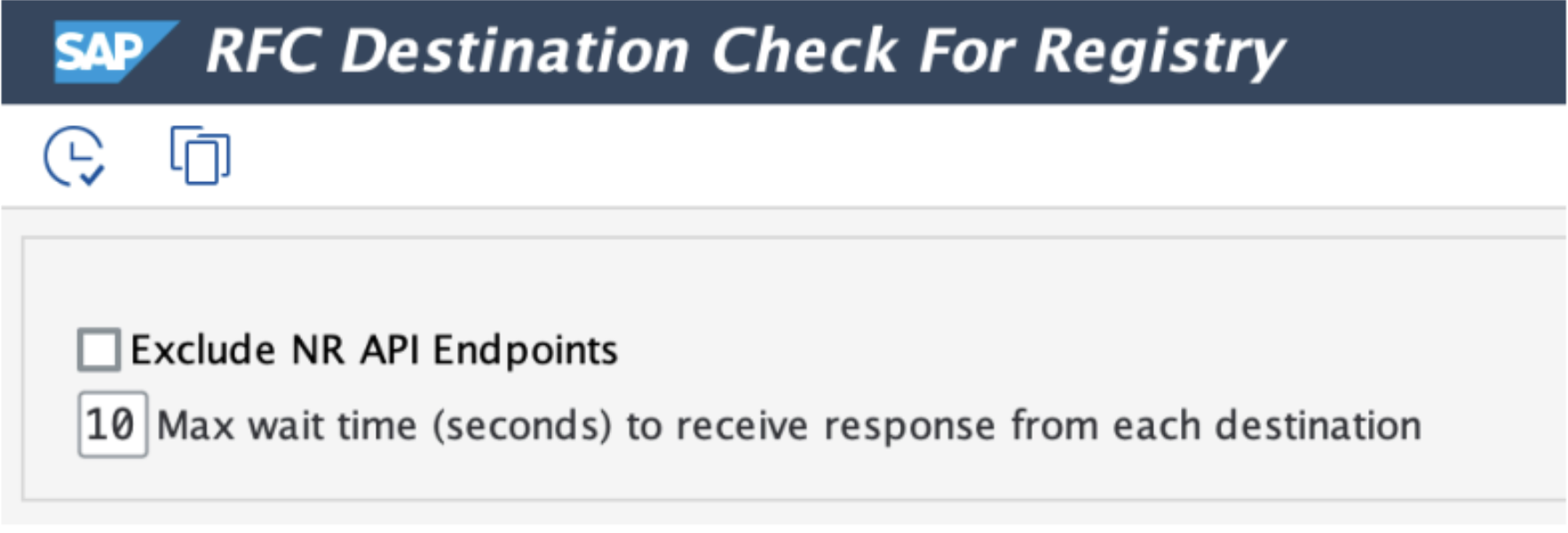
New RFC check program
The RFC check program has been updated with a maximum wait time to receive responses from each destination.
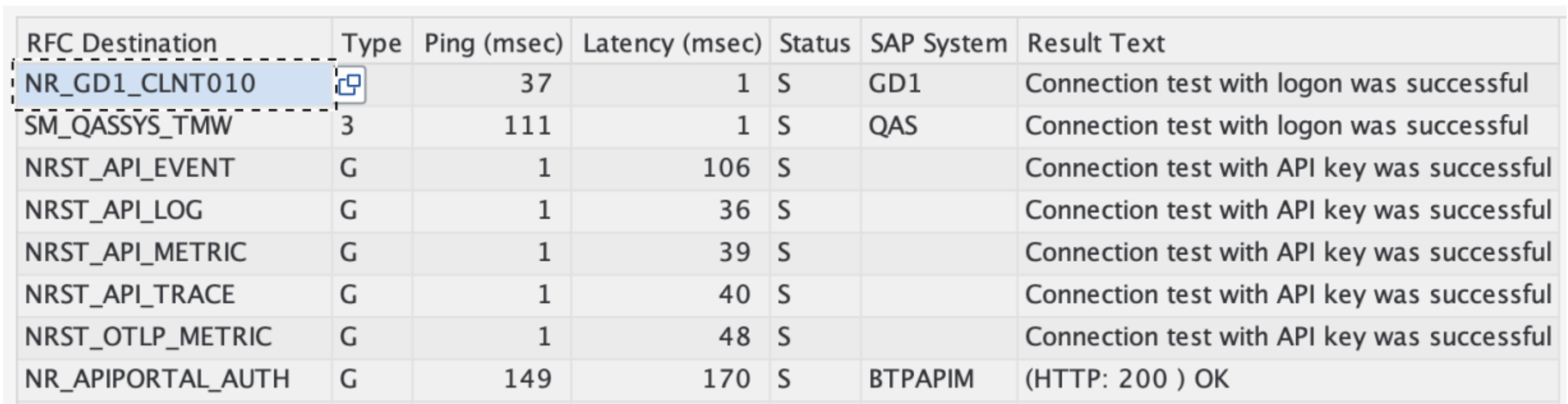
Results now include latency measurements from each destination.
Authorization role updates
Authorization role /NEWR/DATA_PROVIDER
Authorization role /NEWR/DATA_PROVIDER has been updated to add access to the following function:
SREL_GET_NEXT_NEIGHBORS
Authorization role /NEWR/COLLECTION_MANAGER
This role is created specifically for the batch user on the central monitoring system to run collection manager jobs.
New data providers for ABAP business systems
NR_SAP_HDB_BACKUP_BROKEN
Captures HANA DB backup broken history events.
Configuration:
- Data Provider Function:
/NEWR/AGENT_HDB_EVENT - Finisher Function:
/NEWR/EVENTS_FINISHER - Monitoring Group:
HANA_DB - DP Period: 1 Hour
This data provider comes pre-activated. Required parameters:
Parameter | Description | Default Value | Attribute |
|---|---|---|---|
| Database Connection | No | |
| Monitored System RFC Destination | ||
| Collection Time Period | ||
| Monitored System ID | Yes |
Output attributes:
Attribute | Description |
|---|---|
| The unique ID of the broken backup history entry |
| The local time at which the broken backup history was detected |
| The UTC time at which the broken backup history was detected |
| The persistence volume ID |
| The host name |
| The type of database service |
| The redo log position of the broken backup history entry |
| The reason for the broken backup history |
| Additional message for backup broken history |
NR_SAP_HDB_BLKED_TRANS
Captures blocked transactions in HANA DB events.
Configuration:
- Data Provider Function:
/NEWR/AGENT_HDB_EVENT - Finisher Function:
/NEWR/EVENTS_FINISHER - Monitoring Group:
HANA_DB - DP Period: 5 Minutes
This data provider comes pre-activated. Required parameters:
Parameter | Description | Default Value | Attribute |
|---|---|---|---|
| Database Connection | No | |
| Monitored System RFC Destination | ||
| Collection Time Period | ||
| Monitored System ID | Yes |
Output attributes:
Attribute | Description |
|---|---|
| Blocking starting time |
| Blocking end time |
| Site ID |
| Host name |
| Internal port |
| Type of lock: Record, Table, Metadata |
| Lock mode: SHARED, EXCLUSIVE |
| The name of the schema on which the lock is currently placed |
| The name of the object on which the lock is currently placed |
| The ID of the record on which the lock is currently placed |
| The connection ID associated with the blocked write transaction |
| The write transaction ID of the write transaction waiting for the lock |
| Hash code for the statement being blocked |
| The connection ID associated with the write transaction holding the lock |
| The write transaction ID of the write transaction holding the lock |
| The client host for the lock owner |
| Process ID for the lock owner |
| Application source for the lock owner |
| Lock owner's statement |
| Hash code for the lock owner statement |
NR_SAP_HDB_LICENSES
Captures HANA DB license information events.
Configuration:
- Data Provider Function:
/NEWR/AGENT_HDB_EVENT - Finisher Function:
/NEWR/EVENTS_FINISHER - Monitoring Group:
HANA_DB - DP Period: 5 Minutes
This data provider comes pre-activated. Required parameters:
Parameter | Description | Default Value | Attribute |
|---|---|---|---|
| Database Connection | No | |
| Monitored System RFC Destination | ||
| Collection Time Period | ||
| Monitored System ID | Yes |
Output attributes:
Attribute | Description |
|---|---|
| The hardware key of the SAP HANA installation |
| The system identifier (SID) |
| The installation number |
| The system number |
| The license ID for the software product |
| The name of the licensed software product |
| The description of the licensed software product |
| The allowed product usage as specified by the license in bytes (e.g., main memory) |
| Description of allowed product usage |
| The peak product usage value during last 13 months, measured periodically, in bytes |
| The interval of license measurement, in hours |
| The date of the first installation of the license |
| The start date of the license validity period |
| The expiration date of the validity period of the license |
| The latest date on which the license was successfully checked and found valid |
| Displays TRUE if the license is permanent and FALSE if the license is temporary |
| Indicates whether the license is valid or not: TRUE/FALSE |
| Indicates whether the license is a memory-enforced license or not: TRUE/FALSE |
| Indicates whether the system is locked down due to license status: TRUE/FALSE |
| Indicates whether the license is a local database license: TRUE/FALSE |
NR_SAP_HDB_LONG_TRANS
Captures long running transactions in HANA DB events.
Configuration:
- Data Provider Function:
/NEWR/AGENT_HDB_EVENT - Finisher Function:
/NEWR/EVENTS_FINISHER - Monitoring Group:
HANA_DB - DP Period: 5 Minutes
This data provider comes pre-activated. Required parameters:
Parameter | Description | Default Value | Attribute |
|---|---|---|---|
| Database Connection | No | |
| Monitored System RFC Destination | ||
| Collection Time Period | ||
| Monitored System ID | Yes |
Output attributes:
Attribute | Description |
|---|---|
| The connection ID |
| The transaction object ID |
| The transaction start time |
| Elapsed time in seconds |
| User name |
| Client host |
| Connection status |
| Statement string for the transaction |
NR_SAP_HDB_PWD_EXPIRE
Captures expiring user password events.
Configuration:
- Data Provider Function:
/NEWR/AGENT_HDB_EVENT - Finisher Function:
/NEWR/EVENTS_FINISHER - Monitoring Group:
HANA_DB - DP Period: 1 day
This data provider comes pre-activated. Required parameters:
Parameter | Description | Default Value | Attribute |
|---|---|---|---|
| Database Connection | No | |
| Monitored System RFC Destination | ||
| Collection Time Period | ||
| Monitored System ID | Yes |
Output attributes:
Attribute | Description |
|---|---|
| User name |
| Password valid until this date |
| Number of days remaining before password expiration |
NR_SAP_HDB_THREADS
Captures long running threads in HANA DB events.
Configuration:
- Data Provider Function:
/NEWR/AGENT_HDB_EVENT - Finisher Function:
/NEWR/EVENTS_FINISHER - Monitoring Group:
HANA_DB - DP Period: 5 Minutes
This data provider comes pre-activated. Required parameters:
Parameter | Description | Default Value | Attribute |
|---|---|---|---|
| Database Connection | No | |
| Monitored System RFC Destination | ||
| Collection Time Period | ||
| Monitored System ID | Yes |
Output attributes:
Attribute | Description |
|---|---|
| Host name |
| Internal port |
| Connection ID |
| The ID of the statement being executed |
| The thread ID |
| The thread type |
| The thread state |
| The thread method |
| The internal name of the lock |
| The thread detail |
| The IP of the client machine |
| The client process ID |
| The service that called the thread |
| The service called by the thread |
| Whether the thread is active |
| The SQL user name |
| The name of the application |
| The application user name |
| The transaction ID |
| The thread duration in milliseconds |
| The active CPU time of the thread in microseconds |
| The active CPU time of the thread and its associated children in microseconds |
| The statement thread limit |
| The statement memory limit |
| The name of the workload class |
BTP monitoring new data providers
NR_BTP_UDM
Provides SAP Usage Data Management events for SAP BTP. Gathers, stores, and makes usage information available for all services and applications across all regions in a cloud deployment. This information supports central analysis, reporting, and license auditing.
Prerequisite:
RFC destination must be configured to handle authentication. Uses BASIC authentication based on Client ID and Client Password.
Configuration:
- Type: Event (API)
- Data Provider Function Module:
/NEWR/API_DATA_COLLECTOR - Finisher Function Module:
/NEWR/BTP_UDM_FINISHER - Monitoring Component:
BTP_UDM
This data provider comes pre-activated. Required parameters:
Parameter | Description | Default Value | Attribute |
|---|---|---|---|
| UDM data extraction host | No | |
| UDM data extraction path | No | |
| UDM data extraction query | No | |
| An integer value determining the collection period. If set as 1, details for last month will be collected. If set as 2, details for last 2 months will be collected. | No | |
| Authentication destination for UDM | No | |
| New Relic platform account number | No | |
| Monitored System ID | Yes |
Setup instructions:
To get details for API_HOST, Authentication URL, Client ID, and Password:
- Create a Service Instance for Usage Data Management Service with plan
reporting-ga-admin. - Create a service key - it will contain the necessary details.
- Base URI format:
https://uas-reporting.cfapps.<landscape domain>/reports/v1
Transport details
SAP transport SD1K901231 delivered in two files:
K901231.SD1(co-file)R901231.SD1(data)
Enhancements
NR_CALM_LANDSCAPE event
The NR_CALM_LANDSCAPE event is enhanced to include the client endpoints (if any) configured in the system. This does not apply for SAP PaaS/SaaS based services. Example: If your SAP instance has 3 clients - 100, 200, 300... then a separate LMSID would be generated for each one of them.
Required action: Change the monitoring component for this DP from CALM to LANDSCAPE in the DP Registry transaction.
NR.CALM.HM event
The NR.CALM.HM event is enhanced to send the relevant metrics based on the org_name to respective NR accounts of the org unit. This enhancement will be applicable only for serviceType = SAP_CPI and for metrics (CPI.JMS.Queue.Active, CPI.JMS.Queue.Status, CPI.JMS.Queue.Message.Number)
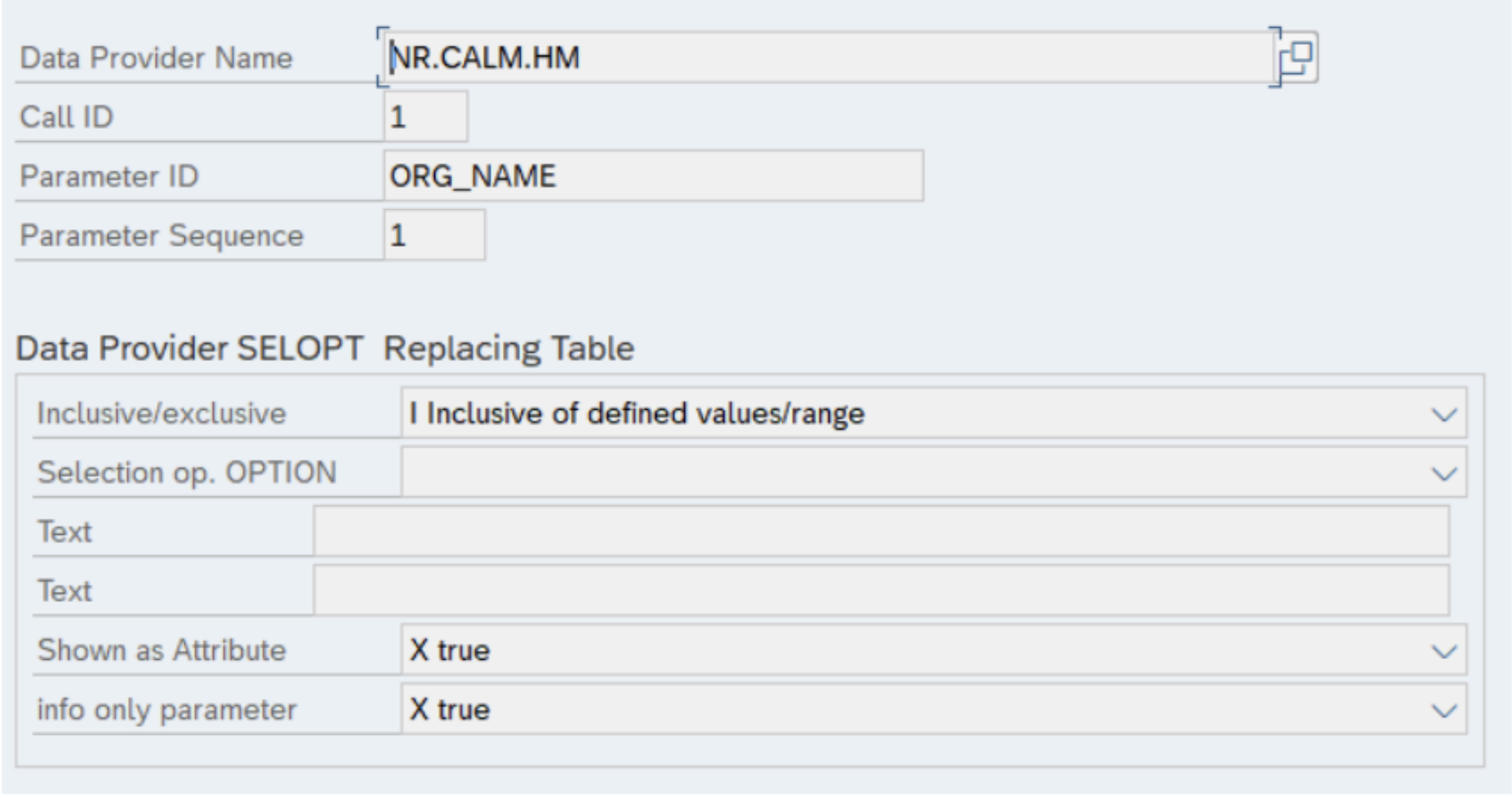
New attribute - ORG_NAME: org_name used as filter for metric names. Add this field to the template table (/NEWR/DP_SELOPTIN) using SM30.
NR_CALM_IS_MPL data provider
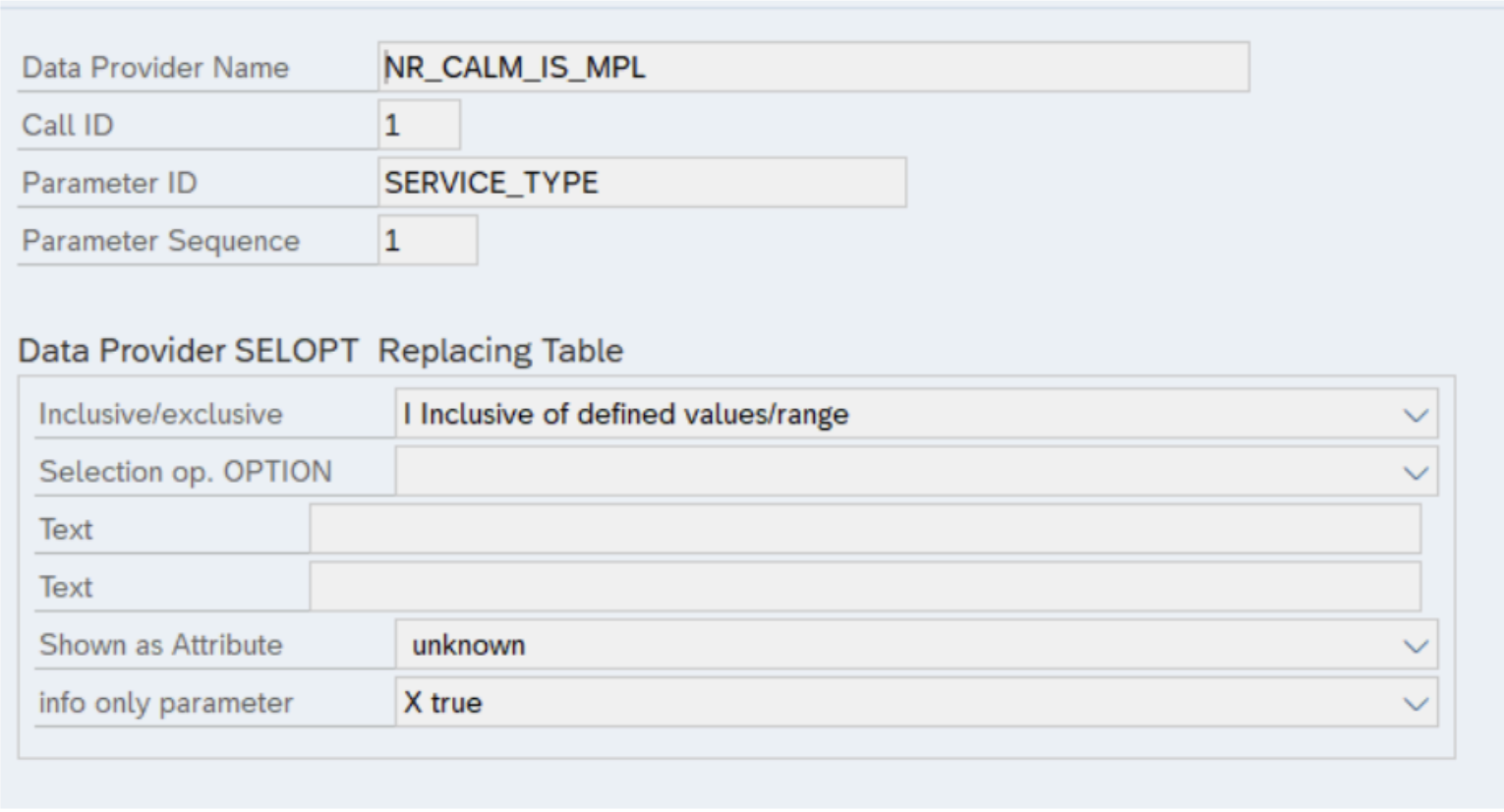
The NR_CALM_IS_MPL data provider now requires a new parameter_id SERVICE_TYPE to differentiate between the IS CPI and MACO instances. Add this field to the template table (/NEWR/DP_SELOPTIN) using SM30.
Program updates
The /NEWR/SYS_GENERATE_DELIVERY program is enhanced to exclude the monitoring component CALM related data provider from generation of Call ID configuration. Instead use the program /NEWR/GEN_DP_CALLID for monitoring component CALM.
The /NEWR/GEN_DP_CALLID program is enhanced to update the new attributes added to the Registry Configuration table.
Fixes
Issue: The NR_CALM_LANDSCAPE data provider does not transmit all systems configured in the Cloud ALM tenant.
Resolution:
/NEWR/ABAP_COLLECTION_MANAGERN(program) - When data providers are submitted for parallel processing and if there is a resource constraint of WP, then that particular DP is skipped for data collection. Now we have enabled the retry mechanism./NEWR/REGISTRY(Tcode) - When we generate the Call ID for a new monitored system, the previously suspended data provider is re-activated again.
Transport details
SAP transport SD1K901229 delivered in two files:
K901229.SD1(co-file)R901229.SD1(data)
Fixes
Issue: One of the standard SAP delivered data elements (DMC_GUID) referenced in the New Relic code does not exist in some customer SAP systems. This impacted the SLT replication data providers.
Resolution: Created a copy of this data element in the New Relic namespace.
Transport details
SAP transport SD1K901215 delivered in two files:
K901215.SD1(co-file)R901215.SD1(data)
Enhancements
The NR_SAP_IDOC event is enhanced by including information about related IDocs from partner systems. This creates a link between the current IDoc and the corresponding IDoc(s) in other systems.
New attributes added:
- Partner_IDOC: Stores the IDoc number from the connected partner system.
- Partner_IDOC_LOGSYS: Identifies the logical system of the partner.
- Outbound IDoc: The logical system of the sending partner.
- Inbound IDoc: The logical system of the receiving partner.
- Role ID, Role Type, hops: These fields are populated by the SAP Object Relationship Service to define the nature of the relationship.
Example values:
Attribute | Example value |
|---|---|
Partner_IDOC |
|
Partner_IDOC_LOGSYS |
|
Partner_IDOC_Role_ID |
|
Partner_IDOC_Role_Type |
|
Partner_IDOC_Role_hops |
|
Fixes
Issue: Formatting issue on timestamp when IDoc payload is retrieved.
Resolution: Fixed timestamp formatting.
Included patch files
This V3.0 SP10 release contains three files:
- K-300SP10NEWR.SAR
- _NEWR_DATA_PROVIDERV3.10.SAP
- _NEWR_SLT_COLLECTORV3.10.SAP
Implementation procedures
Service pack installation and configuration
- Where to install: Deploy this service pack to client 000 of your Central Monitoring System.
- Configuration location: Perform all subsequent configuration tasks in the business client of your Central Monitoring System.
- Complete instructions: For step-by-step installation procedures, consult Installation Guide V3.0 (Appendix VIII: Install Service Pack) or Admin Guide V3.0 (Section: Install Service Pack).
Updates in this patch
BTP monitoring related updates
- New BTP data providers:
NR_CF_AUDIT_EVENTS: Captures events generated by applications deployed on BTP subaccounts - Cloud Foundry Environment (Data Provider Type: Event).NR_CLOUD_CONNECTOR: Health monitoring for SAP Cloud Connector (Data Provider Type: Event).
- New utility: Utility to generate configurations for CloudALM-based data providers.
S/4 HANA and ECC related updates
- New Monitoring Groups (
/NEWR/DP_GROUP):CF: Cloud FoundrySAP_CC: SAP Cloud ConnectorSLT: SAP Landscape Transformation Server
- New data providers:
NR_SAP_CLIENT_MODIFIABLE: Event showing client modification setting in table T000.NR_SAP_BGRFC_Q: Snapshot event of BGRFC Queues.NR_SAP_LICENSE: Event of current SAP License status.NR.SAP.GW.ERROR: Metric of gateway errors.NR.SAP.GW.PERFORMANCE: Metric of gateway performance in terms of average XML size and response time.NR.SAP.SLT.INFO: Collection of metrics that monitors SLT Processes.
Bug fixes
- Fixed a bug in data providers
NR_SAP_SERVER_LISTandNR_SAP_INSTANCE_INFORMATIONwhere they retry indefinitely if the monitored system does not have port 5XX13/5XX14 opened. - Fixed a bug where join conditions are truncated in function module
/NEWR/RFC_EVENTS_COLLECTOR_JN, which is used in data providers for complex table retrieval.
Enhancements
- Configuration table
/NEWR/NRCONNECT: A new attribute for New Relic account name has been added to this configuration table. - Data provider
NR_CALM_LANDSCAPE: Performance improvements.
Collection manager updates
The Collection Manager now supports sending telemetry data through the BTP Integration Suite cloud integration.
Authorization role updates
Authorization role /NEWR/DATA_PROVIDER
Authorization role /NEWR/DATA_PROVIDER has been updated to add access to the following functions:
/SDF/GET_USER_TYPE/SDF/IMA_DC_BGRFC_Q/SDF/IMA_DC_BGRFC_T/SDF/SLIC_READ_LICENSES_700RFC_SYSTEM_INFO- New authorization object
S_TABU_RFCwithACTVT = '03'(Display)
Additional authorization objects required for job spool retrieval, which is also used by data provider NR_SAP_CERTIFICATE:
Authorization object | Description | Field |
|---|---|---|
| Background Processing: Background Administrator |
|
| Spool: Actions |
|
| System Authorizations |
|
| Authorization for External Management Interfaces (XMI) |
|
| Authorization object for XI message monitoring |
|
Authorization role /NEWR/SLT_COLLECTOR
For the new SLT data provider, the remote RFC system user requires a special authorization object S_DMIS:
Authorization object | Description | Field |
|---|---|---|
| Authority object for SAP SLO Data migration server |
|
Manual configuration updates
BTP monitoring new data providers
NR_CF_AUDIT_EVENTS
This data provider captures events generated by applications deployed on BTP subaccounts - Cloud Foundry environment. It offers the flexibility to capture all events or specific events using the AUDIT_EVENTS parameter ID.
Configuration:
- Data Provider Function:
/NEWR/CF_DATA_COLLECTOR - Finisher Function:
/NEWR/CF_AUDIT_FINISHER - Monitoring Group:
CF - Credentials Storage Table:
/NEWR/SEC_STORE
Prerequisite:
For Cloud Foundry, host authentication credentials cannot be stored in the SM59 RFC destination. They must be maintained in the New Relic credentials storage table /NEWR/SEC_STORE using transaction SM30.
This data provider comes pre-activated. Available parameters:
Parameter | Description | Default value | Required |
|---|---|---|---|
| Cloud Foundry data extraction host | No | |
| Cloud Foundry data extraction path | No | |
| Cloud Foundry data extraction query | No | |
| Events to be captured (optional) |
| No |
| Authentication destination for Cloud Foundry | ||
| New Relic platform account number | ||
| Monitored system ID | None | Yes |
NR_CLOUD_CONNECTOR
This data provider captures health monitoring data for the SAP Cloud Connector instance.
Prerequisites:
- You must use basic authentication or form field authentication to read monitoring data via API. If certificate-based authentication has been configured for the Cloud Connector, a client certificate must be used instead.
- Users must be assigned to the
sccmonitoringorsccadminroles.
Configuration:
- Data Provider Function:
/NEWR/CC_DATA_COLLECTOR - Finisher Function:
/NEWR/CC_FINISHER - Monitoring Group:
SAP_CC
This data provider comes pre-activated. Available parameters:
Parameter | Description | Default value | Required |
|---|---|---|---|
| SAP Cloud Connector host | No | |
| New Relic platform account number | No | |
| Monitored system ID | Yes |
New utility to generate configurations for CloudALM-based data providers
Configuration:
- Transaction Code:
/NEWR/GEN_DP_CALLID - Program Name:
/NEWR/GENERATE_CONFIG_CALLID - Configuration table:
/NEWR/CALLID_CNF
Prerequisites:
- Data provider
NR_CALM_LANDSCAPEmust be active and collecting data. - The BTP services to be monitored must be linked to the data provider and maintained in table
/NEWR/CALLID_INFusing transaction SM30.
Limitation:
- Can only be used for data providers assigned to monitoring group CALM (SAP Cloud ALM).
Selection criteria:
Selection criteria | Description |
|---|---|
Data provider | CALM data provider for which configuration needs to be generated |
Service type | Name of systems/services linked to your CALM |
LMS ID | List of LMS IDs configured in CALM for the selected service type |
Scope:
This utility allows you to add, change, delete, and automatically generate configurations for the selected data provider.
SAP HANA and ECC - New data providers
NR_SAP_CLIENT_MODIFIABLE
This is an event that captures the change in Client modification setting from table T000.
Configuration:
- Data Provider Function:
/NEWR/RFC_EVENTS_COLLECTOR - Finisher Function:
/NEWR/EVENTS_FINISHER - Monitoring Group:
SAP_SYSTEM - DP Period: 1 Day
This data provider comes pre-activated. Required parameters:
Parameter | Description | Default Value | Required |
|---|---|---|---|
| Display Attribute Name | No | |
| Table fields | No | |
| Table Name | T000 | No |
| Field for Date and Time | CHANGEDATE | No |
| Monitored System RFC Destination | ||
| Collection Time Period | ||
| Monitored System ID | Yes |
NR_SAP_BGRFC_Q
This data provider captures the snapshot of each BGRFC queue's locking status.
Configuration:
- Data Provider Function:
/NEWR/SDF_IMA_DC_BGRFC_Q_EVENT - Finisher Function:
/NEWR/EVENTS_FINISHER - Monitoring Group:
SAP_APPL
This data provider comes pre-activated. Required parameters:
Parameter | Description | Default Value | Required |
|---|---|---|---|
| BGRFC direction filter | No | |
| BGRFC destination filter | No | |
| BGRFC queue name filter | No | |
| Data Collection configurations | TOT_ROWS=100000 | No |
| Status group filter | No | |
| Monitored System ID |
Output attributes:
Attribute | Description |
|---|---|
| SAP Client |
| Inbound (I) or Outbound (O) |
| |
| Destination lock status: X or Space |
| Unit lock status: X or Space |
| Queue lock status |
| |
| |
| |
| Status Code |
| |
| CRIT (Critical), INTE (Interim), E (Error), L (Locked) |
Status code (STATE):
State Code | Meaning |
|---|---|
21211 |
|
21204 |
|
21213 |
|
21203 |
|
21202 |
|
21201 |
|
21216 |
|
21212 |
|
21217 |
|
21220 |
|
21222 |
|
21221 |
|
21219 |
|
21218 |
|
21206 |
|
21207 |
|
21209 |
|
21208 |
|
21214 |
|
22204 |
|
22203 |
|
22208 |
|
22207 |
|
22202 |
|
22201 |
|
22205 |
|
22206 |
|
22209 |
|
21205 |
|
21200 |
|
21210 |
|
NR_SAP_LICENSE
This data provider monitors the current SAP license status, which can be used to create alerts on expired SAP licenses.
Configuration:
- Data Provider Function:
/NEWR/LICENSE_EXPIRE_EVENT - Finisher Function:
/NEWR/STPI_FINISHER - Monitoring Group:
SAP_APPL - Metric Type: Summary
This data provider comes pre-activated. Required parameters:
Parameter | Description | Default Value | Required |
|---|---|---|---|
| Monitored System RFC Destination | ||
| Monitored System ID |
NR.SAP.GW.ERROR
This data provider extracts error counts for the SAP gateway.
Configuration:
- Communicator Function:
/SDF/E2E_DISPATCHED_COLLECTOR - Data Provider Function:
/SDF/E2E_GW_ERROR_LOG - Finisher Function:
/NEWR/STPI_FINISHER - Monitoring Group:
SAP_APPL - Metric Type: Summary
This data provider comes pre-activated. Required parameters:
Parameter | Description | Default Value | Required |
|---|---|---|---|
| OData Service Name | No | |
| Exception Name | No | |
| SAP Client Number | No | |
| Sample periods in minutes | 15 | No |
| Monitored System RFC Destination | ||
| Monitored System ID |
NR.SAP.GW.PERFORMANCE
This data provider has two metrics for gateway performance:
Metric Name (KEY_FIGURE) | Description |
|---|---|
| Average XML Size |
| Average Response Time |
Configuration:
- Communicator Function:
/SDF/E2E_DISPATCHED_COLLECTOR - Data Provider Function:
/SDF/E2E_GW_PERF - Finisher Function:
/NEWR/STPI_FINISHER - Monitoring Group:
SAP_APPL - Metric Type: Summary
This data provider comes pre-activated. Required parameters:
Parameter | Description | Default Value | Required |
|---|---|---|---|
| OData Service Name | No | |
| SAP Client Number | No | |
| Metric Name | RESPONSETIME XMLSIZE | No |
| Sample periods in minutes | 15 | No |
| Monitored System RFC Destination | ||
| Monitored System ID |
NR.SAP.SLT.INFO
This data provider provides the following metrics for SLT monitoring:
Metric Name (KEY_FIGURE) | Description |
|---|---|
| Source System Status |
| Target System Status |
| Master Job Status |
| Load Job Status |
| Trigger Status |
| Schema Status |
| Schema Latency |
| Configured Number of Load Jobs |
| Not Running but Configured Number of Load Jobs |
| Terminated Number of Load Job Runs since Last Refresh |
| Terminated Number of Master Job Runs since Last Refresh |
| Trigger Active Status |
| Table Number to be Replicated |
| Average Latency Time of the Last 24 Hours |
| Maximal Latency Time of the Last 24 Hours |
| Youngest Timestamp of Replication |
| Average Latency Time of the Last Hour |
| Maximal Latency Time of the Last Hour |
| Oldest Timestamp of a Table to be Replicated |
| Sum of all Table Entries to be Replicated |
| Max Entries to be Replicated |
| Number of Tables not Fully Replicated |
| Table Number in Error State |
Metric output:
Traffic lights (Rating):
- 0: Not active
- 1: Green
- 2: Yellow
- 3: Red
Configuration:
- Data Provider Function:
/SDF/E2E_SLT_INFO - Finisher Function:
/NEWR/STPI_FINISHER - Monitoring Group:
SLT - Metric Type: Gauge
This data provider comes pre-activated. Required parameters:
Parameter | Description | Default Value | Required |
|---|---|---|---|
| Display Configuration Name in Metric | No | |
| Master Transfer ID | No | |
| Metric Name | CON_SS_STATUS CON_TS_STATUS JOB_MASTER_STATUS JOB_LOAD_STATUS TRIGGER_STATUS STATUS_GROUP STAT_LAT24H | Yes |
| Transfer table to be monitored | No | |
| Monitored System RFC Destination | ||
| Monitored System ID |
Collection manager updates
Data transmission to New Relic
The Collection Manager program now supports sending data to New Relic using SAP Cloud Integration (SAP CPI) as middleware.
Transmission method | Description |
|---|---|
Direct | Data is sent directly from SAP to New Relic (existing functionality) |
SAP Cloud Integration | Data is routed through SAP CPI as middleware |
iFlow endpoint | iFlow endpoint destination |
Configuration steps
- Select iFlow authorization type: Choose the authorization method you'll use: ClientId/Secret, Certificate, or External Certificate.
- Create a service instance for SAP Process Integration Runtime and assign either a service key or certificate based on your selected authorization method.
- Use the New Relic-provided iFlow as a starting point. Customize it to meet your requirements, ensuring the authorization method is configured and the iFlow is deployed as an endpoint.
- Create an RFC destination (SM59) using the service key or certificate generated in the previous step along with the iFlow endpoint destination.
- Configure the Collection Manager program to use this iFlow endpoint for transmitting data to New Relic.
Integration flow
Prerequisite:
If you create a custom version of the iFlow, ensure the following mappings are included:
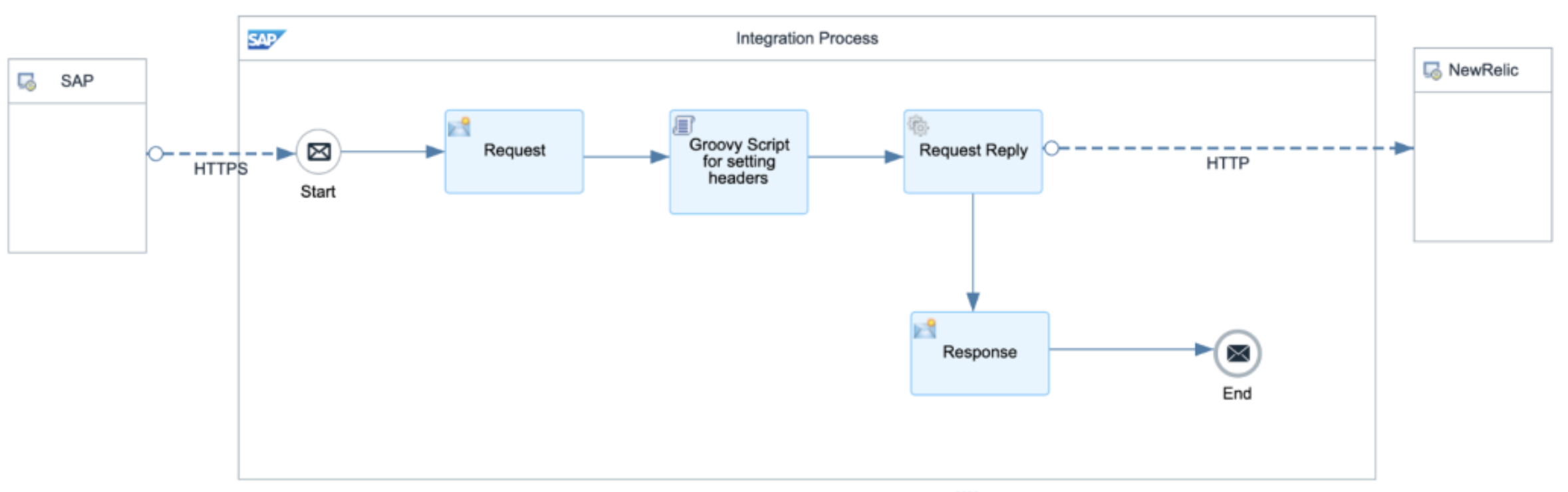
iFlow setup:
- Configure Allowed headers to include
API-Key|targetURL.

- Configure the Authorization Method based on your selected iFlow authorization type:
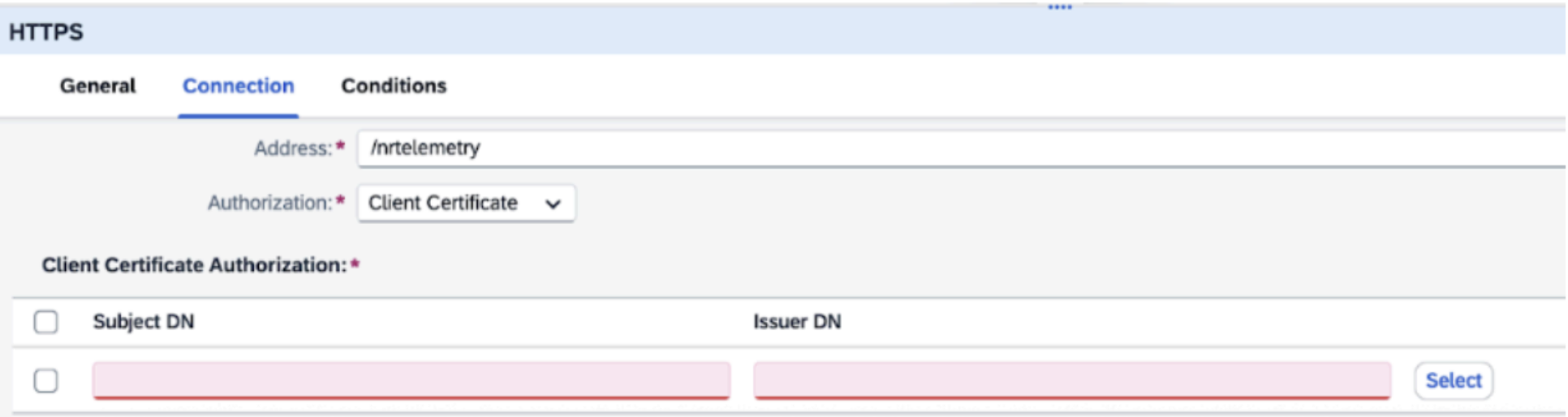
- For ClientId/Secret or Certificate authorization, select User Role.
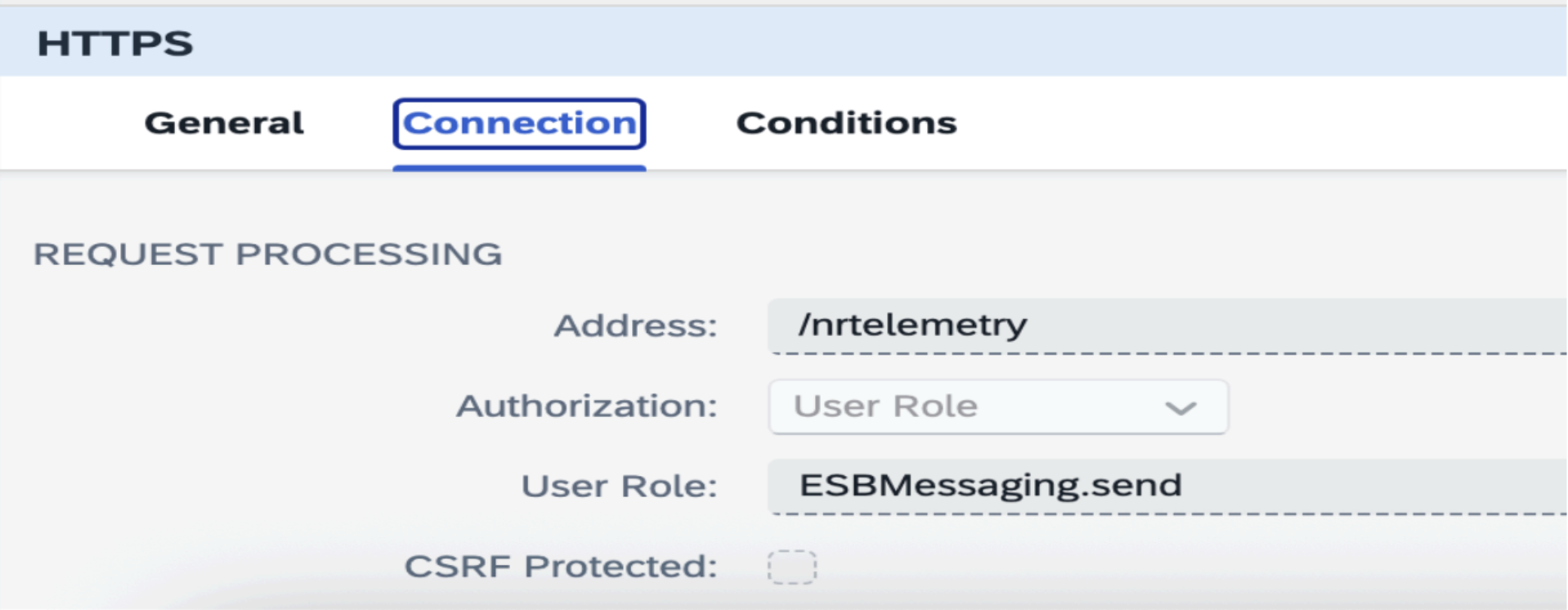
- For External Certificate authorization, select Client Certificate and add the root certificates in the designated section.
- Configure the Request content modifier to store exchange properties.

- Add Groovy Script to dynamically set the headers coming to iFlow.
import com.sap.gateway.ip.core.customdev.util.Message;def Message processData(Message message) {
message.setHeader("API-Key", message.getProperty("apikey"));message.setHeader("Content-Type", "application/json");message.setHeader("Accept", "application/json");
message.setHeader("CamelHttpUri", message.getProperty("targeturl"));
def turl = message.getProperty("CamelHttpUri", String);
def logText = "---Headers---\n";
message.getHeaders().each { k, v -> logText += "${k} = ${v}\n" };messageLogFactory.getMessageLog(message)?.addAttachmentAsString("AllHeaders", logText, "text/plain");
messageLogFactory.getMessageLog(message)?.addAttachmentAsString("URL", turl, "text/plain");}Use Response content modifier to hold the message header/body.
Update the New Relic response HTTP connection.
Included patch files
This V3.0 SP9 release contains two files:
- K-300SP09NEWR.SAR
- _NEWR_DATA_PROVIDERV3.9.SAP
Implementation procedures
Installation and configuration steps
- Where to install: Deploy this service pack to client 000 of your Central Monitoring System.
- Configuration location: Perform all subsequent configuration tasks in the business client of your Central Monitoring System.
- Complete instructions: For step-by-step installation procedures, consult Installation Guide V3.0 (Appendix VIII: Install Service Pack) or Admin Guide V3.0 (Section: Install Service Pack).
Authorization role changes
- An updated authorization role is included in the file
_NEWR_DATA_PROVIDERV3.9.SAP. - More information: See the Authorization role changes section below.
- Required action: Apply this role file to update RFC user authorization profiles across all monitored systems.
- Note: The file
_NEWR_DATA_PROVIDER.SAPhas also been updated to ensure fresh installations automatically include the new authorization objects.
What's new in this release
This service pack delivers several enhancements:
- Backup and Restore capabilities in the Registry transaction (
/NEWR/Registry) - Selective registry configuration generation for specific monitored systems
For detailed usage guidance, see the New feature instructions section.
Changes in this release
BTP monitoring enhancements
- Pagination is now supported for BTP and CALM API data provider functions.
- Enhanced pagination for
NR_BTP_IS_MPL:- New finisher function:
/NEWR/BTP_MPL_FINISHER_V2 - New parameter
API_PAGINATION_LIMITwith a default value of 500. The SAP API supports up to 1000 records per call.
- New finisher function:
- Updated query for
NR_CALM_LANDSCAPEdata provider: TheAPI_QUERYnow includes?limit=999. This adjustment addresses a change in the SAP CALM API, which now returns only 100 records by default. The new limit enables more efficient data collection.
Additional changes
Enhanced functionality
- Flexible data provider configuration: Generate or remove data provider configurations for selected monitored systems.
- Registry backup and restore: New capabilities for backing up and restoring the Data Provider Registry.
- Extended resend program support: The resend program (
/NEWR/RESEND_FAILED_API_TRANS) now handles theAPI_TRACEdata provider type.
Performance improvements
- Enhanced payload retrieval for NR_SAP_ABAP_WS: The
NR_SAP_ABAP_WSdata provider can now retrieve attributes from Node Only tags, improving data processing efficiency. - Expanded job logging: The collection manager job (
/NEWR/ONE_COLLECTION) now provides more detailed messages in job logs for better execution tracking.
Resolved issues
- Fixed IDoc timestamp bug: Corrected a timestamp error in the
NR_SAP_IDOCdata provider. - Security role correction: Updated the
/NEWR/DATA_PROVIDERsecurity role to resolve authorization issues affectingNR.SAP.LOG.GWandNR.SAP.LOG.AUDITLOGdata providers.
Authorization role changes
The /NEWR/DATA_PROVIDER authorization role now includes these objects:
- Transaction SM20: Enables Audit Log retrieval
- Transaction /IWFND/VIEW_LOG: Enables Gateway Log retrieval for backward compatibility
New feature instructions
Service pack deployment procedure
To deploy a New Relic Service Pack, complete these steps:
- Deploy the Service Pack file:
- Access client 000 of the Central Monitoring System
- Apply the Service Pack file using transaction SPAM
- Transfer configuration templates:
- Access the business client of the Central Monitoring System
- Navigate to menu
/n/NEWR/INSTALL - Select Copy Template Tables from Client 000
- Create configurations for new data providers:
- Select Generate Configurations for New Data Providers to create delta configurations for the Service Pack
중요
- Do not add or modify monitored systems while applying the Service Pack.
- After Service Pack deployment, use the Maintain Monitored Systems menu to modify monitored systems if necessary.
- For newly added monitored systems, generate configurations only for those systems rather than regenerating all configurations. See Generating configurations for specific monitored systems for details.
Generating configurations for specific monitored systems
Three new configuration fields are now available to improve registry configuration control:
Available fields:
- Process option: Choose between Generate or Remove operations
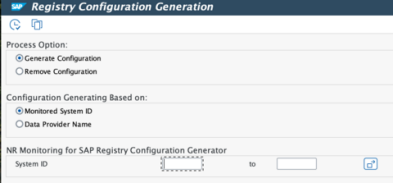
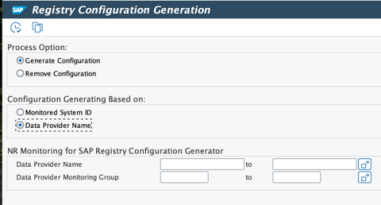
- Configuration generation based on: Choose your generation method:
- Monitored System ID
- Data Provider Name
How to use:
- When using Monitored System ID: Input the System ID for the newly added Monitored System, then click Execute to regenerate data provider configurations.
- When using Data Provider Name: Input the Data Provider Name or Monitoring Group (wildcards are supported), then click Execute to regenerate data provider configurations.
중요
When no System ID or Data Provider Name is entered, all data providers will be removed and regenerated.
For repeat installations, you may encounter a confirmation dialog. Select Yes to proceed. A status bar message will confirm successful completion.
Updating configuration templates
We recommend updating configuration templates only for new custom data providers rather than using the Update Configuration Templates option from the installation menu to update all templates.
Recommended approach:
- Create backups before making configuration changes
- Apply template updates only to data providers needed for newly onboarded systems
Template update procedure:
- Launch program
/NEWR/REP_INSTALL_REPLACINGusing transaction SE38 - Keep "Transfer Stage" at 0 (do not modify)
- Enter only the data provider template from registry entries that requires updating
This targeted method modifies only necessary templates, optimizing the update process and reducing the risk of disrupting existing configurations.
Configuration backup and restore
The Registry transaction (/NEWR/REGISTRY) now includes backup and restore functionality that improves configuration management. These features support both individual and comprehensive backup and restoration operations for data provider configurations.
Feature overview:
Registry backup and restore operations (/NEWR/REGISTRY)
When in change mode, you can access:
- Backup One: Creates a backup for a single selected data provider configuration.
- Backup All: Creates a backup for all active data provider configurations.
- Restore One: Restores a single data provider configuration from any previously created backup (from either Backup One or Backup All).
- Restore All: Restores all data provider configurations from a Backup All backup.
These operations are accessible through the Table View menu in Change Mode.
Management features
- Descriptive comments: Add comments when creating backups to help identify backup versions later.
- Version history: Select from previously created backup versions when restoring configurations.
- Restoration controls: After choosing a backup version, you can:
- Restore: Start the restoration process immediately.
- DP header from backup: Review the Data Provider's technical settings from the backup, including function names and frequencies.
- DP configuration from backup: View the configuration parameters saved in the backup.
These capabilities offer improved control over New Relic configuration management, simplifying recovery from unintended modifications and facilitating efficient updates.
Patch files
V3.0 SP8 contains one file:
- K-300SP08NEWR.SAR
Implementation procedures
Service pack installation and configuration
- Where to install: Deploy this service pack to client 000 of your Central Monitoring System.
- Configuration location: Perform all subsequent configuration tasks in the business client of your Central Monitoring System.
- Complete instructions: For step-by-step installation procedures, consult Installation Guide V3.0 (Appendix VIII: Install Service Pack) or Admin Guide V3.0 (Section: Install Service Pack).
Updates in this patch
BTP monitoring related updates
- New data provider
NR_CALM_RUM_TRACE. This data provider sends Real User Monitoring Trace data to New Relic.
Bug fixes
- Updated
NR_SAP_ABAP_WPto fix a bug that limited Tag Name to only 30 characters. The tag name now matches the SAP standard data structure of 60 characters.
Patch files
V3.0 SP7 contains one file:
- K-300SP07NEWR.SAR
Implementation procedures
Service pack installation and configuration
- Where to install: Deploy this service pack to client 000 of your Central Monitoring System.
- Configuration location: Perform all subsequent configuration tasks in the business client of your Central Monitoring System.
- Complete instructions: For step-by-step installation procedures, consult Installation Guide V3.0 (Appendix VIII: Install Service Pack) or Admin Guide V3.0 (Section: Install Service Pack).
- This service pack includes an enhancement to data provider
NR_SAP_ABAP_WS. If you want to customize this data provider, see the Manual configuration steps for instructions.
Updates in this patch
BTP monitoring related updates
- The BTP/CALM API Host can now be accessed via the same proxy server configured for the Authentication HTTP destination. This enhancement is useful when the Central Monitoring System requires a proxy server to access BTP and/or CALM API endpoints.
- The BTP/CALM service identifier attribute (
SOURCE_ACCT) is now exported when telemetry data is sent to New Relic. This enhancement is useful when monitoring multiple BTP/CALM accounts.
Other updates
- Updated
NR_SAP_ABAP_WPto allow retrieval of all data and attributes under a Node Only tag. - Fixed a bug in
NR_SAP_JOB_ALLwhere the timestamp for unfinished jobs was using local time as UTC time. - Fixed bugs in the Test function of the registry.
- Added new configuration parameter
BYPASS_PARA_IDfor skipping configuration parameter pattern recognition when updating the configuration template. This prevents word strings in certain parameters, such asAPI_PATHandAPI_QUERY, from being recognized asSYS_ID.
Manual configuration steps
Configure NR_SAP_ABAP_WS to retrieve XML payload tags
Data Provider NR_SAP_ABAP_WS is designed with the capability to retrieve values from payload web service XML tags. Previously, only data type or attribute type tags could be retrieved. This service pack allows Node type tags to also be specified for retrieval.
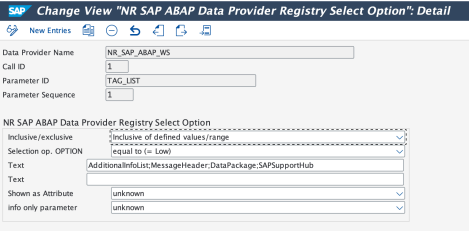
The payload tag to be extracted is configured using the configuration parameter TAG_LIST. Here is an example:
In previous versions, only data or attribute tag names could be configured for retrieval. Here is an XML fragment:
<NodeTag Attribute = Attribute_value><DataTag> Data_value </DataTag></NodeTag>To retrieve the data from the XML, the TAG_LIST is configured with the value:
Attribute;DataTag.
Then the NR_SAP_ABAP_WS event will have these attributes:
Attribute: Attribute_valueDataTag: Data_value
Now the TAG_LIST can be configured as NodeTag. In this case, the event attributes are as follows:
NodeTag_Attribute: Attribute_valueNodeTag_DataTag: Data_value
Overview
This service pack introduces a series of API-based data providers for monitoring SAP BTP/CALM accounts.
New data collection authentication method for BTP Integration Suite API Management
- SP06 introduces a new data collection authentication method using API Management, API Portal, in addition to the two authentication methods introduced in SP05.
- This option requires a subscription to the API Management, API Portal service with the apiportal-apiaccess plan.
- Your BTP Global Account Administrator can subscribe to this service under Entitlements > Service Assignments.
Patch files
V3.0 SP6 contains one file:
- K-300SP06NEWR.SAR
Updates in this patch
BTP monitoring related updates
New data providers
SP06 adds new data providers for BTP monitoring and enhances existing BTP data providers:
NR_BTP_IS_APIMGMT: Data provider to retrieve BTP integration suite API Management logs. This data provider is assigned to Monitoring GroupBTP_APIM. The New Relic event generated from this data provider isNR_IS_APIM_LOG.NR.CALM.HM: Data provider to retrieve all Health Monitoring (HM) data via CloudALM HM API. This data provider is assigned to Monitoring GroupCALM. The metric generated from this data provider can be identified usingdp_name=NR.CALM.HM.NR.CALM.JAM: Data provider to retrieve all Job and Automation (JAM) data via CloudALM JAM API. This data provider is assigned to Monitoring GroupCALM. The metric generated from this data provider can be identified usingdp_name=NR.CALM.JAM.NR.CALM.RUM: Data provider to retrieve all Real User Monitoring (RUM) data via CloudALM RUM API. This data provider is assigned to Monitoring GroupCALM. The metric generated from this data provider can be identified usingdp_name=NR.CALM.RUM.
Bug fixes and enhancements
- Fixed duration calculation and missing RETRY data issue in data provider
NR_BTP_IS_MPL. - Added test functionality for
API_METRICdata providers to display output as JSON from the Registry screen.
Other updates
- Updated testing features in New Relic Registry. OTel API-based metrics can now display results in JSON format when tested from Registry.
- The protection feature, which stops data providers with remote errors, can now be enabled or disabled via a global configuration parameter.
- Enhanced all trace data provider function modules
/NEWR/SAP_WORKLOAD_TRACE*to truncate the EID namespace based on expressions (parameter ID:EID_EXCLUDE_EXPR) stored in registry configuration.