뉴롤릭 사용자로서 귀하는 여러 데이터베이스, 데이터 웨어하우스 및 스프레드시트에 저장된 데이터와 함께 스프레드시트 데이터를 분석해야 할 수도 있습니다. 각 소스에서 데이터를 수동으로 내보내고 오프라인에서 운영자 데이터와 결합하는 것은 시간이 많이 걸리고 생산성을 저하시킵니다. 또한 규정 준수, 보안 또는 운영상의 요구 사항으로 인해 모든 데이터를 단일 데이터베이스로 통합할 수 없는 경우가 많습니다.
New Relic Lens 이러한 과제들을 해결합니다. Lens 은 뉴렐릭 내의 통합 쿼리 플랫폼으로, 뉴렐릭에서 직접 여러 데이터 소스를 연결하고 쿼리할 수 있습니다. Lens 에 ANSI SQL을 사용하여 쿼리를 작성하고 다양한 소스의 데이터를 분석하고 상관 관계를 파악하기 위해 교차 데이터베이스 조인을 수행합니다. Lens 각 데이터 소스에 계산 작업을 푸시하고, 각 데이터 소스는 쿼리의 해당 부분을 처리하고 결과만 반환합니다. Lens 그런 다음 이러한 결과를 결합하여 외부 소스에서 원시 데이터를 수집하지 않음으로써 데이터 전송을 최소화하고 보안을 유지합니다.
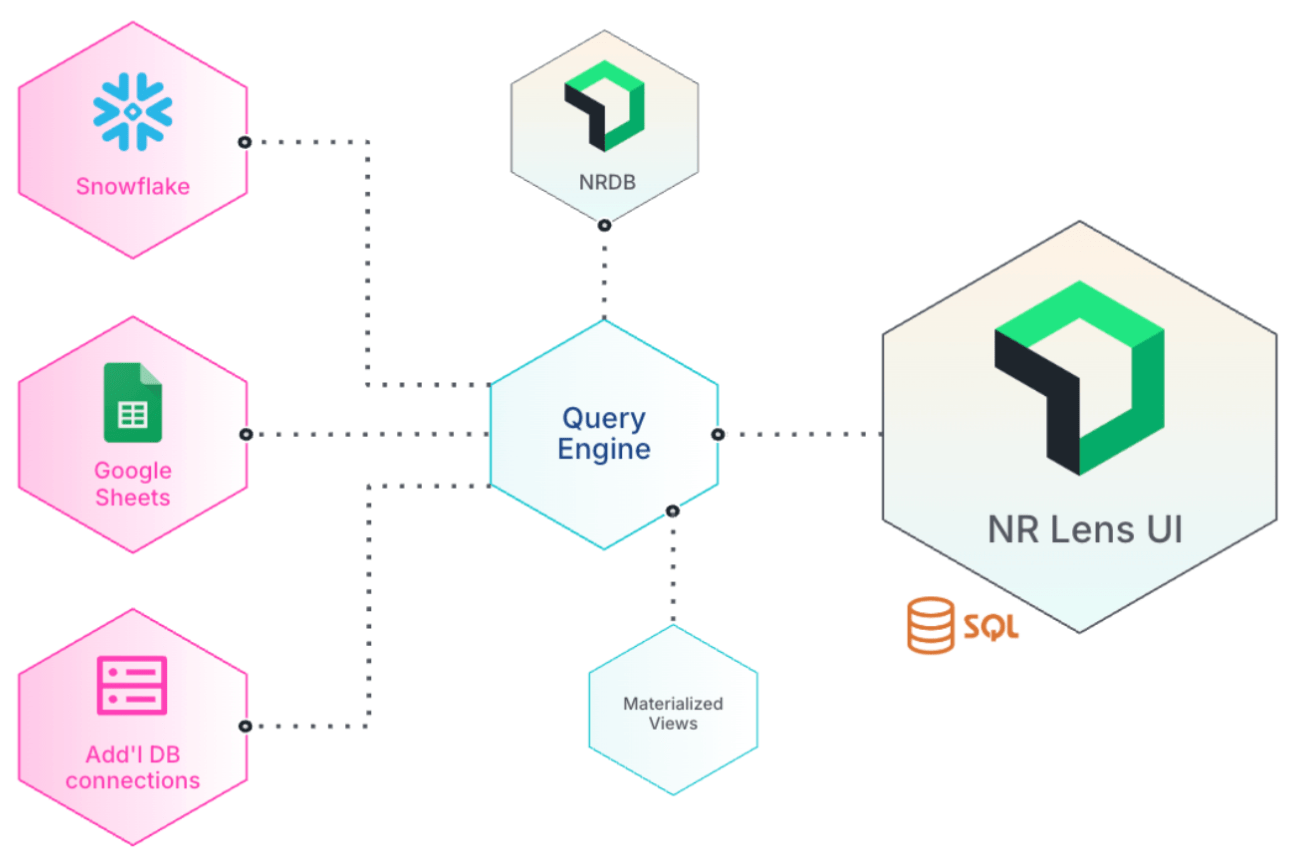
작동 원리
Lens 사용하는 데에는 다음 단계가 포함됩니다.
렌즈 활성화
Lens 공개 미리보기 버전으로 제공됩니다. Organization Manager 에 문의하여 Previews & Trials 페이지에서 참여 여부를 확인하세요.
권한 확인
Organization Manager 인 경우 기본적으로 모든 Lens 기능에 액세스하는 데 필요한 권한이 있습니다. Organization Manager 가 아닌 경우 필요한 권한이 있는 사용자 지정 역할을 만들 려면 Authentication Domain Manager 에 문의하세요.
설정 connectors
Lens NRDB 데이터용 내장 함수 system connectors 이 포함되어 있습니다. 필요한 권한이 있으면 data connectors 외부 데이터 소스에 연결하도록 설정할 수 있습니다.
- 클라우드 데이터 웨어하우스: Snowflake, Redshift, ClickHouse
- 관계형 데이터베이스: PostgreSQL, MySQL, SQL Server
- 문서 데이터베이스: MongoDB, Elasticsearch
- 스프레드시트: Google Sheets
- 데이터 레이크: Iceberg
- 측정 및 검토: Prometheus, AWS CloudWatch
데이터 쿼리
테이블을 참조하고 소스 전체에서 데이터를 조인하려면 connection_name.schema.table 형식을 사용하여 쿼리 빌더, Notebooks 또는 사용자 정의 대시보드 에 SQL 쿼리를 작성하세요.
materialized views 생성 (선택 사항)
자주 실행되는 복잡한 쿼리의 경우 비용을 절감하고 성능을 향상시키기 위해 결과를 materialized views 으로 저장할 수 있습니다.
사용 사례
Lens는 다양한 데이터 분석 시나리오를 지원합니다.
- 예산 분석: 할당된 예산 대비 지출을 추적하기 위해 NRDB 의 뉴렐릭 활용 데이터를 Snowflake 에 저장된 예산 데이터와 비교합니다.
- 데이터베이스 최적화: 여러 수동 내보내기/가져오기 단계(한 데이터베이스에서 다른 데이터베이스로)를 필요한 모든 데이터를 결합하는 단일 SQL 쿼리로 대체하여 비용을 절감하고 효율성을 향상시킵니다.
- 지역별 데이터 통합: 다양한 데이터 소스의 데이터를 통합하여 여러 지리적 지역의 사용자 트래픽을 추적합니다.
- materialized views이용한 성능 최적화: 경영진 대시보드는 5개 이상의 데이터베이스에서 데이터를 통합하고 매주 새로 고쳐집니다. 다중 데이터베이스
JOIN쿼리의 결과를 materialized view 에 저장함으로써 누군가가 대시보드를 로드할 때마다 계산 비용이 많이 드는 쿼리를 실행하는 것을 방지할 수 있습니다. 이를 통해 쿼리 비용이 절감되고 페이지 로딩 속도가 크게 향상됩니다.
Lens를 사용할 수 있는 곳
뉴렐릭 플랫폼의 다음 영역에서 Lens를 사용할 수 있습니다.
- 쿼리 빌더: 쿼리 빌더에서 SQL 쿼리를 직접 작성하고 실행합니다.
- Notebooks노트북에 SQL 블록을 생성하여 쿼리와 시각화, 마크다운 문서를 결합하세요.
- 고객 Dashboards: 개인 대시보드에 SQL 기반 차트를 추가하세요.
중요
SQL 기반 차트는 공개 대시보드에서 지원되지 않습니다.
사용자 역할 및 권한
Connector 및 materialized view 액세스는 특정 RBAC 권한에 의해 제어됩니다. Organization Manager 역할을 가진 사용자는 기본적으로 모든 Lens 관련 RBAC 권한을 갖습니다.
다른 사용자의 경우 Authentication Domain Manager 은 필요한 Lens 권한을 가진 NerdGraph를 통해 조직 범위의 사용자 지정 역할을 생성 해야 합니다. 역할을 생성할 때 아래 표의 권한 ID를 permissionIds 에 추가하세요.
/ UI-based permission assignment (for future use when UI support is available): For other users, the <DNT>Authentication Domain Manager</DNT> needs to create an organization-scoped custom role with the required <DNT>Lens</DNT> permissions from the <DNT>Query Your Data</DNT> section. check... /
Connector
다음 권한 ID는 Lens connectors 에 대한 접근을 제어합니다.
권한 ID | 설명 |
|---|---|
| connectors 과 그 세부 정보를 확인하세요 |
| 새로 만들기 connectors |
| 기존 내용을 수정하세요 connectors |
| 삭제 connectors |
| 다음에서 데이터 쿼리 connectors |
Materialized view
다음 권한 ID는 materialized views 에 대한 접근을 제어합니다.
권한 ID | 설명 |
|---|---|
| 보다 materialized views |
| 만들다 materialized views |
| 편집하다 materialized views |
| 새로 고치다 materialized views |
| 삭제 materialized views |
세밀한 접근 제어
RBAC 권한 외에도 개별 connectors 에 대한 세부적인 액세스 제어를 구성할 수 있습니다. 자세한 내용은 Connector 접근 제어를 참조하세요.