このドキュメントでは、次の方法について説明します。
- ソフトウェア システムの脆弱性の表面領域を計算する
- 各アプリケーションのランタイム アーキテクチャがビジネス リスク、脆弱性、重大度にどのように影響するかを理解する
このワークフローが当てはまらない場合は、特定のアプリケーションの脆弱性の監視に関するドキュメントをご覧ください。
システムの脆弱性の表面領域を表示する
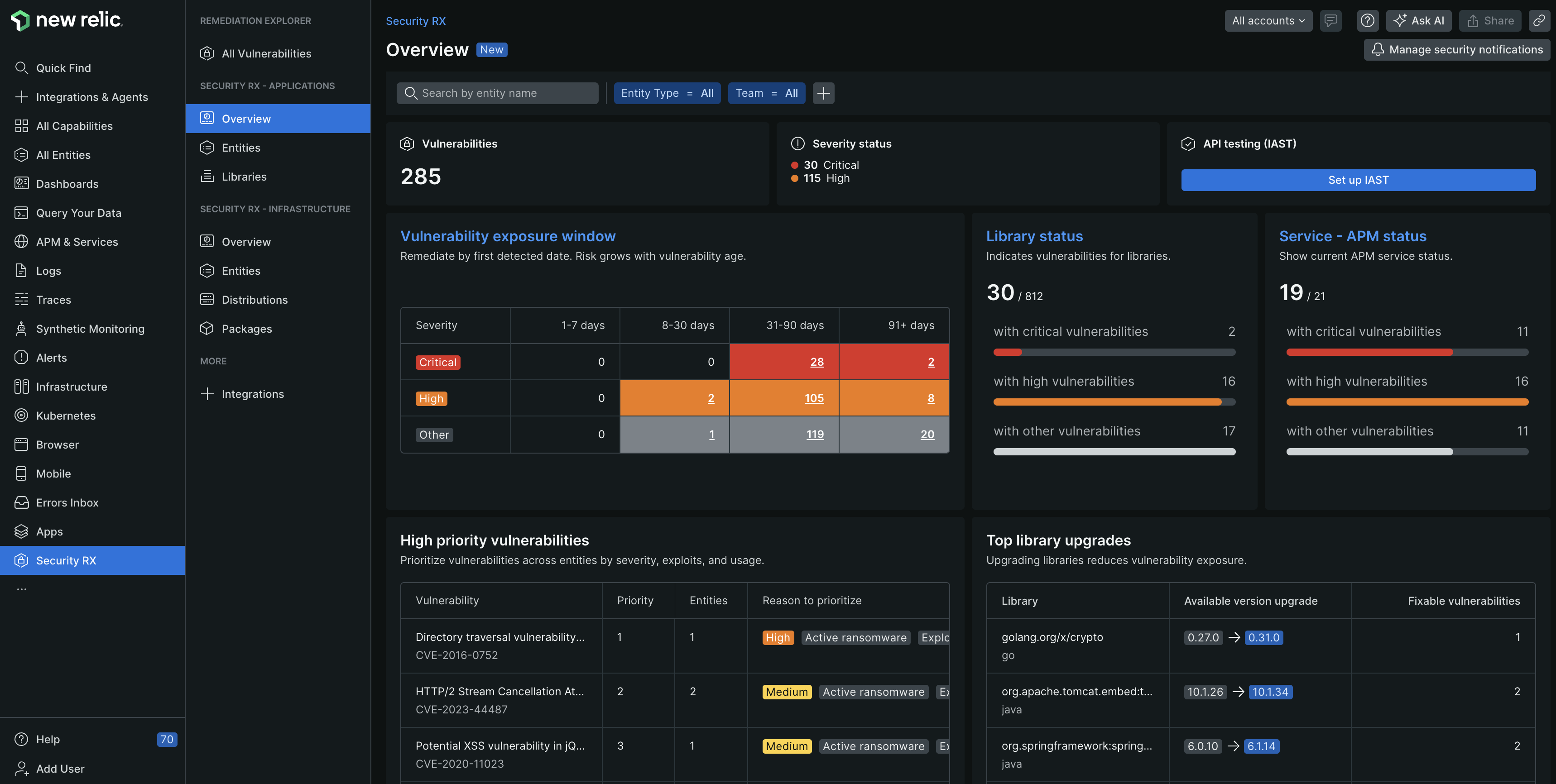
one.newrelic.com > All capabilities > Security RX
脆弱性データが New Relic に流れ始めると、さまざまなスコープビューを通じてデータにアクセスできるようになります。 システム全体の概要を表示するには、 Security RX capability > Security RX - Applications > Overviewに移動します。 このページには、システムの脆弱性とベースライン セキュリティ ハイジーンを表す厳選されたダッシュボードが提供されます。
すべてのエンティティ、ライブラリ、およびアクティブな脆弱性の脆弱性を監査することにより、システムのセキュリティをより深く掘り下げます。
Security RX - アプリケーションの概要ページからEntitiesを選択して、すべてのアプリケーションの脆弱性ステータスを確認します。 このビューにはすべてのアプリケーションとコード リポジトリが表示され、重み付けされた脆弱性スコアと重大度プロファイルに基づいて脆弱性の修復に優先順位を付けることができます。
エンティティをクリックすると、Security RX のスコープ付きエンティティ ビューが開きます。スコープ指定されたエンティティ ビューの詳細については、エンティティ レベルのセキュリティの監視に関するドキュメントをご覧ください。
「セキュリティ RX - アプリケーション」概要ページで、 Librariesを選択して、システム内のすべてのライブラリのセキュリティへの影響を確認します。 このビューには、サービスで使用されるすべてのライブラリと、脆弱性の数と重大度によるセキュリティへの影響が表示されます。
ライブラリをクリックすると、現在使用されているすべてのライブラリ バージョンのリストと、ライブラリによって検出されたすべての脆弱性を表示するタブが表示されます。
ライブラリ バージョンをクリックすると、影響を受けるエンティティと、このライブラリ バージョンによって検出された脆弱性のリストが表示されます。
Security RX - Applications overviewページからVulnerabilitiesを選択して、ソフトウェア システム内のすべての脆弱性を確認します。 このビューには、すべての脆弱性、優先順位、優先順位を付ける理由、影響を受けるエンティティの数、検出されたエンティティの数などが表示されます。
このビューは、特定の脆弱性に対応する場合に特に役立ちます。 このビューでは、各サービスが影響を受けているかどうかを確認するのではなく、エンティティやライブラリではなく脆弱性に基づいて情報を要約します。
修復する必要がある脆弱性を見つけてクリックし、サービスへの直接的な影響を確認して、推奨される修復手順を実行します。
次は何ですか?