Included patch files
This V3.0 SP10 release contains three files:
- K-300SP10NEWR.SAR
- _NEWR_DATA_PROVIDERV3.10.SAP
- _NEWR_SLT_COLLECTORV3.10.SAP
Implementation procedures
Service pack installation and configuration
- Where to install: Deploy this service pack to client 000 of your Central Monitoring System.
- Configuration location: Perform all subsequent configuration tasks in the business client of your Central Monitoring System.
- Complete instructions: For step-by-step installation procedures, consult Installation Guide V3.0 (Appendix VIII: Install Service Pack) or Admin Guide V3.0 (Section: Install Service Pack).
Updates in this patch
BTP monitoring related updates
- New BTP data providers:
NR_CF_AUDIT_EVENTS: Captures events generated by applications deployed on BTP subaccounts - Cloud Foundry Environment (Data Provider Type: Event).NR_CLOUD_CONNECTOR: Health monitoring for SAP Cloud Connector (Data Provider Type: Event).
- New utility: Utility to generate configurations for CloudALM-based data providers.
S/4 HANA and ECC related updates
- New Monitoring Groups (
/NEWR/DP_GROUP):CF: Cloud FoundrySAP_CC: SAP Cloud ConnectorSLT: SAP Landscape Transformation Server
- New data providers:
NR_SAP_CLIENT_MODIFIABLE: Event showing client modification setting in table T000.NR_SAP_BGRFC_Q: Snapshot event of BGRFC Queues.NR_SAP_LICENSE: Event of current SAP License status.NR.SAP.GW.ERROR: Metric of gateway errors.NR.SAP.GW.PERFORMANCE: Metric of gateway performance in terms of average XML size and response time.NR.SAP.SLT.INFO: Collection of metrics that monitors SLT Processes.
Bug fixes
- Fixed a bug in data providers
NR_SAP_SERVER_LISTandNR_SAP_INSTANCE_INFORMATIONwhere they retry indefinitely if the monitored system does not have port 5XX13/5XX14 opened. - Fixed a bug where join conditions are truncated in function module
/NEWR/RFC_EVENTS_COLLECTOR_JN, which is used in data providers for complex table retrieval.
Enhancements
- Configuration table
/NEWR/NRCONNECT: A new attribute for New Relic account name has been added to this configuration table. - Data provider
NR_CALM_LANDSCAPE: Performance improvements.
Collection manager updates
The Collection Manager now supports sending telemetry data through the BTP Integration Suite cloud integration.
Authorization role updates
Authorization role /NEWR/DATA_PROVIDER
Authorization role /NEWR/DATA_PROVIDER has been updated to add access to the following functions:
/SDF/GET_USER_TYPE/SDF/IMA_DC_BGRFC_Q/SDF/IMA_DC_BGRFC_T/SDF/SLIC_READ_LICENSES_700RFC_SYSTEM_INFO- New authorization object
S_TABU_RFCwithACTVT = '03'(Display)
Additional authorization objects required for job spool retrieval, which is also used by data provider NR_SAP_CERTIFICATE:
Authorization object | Description | Field |
|---|---|---|
| Background Processing: Background Administrator |
|
| Spool: Actions |
|
| System Authorizations |
|
| Authorization for External Management Interfaces (XMI) |
|
| Authorization object for XI message monitoring |
|
Authorization role /NEWR/SLT_COLLECTOR
For the new SLT data provider, the remote RFC system user requires a special authorization object S_DMIS:
Authorization object | Description | Field |
|---|---|---|
| Authority object for SAP SLO Data migration server |
|
Manual configuration updates
BTP monitoring new data providers
NR_CF_AUDIT_EVENTS
This data provider captures events generated by applications deployed on BTP subaccounts - Cloud Foundry environment. It offers the flexibility to capture all events or specific events using the AUDIT_EVENTS parameter ID.
Configuration:
- Data Provider Function:
/NEWR/CF_DATA_COLLECTOR - Finisher Function:
/NEWR/CF_AUDIT_FINISHER - Monitoring Group:
CF - Credentials Storage Table:
/NEWR/SEC_STORE
Prerequisite:
For Cloud Foundry, host authentication credentials cannot be stored in the SM59 RFC destination. They must be maintained in the New Relic credentials storage table /NEWR/SEC_STORE using transaction SM30.
This data provider comes pre-activated. Available parameters:
Parameter | Description | Default value | Required |
|---|---|---|---|
| Cloud Foundry data extraction host | No | |
| Cloud Foundry data extraction path | No | |
| Cloud Foundry data extraction query | No | |
| Events to be captured (optional) |
| No |
| Authentication destination for Cloud Foundry | ||
| New Relic platform account number | ||
| Monitored system ID | None | Yes |
NR_CLOUD_CONNECTOR
This data provider captures health monitoring data for the SAP Cloud Connector instance.
Prerequisites:
- You must use basic authentication or form field authentication to read monitoring data via API. If certificate-based authentication has been configured for the Cloud Connector, a client certificate must be used instead.
- Users must be assigned to the
sccmonitoringorsccadminroles.
Configuration:
- Data Provider Function:
/NEWR/CC_DATA_COLLECTOR - Finisher Function:
/NEWR/CC_FINISHER - Monitoring Group:
SAP_CC
This data provider comes pre-activated. Available parameters:
Parameter | Description | Default value | Required |
|---|---|---|---|
| SAP Cloud Connector host | No | |
| New Relic platform account number | No | |
| Monitored system ID | Yes |
New utility to generate configurations for CloudALM-based data providers
Configuration:
- Transaction Code:
/NEWR/GEN_DP_CALLID - Program Name:
/NEWR/GENERATE_CONFIG_CALLID - Configuration table:
/NEWR/CALLID_CNF
Prerequisites:
- Data provider
NR_CALM_LANDSCAPEmust be active and collecting data. - The BTP services to be monitored must be linked to the data provider and maintained in table
/NEWR/CALLID_INFusing transaction SM30.
Limitation:
- Can only be used for data providers assigned to monitoring group CALM (SAP Cloud ALM).
Selection criteria:
Selection criteria | Description |
|---|---|
Data provider | CALM data provider for which configuration needs to be generated |
Service type | Name of systems/services linked to your CALM |
LMS ID | List of LMS IDs configured in CALM for the selected service type |
Scope:
This utility allows you to add, change, delete, and automatically generate configurations for the selected data provider.
SAP HANA and ECC - New data providers
NR_SAP_CLIENT_MODIFIABLE
This is an event that captures the change in Client modification setting from table T000.
Configuration:
- Data Provider Function:
/NEWR/RFC_EVENTS_COLLECTOR - Finisher Function:
/NEWR/EVENTS_FINISHER - Monitoring Group:
SAP_SYSTEM - DP Period: 1 Day
This data provider comes pre-activated. Required parameters:
Parameter | Description | Default Value | Required |
|---|---|---|---|
| Display Attribute Name | No | |
| Table fields | No | |
| Table Name | T000 | No |
| Field for Date and Time | CHANGEDATE | No |
| Monitored System RFC Destination | ||
| Collection Time Period | ||
| Monitored System ID | Yes |
NR_SAP_BGRFC_Q
This data provider captures the snapshot of each BGRFC queue's locking status.
Configuration:
- Data Provider Function:
/NEWR/SDF_IMA_DC_BGRFC_Q_EVENT - Finisher Function:
/NEWR/EVENTS_FINISHER - Monitoring Group:
SAP_APPL
This data provider comes pre-activated. Required parameters:
Parameter | Description | Default Value | Required |
|---|---|---|---|
| BGRFC direction filter | No | |
| BGRFC destination filter | No | |
| BGRFC queue name filter | No | |
| Data Collection configurations | TOT_ROWS=100000 | No |
| Status group filter | No | |
| Monitored System ID |
Output attributes:
Attribute | Description |
|---|---|
| SAP Client |
| Inbound (I) or Outbound (O) |
| |
| Destination lock status: X or Space |
| Unit lock status: X or Space |
| Queue lock status |
| |
| |
| |
| Status Code |
| |
| CRIT (Critical), INTE (Interim), E (Error), L (Locked) |
Status code (STATE):
State Code | Meaning |
|---|---|
21211 |
|
21204 |
|
21213 |
|
21203 |
|
21202 |
|
21201 |
|
21216 |
|
21212 |
|
21217 |
|
21220 |
|
21222 |
|
21221 |
|
21219 |
|
21218 |
|
21206 |
|
21207 |
|
21209 |
|
21208 |
|
21214 |
|
22204 |
|
22203 |
|
22208 |
|
22207 |
|
22202 |
|
22201 |
|
22205 |
|
22206 |
|
22209 |
|
21205 |
|
21200 |
|
21210 |
|
NR_SAP_LICENSE
This data provider monitors the current SAP license status, which can be used to create alerts on expired SAP licenses.
Configuration:
- Data Provider Function:
/NEWR/LICENSE_EXPIRE_EVENT - Finisher Function:
/NEWR/STPI_FINISHER - Monitoring Group:
SAP_APPL - Metric Type: Summary
This data provider comes pre-activated. Required parameters:
Parameter | Description | Default Value | Required |
|---|---|---|---|
| Monitored System RFC Destination | ||
| Monitored System ID |
NR.SAP.GW.ERROR
This data provider extracts error counts for the SAP gateway.
Configuration:
- Communicator Function:
/SDF/E2E_DISPATCHED_COLLECTOR - Data Provider Function:
/SDF/E2E_GW_ERROR_LOG - Finisher Function:
/NEWR/STPI_FINISHER - Monitoring Group:
SAP_APPL - Metric Type: Summary
This data provider comes pre-activated. Required parameters:
Parameter | Description | Default Value | Required |
|---|---|---|---|
| OData Service Name | No | |
| Exception Name | No | |
| SAP Client Number | No | |
| Sample periods in minutes | 15 | No |
| Monitored System RFC Destination | ||
| Monitored System ID |
NR.SAP.GW.PERFORMANCE
This data provider has two metrics for gateway performance:
Metric Name (KEY_FIGURE) | Description |
|---|---|
| Average XML Size |
| Average Response Time |
Configuration:
- Communicator Function:
/SDF/E2E_DISPATCHED_COLLECTOR - Data Provider Function:
/SDF/E2E_GW_PERF - Finisher Function:
/NEWR/STPI_FINISHER - Monitoring Group:
SAP_APPL - Metric Type: Summary
This data provider comes pre-activated. Required parameters:
Parameter | Description | Default Value | Required |
|---|---|---|---|
| OData Service Name | No | |
| SAP Client Number | No | |
| Metric Name | RESPONSETIME XMLSIZE | No |
| Sample periods in minutes | 15 | No |
| Monitored System RFC Destination | ||
| Monitored System ID |
NR.SAP.SLT.INFO
This data provider provides the following metrics for SLT monitoring:
Metric Name (KEY_FIGURE) | Description |
|---|---|
| Source System Status |
| Target System Status |
| Master Job Status |
| Load Job Status |
| Trigger Status |
| Schema Status |
| Schema Latency |
| Configured Number of Load Jobs |
| Not Running but Configured Number of Load Jobs |
| Terminated Number of Load Job Runs since Last Refresh |
| Terminated Number of Master Job Runs since Last Refresh |
| Trigger Active Status |
| Table Number to be Replicated |
| Average Latency Time of the Last 24 Hours |
| Maximal Latency Time of the Last 24 Hours |
| Youngest Timestamp of Replication |
| Average Latency Time of the Last Hour |
| Maximal Latency Time of the Last Hour |
| Oldest Timestamp of a Table to be Replicated |
| Sum of all Table Entries to be Replicated |
| Max Entries to be Replicated |
| Number of Tables not Fully Replicated |
| Table Number in Error State |
Metric output:
Traffic lights (Rating):
- 0: Not active
- 1: Green
- 2: Yellow
- 3: Red
Configuration:
- Data Provider Function:
/SDF/E2E_SLT_INFO - Finisher Function:
/NEWR/STPI_FINISHER - Monitoring Group:
SLT - Metric Type: Gauge
This data provider comes pre-activated. Required parameters:
Parameter | Description | Default Value | Required |
|---|---|---|---|
| Display Configuration Name in Metric | No | |
| Master Transfer ID | No | |
| Metric Name | CON_SS_STATUS CON_TS_STATUS JOB_MASTER_STATUS JOB_LOAD_STATUS TRIGGER_STATUS STATUS_GROUP STAT_LAT24H | Yes |
| Transfer table to be monitored | No | |
| Monitored System RFC Destination | ||
| Monitored System ID |
Collection manager updates
Data transmission to New Relic
The Collection Manager program now supports sending data to New Relic using SAP Cloud Integration (SAP CPI) as middleware.
Transmission method | Description |
|---|---|
Direct | Data is sent directly from SAP to New Relic (existing functionality) |
SAP Cloud Integration | Data is routed through SAP CPI as middleware |
iFlow endpoint | iFlow endpoint destination |
Configuration steps
- Select iFlow authorization type: Choose the authorization method you'll use: ClientId/Secret, Certificate, or External Certificate.
- Create a service instance for SAP Process Integration Runtime and assign either a service key or certificate based on your selected authorization method.
- Use the New Relic-provided iFlow as a starting point. Customize it to meet your requirements, ensuring the authorization method is configured and the iFlow is deployed as an endpoint.
- Create an RFC destination (SM59) using the service key or certificate generated in the previous step along with the iFlow endpoint destination.
- Configure the Collection Manager program to use this iFlow endpoint for transmitting data to New Relic.
Integration flow
Prerequisite:
If you create a custom version of the iFlow, ensure the following mappings are included:
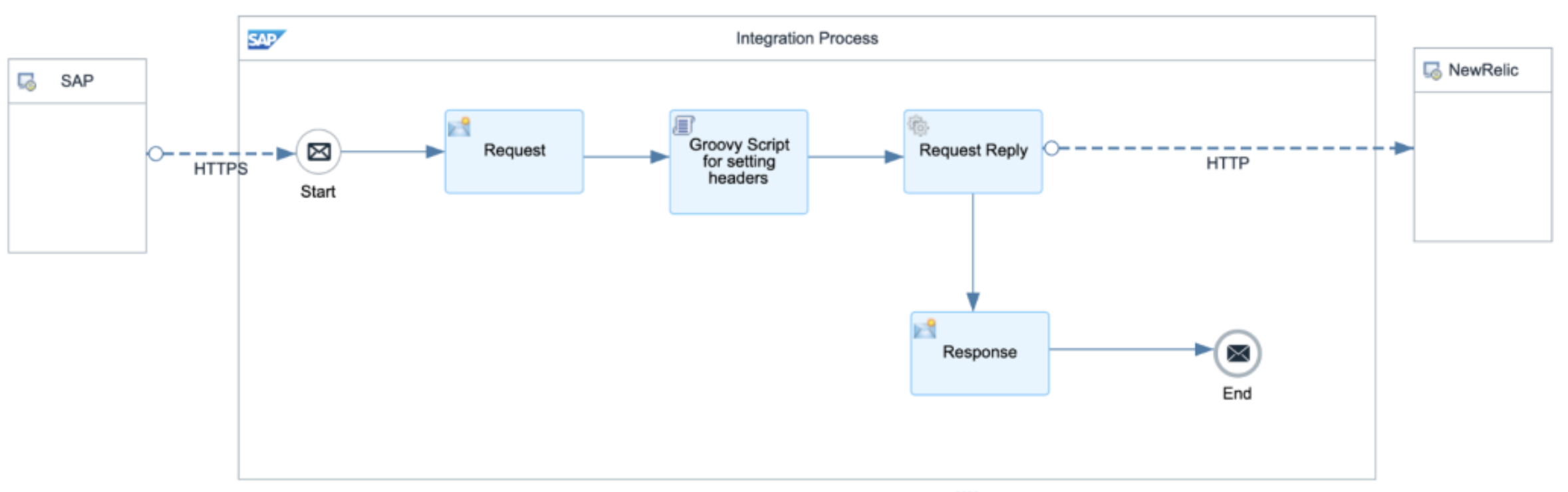
iFlow setup:
- Configure Allowed headers to include
API-Key|targetURL.

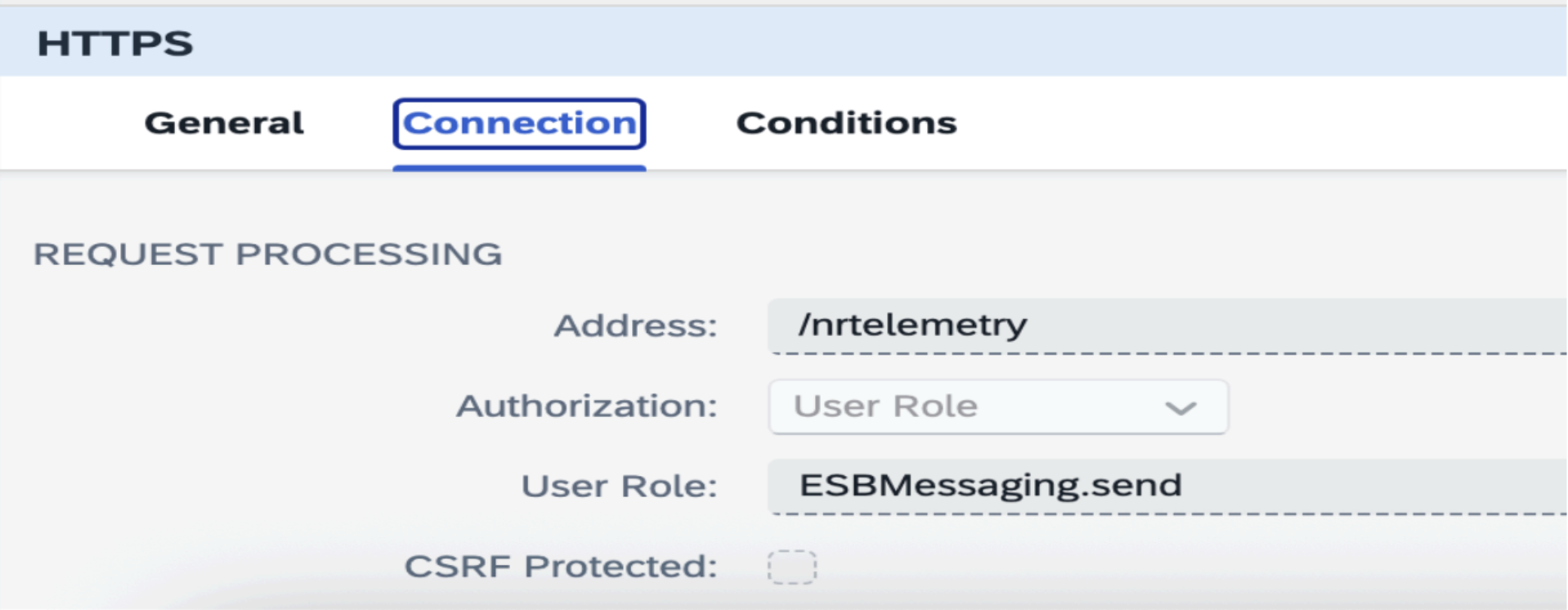
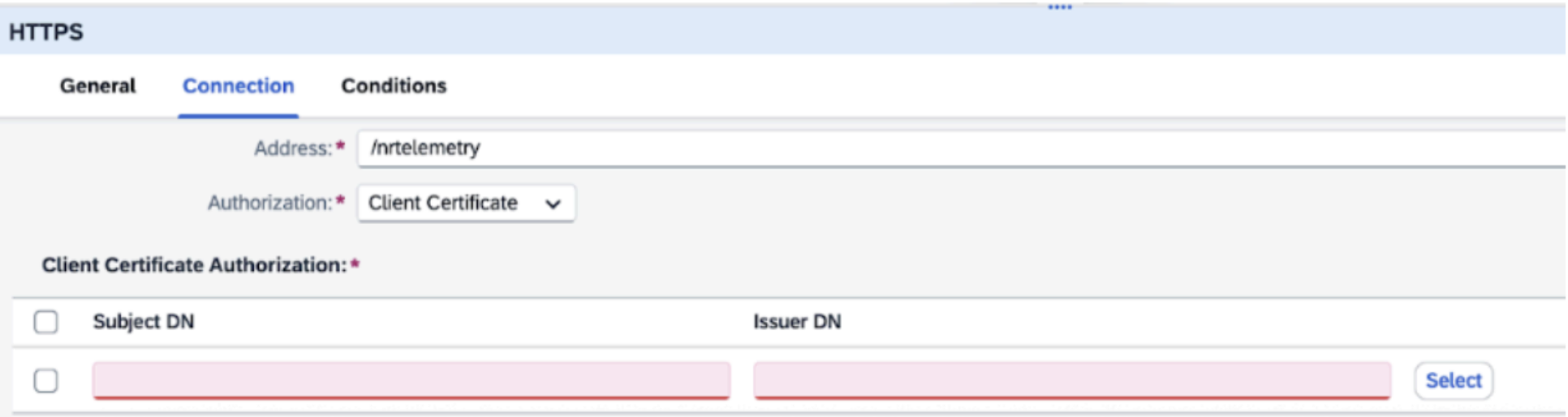
- Configure the Authorization Method based on your selected iFlow authorization type:
- For ClientId/Secret or Certificate authorization, select User Role.
- For External Certificate authorization, select Client Certificate and add the root certificates in the designated section.
- Configure the Request content modifier to store exchange properties.

- Add Groovy Script to dynamically set the headers coming to iFlow.
import com.sap.gateway.ip.core.customdev.util.Message;def Message processData(Message message) {
message.setHeader("API-Key", message.getProperty("apikey"));message.setHeader("Content-Type", "application/json");message.setHeader("Accept", "application/json");
message.setHeader("CamelHttpUri", message.getProperty("targeturl"));
def turl = message.getProperty("CamelHttpUri", String);
def logText = "---Headers---\n";
message.getHeaders().each { k, v -> logText += "${k} = ${v}\n" };messageLogFactory.getMessageLog(message)?.addAttachmentAsString("AllHeaders", logText, "text/plain");
messageLogFactory.getMessageLog(message)?.addAttachmentAsString("URL", turl, "text/plain");}Use Response content modifier to hold the message header/body.
Update the New Relic response HTTP connection.