Overview
This service pack introduces a series of API-based data providers for monitoring BTP accounts.
BTP data can be collected using two methods:
- Through BTP Process Integration Runtime Service. This option requires a subscription to "Process Integration Runtime Service" in the monitored BTP accounts.
- Through SAP CloudALM. This option requires setting up a CloudALM account to monitor the BTP accounts.
Patch files
V3.0 SP5 contains one file:
- K-300SP05NEWR.SAR
Updates in this patch
V3.0 SP5 includes the following features:
New data provider types
- API event: Event data from API calls
- API metric: Metric data from API calls
New data providers
SP05 includes the following new data providers:
NR_BTP_IS_MPL: Data provider to retrieve BTP integration suite iFlow message logs. This data provider is assigned to Monitoring Group BTP_IS. The New Relic event generated from this data provider isNR_IS_IFLOW_LOG.NR_CALM_IS_MPL: Data provider to retrieve BTP integration suite iFlow message logs via CloudALM Integration Monitoring. This data provider is assigned to Monitoring Group CALM. The New Relic event generated from this data provider isNR_IS_IFLOW_LOG.NR_CALM_LANDSCAPE: Data provider to retrieve CloudALM landscape monitoring data. This data provider is assigned to Monitoring Group CALM.
Monitored System configuration screen updates
The Monitored System configuration screen has been updated to accommodate API-based monitoring:
- An API Host field has been added to the configuration screen.
Bug fixes
- Fixed an issue where ST-PI version mismatches between the monitoring system and monitored systems may cause the data provider function for
NR_SAP_SYSTEM_USER_SESSIONto dump. - Fixed an issue where the RFC Destination filter does not pick up monitored systems that have no New Relic account specified in the configuration.
- Added automatic switching between HTTP and HTTPS protocols when calling SAPControl web services.
- Added seconds to the schedule starting time field in the Run Time control table. This requires the runtime table to be cleared after installing SP05.
- Fixed an issue in numeric attributes handling in finisher functions.
Patch files
V3.0 SP4 contains one file:
- K-300SP04NEWR.SAR
Updates in this patch
V3.0 SP4 includes the following features:
New utilities
Self monitoring/protection utility
Issues in monitored systems, such as missing authorization, RFC interface changes between SAP versions, and resource constraints (CPU, memory, etc.), may cause data provider functions to dump in remote monitored systems. This new self monitoring/protection utility records and alerts on dumps caused by data collection, and stops data collection on the affected remote system until the issues are resolved.
The utility includes the following components:
- Monitors RFC calls to remote systems. Captures any System Failure exceptions and records Data Provider Name, RFC Destination, and Remote Function Module in the
/NEWR/PROTECTIONtable. - Collects error messages and sends them to the New Relic platform as log entries (
LOGTYPE = 'NR.RFC.CALL.STATUS.LOG'), which can be used to create alerts. - Skips the failed Data Provider + RFC destination combinations in future data collection runs, until the issues are resolved and removed from transaction
/NEWR/PROTECTION.
New Relic account ID field
A New Relic Account ID column has been added to the Monitored System Configuration screen. The Monitored System/Database can now send data to a default New Relic account. If left blank, the collection job determines which New Relic account receives the data.
Bug fixes
- HANA database connection instances are now released after each SQL query and recreated for the next query. This resolves an issue where too many database connections were created for HANA data providers.
Patch files
v3.0 SP3 has two files:
K-300SP03NEWR.SAR_NEWR_DATA_COLLECTORV3.3.SAP
Updates in this patch
v3.0 SP3 includes the following features:
New utilities
New program /NEWR/ONE_COLLECTION
Starting from SP3, the functionality of /NEWR/ABAP_COLLECTION_MANAGERN and RSBTONEJOB2 are combined into one program /NEWR/ONE_COLLECTION. This program has all the parameters from /NEWR/ABAP_COLLECTION_MANAGERN and the job name used in RSBTONEJOB2. It is used the same way as the program RSBTONEJOB2.
Bug fixes
This service pack fixes the following issues:
- Changed the collection time zone from UTC to local server time zone for the data providers
NR_SAP_WORKLOAD_COMPLETEandNR.SAP.WORKLOAD.COMPLETE - Data provider parameter ID now allows mixed upper and lower case
- Data provider
NR_SAP_JOB_ALLreturns empty event attributes. This problem is specific to the central monitoring system with S/4 HANA Foundation 2023
Manual configuration steps
Starting from SP3, the functionality of /NEWR/ABAP_COLLECTION_MANAGERN and RSBTONEJOB2 are combined into one program /NEWR/ONE_COLLECTION. To schedule jobs, variants should be created for /NEWR/ONE_COLLECTION and jobs scheduled with these variants.
Create variants for /NEWR/ONE_COLLECTION
Program /NEWR/ONE_COLLECTION has all the parameters from /NEWR/ABAP_COLLECTION_MANAGERN and the job name previously used in RSBTONEJOB2. It is used the same way as the program RSBTONEJOB2.
Create variants with the following values:
Parameter | TRACE variant | IDOC variant | SYSTEM variant |
|---|---|---|---|
Job name |
|
|
|
New Relic account ID | SAP account used to receive data | SAP account used to receive data | SAP account used to receive data |
Records per trans | Default to 10000 | Default to 10000 | Default to 10000 |
Data provider name | Select single values: | Select single values: | Exclude single values: |
Execution mode | Sequential processing | Sequential processing | Parallel processing |
Min WP required | If system DIA WP >= 30, set to 6; otherwise set to 3 | N/A | If system DIA WP >= 30, set to 6; otherwise set to 3 |
Schedule collection jobs
Use transaction SM36 to schedule 3 jobs:
Parameter | Job 1 | Job 2 | Job 3 |
|---|---|---|---|
Job name |
|
|
|
Program |
|
|
|
Variant |
|
|
|
Running frequency | Every 5 minutes | Every 5 minutes | Every 5 minutes |
Security role update
Upload the new role file _NEWR_DATA_PROVIDERV3.3.SAP to the monitored systems. The new security roles exclude user master tables from the object S_TABU_NAM.
Patch files
v3.0 SP2 has one patch file for ABAP:
K-300SP02NEWR.SAR
Updates in this patch
New utilities
Telemetry attribute batch maintenance utility
Program: /NEWR/MODIFY_REGISTRY_PARALINE
This utility can be used to add configuration parameters to multiple data providers in batch mode. It can also be used to add system level tags to the data sent to New Relic. This utility can also be accessed on the /NEWR/INSTALL menu, under the "Expert Mode" section.
Key features:
- Add, delete, or update configuration parameters
- Batch mode operations across multiple data providers
- System-level tag management
Registry configuration copy utility
Program: /NEWR/COPY_TABLE_FROM
This utility was designed to copy registry table (/NEWR/DPREGISTRY) and template table (/NEWR/DP_REG_IN) with the corresponding configuration table (/NEWR/DPSELOPDIR) and (/NEWR/DP_SELOPIN) from one system/client to another system/client.
The table name cannot be changed. The new enhancement allows copying these tables to different names.
RFC check utility update
Program: /NEWR/REGISTRY_RFC_CHECK
Added a new checkbox parameter to bypass checking of NR API endpoints (External HTTP destinations). The new parameter is required when scheduling the RFC check job. If external HTTP destinations are not bypassed when checked periodically by the job, New Relic platform may mistake it for failed data transmission attempts.
Bug fixes
This service pack fixes the following issues:
- When the Central Monitoring System ST-PI version is 740 SP23 and above, calling the Log data provider function (
/SDF/E2EEM_GET_DATA) causes ABAP dump - When the Central Monitoring System ST-PI version is 640 SP23 and above, calling the IDOC data provider function (
/SDF/IMA_DC_IDOC) causes ABAP dump - If numeric attributes have empty spaces at the end, it causes the New Relic platform to reject the telemetry data. This patch removes the space
- Increased the length of count field for metric data type to prevent metric data in Gauge type from being rejected by the New Relic platform
- Truncate leading zeros of numeric attribute values to fix NR integration errors
- Pass HDB name to self monitoring span calls (only impacts self-monitoring dashboard)
Manual configuration steps
Create a background job variant for RFC check
Create a new variant for program /NEWR/REGISTRY_RFC_CHECK, with "Exclude NR API Endpoints" checkbox checked. Use this variant to schedule the RFC check job.
Use "Modify data provider configuration parameters"
This service pack includes a new utility to add/delete/modify attributes or tags for all or selected data providers in batch mode. One of the use cases for this utility is to add a system tag to show the central monitoring system where all data is collected.
Access methods:
- Menu path:
/n/NEWR/INSTALL> Expert mode > Data provider maintenance > Modify data provider configuration parameter - Transaction code:
/n/NEWR/DP_CONFIG_PARAin the SAP GUI command window
Configuration screen sections
Top section: data provider filtering
The top section of the selection screen allows filtering for the data provider where the configuration parameter should be added, deleted, or updated. If left blank, all data providers will be updated including deactivated and suspended data providers. Data provider status is part of the selection screen so you can apply the change to only data providers in certain status, such as active only.
Second section: parameter specification
Use the second section of the screen to specify the parameter to be modified. The parameter ID is mandatory. This field is not case sensitive; all characters will be converted to uppercase once saved.
重要
All the fields specified on this screen will be updated to registry as-is. Please make sure each field has a value specified. Any field left blank will be blank in the registry.
Parameter operation modes
Adding a new parameter:
When adding a new parameter, the value specified in 'Parameter Sequence #' is ignored. The sequence number will be the next available sequence number for this parameter.
Deleting a parameter:
When deleting a parameter, leaving the sequence number field blank will remove all instances of the specified parameter, regardless of the sequence number.
Updating a parameter:
When updating a parameter, a sequence number is mandatory.
Patch overview
Patch files
v3.0 SP1 has one patch file for ABAP:
K-250SP03NEWR.SAR
The patch also includes a new role file:
_NEWR_DATA_PROVIDER V3.1.SAP
Updates in this patch
New data providers
SAP Workload monitoring data providers
The main feature enhancement for SP1 is data providers from SAP Workload Monitoring (Transaction ST03N). SAP Workload Monitor uses the SAP performance database to analyze the ABAP kernel's workload and performance. It has many views, such as Workload Overview, Task Profile, Top Long Running Dialog Programs, etc.
Standard SAP function SWNC_GET_WORKLOAD_SNAPSHOT is called every 5 minutes to take performance database snapshots by two main data providers:
NR_SAP_WORKLOAD_COMPLETE(Event)NR.SAP.WORKLOAD.COMPLETE(Metric)
These retrieve snapshot data and transmit to New Relic with sub-events and sub-metrics.
Data providers and ST03 analytics views:
Data provider name | ST03 analytics view | Data provider type | Internal table name |
|---|---|---|---|
| Workload Overview | sub-metric | TASKTYPE |
| Workload Overview | sub-event | TASKTYPE |
| Transaction Profile, Standard | sub-event | TIMES |
| Time Profile | sub-metric | TASKTIMES |
| Time Profile | sub-event | TASKTIMES |
| Ranked Top 25 Program Dialog Response Time | sub-event | HITLIST_RESPTIME |
| Ranked Top 25 Database Access Response Time | sub-event | HITLIST_DATABASE |
| User Statistics: User Profile | sub-event | USERWORKLOAD |
| User Statistics | sub-event | USERTCODE |
| Frontend Statistics | sub-event | FRONTEND |
| Memory Use Statistics | sub-event | MEMORY |
| Spool Statistics | sub-event | SPOOLACT |
| Web Client Statistics | sub-event | WEBC |
| Web Client Destination Statistics | sub-event | WEBCD |
| Web Server Statistics | sub-event | WEBS |
| Web Server Destination Statistics | sub-event | WEBSD |
| RFC Client Profile | sub-event | RFCCLNT |
| RFC Client Destination Profile | sub-event | RFCCLNTDEST |
| RFC Server Profile | sub-event | RFCSRVR |
| RFC Server Destination Profile | sub-event | RFCSRVRDEST |
External outbound email data provider
This data provider (NR_SAP_EXTERNAL_OUTBOUND_EMAIL) extracts emails sent from SAP application server instance to an external address.
Bug fixes
This service pack fixes the following issues:
- Trace sending incorrect span timestamps
- The user who runs the collection job has to use the system time zone
- The collection manager dumps when HANA expensive statement data provider is not configured
- The RFC check program does not check New Relic endpoint HTTP destinations when the only monitored system is the monitoring system and RFC destination is set to 'NONE'
Manual configuration steps
There are a few data provider configuration changes that need to be manually done. Configuration changes can be performed using SAP transaction /n/NEWR/REGISTRY. Select the data provider in question and click on the "Configure" button to make the change.
Workload complete data providers configuration
The NR_SAP_WORKFLOW_COMPLETE and NR.SAP.WORKLOAD.COMPLETE data providers are shipped with SETTING_SWITCH parameters empty, therefore default values are used during execution. However, they can be adjusted for optimal performance:
SETTING_SWITCH parameter
This parameter allows a precise tuning of system settings to strike a balance of performance and system resource demands. If this parameter is not set, the default values are in force. There are multiple configuration options, which are combined and separated by semicolon:
Parameter | Description | Default value |
|---|---|---|
| Minimum percentage of free work processes over total work processes. | 25(%) |
| Minimum number of free WP, nn is 01 to 99. Between | 5 |
| Maximum waiting time (in seconds). If the data provider cannot secure enough free dialog work processes within the maximum waiting time, the collection RFC call is skipped. This might lead to a data gap. | 20 |
| Maximum IDOC header to be retrieved in each RFC call to | 10000 |
| Maximum number of events sent to New Relic Cloud in each batch. | 5000 |
| Maximum data provider work processes per user. When work process and memory limitations exist on the monitoring system ABAP servers, this parameter limits the maximum dialog work processes occupied by New Relic Monitoring for SAP. Run the New Relic Monitoring Collection Manager with a specific user ID to implement this limit. The total work processes used equals the number of WPs occupied by that user ID. If the data provider attempts to start work processes beyond this limit, it waits 1 second and retries until work processes become available or the maximum wait time is reached. | Not enforced if empty or missing |
| The user ID that runs Collection Manager. If this parameter is empty or missing, the maximum data provider work process is not enforced. | Not enforced if empty or missing |
External outbound email configuration
The NR_SAP_EXTERNAL_OUTBOUND_EMAIL data provider is normally shipped as suspended and runs wide open. However, we recommend setting filters before running. Possible filter parameters are:
EMAIL_SENDS
Specific email sender for monitoring can be enumerated here, separated by semicolon. Wildcard is not supported for this parameter.
EMAIL_STATUS
Enumerated statuses to be monitored, separated by semicolon. Leaving this parameter empty will monitor all email statuses. By default, these statuses are monitored: WAIT;TRANSIT;OK;ERROR;INCONS;FUTURE;RETRY;DIRECT;ACTIVE.
EMAIL_TITLE
Filter on emails' subject line. Wildcard * is supported for this parameter.
Security role update
Upload the new role file _NEWR_DATA_PROVIDER.SAP to the monitored systems for the new authorization required for the new data provider.
The following RFC functions are added to the RFC security object:
SX_SNDREC_SELECT
What's new in this version
Removal of Java Enterprise Connector
Starting from this version, New Relic Monitoring for SAP Solutions can connect to New Relic API endpoints without the need for Java Enterprise Connector. There will be no need for any installation activity on the operating system level. This makes this version capable of running on SAP's Private Cloud Edition (RISE).
For backward compatibility, the Java Enterprise Connector from version 2.5 may still be used with 3.0, but is no longer recommended.
Connecting to New Relic API endpoints is now managed with the ABAP Add-on in the following fashion:
- New Relic endpoints are configured as External HTTP Destination (Type G) in SAP transaction
SM59 - New Relic accounts, applicable endpoint destinations and API Ingest Keys are configured in transaction
/n/NEWR/CONNECT
New HANA database monitoring
Connect to HANA using ABAP database connection
HANA databases are now connected using native ABAP database connections. The following prerequisites must be satisfied to monitor the HANA database from the central monitoring system:
Connection to the HANA database
You must have one of the following:
- HANA Client v2.0 (version needs to match the HANA server), or
- HANA Client Lib file
libSQLDBCHDB.so(Linux) andlibSQLDBCHDB.dll(Windows) in the SAP Kernel folder (use SID Admin ID, e.g.,sd1adm)
HANA database user with catalog read and monitoring access
Sample commands:
CREATE ROLE NR_AGENT_ROLE;GRANT CATALOG READ TO NR_AGENT_ROLE;GRANT MONITORING TO NR_AGENT_ROLE;CREATE USER NRAGENT PASSWORD Xxxxxxxx NO FORCE_FIRST_PASSWORD_CHANGE;GRANT NR_AGENT_ROLE TO NRAGENT;Network access
The Central Monitoring System must have access to the HANA server and tenant DB port.
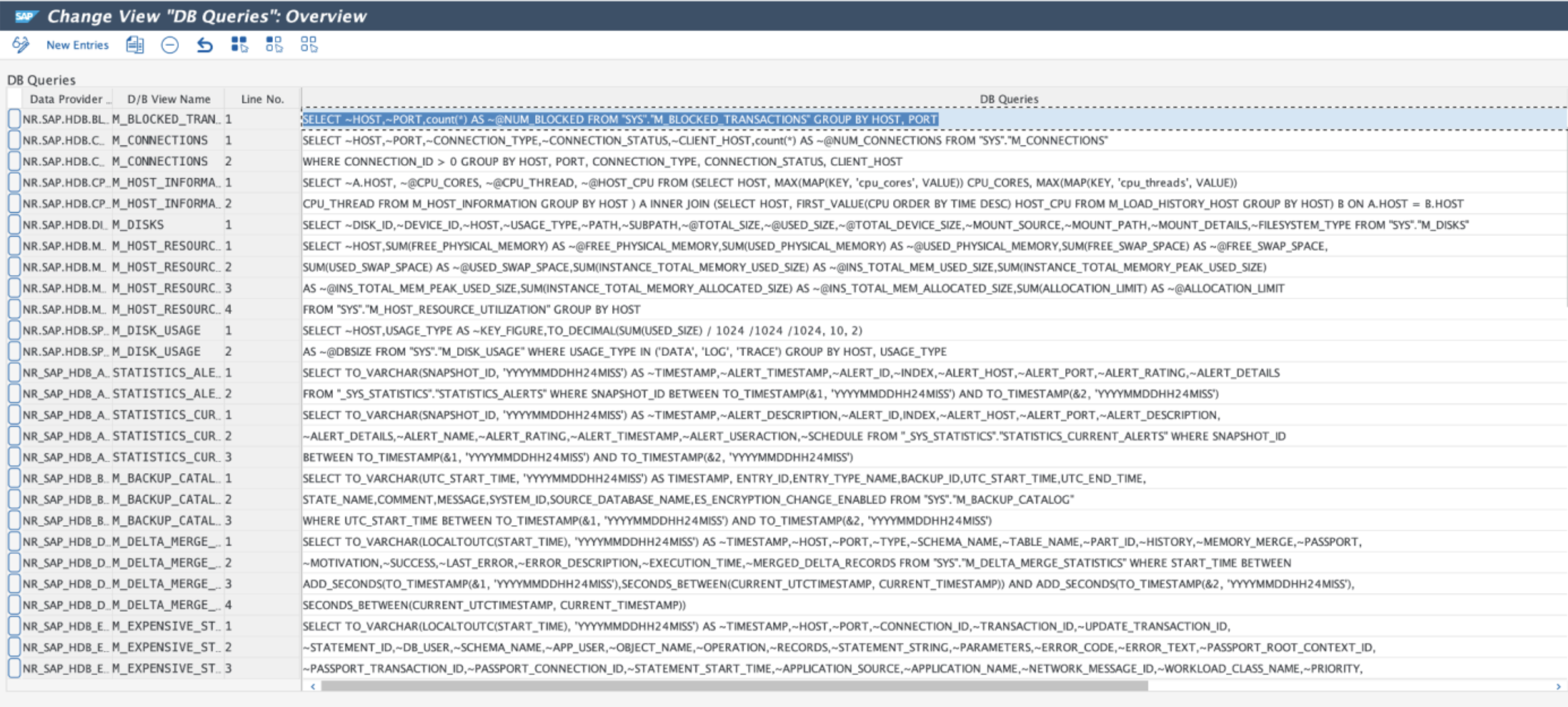
HANA database queries
The monitoring queries are now maintained using an ABAP transaction (/NEWR/DB_QUERIES). They can also be accessed via New Relic menu path Expert Mode > HANA DB Monitoring Queries in the menu /NEWR/INSTALL.
ヒント
Each query line is limited to 192 characters, and the fields retrieved need to be prefixed with ~.
New installation menu
The installation menu (/NEWR/INSTALL) is updated with 5 major sections:
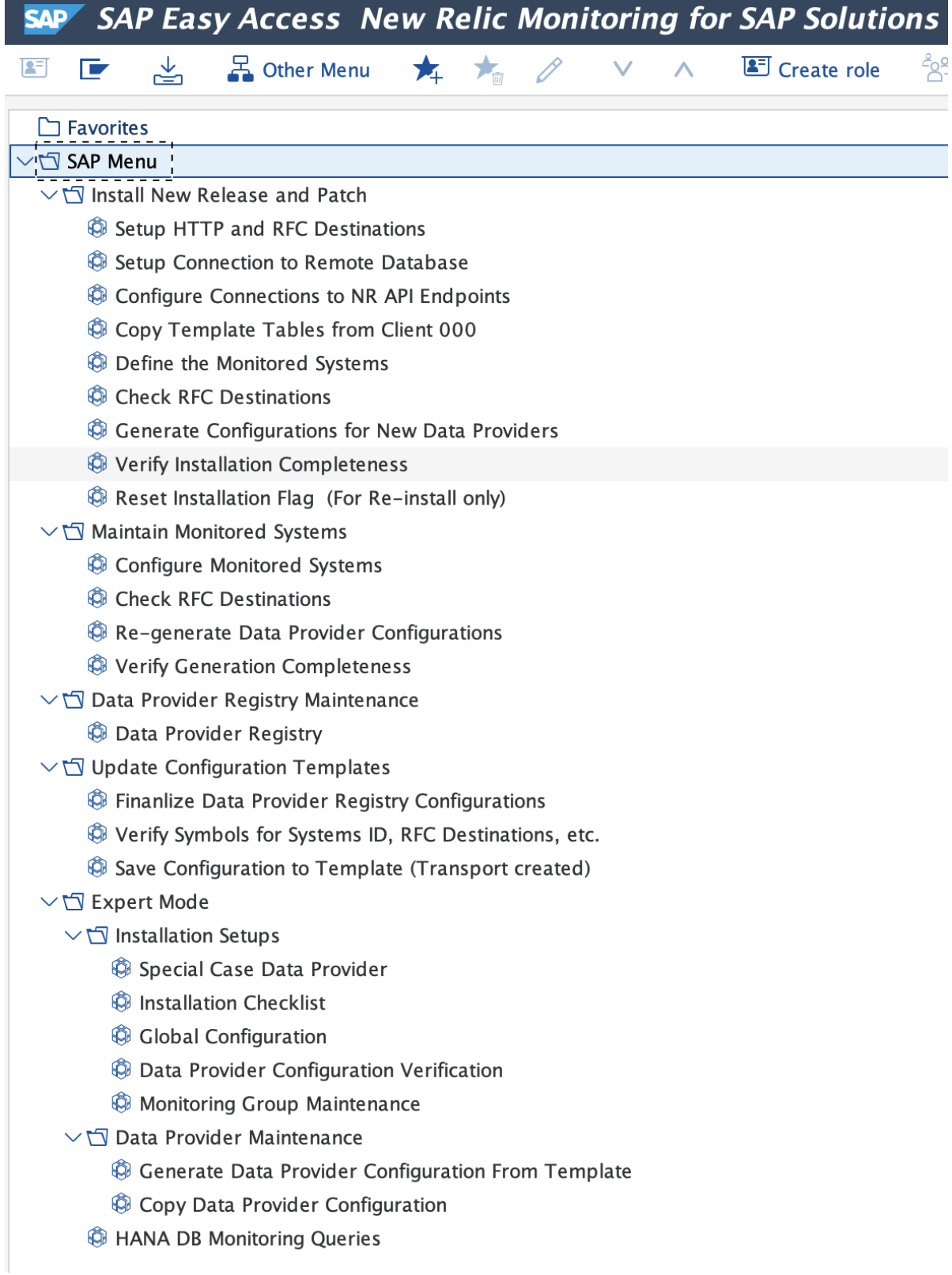
Install new release and patch
This section is used to install new release and/or service patches delivered from New Relic. The menu items in this section are intended to be executed in sequence to complete the installation process. It automatically detects the new release/patch to be installed.
重要
Once the process is completed, the process cannot be repeated, unless the installation flag is reset. Please refer to the installation guide.
Maintain monitored systems
Use this section to add or remove monitored systems or change monitoring groups. The data provider registry configurations can be re-generated in this section as well.
Data provider registry maintenance
This is a convenient way to access the transaction /n/NEWR/REGISTRY.
Update configuration templates
Configuration changes for the data providers, including custom data providers, can be saved back to the template in this section. Once saved, the changes will not be lost when the configurations are generated again.
Expert mode
Here are advanced utilities to maintain the support tables for the installation process, including adding new database queries to monitor the HANA database. Details of these utilities are covered in the Administration Guide.
Supported SAP versions
New Relic Monitoring for SAP Solutions is compatible with the following SAP versions:
SAP_BASIS | SAP_ABA | ST_PI |
|---|---|---|
740 | 740 | SP14 |
750 | 750 | 740 SP14 |
750 | 75A | 740 SP14 |
751 | 75B | 740 SP14 |
752 | 75C | 740 SP14 |
753 | 75D | 740 SP14 |
754 | 75E | 740 SP14 |
755 | 75F | 740 SP14 |
756 | 75G | 740 SP14 |
757 | 75H | 740 SP14 |
758 | 75I | 740 SP14 |
Install New Relic Monitoring for SAP Solutions v3.0
Installation packages included
There are two installation packages included:
K-300AOIINNEWR.SAR: For a fresh install of the New Relic Monitoring for SAP Solutions v3.0K-300AOUINNEWR.SAR: For upgrade to the New Relic Monitoring for SAP Solutions v3.0 from v2.5
Upgrade from v2.5
If you are upgrading from v2.5, it is important to save any configuration changes before configuring the new v3.0. You can do this before or after the v3.0 ABAP Add-on is installed in client 000.
注意
The configuration templates must be saved BEFORE copying the new template from client 000. Otherwise, the factory setting will override any changes made in the previous version.
To save the configuration template:
- Open the menu
/n/NEWR/INSTALL - Open Update or Save Configuration Template folder
- Follow the steps
Update HANA database monitoring
If HANA database is monitored in v2.5, there are a few more steps required to convert from v2.5 JDBC-based database connection to v3.0 ABAP database connection:
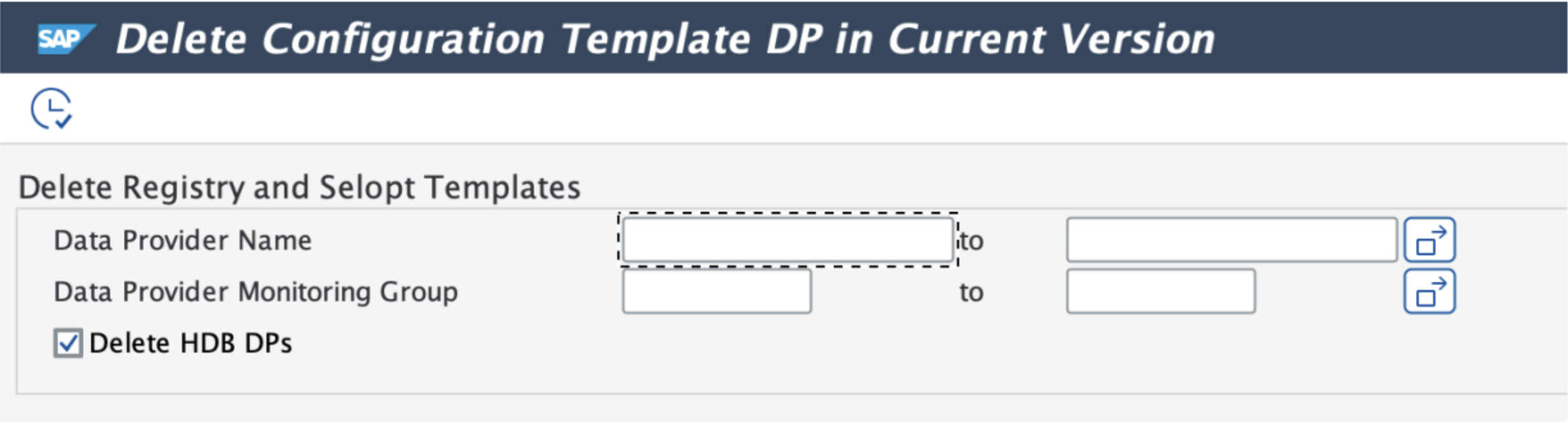
Remove v2.5 HDB configuration template
From v2.5 to v3.0, New Relic Monitoring for SAP changes the way it monitors the HANA database from using the Java Enterprise Connector via JDBC to using SAP ABAP database connection. Because of this drastic change, to upgrade, you need to first remove the v2.5 configuration templates.
Steps:
- Use transaction
SE38to execute program/NEWR/REP_DELETE_INS_TEMPLATE - Normally, no adjustment of the parameters is needed
- Click on the execute button
Set up ABAP database connection
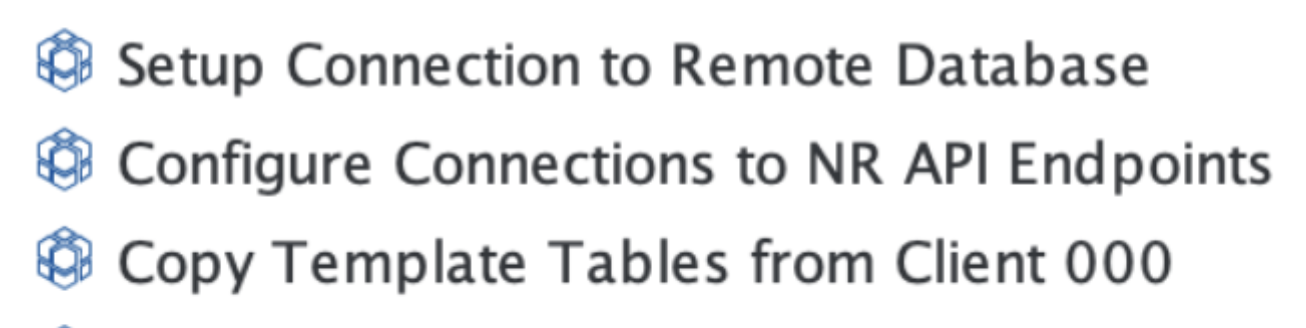
Follow the v3.0 installation guide to complete these tasks:
- Set up HANA database connection in
DBACOCKPIT - Configure connection to New Relic endpoints
- Copy new configuration template from client 000
In the menu folder Install new releases and patches, execute the menu items in sequence.
Update the monitoring group for the monitored systems
In v2.5, because the database connection is handled by the Java Enterprise Connector, the HANA_DB monitoring group is normally set up separately from the rest of the data providers. In v3.0 this is no longer necessary. The separate configuration line connecting to Java Enterprise Connector (normally RFC destination NR_EI_AGENT) should be removed.

To complete the configuration, perform the following steps:
Remove the v2.5 HANA_DB monitoring configuration (row identified by the RFC destination
NR_EI_AGENT)Add the newly created database connection to the DB Connection field
Configure the monitoring group:
- Highlight the monitored system (e.g., SD2)
- Click on "Monitoring Group" button
- Turn on "HANA_DB"
- Click on the "Generate" button
Continue to the next step to re-generate the registry configuration
Re-generate the registry configuration
After updating the monitoring groups, complete the registry configuration regeneration to finalize the upgrade process.