Vulnerability Identifier: NR26-04
Priority: Critical
Summary
We are notifying customers of a critical security vulnerability (CVE-2026-5281) identified in Google Chrome. This issue originates from a third-party component and is not a flaw in the New Relic product itself.
Within the New Relic ecosystem, the potential impact is limited to Synthetic Monitoring. Specifically, exposure may occur only if a synthetic monitor using a vulnerable browser instance navigates to a malicious or compromised webpage.
Action required
To use the latest Chrome version (146.0.7680.177) with Synthetics Node Browser Runtimes:
For Public Monitors: Select Latest from the runtime version dropdown in your monitor settings for Scripted Browser monitors
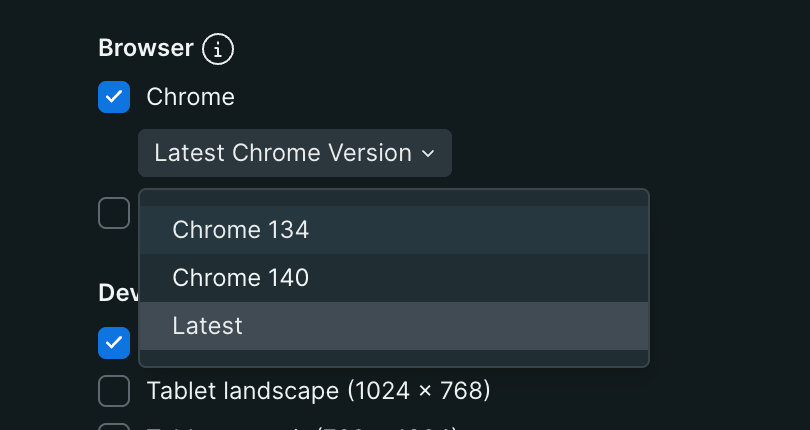
For Private Monitors: Use DockerHub Image with rc1.14 tag (link) to get the latest synthetics-node-browser-runtime image which uses chrome 146.0.7680.177 version. You can use the DESIRED_RUNTIMES variable to configure the runtime version while starting the Private Location.
Frequently Asked Questions
How can I tell if my scripted monitors are impacted?
Customers can get a list of monitors that are not on the latest Chrome version by using this account-specific NRQL query:
select uniques(monitorId) from SyntheticCheck where type = 'SCRIPT_BROWSER' and browserVersion !='146.0.7680.177-1' and browser!='FIREFOX' since 1 week agoIf I am running on Private Locations do I need to update my Synthetics Job Managers along with Node Browser Runtimes?
We generally recommend customers use the latest SJM release (release-513 or later).
How do I update the Simple Browser and Step Monitors?
For Public Location: No separate action is required from customers as we are upgrading to Latest from our end.
For Private Locations: Use DockerHub Image with rc1.14 tag (link) to get the latest
synthetics-node-browser-runtimeimage which uses chrome146.0.7680.177version. You can use theDESIRED_RUNTIMESvariable to configure the runtime version while starting the Private Location.What should I do if my Scripted Browser monitor is failing after upgrading to the latest version of Chrome?
If you encounter issues validating your scripts on the latest Chrome 146+ runtime, please refer to following documents for reference:
- Transition Guide for Scripted Browser Monitors
- Troubleshooting Scripted Browser Errors
- Troubleshooting Runtime Upgrade Errors
- Troubleshooting Private Locations
If additional assistance is needed, open a case with our Support team through the help section in the New Relic platform.
Technical Vulnerability Information
Publication History
April 04, 2026 - NR26-04 Published