La integración de New Relic Elasticsearch OpenTelemetry (OTel) proporciona observabilidad integral para sus clústeres Elasticsearch utilizando protocolos OpenTelemetry estándar de la industria. Al aprovechar el OpenTelemetry Collector, obtienes una canalización unificada que recopila de manera eficiente tanto métricas como logs de tu infraestructura de Elasticsearch, lo que garantiza una monitorización rápida y confiable que se integra directamente con New Relic.
Importante
Elija su enfoque de monitoreo: Esta integración basada en OpenTelemetry ofrece un monitoreo moderno y neutral para el proveedor. Si prefiere nuestro enfoque tradicional o necesita compatibilidad específica, consulte nuestra integración estándar de Elasticsearch.
¿Por qué elegir este enfoque de OpenTelemetry?
- Recopilación unificada de datos: Un único recopilador gestiona métricas, logs y rastreos de Elasticsearch y sistemas host.
- Neutralidad de proveedor: Utiliza estándares de código abierto que funcionan con cualquier plataforma de observabilidad, sin bloqueo de proveedor.
- Alto rendimiento: El procesamiento por lotes, la compresión y la reducción de la cardinalidad integrados minimizan el impacto en los recursos.
- Arquitectura preparada para el futuro: Construida sobre estándares abiertos en evolución que se adaptan a medida que crece tu infraestructura.
- Integración nativa de New Relic: procesamiento de datos optimizado y experiencia de dashboard sin problemas.
Caso de uso: Una empresa de comercio electrónico utiliza Elasticsearch para su función de búsqueda de productos. Al usar esta integración, su equipo de operaciones puede ver si su servicio de búsqueda está en buen estado, qué tan rápido responden las búsquedas y recibir notificaciones antes de que se agote la memoria, todo desde un solo dashboard. Cuando los clientes comienzan a quejarse de resultados de búsqueda lentos, el equipo puede ver rápidamente si es un problema de Elasticsearch, un problema del servidor o algo más al ver todos sus datos de monitoreo juntos.
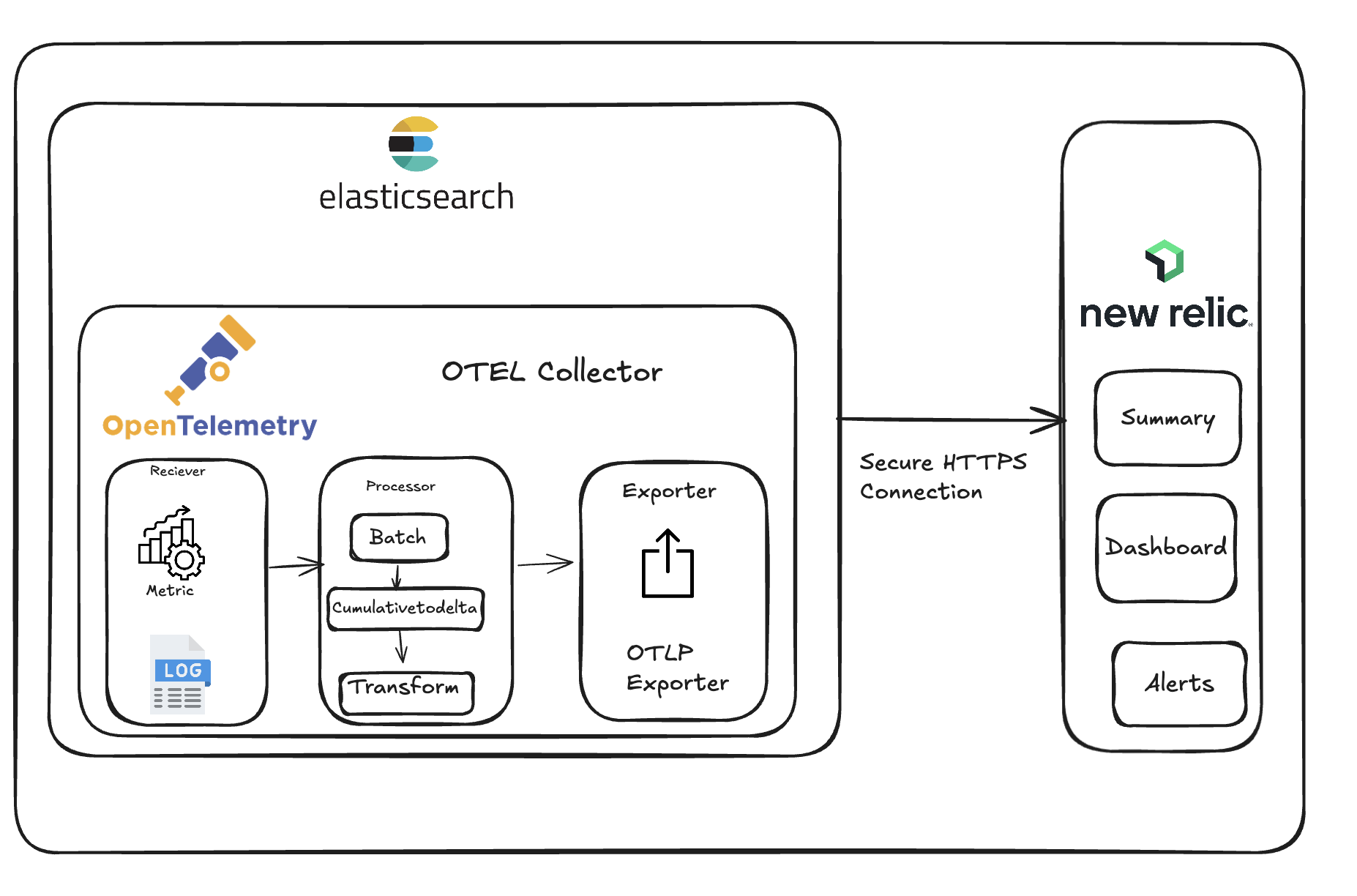
Lo que obtendrás
Supervise su infraestructura de Elasticsearch con:
- Monitoreo del estado del clúster: rastree el estado del nodo, la distribución de fragmentos y el estado del clúster en tiempo real.
- Información sobre el rendimiento: supervise la latencia de búsqueda, las tasas de indexación y las métricas de rendimiento de la JVM.
- Utilización de recursos: Vea el uso de CPU, memoria, disco y red en todos los nodos.
- Alertas proactivas: Recibe notificaciones antes de que los problemas afecten a tus usuarios con umbrales inteligentes.
- Correlación de pila completa: Conecte las métricas de Elasticsearch con los datos de la aplicación y la infraestructura.
Empezar
¿Listo para monitorear su clúster de Elasticsearch? Elija el método de instalación que coincida con su entorno:
Instalación en el host: Instalar la integración de OpenTelemetry para Elasticsearch - Para Elasticsearch que se ejecuta directamente en servidores o VM.
Instalación de Kubernetes: Monitorear Elasticsearch en Kubernetes - Para implementaciones de Elasticsearch en contenedores que usan el descubrimiento automático de pods.
Referencia de métricas y datos
La integración de OpenTelemetry con Elasticsearch recopila más de 50 métricas que cubren la salud del clúster, el rendimiento, las estadísticas de la JVM y el monitoreo de la infraestructura. Estas métricas le ayudan a monitorear aspectos críticos como la distribución de fragmentos, la latencia de búsqueda, el uso de memoria y la utilización de recursos.
Para obtener información detallada sobre todas las métricas disponibles, sus descripciones y cómo se organizan sus datos en New Relic, consulte la referencia de métricas de Elasticsearch.
Próximos pasos
¿Listo para comenzar a monitorear su clúster de Elasticsearch? Siga estos pasos para obtener una observabilidad integral:
Elija su método de instalación:
- Instalación en host - Para Elasticsearch que se ejecuta en servidores o máquinas virtuales
- Instalación de Kubernetes - Para implementaciones en contenedores con descubrimiento automático de pods
Explore sus datos - Aprenda a encontrar métricas en la UI de New Relic y crear consultas NRQL personalizadas
Revise la referencia de métricas - Comprenda todas las métricas disponibles para la salud del clúster, el rendimiento y el monitoreo de la infraestructura