El monitoreo de red eBPF proporciona una visibilidad profunda de la comunicación de red de sus aplicaciones al rastrear métricas críticas de DNS, TCP y sockets directamente desde el kernel. A diferencia del monitoreo de red tradicional que se enfoca en la conectividad de la infraestructura, esta solución ofrece información de la red en el contexto de sus aplicaciones y servicios específicos, ayudándole a responder "¿Es la aplicación o la red?"
Esta capacidad proporciona un análisis profundo de red a nivel de paquetes directamente desde el kernel, lo que ayuda a eliminar la necesidad de herramientas adicionales de análisis de red, al tiempo que ofrece telemetría de red granular correlacionada con los datos de rendimiento de su aplicación. Puede utilizar estas métricas para diagnosticar problemas de conectividad, identificar cuellos de botella de rendimiento y rastrear la tasa de transferencia de datos, todo dentro del contexto de las aplicaciones y servicios específicos que son importantes para su negocio.
Metadatos de dirección IP
Para una visibilidad integral de la red y capacidades de solución de problemas, el monitoreo de red eBPF recopila direcciones IP como parte de los metadatos de conexión de red. Esto incluye tanto las direcciones IP de origen como las de destino para conexiones TCP, consultas DNS y otras comunicaciones de red. Los datos de direcciones IP son esenciales para:
Identificación de puntos finales de conexión y rutas de red
Rastreo de dependencias de red entre servicios
Diagnóstico de problemas de conectividad y cuellos de botella de rendimiento
Correlación de métricas de red con aplicaciones y servicios específicos
Los datos de métricas de red se retienen según su configuración de retención de datos de New Relic. Puede configurar los períodos de retención de datos a través de la configuración de su cuenta o contactando a su equipo de cuenta para requisitos de retención personalizados. Para obtener más información, consulte Administrar la retención de datos. Si no desea recopilar las direcciones IP de origen y destino para las comunicaciones de red, por favor no instrumente el monitoreo de red eBPF.
Monitoreo de capacidades de red
El dashboard de métricas de red proporciona un análisis integral de la red mediante seis pestañas especializadas, diseñadas para guiarlo a través de un workflow sistemático de resolución de problemas:
Pestañas de monitoreo de red
El dashboard de monitoreo de red está organizado en las siguientes pestañas, cada una de las cuales ofrece información específica para ayudarlo a diagnosticar y resolver problemas de rendimiento relacionados con la red:
Errores: La pestaña Errors es su punto de partida para diagnosticar problemas de red, lo que ayuda a proporcionar una vista integral de todos los errores relacionados con la red. Esto incluye:
- Errores de conexión DNS y recuentos de errores
- Errores de conexión TCP y recuentos de errores
- Errores HTTP, como los códigos de estado 4xx y 5xx, junto con sus recuentos y tendencias a lo largo del tiempo
Latencia: La pestaña Latency ofrece información detallada sobre el rendimiento de la red mediante el seguimiento de métricas de tiempo críticas, incluyendo:
- Latencia del handshake TCP, que mide el tiempo que toma establecer una conexión TCP
- Latencia de entrega de paquetes TCP, que indica cuánto tiempo tardan los paquetes en ser transmitidos y confirmados
- Latencia de resolución de DNS, que muestra cuánto tiempo toma encontrar una dirección IP para un nombre de dominio
Pérdida de paquetes: La pestaña Packet loss le ayuda a identificar problemas de confiabilidad de la red al rastrear:
- Descartes de paquetes a nivel de kernel, que indican paquetes que fueron descartados por el sistema operativo
- Tiempos de espera de conexión TCP, que ocurren cuando una conexión no logra establecerse dentro de un período de tiempo especificado
- Retransmisiones de paquetes, que ocurren cuando los paquetes se pierden y deben reenviarse
Sockets: La pestaña Sockets proporciona información sobre problemas de conexión a nivel del sistema, incluyendo:
- Errores de socket y sus conteos, que pueden indicar problemas con la asignación de búfer, limitaciones de memoria o límites de descriptores de archivos
Banderas TCP: La pestaña TCP flags ofrece una visibilidad profunda de los estados de conexión TCP, incluyendo:
- Indicadores TCP de entrada, que muestran el estado de las conexiones entrantes a través del análisis de paquetes SYN, ACK, FIN y RST
- Flags TCP salientes, que muestran el estado de las conexiones salientes mediante el análisis de paquetes SYN, ACK, FIN y RST
Conexiones: La pestaña Connections proporciona metadatos de conexión completos para el tráfico entrante y saliente, incluyendo:
- Recuentos de conexiones, que muestran el número de conexiones activas a lo largo del tiempo
- Estadísticas de duración de la conexión, que indican cuánto tiempo se mantienen las conexiones
- Detalles a nivel de proceso, que proporcionan información sobre qué aplicaciones están generando tráfico de red
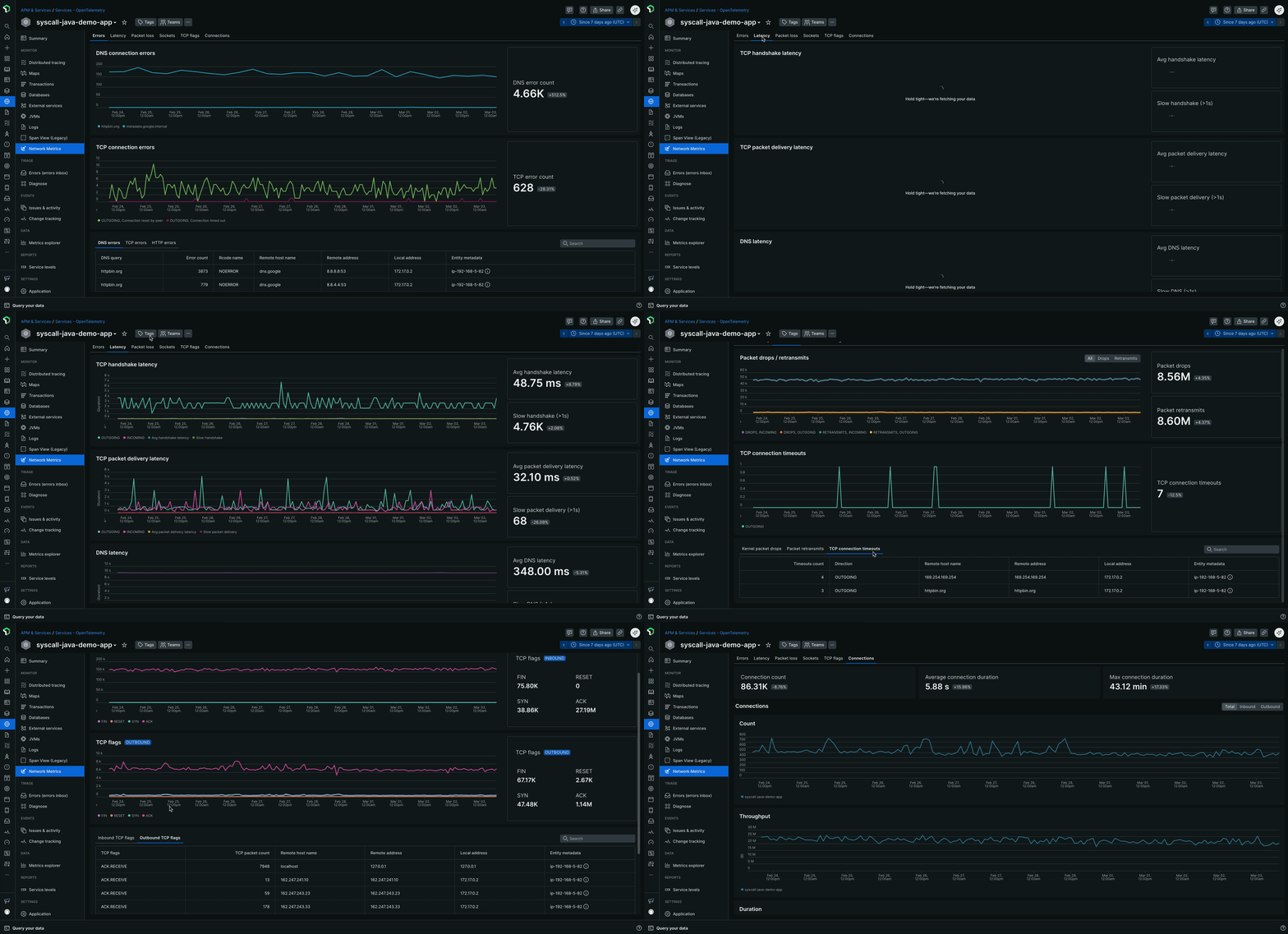
Casos de uso
- Solución de problemas de llamadas lentas a API externas: Cuando las aplicaciones muestran tiempos de respuesta degradados hacia servicios externos, las métricas de red pueden ayudar a identificar si el problema se debe a retrasos en el protocolo de enlace TCP, pérdida de paquetes o problemas de retransmisión, en lugar de a la lógica de la aplicación.
- Análisis de la causa raíz de la degradación del rendimiento: correlacione los problemas de rendimiento de la aplicación con los problemas de la capa de red examinando el estado de la conexión TCP, la latencia de entrega de paquetes y los cambios en el estado de la conexión.
- Monitoreo de comunicación entre servicios: monitoree la salud de la comunicación entre microservicios en todo su clúster, identificando congestión de red o problemas de enrutamiento entre servicios.
- Resolución de problemas de dependencia externa: Identifique rápidamente cuándo los problemas de rendimiento se originan en extremos externos de API o servicios de terceros mediante el análisis de los patrones de red saliente y la calidad de la conexión.
Opciones de implementación
Puede habilitar la métrica de red eBPF de dos maneras dependiendo de su configuración de monitoreo actual:
Para clientes actuales de New Relic APM: Si ya tiene agentes de New Relic APM desplegados, puede agregar métricas de red eBPF junto con su instrumentación existente. El agente eBPF opera en modo de solo red, complementando sus datos de APM con información de red a nivel de kernel sin interrumpir su configuración actual. Para obtener más información, consulte la sección Habilitar el modo de solo métricas de red para clientes de APM existentes.
Para un monitoreo más integral: Despliegue el agente eBPF completo con capacidades tanto de APM eBPF como de métricas de red para una observabilidad completa a través de las capas de aplicación, infraestructura y red. Este enfoque proporciona una recolección unificada de telemetría a través de un solo agente.
Ambas opciones de implementación proporcionan las mismas capacidades de Monitoreo de red que se describen a continuación.
Habilite el modo de red solo métrica para clientes APM existentes
Si ya tiene agentes de APM de New Relic desplegados y desea agregar visibilidad de red sin modificar su instrumentación de APM actual, puede configurar el agente eBPF para operar en el modo de solo métricas de red. Esto proporciona información de red a nivel de kernel que complementa sus datos de APM existentes.
Cuando el modo de solo métricas de red está habilitado, el agente eBPF detecta automáticamente la presencia de agentes de APM de New Relic existentes en su sistema y suprime de forma inteligente la recolección de datos de APM de eBPF para evitar conflictos. Esta integración perfecta le permite mantener su instrumentación de APM actual mientras obtiene visibilidad adicional de la capa de red, lo que garantiza que ambas soluciones de monitoreo funcionen juntas para ayudar a evitar la duplicación.
Para el entorno de Kubernetes
Entorno de host Linux
Ver el eBPF Monitoreo de datos rojos
Puede ver los datos de Monitoreo de red eBPF en la UI New Relic APM :
- Vaya a one.newrelic.com > APM & Services.
- Seleccione la entidad eBPF deseada.
- En la sección Monitor, haga clic en Network Metrics. Se muestra la red métrica.
Sugerencia
El agente eBPF genera automáticamente nombres de entidades de forma diferente según el entorno:
En los hosts o Docker, estos nombres son una combinación del nombre del proceso, su directorio o ID de contenedor y el puerto de escucha. Por ejemplo,
ruby:/home/ubuntu/app:[5678]ojava:f4aead533895:[8080].En Kubernetes, estos nombres se derivan del nombre del servicio, por ejemplo,
mysql-database-service.Asignar un nombre personalizado a la aplicación:
Puede asignar un nombre personalizado a su aplicación configurando la variable de entorno
NEW_RELIC_APP_NAMEtanto para Kubernetes como para las aplicaciones en el host.
APM eBPF
Aprenda a usar el APM de New Relic basado en eBPF para el monitoreo de aplicaciones sin código y agnóstico al lenguaje con descubrimiento automático de servicios.
resolución de problemas eBPF
Aprenda a solucionar problemas con el agente eBPF de New Relic.
eBPF mejores prácticas
Conozca las mejores prácticas para emplear el agente eBPF de New Relic.