---
title: Use lookups to query table data
source: https://docs.newrelic.com/docs/nrql/using-nrql/lookups
---
When you [upload CSV-format lookup tables](https://docs.newrelic.com/docs/logs/ui-data/lookup-tables-ui), you can use the `lookup()` function to access that data in your NRQL queries. You can use lookup tables to help you parse telemetry data and customize your data groupings.
## Basic query syntax [#basic-syntax]
The following lookup query shows the basic syntax for this function using a table named `storeNames` and selecting all the data from that table:
```sql
FROM lookup(storeNames)
SELECT *
```
This query selects specific attributes from that same table:
```sql
FROM lookup(storeNames)
SELECT store_ID, store_name, description
```
## Query limits [#query-limits]
Lookup tables support a higher [`LIMIT`](https://docs.newrelic.com/docs/query-your-data/nrql-new-relic-query-language/get-started/nrql-syntax-clauses-functions/#sel-limit) when querying than other NRQL data types do. You can set a `LIMIT` of up to 20,000 when using a lookup table within a query, [subquery](https://docs.newrelic.com/docs/query-your-data/nrql-new-relic-query-language/get-started/subqueries-in-nrql/), and [nested aggregation](https://docs.newrelic.com/docs/query-your-data/nrql-new-relic-query-language/nrql-query-tutorials/nested-aggregation-make-ordered-computations-single-query/).
> #### 💡 TIP
>
> When you use a lookup table within a subquery, the outer query `LIMIT` is bound by the standard maximum value unless it also uses a lookup table.
## Technical limitations [#limitations]
- You can't use lookup data with NRQL alert conditions.
- You can only query lookup tables from the [account](https://docs.newrelic.com/docs/accounts/accounts-billing/account-structure/new-relic-account-structure/#organization-accounts) you uploaded the lookup table in.
- The following NRQL clauses aren't supported with lookup queries:
- `TIMESERIES`
- `COMPARE WITH`
- `EXTRAPOLATE`
- **Note:** You can use these clauses if you contain the lookup query in an inner query. See [this query](#item-ids) for an example.
## Lookup examples [#query-with-data]
Lookup tables allow you to use queries that combine data with your New Relic-stored telemetry data.
Here are some query examples:
**Avoid hardcoding a long list of hosts**
This query avoids hardcoding a long list of hosts by querying host names contained in a lookup table:
````sql
FROM Log
SELECT count(*)
WHERE hostname IN (FROM lookup(myHosts) SELECT uniques(myHost))
```
````
**Query using JOIN**
Using `JOIN` queries can make your data easier to understand. For example, this query for a custom event type uses the `storeNames` table to show the store names along with the total sales.
````sql
FROM StoreEvent
JOIN (FROM lookup(storeNames) SELECT store_ID as storeId, storeName AS name LIMIT 10000) ON shopId = storeId
SELECT shopId, storeName, totalSales
```
This allows a limit of 10,000 because lookup tables support a higher limit than other NRQL data types, as is mentioned in the [query limits](#query-limits) section.
````
**Map values to broader categories**
This query maps `shopId` values to a broader `storeCategory` value by using a `JOIN` clause on lookup table data. This enables you to perform aggregations on `StoreEvent` records based on these broader categories and extract new insights from your data.
````sql
FROM StoreEvent
JOIN (FROM lookup(storeCategories) SELECT store_ID as storeId, storeCategory) ON shopId = storeId
SELECT sum(totalSales) FACET storeCategory
```
````
**Translate status codes**
Here's a query that translates status codes to readable summaries of the status:
````sql
FROM Transaction
JOIN (FROM lookup(statusCodeTable) SELECT status_code, status_summary, status_definition)
ON http.statusCode=status_code
SELECT count(*) FACET status_summary
```
Here are some example results:
 ````
**Translate item IDs**
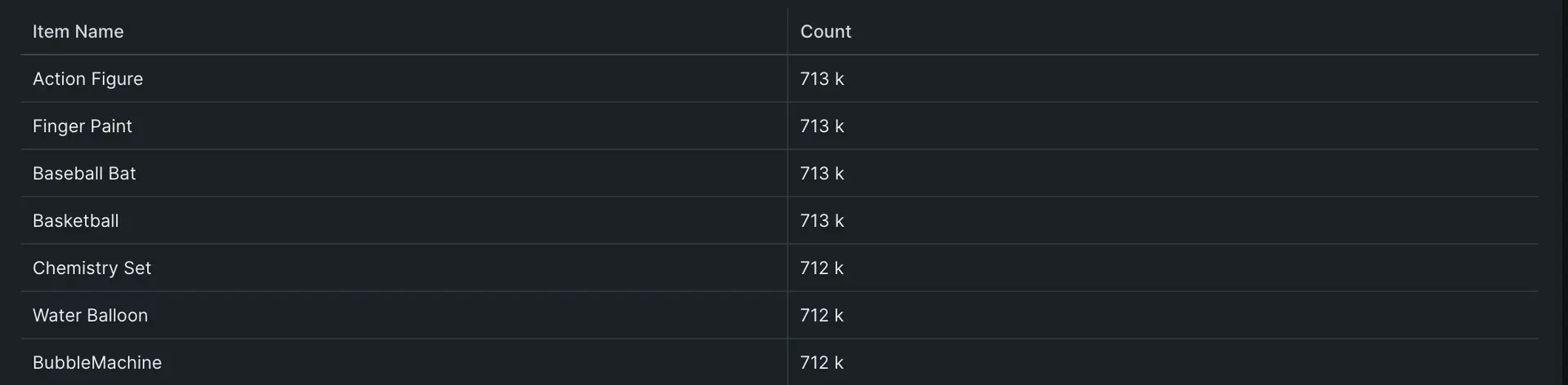
This query shows how several NRQL features can work together to get business information from queries of log data. The below query:
1. Extracts information about items from log messages using [`aparse()`](https://docs.newrelic.com/docs/query-your-data/nrql-new-relic-query-language/get-started/nrql-syntax-clauses-functions/#func-aparse)
2. Uses `JOIN` on lookup table data to get user-friendly item names
3. Outputs a table of item names and the number of items stored
```sql
WITH aparse(message, 'POST to carts: * body: {"itemId":"*","unitPrice":*}%') AS (URL, ItemID, Price)
FROM Log
JOIN (FROM lookup(itemNames) SELECT ItemID, itemName) ON ItemID
SELECT count(*) FACET itemName
WHERE message LIKE 'POST to carts%'
SINCE 30 days ago
```
Here are some example results:
**Use geographic info to analyze locations**
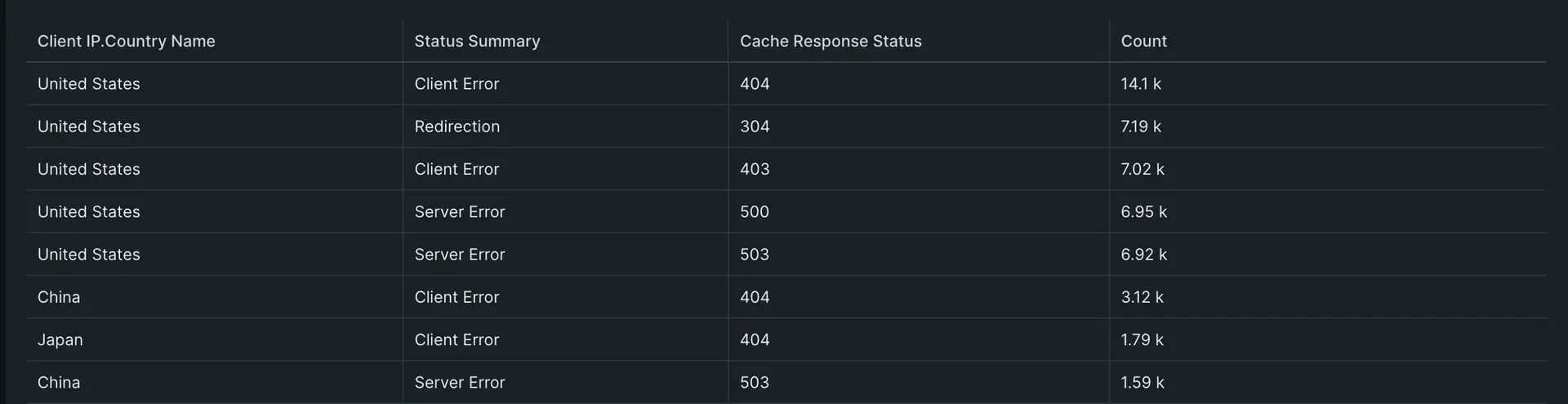
This query combines lookups and [GeoIP](https://docs.newrelic.com/docs/logs/ui-data/parsing#geo) to find which locations have the most unsuccessful statuses:
````sql
FROM Log
JOIN (FROM lookup(statusCodeTable) SELECT status_code, status_summary, status_definition)
ON CacheResponseStatus=status_code
SELECT count(*) WHERE ClientIP.countryName IS NOT NULL AND status_summary != 'Success'
FACET ClientIP.countryName, status_summary, CacheResponseStatus
SINCE 1 day ago LIMIT MAX
```
Here are some example results:
````
**Translate item IDs**
This query shows how several NRQL features can work together to get business information from queries of log data. The below query:
1. Extracts information about items from log messages using [`aparse()`](https://docs.newrelic.com/docs/query-your-data/nrql-new-relic-query-language/get-started/nrql-syntax-clauses-functions/#func-aparse)
2. Uses `JOIN` on lookup table data to get user-friendly item names
3. Outputs a table of item names and the number of items stored
```sql
WITH aparse(message, 'POST to carts: * body: {"itemId":"*","unitPrice":*}%') AS (URL, ItemID, Price)
FROM Log
JOIN (FROM lookup(itemNames) SELECT ItemID, itemName) ON ItemID
SELECT count(*) FACET itemName
WHERE message LIKE 'POST to carts%'
SINCE 30 days ago
```
Here are some example results:

**Use geographic info to analyze locations**
This query combines lookups and [GeoIP](https://docs.newrelic.com/docs/logs/ui-data/parsing#geo) to find which locations have the most unsuccessful statuses:
````sql
FROM Log
JOIN (FROM lookup(statusCodeTable) SELECT status_code, status_summary, status_definition)
ON CacheResponseStatus=status_code
SELECT count(*) WHERE ClientIP.countryName IS NOT NULL AND status_summary != 'Success'
FACET ClientIP.countryName, status_summary, CacheResponseStatus
SINCE 1 day ago LIMIT MAX
```
Here are some example results:
 ````
````