---
title: VMware vSphere monitoring integration
source: https://docs.newrelic.com/docs/infrastructure/host-integrations/host-integrations-list/vmware-vsphere-monitoring-integration
---

New Relic's VMware vSphere integration helps you understand the health and performance of your vSphere environment. You can:

-   Query data to get insights on the performance on your hypervisors, virtual machines, and more.
-   Go from high level views down to the most granular data.

Our integration uses the [vSphere API](https://code.vmware.com/apis/704/vsphere) to collect metrics and events generated by all vSphere's components, and forwards the data to our platform via the infrastructure agent.
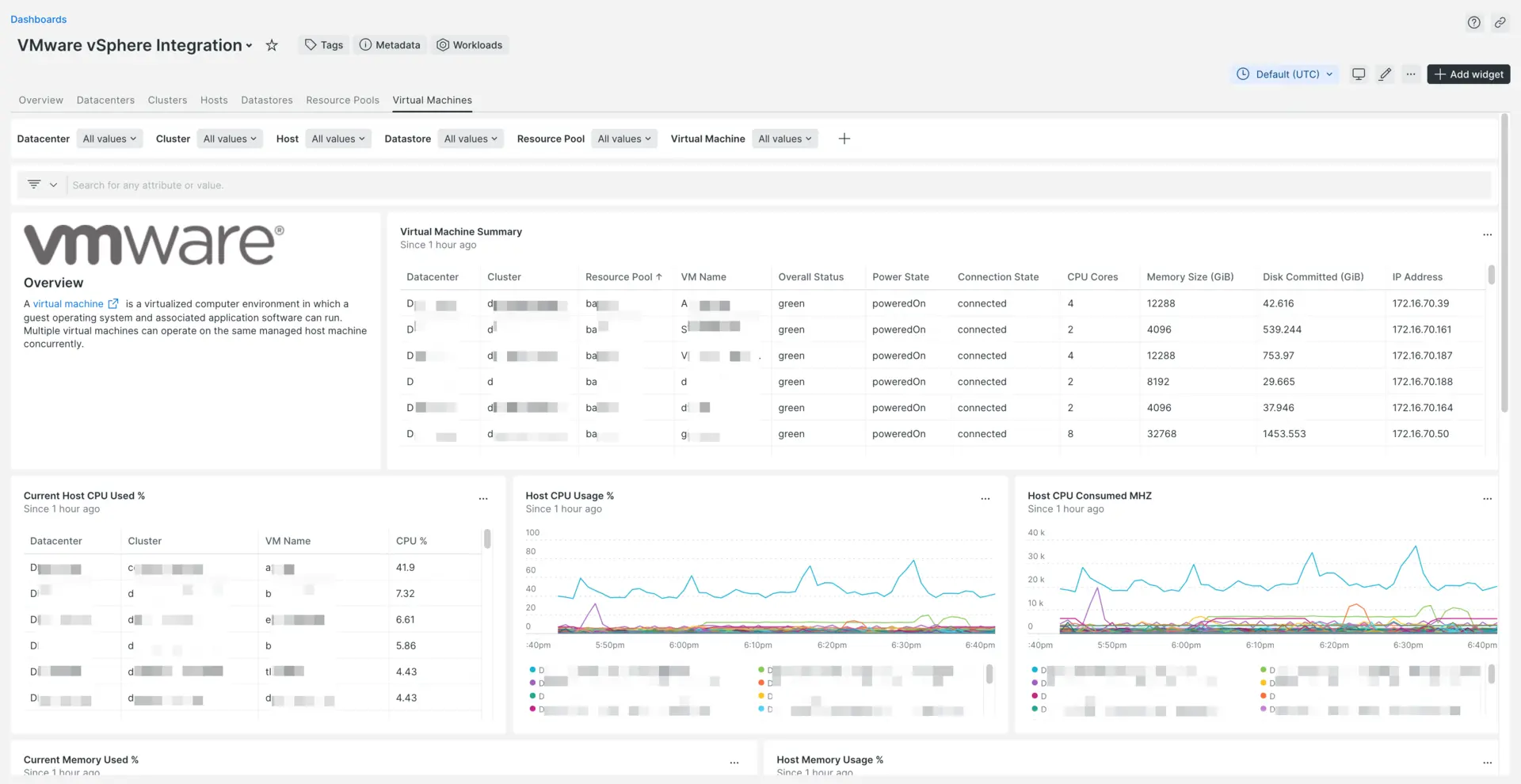
![](https://docs.newrelic.com/images/infrastructure_screenshot-full_vmware-vsphere-ui.webp)

## Why it matters [#features]

With our vSphere integration you can:

-   Instrument and monitor multiple vSphere instances using the same account.
-   Collect data on snapshots, VMs, hosts, resource pools, clusters, and datastores, including tags.
-   Monitor the health of your hypervisors and VMs using our charts and dashboards.
-   Use the data retrieved to monitor key performance and key capacity scaling indicators.
-   Set alerts based on any metrics collected from vCenter.
-   Create [workloads]((/docs/new-relic-solutions/new-relic-one/workloads/workloads-isolate-resolve-alert-events-faster)) to group resources and focus on key data.

## Compatibility and requirements [#requirements]

Our integration is compatible with VMware vSphere 6.5 or higher.

Before installing the integration, make sure that you meet the following requirements:

-   [Infrastructure agent installed on a host](https://docs.newrelic.com/docs/infrastructure/install-infrastructure-agent/get-started/install-infrastructure-agent-new-relic)
-   vCenter service account having at least read-only global permissions with the `propagate to children` option checked

> #### ⚠️ IMPORTANT
>
> **Large environments:** In environments with more than 800 virtual machines, the integration cannot report all data and may fail. We offer a workaround that will preserve all metrics and events, but it will disable entity registration. To apply the workaround, add the following environment variable to the configuration file:
>
> ```yaml
> integrations:
>   - name: nri-vsphere
>     env:
>       # Integration configuration parameters.
>
>       EVENTS: true
>       METRICS: true
> ```

## Install the integration [#install]

The easiest way to install the integration is to follow our [guided install](https://onenr.io/0Bj3VYmGbRX):

1.  Log in to [one.newrelic.com](https://onenr.io/0Bj3VYmGbRX).
2.  Click **Integrations & Agents**, search for "vSphere," and click the integration.
3.  Follow the steps in the UI.

If you need to manually install, see the sections below.

**Linux installation**

1.  Install [the infrastructure agent](https://docs.newrelic.com/docs/integrations/host-integrations/installation/install-infrastructure-host-integrations/#install), and replace `INTEGRATION_FILE_NAME` with `nri-vsphere` when running the installation command.
2.  Change the directory to the integrations folder:

    ```shell
    cd /etc/newrelic-infra/integrations.d
    ```
3.  Copy of the sample configuration file:

    ```shell
    sudo cp vsphere-config.yml.sample vsphere-config.yml
    ```
4.  Edit the `vsphere-config.yml` file as described in the [configuration settings](#config).

**Windows installation**

1.  Download the `nri-vsphere` MSI installer image from:

    [download.newrelic.com/infrastructure_agent/windows/integrations/nri-vsphere/nri-vsphere-amd64.msi](https://download.newrelic.com/infrastructure_agent/windows/integrations/nri-vsphere/nri-vsphere-amd64.msi)
2.  To install from the Windows command prompt, run:

    ```shell
    msiexec.exe /qn /i PATH\TO\nri-vsphere-amd64.msi
    ```
3.  In the Integrations directory, `C:\Program Files\New Relic\newrelic-infra\integrations.d\`, create a copy of the sample configuration file by running:

    ```shell
    cp vsphere-config.yml.sample vsphere-config.yml
    ```
4.  Edit the `vsphere-config.yml` file as described in the [configuration settings](#config).

**Tarball installation (advanced)**

You can also [install the integration from a tarball file](https://docs.newrelic.com/docs/integrations/host-integrations/installation/install-host-integrations-built-new-relic#tarball). This gives you full control over the installation and configuration process.

## Configure the integration [#config]

An integration's YAML-format configuration is where you can place required login credentials and configure how data is collected. Which options you change depend on your setup and preference.

To configure the vSphere integration, you must define the URL of the vSphere API endpoint, and your vSphere username and password. For configuration examples, see the [sample configuration files](#example-config). Some vSphere integration features are optional and can be enabled via configuration settings.

In addition, with [secrets management](https://docs.newrelic.com/docs/integrations/host-integrations/installation/secrets-management), you can configure on-host integrations with New Relic's infrastructure agent to use sensitive data (such as passwords) without having to write them as plain text into the integration's configuration file.

**Collect vSphere events**

To collect vSphere events, use the `ENABLE_VSPHERE_EVENTS` environment variable.

The integration collects events between the current time and the last fetched event for each data center. It stores the information regarding the last fetched event in a cache that is updated after each execution. Events are only available if the integration is connected to a vCenter and not directly to an ESXi host.

The number of events collected per request can be tuned by modifying `EVENTS_PAGE_SIZE`, which is set to `100` by default.

Events are available in the **Events** page and can be queried via [NRQL](https://docs.newrelic.com/docs/query-data/nrql-new-relic-query-language/getting-started/introduction-nrql) as `InfrastructureEvent` under `vSphereEvent`. Here is an example of vSphere events data:

````
"summary": "User dcui@127.0.0.1 logged out (login time: Tuesday, 14 July, 2020 08:32:09 AM, number of API invocations: 0, user agent: VMware-client/6.5.0)",
"vSphereEvent.computeResource": "cluster1",
"vSphereEvent.datacenter": "Prod Datacenter",
"vSphereEvent.date": "Tue, 14 Jul 2020 09:03:51 UTC",
"vSphereEvent.host": "192.168.0.230",
"vSphereEvent.userName": "dcui"
```

````

**Collect snapshots data**

To collect snapshot data, use the `ENABLE_VSPHERE_SNAPSHOTS` environment variable.

Snapshot data can be found in `VSphereSnapshotVmSample`. Collected data covers total and unique space occupied by disk and memory files, snapshot tree, and creation time.

You can use this information to create [NRQL](https://docs.newrelic.com/docs/query-data/nrql-new-relic-query-language/getting-started/introduction-nrql) queries, [dashboards](https://docs.newrelic.com/docs/dashboards/new-relic-one-dashboards/get-started/introduction-new-relic-one-dashboards), and [alerts](https://docs.newrelic.com/docs/alerts/new-relic-alerts/defining-conditions/create-alert-conditions-nrql-queries), since it's linked to the corresponding virtual machine entity.

**Collect vSphere tags**

To collect vSphere tags, use the `ENABLE_VSPHERE_TAGS` environment variable.

Tags are available as attributes in the corresponding entity sample as `label.tagCategory:tagName`.

If two tags of the same category are assigned to a resource, they are added to a unique attribute separated by a pipe character. For example: `label.tagCategory:tagName|tagName`2.

Tags can be used to run [NRQL](https://docs.newrelic.com/docs/query-data/nrql-new-relic-query-language/getting-started/introduction-nrql) queries, filter entities in our [entity explorer](https://docs.newrelic.com/docs/new-relic-one/use-new-relic-one/ui-data/new-relic-one-entity-explorer), and to create [dashboards](https://docs.newrelic.com/docs/dashboards/new-relic-one-dashboards/get-started/introduction-new-relic-one-dashboards) and [alerts](https://docs.newrelic.com/docs/alerts/new-relic-alerts/defining-conditions/create-alert-conditions-nrql-queries).

**Filter resources by tags**

Resource filtering allows you to specify which resources you want to monitor by declaring a set of tags that resources must have in order to be monitored.

Resources require a match on any (one or more) of the filter tags in order to be included. If none of the resource tags match any of the filter tags, no information about that resource is sent to New Relic.

To use filtering resources by tag you need to have the `ENABLE_VSPHERE_TAGS` environment variable enabled.

A tag filter expression is a space-separated list of pairs of strings with the format `category=name`.

For example, to only retrieve resources with a tag category `region` and include regions `us` and `eu` use a filter expression like: `region=us region=eu`

````
INCLUDE_TAGS: >
  region=us
  region=eu
```

To enable resource filtering by tag, edit your integration configuration file and add the option `INCLUDE_TAGS` with the filter expression you want.

<Callout variant="caution">
  Note that data center resources acting as the root of the resource tree MUST have tags attached AND match the filter expression in order for other child resources to be fetched.
</Callout>

````

**Enable and configure performance metrics (preview)**

Performance metrics provide a better understanding of the current status of VMware resources and can be collected **in addition** to the metrics collected by default;and included in the samples;described at the bottom of the page.

All metrics collected are included in the corresponding sample with the `perf.` prefix attached to the name. For example, `net.packetsRx.summation` is collected and sent as `perf.net.packetsRx.summation`.

To collect vSphere performance metrics, use the `ENABLE_VSPHERE_PERF_METRICS` environment variable.

Data is collected according to the settings in the [`vsphere-performance.metrics`](https://github.com/newrelic/nri-vsphere/blob/master/vsphere-performance.metrics) configuration file. You can override the location of the performance metrics config file using `PERF_METRIC_FILE` environment variable. Notice that the integration follows [VMware's data collection levels](https://docs.vmware.com/en/VMware-vSphere/7.0/com.vmware.vsphere.monitoring.doc/GUID-25800DE4-68E5-41CC-82D9-8811E27924BC.html) (1 to 4).

When `ENABLE_VSPHERE_PERF_METRICS` is set, all level 1 metrics are collected. The data collection level of the performance metrics collected can be modified using `PERF_LEVEL`. Each metric in the config file can be commented out and new ones can be added if needed.

> #### ⚠️ CAUTION
>
> Collection of performance data can increase the load in vCenter and the time needed by to collect data. We recommended to only include the metrics you need in the configuration file.

To fine-tune data collection, the number of entities and metrics retrieved per request can be modified using `BATCH_SIZE_PERF_ENTITIES` and `BATCH_SIZE_PERF_METRICS`.

> #### 💡 TIP
>
> For more information on vSphere performance metrics, see the [VMware documentation](https://docs.vmware.com/en/VMware-vSphere/6.7/vsphere-esxi-vcenter-server-67-monitoring-performance-guide.pdf).

**Multiple instances**

In this configuration we are monitoring multiple vSphere servers from the same integration. For the first instance (`FIRST_VSPHERE_API_URL`) we are collecting events and tags while for the second instance (`SECOND_VSPHERE_API_URL`) we have turned them off.

````yaml
integrations:
  - name: nri-vsphere
    env:
      # vSphere API connection data (vCenter or ESXi servers)
      URL: https://<FIRST_VSPHERE_API_URL>/sdk
      USER: <FIRST_VSPHERE_USER>
      PASS: <FIRST_PASSWORD>

      # Collect events data
      ENABLE_VSPHERE_EVENTS: true

      # Collect vSphere tags
      ENABLE_VSPHERE_TAGS: true

    # Execution interval. Set a value higher than 20s, as real-time vSphere samples are run every 20s.
    interval: 120s
  - name: nri-vsphere
    env:
      # vSphere API connection data (vCenter or ESXi servers)
      URL: https://<SECOND_VSPHERE_API_URL>/sdk
      USER: <SECOND_VSPHERE_USER>
      PASS: <SECOND_PASSWORD>

      # Collect events data
      ENABLE_VSPHERE_EVENTS: false

      # Collect vSphere tags
      ENABLE_VSPHERE_TAGS: false

    # Execution interval. Set a value higher than 20s, as real-time vSphere samples are run every 20s.
    interval: 300s
```

````

> #### ⚠️ IMPORTANT
>
> If you connect the integration directly to the ESXi host, vCenter data is not available (for example, events, tags, or data center metadata).

### Example configuration [#example-config]

Here are examples of the vSphere integration configuration, including performance metrics:

-   [`vsphere-config.yml.sample`](https://github.com/newrelic/nri-vsphere/blob/master/vsphere-config.yml.sample) (Linux)
-   [`vsphere-win-config.yml.sample`](https://github.com/newrelic/nri-vsphere/blob/master/vsphere-win-config.yml.sample) (Windows)
-   [`vsphere-performance.metrics`](https://github.com/newrelic/nri-vsphere/blob/master/vsphere-performance.metrics) (Performance metrics)

For more information, see our documentation about the [general structure of on-host integration configurations](https://docs.newrelic.com/docs/integrations/integrations-sdk/file-specifications/host-integration-configuration-overview).

> #### ⚠️ IMPORTANT
>
> The configuration option [inventory_source](https://docs.newrelic.com/docs/integrations/integrations-sdk/file-specifications/host-integrations-newer-configuration-format#inventory_source) is not compatible with this integration.

## Update your integration [#update]

**On-host integrations do not automatically update.**

For best results, regularly [update the integration package](https://docs.newrelic.com/docs/integrations/host-integrations/installation/update-infrastructure-host-integration-package) and the [infrastructure agent](https://docs.newrelic.com/docs/infrastructure/new-relic-infrastructure/installation/update-infrastructure-agent).

## View and use data [#data]

Data from this service is reported to an [integration dashboard](https://onenr.io/0qwyY4Bzpwn). You can [query this data](https://docs.newrelic.com/docs/using-new-relic/data/understand-data/query-new-relic-data) for troubleshooting purposes or to create charts and dashboards.

vSphere data is attached to these [event types](https://docs.newrelic.com/docs/using-new-relic/welcome-new-relic/getting-started/glossary#event):

-   `VSphereHostSample`
-   `VSphereClusterSample`
-   `VSphereVmSample`
-   `VSphereDatastoreSample`
-   `VSphereDatacenterSample`
-   `VSphereResourcePoolSample`
-   `VSphereSnapshotVmSample`

Performance data is enabled and configured separately (see [Enable and configure performance metrics](#perf-metrics)).

For more on how to view and use your data, see [Understand integration data](https://docs.newrelic.com/docs/infrastructure/integrations/find-use-infrastructure-integration-data).

## Metric data [#metrics]

The vSphere integration provides metric data attached to the following New Relic [events](https://docs.newrelic.com/docs/telemetry-data-platform/ingest-manage-data/understand-data/new-relic-data-types#events-new-relic):

-   `VSphereHostSample`
-   `VSphereVmSample`
-   `VSphereDatastoreSample`
-   `VSphereDatacenterSample`
-   `VSphereResourcePoolSample`
-   `VSphereClusterSample`
-   `VSphereSnapshotVmSample`

### VSphereHostSample

| Name                   | Description                                                                                                                                                                                                                                                                                                                                                                                                                                                                                                                                                                                                                                                                                                                                                                                                                                                                                                 |
| ---------------------- | ----------------------------------------------------------------------------------------------------------------------------------------------------------------------------------------------------------------------------------------------------------------------------------------------------------------------------------------------------------------------------------------------------------------------------------------------------------------------------------------------------------------------------------------------------------------------------------------------------------------------------------------------------------------------------------------------------------------------------------------------------------------------------------------------------------------------------------------------------------------------------------------------------------- |
| `cpu.totalMHz`         | Sum of the MHz for all the individual cores on the host                                                                                                                                                                                                                                                                                                                                                                                                                                                                                                                                                                                                                                                                                                                                                                                                                                                     |
| `cpu.coreMHz`          | Speed of the CPU cores                                                                                                                                                                                                                                                                                                                                                                                                                                                                                                                                                                                                                                                                                                                                                                                                                                                                                      |
| `cpu.available`        | Amount of free CPU MHz in the host                                                                                                                                                                                                                                                                                                                                                                                                                                                                                                                                                                                                                                                                                                                                                                                                                                                                          |
| `cpu.overallUsage`     | CPU usage across all cores on the host in MHz                                                                                                                                                                                                                                                                                                                                                                                                                                                                                                                                                                                                                                                                                                                                                                                                                                                               |
| `cpu.percent`          | Percentage of CPU utilization in the host                                                                                                                                                                                                                                                                                                                                                                                                                                                                                                                                                                                                                                                                                                                                                                                                                                                                   |
| `cpu.cores`            | Number of physical CPU cores on the host. Physical CPU cores are the processors contained by a CPU package                                                                                                                                                                                                                                                                                                                                                                                                                                                                                                                                                                                                                                                                                                                                                                                                  |
| `cpu.threads`          | Number of physical CPU threads on the host                                                                                                                                                                                                                                                                                                                                                                                                                                                                                                                                                                                                                                                                                                                                                                                                                                                                  |
| `disk.totalMiB`        | Total capacity of disks mounted in host, in MiB                                                                                                                                                                                                                                                                                                                                                                                                                                                                                                                                                                                                                                                                                                                                                                                                                                                             |
| `mem.free`             | Amount of available memory in the host, in MiB                                                                                                                                                                                                                                                                                                                                                                                                                                                                                                                                                                                                                                                                                                                                                                                                                                                              |
| `mem.usage`            | Amount of used memory in the host, in MiB                                                                                                                                                                                                                                                                                                                                                                                                                                                                                                                                                                                                                                                                                                                                                                                                                                                                   |
| `mem.size`             | Total memory capacity of the host, in MiB                                                                                                                                                                                                                                                                                                                                                                                                                                                                                                                                                                                                                                                                                                                                                                                                                                                                   |
| `vmCount`              | Number of virtual machines in the host                                                                                                                                                                                                                                                                                                                                                                                                                                                                                                                                                                                                                                                                                                                                                                                                                                                                      |
| `hypervisorHostname`   | Name of the host                                                                                                                                                                                                                                                                                                                                                                                                                                                                                                                                                                                                                                                                                                                                                                                                                                                                                            |
| `uuid`                 | The hardware BIOS identification                                                                                                                                                                                                                                                                                                                                                                                                                                                                                                                                                                                                                                                                                                                                                                                                                                                                            |
| `datacenterName`       | Name of the data center related to the host                                                                                                                                                                                                                                                                                                                                                                                                                                                                                                                                                                                                                                                                                                                                                                                                                                                                 |
| `clusterName`          | Name of the cluster related to the host                                                                                                                                                                                                                                                                                                                                                                                                                                                                                                                                                                                                                                                                                                                                                                                                                                                                     |
| `resourcePoolNameList` | List of names of the resource pools related to the host                                                                                                                                                                                                                                                                                                                                                                                                                                                                                                                                                                                                                                                                                                                                                                                                                                                     |
| `datastoreNameList`    | List of names of datastores related to the host                                                                                                                                                                                                                                                                                                                                                                                                                                                                                                                                                                                                                                                                                                                                                                                                                                                             |
| `datacenterLocation`   | Data center location                                                                                                                                                                                                                                                                                                                                                                                                                                                                                                                                                                                                                                                                                                                                                                                                                                                                                        |
| `networkNameList`      | List of names of networks related to the host                                                                                                                                                                                                                                                                                                                                                                                                                                                                                                                                                                                                                                                                                                                                                                                                                                                               |
| `overallStatus`        | - `gray`: Status is unknown - `green`: Entity is OK - `yellow`: Entity might have a problem - `red`: Entity definitely has a problem                                                                                                                                                                                                                                                                                                                                                                                                                                                                                                                                                                                                                                                                                                                                                                        |
| `connectionState`      | The host connection state: - `connected`: Connected to the server. For ESX Server, this is the default setting. - `disconnected`: The user has explicitly taken the host down. VirtualCenter does not expect to receive heartbeats from the host. The next time a heartbeat is received, the host is moved to the connected state again and an event is logged. - `notResponding`: VirtualCenter is not receiving heartbeats from the server. The state automatically changes to connected once heartbeats are received again. This state is typically used to trigger an alarm on the host.                                                                                                                                                                                                                                                                                                                |
| `inMaintenanceMode`    | The flag to indicate whether or not the host is in maintenance mode. This flag is set when the host has entered the maintenance mode. It is not set during the entering phase of maintenance mode.                                                                                                                                                                                                                                                                                                                                                                                                                                                                                                                                                                                                                                                                                                          |
| `inQuarantineMode`     | The flag to indicate whether or not the host is in quarantine mode. `InfraUpdateHa` will recommend to set this flag based on the `HealthUpdates` received by the `HealthUpdateProviders` configured for the cluster. A host that is reported as degraded will be recommended to enter quarantine mode, while a host that is reported as healthy will be recommended to exit quarantine mode. Execution of these recommended actions will set this flag. Hosts in quarantine mode will be avoided by vSphere DRS as long as the increased consolidation in the cluster does not negatively affect VM performance.                                                                                                                                                                                                                                                                                            |
| `powerState`           | The host power state: - `poweredOff`: The host was specifically powered off by the user through VirtualCenter. This state is not a cetain state, because after VirtualCenter issues the command to power off the host, the host might crash, or kill all the processes but fail to power off. - `poweredOn`: The host is powered on. A host that is entering standby mode entering is also in this state. - `standBy`: The host was specifically put in standby mode, either explicitly by the user or automatically by DPM. This state is not a certain state, because after VirtualCenter issues the command to put the host in standby state, the host might crash, or kill all the processes but fail to power off. A host that is exiting standby mode s also in this state. - `unknown`: If the host is disconnected or `notResponding`, we know its power state, so the host is marked as `unknown`. |
| `standbyMode`          | The host’s standby mode. The property is only populated by vCenter server. If queried directly from the ESX host, the property is `unset`. - `entering`: The host is entering standby mode. - `exiting`: The host is exiting standby mode. - `in`: The host is in standby mode. - `none`: The host is not in standby mode, and it is not in the process of entering or exiting standby mode.                                                                                                                                                                                                                                                                                                                                                                                                                                                                                                                |
| `cryptoState`          | Encryption state of the host. Valid values are enumerated by the CryptoState type: - `incapable`: The host is not safe for receiving sensitive material. - `prepared`: The host is prepared for receiving sensitive material but does not have a host key set yet. - `safe`: The host is crypto safe and has a host key set.                                                                                                                                                                                                                                                                                                                                                                                                                                                                                                                                                                                |
| `bootTime`             | The time when the host was booted.                                                                                                                                                                                                                                                                                                                                                                                                                                                                                                                                                                                                                                                                                                                                                                                                                                                                          |

### VSphereVmSample [#vspherevirtualmachine]

| Name                       | Description                                                                                                                                                                                                                                                                                                                                                                                                                                                                                    |
| -------------------------- | ---------------------------------------------------------------------------------------------------------------------------------------------------------------------------------------------------------------------------------------------------------------------------------------------------------------------------------------------------------------------------------------------------------------------------------------------------------------------------------------------- |
| `mem.size`                 | Memory size of the virtual machine, in MiB                                                                                                                                                                                                                                                                                                                                                                                                                                                     |
| `mem.usage`                | Guest memory utilization statistics, in MiB. This is also known as active guest memory. The value can range between `0` and the configured memory size of the virtual machine. Valid while the virtual machine is running.                                                                                                                                                                                                                                                                     |
| `mem.free`                 | Guest memory available, in MiB. The value can range between `0` and the configured memory size of the virtual machine. Valid while the virtual machine is running.                                                                                                                                                                                                                                                                                                                             |
| `mem.ballooned`            | The size of the balloon driver in the virtual machine, in MiB. The host will inflate the balloon driver to reclaim physical memory from the virtual machine. This is a sign that there is memory pressure on the host.                                                                                                                                                                                                                                                                         |
| `mem.swapped`              | The portion of memory, in MiB, that is granted to this virtual machine from the host's swap space. This is a sign that there is memory pressure on the host.                                                                                                                                                                                                                                                                                                                                   |
| `mem.swappedSsd`           | The amount of memory swapped to fast disk device such as SSD, in MiB                                                                                                                                                                                                                                                                                                                                                                                                                           |
| `cpu.allocationLimit`      | Resource limits for CPU, in MHz. If set to `-1`, there is no fixed allocation limit.                                                                                                                                                                                                                                                                                                                                                                                                           |
| `cpu.overallUsage`         | Basic CPU performance statistics, in MHz. Valid while the virtual machine is running.                                                                                                                                                                                                                                                                                                                                                                                                          |
| `cpu.hostUsagePercent`     | Percent of the host CPU used by the virtual machine. In case a limit is configured, the percentage is calculated by taking the limit as the total.                                                                                                                                                                                                                                                                                                                                             |
| `cpu.cores`                | Number of processors in the virtual machine                                                                                                                                                                                                                                                                                                                                                                                                                                                    |
| `disk.totalMiB`            | Total storage space, committed to this virtual machine across all datastores, in MiB                                                                                                                                                                                                                                                                                                                                                                                                           |
| `ipAddress`                | Primary guest IP address, if available                                                                                                                                                                                                                                                                                                                                                                                                                                                         |
| `ipAddresses`              | List of IPs associated with the VM (except `ipAddress`). A pipe or vertical bar character (`|`) is used as a separator.                                                                                                                                                                                                                                                                                                                                                                        |
| `connectionState`          | Indicates whether or not the virtual machine is available for management: - `connected`: Server has access to the virtual machine. - `disconnected`: Server is currently disconnected from the virtual machine, since its host is disconnected. - `inaccessible`: One or more of the virtual machine configuration files are inaccessible. - `invalid`: The virtual machine configuration format is invalid. - `orphaned`: The virtual machine is no longer registered on its associated host. |
| `powerState`               | The current power state of the virtual machine: `poweredOff`, `poweredOn`, or `suspended`.                                                                                                                                                                                                                                                                                                                                                                                                     |
| `guestHeartbeatStatus`     | - `gray`: Status is unknown. - `green`: Entity is OK. - `yellow`: Entity might have a problem. - `red`: Entity definitely has a problem.                                                                                                                                                                                                                                                                                                                                                       |
| `operatingSystem`          | Operating system of the virtual machine                                                                                                                                                                                                                                                                                                                                                                                                                                                        |
| `guestFullName`            | Guest operating system full name, if available from guest tools                                                                                                                                                                                                                                                                                                                                                                                                                                |
| `hypervisorHostname`       | Name of the host where the virtual machine is running                                                                                                                                                                                                                                                                                                                                                                                                                                          |
| `instanceUuid`             | Unique identification of the virtual machine                                                                                                                                                                                                                                                                                                                                                                                                                                                   |
| `datacenterName`           | Name of the data center                                                                                                                                                                                                                                                                                                                                                                                                                                                                        |
| `clusterName`              | Name of the cluster                                                                                                                                                                                                                                                                                                                                                                                                                                                                            |
| `resourcePoolNameList`     | List of names of the resource pools                                                                                                                                                                                                                                                                                                                                                                                                                                                            |
| `datastoreNameList`        | List of names of datastores                                                                                                                                                                                                                                                                                                                                                                                                                                                                    |
| `networkNameList`          | List of names of networks                                                                                                                                                                                                                                                                                                                                                                                                                                                                      |
| `datacenterLocation`       | Data center location                                                                                                                                                                                                                                                                                                                                                                                                                                                                           |
| `overallStatus`            | - `gray`: Status is unknown. - `green`: Entity is OK. - `yellow`: Entity might have a problem. - `red`: Entity definitely has a problem.                                                                                                                                                                                                                                                                                                                                                       |
| `disk.suspendMemory`       | Size of the snapshot file (bytes).                                                                                                                                                                                                                                                                                                                                                                                                                                                             |
| `disk.suspendMemoryUnique` | Size of the snapshot file, unique blocks (bytes).                                                                                                                                                                                                                                                                                                                                                                                                                                              |
| `disk.totalUncommittedMiB` | Additional storage space potentially used by this virtual machine on all datastores. Essentially an aggregate of the property uncommitted across all datastores that this virtual machine is located on (Mebibytes).                                                                                                                                                                                                                                                                           |
| `disk.totalUnsharedMiB`    | Total storage space occupied by the virtual machine across all datastores, that is not shared with any other virtual machine (Mebibytes).                                                                                                                                                                                                                                                                                                                                                      |
| `mem.hostUsage`            | Host memory usage (Mebibytes).                                                                                                                                                                                                                                                                                                                                                                                                                                                                 |
| `resourcePoolName`         | Resource Pool Name.                                                                                                                                                                                                                                                                                                                                                                                                                                                                            |
| `vmConfigName`             | Vm Config Name.                                                                                                                                                                                                                                                                                                                                                                                                                                                                                |
| `vmHostname`               | Vm Hostname.                                                                                                                                                                                                                                                                                                                                                                                                                                                                                   |

### VSphereDatastoreSample

| Name                 | Description                                                                                                                              |
| -------------------- | ---------------------------------------------------------------------------------------------------------------------------------------- |
| `capacity`           | Maximum capacity of this datastore, in GiB, if accessible is `true`                                                                      |
| `freeSpace`          | Available space of this datastore, in GiB, if accessible is `true`                                                                       |
| `uncommitted`        | Total additional storage space, potentially used by all virtual machines on this datastore, in GiB, if accessible is `true`              |
| `vmCount`            | Number of virtual machines attached to the datastore                                                                                     |
| `datacenterLocation` | Data center location                                                                                                                     |
| `datacenterName`     | Data center name                                                                                                                         |
| `hostCount`          | Number of hosts attached to the datastore                                                                                                |
| `overallStatus`      | - `gray`: Status is unknown. - `green`: Entity is OK. - `yellow`: Entity might have a problem. - `red`: Entity definitely has a problem. |
| `accessible`         | Connectivity status of the datastore. If this is set to `false`, the datastore is not accessible.                                        |
| `url`                | Unique locator for the datastore, if accessible is `true`                                                                                |
| `fileSystemType`     | Type of file system volume, such as `VMFS` or `NFS`                                                                                      |
| `name`               | Name of the datastore                                                                                                                    |
| `nas.remoteHost`     | Host that runs the NFS/CIFS server                                                                                                       |
| `nas.remotePath`     | Remote path of NFS/CIFS mount point                                                                                                      |

### VSphereDatacenterSample

| Name                         | Description                                                                                                                          |
| ---------------------------- | ------------------------------------------------------------------------------------------------------------------------------------ |
| `datastore.totalUsedGiB`     | Total used space in the datastores, in GiB                                                                                           |
| `datastore.totalFreeGiB`     | Total free space in the datastores, in GiB                                                                                           |
| `datastore.totalGiB`         | Total size of the datastores, in GiB                                                                                                 |
| `cpu.cores`                  | Total CPU count per data center                                                                                                      |
| `cpu.overallUsagePercentage` | Total CPU usage, in percentage                                                                                                       |
| `cpu.overallUsage`           | Total CPU usage, in MHz                                                                                                              |
| `cpu.totalMHz`               | Total CPU capacity, in MHz                                                                                                           |
| `mem.usage`                  | Total memory usage, in MiB                                                                                                           |
| `mem.size`                   | Total memory, in MiB                                                                                                                 |
| `mem.usagePercentage`        | Total memory usage as percentage                                                                                                     |
| `clusters`                   | Total cluster count per data center                                                                                                  |
| `resourcePools`              | Total resource pools per data center                                                                                                 |
| `datastores`                 | Total datastores per data center                                                                                                     |
| `networks`                   | Total network adapter count per data center                                                                                          |
| `overallStatus`              | - `gray`: Status is unknown - `green`: Entity is OK - `yellow`: Entity might have a problem - `red`: Entity definitely has a problem |
| `hostCount`                  | Total host system count per data center                                                                                              |
| `vmCount`                    | Total virtual machines count per data center                                                                                         |

### VSphereResourcePoolSample

| Name                 | Description                                                                                                                              |
| -------------------- | ---------------------------------------------------------------------------------------------------------------------------------------- |
| `cpu.TotalMHz`       | Resource pool CPU total capacity, in MHz                                                                                                 |
| `cpu.overallUsage`   | Resource pool CPU usage, in MHz                                                                                                          |
| `mem.size`           | Resource pool total memory reserved, in MiB                                                                                              |
| `mem.usage`          | Resource pool memory usage, in MiB                                                                                                       |
| `mem.free`           | Resource pool memory available, in MiB                                                                                                   |
| `mem.ballooned`      | Size of the balloon driver in the resource pool, in MiB                                                                                  |
| `mem.swapped`        | Portion of memory, in MiB, that is granted to this resource pool from the host's swap space                                              |
| `vmCount`            | Number of virtual machines in the resource pool                                                                                          |
| `overallStatus`      | - `gray`: Status is unknown. - `green`: Entity is OK. - `yellow`: Entity might have a problem. - `red`: Entity definitely has a problem. |
| `resourcePoolName`   | Name of the resource pool                                                                                                                |
| `datacenterLocation` | Data center location                                                                                                                     |
| `datacenterName`     | Name of the data center                                                                                                                  |
| `clusterName`        | Name of the cluster                                                                                                                      |

### VSphereClusterSample

| Name                                   | Description                                                                                                                                                                                                                                                                                                                                                                                                             |
| -------------------------------------- | ----------------------------------------------------------------------------------------------------------------------------------------------------------------------------------------------------------------------------------------------------------------------------------------------------------------------------------------------------------------------------------------------------------------------- |
| `cpu.totalEffectiveMHz`                | Effective CPU resources, in MHz, available to virtual machines. This is the aggregated effective resource level from all running hosts. Hosts that are in maintenance mode or are unresponsive are not counted. Resources used by the VMware Service Console are not included in the aggregate. This value represents the amount of resources available for the root resource pool for running virtual machines.        |
| `cpu.totalMHz`                         | Aggregated CPU resources of all hosts, in MHz. It does not filter out cpu used by system or related to hosts under maintenance.                                                                                                                                                                                                                                                                                         |
| `cpu.cores`                            | Number of physical CPU cores. Physical CPU cores are the processors contained by a CPU package.                                                                                                                                                                                                                                                                                                                         |
| `cpu.threads`                          | Aggregated number of CPU threads.                                                                                                                                                                                                                                                                                                                                                                                       |
| `mem.size`                             | Aggregated memory resources of all hosts, in MiB. It does not filter out memory used by system or related to hosts under maintenance.                                                                                                                                                                                                                                                                                   |
| `mem.effectiveSize`                    | Effective memory resources, in MiB, available to run virtual machines. This is the aggregated effective resource level from all running hosts. Hosts that are in maintenance mode or are unresponsive are not counted. Resources used by the VMware Service Console are not included in the aggregate. This value represents the amount of resources available for the root resource pool for running virtual machines. |
| `effectiveHosts`                       | Total number of effective hosts. This number exclude hosts under maintenance.                                                                                                                                                                                                                                                                                                                                           |
| `hosts`                                | Total number of hosts                                                                                                                                                                                                                                                                                                                                                                                                   |
| `overallStatus`                        | - `gray`: Status is unknown. - `green`: Entity is OK. - `yellow`: Entity might have a problem. - `red`: Entity definitely has a problem.                                                                                                                                                                                                                                                                                |
| `datastoreList`                        | List of datastore used by the cluster. A pipe or vertical bar character (`|`) is used as a separator.                                                                                                                                                                                                                                                                                                                   |
| `hostList`                             | List of hosts belonging to the cluster. A pipe or vertical bar character (`|`) is used as a separator.                                                                                                                                                                                                                                                                                                                  |
| `networkList`                          | List of networks attached to the cluster. A pipe or vertical bar character (`|`) is used as a separator.                                                                                                                                                                                                                                                                                                                |
| `drsConfig.vmotionRate`                | Threshold for generated ClusterRecommendations. DRS generates only those recommendations that are above the specified vmotionRate. Ratings vary from 1 to 5. This setting applies to manual, partiallyAutomated, and fullyAutomated DRS clusters.                                                                                                                                                                       |
| `dasConfig.restartPriorityTimeout`     | Maximum time the lower priority VMs should wait for the higher priority VMs to be ready (Seconds).                                                                                                                                                                                                                                                                                                                      |
| `datacenterName`                       | Data center name.                                                                                                                                                                                                                                                                                                                                                                                                       |
| `datacenterLocation`                   | Data center location.                                                                                                                                                                                                                                                                                                                                                                                                   |
| `drsConfig.enabled`                    | Flag indicating whether or not the service is enabled.                                                                                                                                                                                                                                                                                                                                                                  |
| `drsConfig.enableVmBehaviorOverrides`  | Flag that dictates whether DRS Behavior overrides for individual virtual machines (ClusterDrsVmConfigInfo) are enabled.                                                                                                                                                                                                                                                                                                 |
| `drsConfig.defaultVmBehavior`          | Specifies the cluster-wide default DRS behavior for virtual machines. You can override the default behavior for a virtual machine by using the ClusterDrsVmConfigInfo object.                                                                                                                                                                                                                                           |
| `dasConfig.enabled`                    | Flag to indicate whether or not vSphere HA feature is enabled.                                                                                                                                                                                                                                                                                                                                                          |
| `dasConfig.admissionControlEnabled`    | Flag that determines whether strict admission control is enabled                                                                                                                                                                                                                                                                                                                                                        |
| `dasConfig.isolationResponse`          | Indicates whether or not the virtual machine should be powered off if a host determines that it is isolated from the rest of the compute resource.                                                                                                                                                                                                                                                                      |
| `dasConfig.restartPriority`            | Restart priority for a virtual machine.                                                                                                                                                                                                                                                                                                                                                                                 |
| `dasConfig.hostMonitoring`             | Determines whether HA restarts virtual machines after a host fails.                                                                                                                                                                                                                                                                                                                                                     |
| `dasConfig.vmMonitoring`               | Level of HA Virtual Machine Health Monitoring Service.                                                                                                                                                                                                                                                                                                                                                                  |
| `dasConfig.vmComponentProtecting`      | This property indicates if vSphere HA VM Component Protection service is enabled.                                                                                                                                                                                                                                                                                                                                       |
| `dasConfig.hbDatastoreCandidatePolicy` | The policy on what datastores will be used by vCenter Server to choose heartbeat datastores: allFeasibleDs, allFeasibleDsWithUserPreference, userSelectedDs                                                                                                                                                                                                                                                             |

### VSphereSnapshotVmSample [#vspheresnapshot]

| Name                      | Description                                                                                                                                                                                                                                                                                                                                                                                                                                                                                           |
| ------------------------- | ----------------------------------------------------------------------------------------------------------------------------------------------------------------------------------------------------------------------------------------------------------------------------------------------------------------------------------------------------------------------------------------------------------------------------------------------------------------------------------------------------- |
| `snapshotTreeInfo`        | Tree info for the snapshot. Es: Cluster:Vm:Snapshot1:Snapshot2                                                                                                                                                                                                                                                                                                                                                                                                                                        |
| `name`                    | Snapshot name                                                                                                                                                                                                                                                                                                                                                                                                                                                                                         |
| `creationTime`            | Snapshot creation time                                                                                                                                                                                                                                                                                                                                                                                                                                                                                |
| `powerState`              | The power state of the virtual machine when this snapshot was taken                                                                                                                                                                                                                                                                                                                                                                                                                                   |
| `snapshotId`              | The unique identifier that distinguishes this snapshot from other snapshots of the virtual machine                                                                                                                                                                                                                                                                                                                                                                                                    |
| `quiesced`                | Flag to indicate whether or not the snapshot was created with the "quiesce" option, ensuring a consistent state of the file system                                                                                                                                                                                                                                                                                                                                                                    |
| `backupManifest`          | The relative path from the snapshotDirectory pointing to the backup manifest. Available for certain quiesced snapshots only                                                                                                                                                                                                                                                                                                                                                                           |
| `description`             | Description of the snapshot                                                                                                                                                                                                                                                                                                                                                                                                                                                                           |
| `replaySupported`         | Flag to indicate whether this snapshot is associated with a recording session on the virtual machine that can be replayed                                                                                                                                                                                                                                                                                                                                                                             |
| `totalMemoryInDisk`       | Total size of memory in disk.                                                                                                                                                                                                                                                                                                                                                                                                                                                                         |
| `totalUniqueMemoryInDisk` | Total size of the file corresponding to the file blocks that were allocated uniquely to store memory. In other words, if the underlying storage supports sharing of file blocks across disk files, the property corresponds to the size of the file blocks that were allocated only in context of this file. It does not include shared blocks that were allocated in other files. This property will be unset if the underlying implementation is unable to compute this information.                |
| `totalDisk`               | Total size of snapshot files in disk                                                                                                                                                                                                                                                                                                                                                                                                                                                                  |
| `totalUniqueDisk`         | Total size of the file corresponding to the file blocks that were allocated uniquely to store snapshot data in disk. In other words, if the underlying storage supports sharing of file blocks across disk files, the property corresponds to the size of the file blocks that were allocated only in context of this file. It does not include shared blocks that were allocated in other files. This property will be unset if the underlying implementation is unable to compute this information. |
| `datastorePathDisk`       | Disk file path in the datastore                                                                                                                                                                                                                                                                                                                                                                                                                                                                       |
| `datastorePathMemory`     | Memory file path in the datastore                                                                                                                                                                                                                                                                                                                                                                                                                                                                     |

## Troubleshooting [#troubleshooting]

**Gaps on reported data**

One possible reason for data gaps could be because of the integration taking too long to collect and process data from vCenter. In case the integration exceeds the [timeout](https://docs.newrelic.com/docs/infrastructure/host-integrations/infrastructure-integrations-sdk/specifications/host-integrations-standard-configuration-format/#timeout), which by default is `120s`, the infrastructure agent will kill the integration, and a log message like the following will be printed:

````shell
level=warn msg="HeartBeat timeout exceeded after 120000000000" integration_name=nri-vsphere
```

In order to fix this, you could extend the [timeout](/docs/infrastructure/host-integrations/infrastructure-integrations-sdk/specifications/host-integrations-standard-configuration-format/#timeout) parameter in the config file.

```yaml
integrations:
  - name: nri-vsphere
    env:
      # Integration configuration parameters.

    interval: 120s

    timeout: 300s
```

````
