---
title: Node.js agent configuration
source: https://docs.newrelic.com/docs/apm/agents/nodejs-agent/installation-configuration/nodejs-agent-configuration
---
You can tailor the Node.js agent to your app's requirements by editing your `newrelic.js` config file or by setting an environment variable. The config file resides in the root directory of your app. You can also configure a few options from New Relic, or use the [Node.js agent API](https://docs.newrelic.com/docs/agents/nodejs-agent/api-guides/nodejs-agent-api).
## Get started [#requirements]
You'll be able to configure our Node.js agent to suit your environment after you [create a New Relic account](https://newrelic.com/signup) (it's free, forever) and [install the Node.js agent](https://docs.newrelic.com/docs/apm/agents/nodejs-agent/installation-configuration/install-nodejs-agent/).
The [`license_key`](#license) setting is required. Also, we highly recommend setting the [`app_name`](#app_name) so that your app has a [meaningful name](https://docs.newrelic.com/docs/apm/new-relic-apm/installation-configuration/name-your-application) instead of the default `My Application`.
## Configuration methods and precedence [#methods-and-precedence]
The primary method to configure the Node.js agent is the agent configuration file (`newrelic.js`). You can also configure most settings with [environment variables](#environment). You can also adjust some settings with [server-side configuration](#server-side).
The Node.js agent uses this order of precedence for configuration methods:
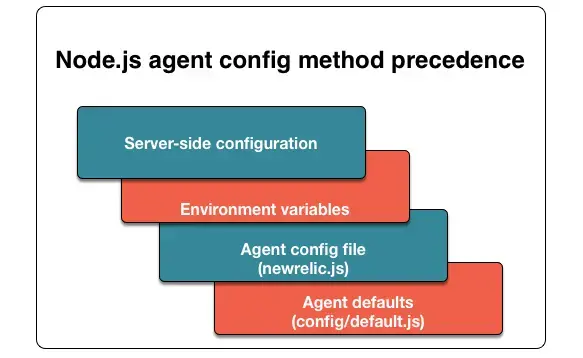
**Node.js configuration hierarchy:** Server-side configuration settings override environment variables. Environment variables override the agent config file. The config file overrides the agent defaults.
Here are detailed descriptions of each configuration method:
**Agent configuration file**
The config file (`newrelic.js`) contains every Node.js agent setting. When you [install the Node.js agent](https://docs.newrelic.com/docs/agents/nodejs-agent/installation-configuration/installing-maintaining-nodejs#installing), you must copy `newrelic.js` into your app's root directory. Most settings are empty by default; they inherit their values from `config/default.js`.
If your application is running on CommonJS, simply change the configuration file type to (`newrelic.cjs`). This filetype is supported as of [v7.5.0](https://docs.newrelic.com/docs/release-notes/agent-release-notes/nodejs-release-notes/node-agent-7-5-0/) of the Node.js agent.
**Environment variables**
All configuration settings in `newrelic.js` have equivalent environment variables. These are useful, for example, if your agent runs in a PaaS environment such as Heroku or Microsoft Azure. Node.js agent environment variables always start with `NEW_RELIC_`.
These environment variables are documented below under individual config options as the **Environ variable**. There are also two rarely used settings that can [only be configured via environment variables](#environment-variable-overrides). If you are unsure how to specify more complex types as environment variables, [use the reference guide](#environment-variable-type-reference-guide).
If you're using New Relic CodeStream to monitor performance from your IDE, you may also want to [associate repositories with your services](https://docs.newrelic.com/docs/codestream/observability/repo-association) and [associate build SHAs or release tags with errors](https://docs.newrelic.com/docs/codestream/observability/error-investigation/#buildsha).
**Server-side configuration**
Owners and Admins can view and configure a few settings [directly in New Relic](https://docs.newrelic.com/docs/agents/manage-apm-agents/configuration/server-side-agent-configuration). Where available, the UI labels for server-side config are listed in this document under individual config options as the **Server-side label**.
## Exports variables [#exports_config]
This section defines the Node.js agent variables in the order they typically appear in the `exports.config = {` section of your app's `newrelic.js` configuration file.
**app_name (REQUIRED)**
| Type | String |
| -------------------------------- | -------------------- |
| Default | `"My Application"` |
| [Environ variable](#environment) | `NEW_RELIC_APP_NAME` |
The [name New Relic uses to identify your app](https://docs.newrelic.com/docs/apm/new-relic-apm/installation-configuration/name-your-application). For example, `app_name: ['MyNodeApp']`. To [use multiple names for your app](https://docs.newrelic.com/docs/apm/new-relic-apm/installation-configuration/use-multiple-names-app), specify a comma-delimited list of names.
Data for all applications with the same name will be merged in the New Relic UI, so set this carefully. We **highly recommend** that you replace the default name with a descriptive name to avoid confusion and unintended aggregation of data.
> #### 💡 TIP
>
> For [Azure users](https://docs.newrelic.com/docs/agents/nodejs-agent/hosting-services/nodejs-agent-microsoft-azure), the Node.js agent will use `APP_POOL_ID` if it is set, so you can use the name you chose for your Azure Web Server without setting it twice.
**license_key (REQUIRED)**
| Type | String |
| -------------------------------- | ----------------------- |
| Default | (none) |
| [Environ variable](#environment) | `NEW_RELIC_LICENSE_KEY` |
This setting is required. Your New Relic license key. For example, `license_key: '40HexadecimalCharacters'`.
**agent_enabled**
| Type | Boolean |
| -------------------------------- | ------------------- |
| Default | `true` |
| [Environ variable](#environment) | `NEW_RELIC_ENABLED` |
Set to `false` to stop the agent from starting up. This is useful when debugging your code requires temporarily disabling the agent. It prevents the agent from bootstrapping its instrumentation or setting up all its pieces, which prevents the agent from starting up and connecting to New Relic's servers.
**allow_all_headers**
If `true`, enables capture of all HTTP headers, except for those filtered by `exclude` rules. If `false`, collected headers are limited to those defined in [Node.js agent attributes](https://docs.newrelic.com/docs/agents/nodejs-agent/installation-configuration/nodejs-agent-attributes).
| Type | Boolean |
| -------------------------------- | ----------------------------- |
| Default | `false` |
| [Environ variable](#environment) | `NEW_RELIC_ALLOW_ALL_HEADERS` |
> #### ⚠️ CAUTION
>
> Any header-related include/exclude rules must be in camelCase form to be filtered.
**compressed_content_encoding**
If the data compression threshold is reached in the payload, the agent compresses data, using gzip compression by default. The config option `compressed_content_encoding` can be set to `deflate` to use deflate compression.
| Type | String |
| -------------------------------- | --------------------------------------- |
| Default | `gzip` |
| [Environ variable](#environment) | `NEW_RELIC_COMPRESSED_CONTENT_ENCODING` |
**apdex_t (DEPRECATED)**
| Type | Number |
| --------------------------------- | ------------------- |
| Default | `0.100` |
| [Server-side label](#server-side) | `Apdex T` |
| [Environ variable](#environment) | `NEW_RELIC_APDEX_T` |
Set your Apdex T [via the New Relic UI](https://docs.newrelic.com/docs/apm/new-relic-apm/apdex/apdex-measure-user-satisfaction/#apm-apdex).
**certificates**
| Type | Array of strings |
| -------------------------------- | ------------------------ |
| Default | `[]` |
| [Environ variable](#environment) | `NEW_RELIC_CERTIFICATES` |
Additional certificates to trust for SSL connections, specified as an array of strings in PEM format. This affects both connections to an HTTPS proxy and connections to New Relic.
> #### 💡 TIP
>
> You can also configure the agent to read its certificates from a file:
>
> ````js
> certificates: [ fs.readFileSync('myca.crt', {encoding: 'utf8'}) ]
> ```
>
> ````
**high_security**
| Type | Boolean |
| -------------------------------- | ------------------------- |
| Default | `false` |
| [Environ variable](#environment) | `NEW_RELIC_HIGH_SECURITY` |
When set to `true`, enables [high security v2](https://docs.newrelic.com/docs/accounts-partnerships/accounts/security/high-security#version2description). You must also enable the [`ssl`](#ssl) setting and [enable high security in the UI](https://docs.newrelic.com/docs/accounts-partnerships/accounts/security/high-security#version2enabled).
**host**
| Type | String |
| -------------------------------- | ------------------------ |
| Default | `collector.newrelic.com` |
| [Environ variable](#environment) | `NEW_RELIC_HOST` |
> #### ⚠️ IMPORTANT
>
> Do not edit this value unless New Relic Support asks you to change it.
Hostname for the [New Relic collector](https://docs.newrelic.com/docs/accounts-partnerships/education/getting-started-new-relic/glossary#collector) to connect to the Internet; for example, `host: 'collector.newrelic.com'`.
**labels**
Adds [tags](https://docs.newrelic.com/docs/apm/new-relic-apm/maintenance/labels-categories-organize-your-apps-servers). Specify your tags as objects or a semicolon-delimited string of colon-separated pairs (for example, `Server:One;Data Center:Primary`).
| Type | Object or string |
| -------------------------------- | ------------------ |
| Default | (none) |
| [Environ variable](#environment) | `NEW_RELIC_LABELS` |
**port**
| Type | Integer |
| -------------------------------- | ---------------- |
| Default | `443` |
| [Environ variable](#environment) | `NEW_RELIC_PORT` |
> #### ⚠️ IMPORTANT
>
> Do not edit this value unless New Relic Support asks you to change it.
Port number to connect to the New Relic collector; for example, `port: 443`.
**proxy**
| Type | String |
| -------------------------------- | --------------------- |
| Default | (none) |
| [Environ variable](#environment) | `NEW_RELIC_PROXY_URL` |
A URL specifying the proxy server to connect to the Internet. For example, `proxy: 'http://user:pass@10.0.0.1:8000/'`. Important considerations:
- The `proxy` config file setting overrides the other config file proxy settings (`proxy_host`, `proxy_port`, `proxy_user`, `proxy_pass`) if used. Similarly, the `NEW_RELIC_PROXY_URL` environment variable overrides the other environment variable proxy settings (`NEW_RELIC_PROXY_HOST`, `NEW_RELIC_PROXY_PORT`, `NEW_RELIC_PROXY_USER`, and `NEW_RELIC_PROXY_PASS`) if used.
- If you're using [Infinite Tracing](https://docs.newrelic.com/docs/distributed-tracing/infinite-tracing/introduction-infinite-tracing): [see how to configure a proxy for Infinite Tracing](https://docs.newrelic.com/docs/distributed-tracing/infinite-tracing/infinite-tracing-configure-proxy-support/#node-php-python-ruby).
**proxy_host**
| Type | String |
| -------------------------------- | ---------------------- |
| Default | (none) |
| [Environ variable](#environment) | `NEW_RELIC_PROXY_HOST` |
Hostname or IP address of the proxy server to connect to the Internet.
**proxy_pass**
| Type | String |
| -------------------------------- | ---------------------- |
| Default | (none) |
| [Environ variable](#environment) | `NEW_RELIC_PROXY_PASS` |
Password for authenticating to the proxy server. The agent supports only basic HTTP authentication.
**proxy_port**
| Type | String |
| -------------------------------- | ---------------------- |
| Default | (none) |
| [Environ variable](#environment) | `NEW_RELIC_PROXY_PORT` |
Port number of the proxy server to connect to the Internet.
**proxy_user**
| Type | String |
| -------------------------------- | ---------------------- |
| Default | (none) |
| [Environ variable](#environment) | `NEW_RELIC_PROXY_USER` |
User name for authenticating to the proxy server. The agent supports only basic HTTP authentication.
## Logging variables [#logging_config]
This section defines the Node.js agent variables in the order they typically appear in the `logging: {` section of your app's `newrelic.js` configuration file.
**enabled**
| Type | String |
| -------------------------------- | ------------------------------------- |
| Default | `true` (`false` in `serverless_mode`) |
| [Environ variable](#environment) | `NEW_RELIC_LOG_ENABLED` |
Enables or disables agent specific logging.
**level**
| Type | String |
| -------------------------------- | --------------------- |
| Default | `info` |
| [Environ variable](#environment) | `NEW_RELIC_LOG_LEVEL` |
Defines the level of detail recorded in the agent logs. From least detail to most detail, possible values are `fatal`, `error`, `warn`, `info`, `debug`, or `trace`.
> #### ⚠️ CAUTION
>
> Do not use `debug` or `trace` logging unless New Relic Support asks you to use them. These levels of logging can generate excessive overhead. For most situations, use `info`.
**filepath**
| Type | String |
| -------------------------------- | ----------------------------------------- |
| Default | `process.cwd()` plus `newrelic_agent.log` |
| [Environ variable](#environment) | `NEW_RELIC_LOG` |
Complete path to the New Relic agent log, including the filename. Defaults to `filepath: require('path').join(process.cwd(), 'newrelic_agent.log')`. If the agent can’t create the log file, then it:
- Logs the `New Relic failed to open log file` error using `console.error`.
- Buffers all subsequent log messages in memory.
- When the memory buffer reaches its 128 MiB limit, the agent discards any new log messages and emits the following warning via `process.emitWarning`: `[NRWARN001] NewRelicWarning: Dropping log message, buffer would overflow.`
When creating the log file, the agent sets the file permissions to 0o600 (readable/writable to the owner).
- To write all logging to **stdout**, set this to `stdout`.
- To write all logging to **stderr**, set this to `stderr`.
> #### ⚠️ IMPORTANT
>
> In agent versions prior to 7.0.0, the agent would shut down the process if it was unable to create this file.
## AI monitoring [#ai-monitoring]
This section includes Node.js agent configurations for setting up AI monitoring.
> #### ⚠️ IMPORTANT
>
> You must enable [distributed tracing](https://docs.newrelic.com/docs/apm/agents/nodejs-agent/installation-configuration/nodejs-agent-configuration/#dt-main) to capture AI data. It's turned on by default in Node.js agents 8.3.0 and higher. If you've enabled high security mode, AI monitoring will not work.
> #### ⚠️ IMPORTANT
>
> When enabled, AI Monitoring will record a streaming copy of inputs and outputs sent to and from the models you choose to monitor, including any personal information contained therein. When using AI Monitoring, you are responsible for obtaining consent from your model users that their interactions may be recorded by a third party (New Relic) for the purpose of providing the AI Monitoring feature.
**ai_monitoring.enabled**
| Type | Boolean |
| -------------------------------- | --------------------------------- |
| Default | `false` |
| [Environ variable](#environment) | `NEW_RELIC_AI_MONITORING_ENABLED` |
When set to `true`, enables AI monitoring. Allows the agent to capture LLM event data.
**ai_monitoring.streaming.enabled**
| Type | Boolean |
| -------------------------------- | ------------------------------------------- |
| Default | `true` |
| [Environ variable](#environment) | `NEW_RELIC_AI_MONITORING_STREAMING_ENABLED` |
When set to `false`, disables instrumentation for streamed LLM data. Set to `true`, captures streamed data for LLM events.
**ai_monitoring.record_content.enabled**
| Type | Boolean |
| -------------------------------- | ------------------------------------------------ |
| Default | `true` |
| [Environ variable](#environment) | `NEW_RELIC_AI_MONITORING_RECORD_CONTENT_ENABLED` |
If set to `false`, agent omits input and output content (like text strings from prompts and responses) captured in LLM events. This is an optional security setting if you don’t want to record sensitive data sent to and received from your LLMs.
## Cloud variables [#cloud_config]
This section defines the Node.js agent variables to create a relationship between cloud providers and APM applications.
**cloud.aws.account_id**
| Type | Integer |
| -------------------------------- | -------------------------------- |
| Default | `null` |
| [Environ variable](#environment) | `NEW_RELIC_CLOUD_AWS_ACCOUNT_ID` |
The AWS account ID for the AWS account associated with this app.
## Audit logging [#audit_log]
This section defines the Node.js agent variables in the order they typically appear in the `audit_log: {` section of your app's `newrelic.js` configuration file.
**enabled**
| Type | Boolean |
| -------------------------------- | ----------------------------- |
| Default | `false` |
| [Environ variable](#environment) | `NEW_RELIC_AUDIT_LOG_ENABLED` |
When enabled, the agent logs the payloads it sends to the collector. This data is included in the main log file even when logging level is set to the lowest level.
**endpoints**
| Type | Array |
| -------------------------------- | ------------------------------- |
| Default | `[]` (include all types) |
| [Environ variable](#environment) | `NEW_RELIC_AUDIT_LOG_ENDPOINTS` |
The agent sends several different types of data to the collector in separate payloads. By default, all of them are included in the log file. This option makes it possible to limit logging only to specific types of data.
Valid values include:
- `agent_settings`
- `analytic_event_data`
- `connect`
- `custom_event_data`
- `error_data`
- `error_event_data`
- `metric_data`
- `preconnect`
- `shutdown`
- `span_event_data`
- `sql_trace_data`
- `transaction_sample_data`
## API configuration [#api_config]
This section allows you to choose which API methods are enabled. Each configuration option allows you to modularly enable API methods that are responsible for sending custom information to New Relic.
> #### ⚠️ IMPORTANT
>
> All of these are set to `false` when the agent is in high-security mode.
**custom_attributes_enabled**
| Type | Boolean |
| -------------------------------- | --------------------------------- |
| Default | `true` |
| [Environ variable](#environment) | `NEW_RELIC_API_CUSTOM_ATTRIBUTES` |
This option enables [`newrelic.addCustomAttribute`](https://docs.newrelic.com/docs/agents/nodejs-agent/supported-features/nodejs-agent-api#add-custom-param) and [`newrelic.addCustomAttributes`](https://docs.newrelic.com/docs/agents/nodejs-agent/supported-features/nodejs-agent-api#add-custom-params).
**custom_events_enabled**
| Type | Boolean |
| -------------------------------- | ----------------------------- |
| Default | `true` |
| [Environ variable](#environment) | `NEW_RELIC_API_CUSTOM_EVENTS` |
This option enables [`recordCustomEvent`](https://docs.newrelic.com/docs/agents/nodejs-agent/supported-features/nodejs-agent-api#record_custom_event).
**notice_error_enabled**
| Type | Boolean |
| -------------------------------- | ---------------------------- |
| Default | `true` |
| [Environ variable](#environment) | `NEW_RELIC_API_NOTICE_ERROR` |
This option enables [`newrelic.noticeError`](https://newrelic.github.io/node-newrelic/API.html#noticeError).
## Attributes [#node-js-attributes]
This section defines the variables for [Node.js agent attributes](https://docs.newrelic.com/docs/agents/nodejs-agent/attributes/nodejs-agent-attributes) in the order they typically appear in the `attributes: {` section of your app's `newrelic.js` configuration file.
> #### ⚠️ CAUTION
>
> Any header-related include/exclude rules must be in camelCase form to be filtered.
**enabled**
| Type | Boolean |
| -------------------------------- | ------------------------------ |
| Default | `true` |
| [Environ variable](#environment) | `NEW_RELIC_ATTRIBUTES_ENABLED` |
If `true`, enables capture of attributes for all destinations.
**exclude**
| Type | Array |
| -------------------------------- | ------------------------------ |
| Default | `[]` |
| [Environ variable](#environment) | `NEW_RELIC_ATTRIBUTES_EXCLUDE` |
Prefix of attributes to exclude from all destinations. Allows `*` as wildcard at end. For example, in the config file, this would include all parameters except `somethingSecret`:
````js
attributes: {
include: [ 'request.parameters.*' ],
exclude: [ 'request.parameters.somethingSecret' ]
}
```
````
**include**
| Type | Array |
| -------------------------------- | ------------------------------ |
| Default | `[]` |
| [Environ variable](#environment) | `NEW_RELIC_ATTRIBUTES_INCLUDE` |
Prefix of attributes to include from all destinations. Allows `*` as wildcard at end.
For example, in the `config` file, this would include all parameters:
````js
attributes: {
include: [ 'request.parameters.*' ]
}
```
Using this example Express route definition and request URL:
```js
app.get('/api/users/:id', myMiddleware, myController)
```
```sh
curl http://localhost:3000/api/users/abc123?id=true
```
The _route parameter_ is `id`, and has a value of `abc123`. This becomes the attribute `request.parameters.route.id: abc123` on the Transaction, root Segment, and Span. This example also has a _query parameter_ of `id`, which has a value of `true`. This would become the attribute `request.parameters.id: true` on the Transaction, root Segment, and Span.
````
**include_enabled**
| Type | Boolean |
| -------------------------------- | -------------------------------------- |
| Default | `true` |
| [Environ variable](#environment) | `NEW_RELIC_ATTRIBUTES_INCLUDE_ENABLED` |
When `true`, patterns may be added to the [`attributes.include`](https://docs.newrelic.com/docs/agents/nodejs-agent/attributes/nodejs-agent-attributes#cfg-attributes-include) list.
## Error collector variables [#error_config]
You can [manage how error are handled](https://docs.newrelic.com/docs/agents/manage-apm-agents/agent-data/manage-errors-apm-collect-ignore-mark-expected) in New Relic. This section defines the Node.js agent variables in the order they typically appear in the `error_collector: {` section of your app's `newrelic.js` configuration file.
**enabled**
| Type | Boolean |
| --------------------------------- | ----------------------------------- |
| Default | `true` |
| [Environ variable](#environment) | `NEW_RELIC_ERROR_COLLECTOR_ENABLED` |
| [Server-side label](#server-side) | `Enable error collection?` |
When enabled, the agent collects [error traces](https://docs.newrelic.com/docs/apm/applications-menu/events/viewing-apm-errors-error-traces) from your app.
**ignore_status_codes**
| Type | Array of Integers |
| --------------------------------- | ---------------------------------------------- |
| Default | `[404]` |
| [Environ variable](#environment) | `NEW_RELIC_ERROR_COLLECTOR_IGNORE_ERROR_CODES` |
| [Server-side label](#server-side) | `Ignore these status codes` |
Comma-delimited list of HTTP status codes for the error collector to ignore.
> #### ⚠️ CAUTION
>
> Errors recorded using [`newrelic.noticeError()`](https://newrelic.github.io/node-newrelic/API.html#noticeError) do not obey this configuration value.
**ignore_classes**
| Type | Array\|Object |
| -------------------------------- | ----------------------------------------- |
| Default | `[]` |
| [Environ variable](#environment) | `NEW_RELIC_ERROR_COLLECTOR_IGNORE_ERRORS` |
Comma-delimited list of javascript error types/classes for the error collector to ignore.
The following configuration
````js
error_collector: {
/* ... */
ignore_classes: ["ReferenceError"]
}
```
Would ignore all reference errors.
Errors recorded using [`newrelic.noticeError()`](https://newrelic.github.io/node-newrelic/API.html#noticeError) do not obey this configuration value.
````
**ignore_messages**
| Type | Object |
| -------------------------------- | ------------------------------------------- |
| Default | `{}` |
| [Environ variable](#environment) | `NEW_RELIC_ERROR_COLLECTOR_IGNORE_MESSAGES` |
A JavaScript object describing a list of classes tied to error messages for the collector to ignore. The following configuration would ignore all errors of the type `Error` with the exact (case-sensitive) message strings of `Undefined` and `Out of time`:
````js
error_collector: {
/* ... */
ignore_messages: {"Error":["Undefined", "Out of time"]}
}
```
Would ignore all errors of type `Error`, with the exact (case-sensitive) message strings of `Undefined` and `Out of time`.
Errors recorded using [`newrelic.noticeError()`](https://newrelic.github.io/node-newrelic/API.html#noticeError) do not obey this configuration value.
````
**expected_status_codes**
| Type | Array of integers |
| -------------------------------- | ------------------------------------------------ |
| Default | `[]` |
| [Environ variable](#environment) | `NEW_RELIC_ERROR_COLLECTOR_EXPECTED_ERROR_CODES` |
Comma-delimited list of HTTP status codes for the error collector to mark as expected.
> #### ⚠️ CAUTION
>
> Errors recorded using [`newrelic.noticeError()`](https://newrelic.github.io/node-newrelic/API.html#noticeError) do not obey this configuration value.
**expected_classes**
| Type | Array |
| -------------------------------- | ------------------------------------------- |
| Default | `[]` |
| [Environ variable](#environment) | `NEW_RELIC_ERROR_COLLECTOR_EXPECTED_ERRORS` |
The following configuration
````js
error_collector: {
/* ... */
expected_classes: ["ReferenceError"]
}
```
Would mark all reference errors as expected.
Errors recorded using [`newrelic.noticeError()`](https://newrelic.github.io/node-newrelic/API.html#noticeError) do not obey this configuration value.
````
**expected_messages**
| Type | Object |
| -------------------------------- | --------------------------------------------- |
| Default | `{}` |
| [Environ variable](#environment) | `NEW_RELIC_ERROR_COLLECTOR_EXPECTED_MESSAGES` |
A javascript object describing a list of javascript classes tied to javascript error messages for the collector to ignore. The following configuration.
````js
error_collector: {
/* ... */
expected_messages: {"Error":["Undefined", "Out of time"]}
}
```
Would mark all errors of type `Error`, with the exact (case-sensitive) message strings of `Undefined` and `Out of time`.
Errors recorded using [`newrelic.noticeError()`](https://newrelic.github.io/node-newrelic/API.html#noticeError) do not obey this configuration value.
````
**attributes.enabled**
| Type | Boolean |
| -------------------------------- | ---------------------------------------------- |
| Default | `true` |
| [Environ variable](#environment) | `NEW_RELIC_ERROR_COLLECTOR_ATTRIBUTES_ENABLED` |
If `true`, the agent captures attributes from error collection.
> #### ⚠️ CAUTION
>
> Any header-related include/exclude rules must be in camelCase form to be filtered.
**attributes.exclude**
| Type | Array |
| -------------------------------- | ---------------------------------------------- |
| Default | `[]` |
| [Environ variable](#environment) | `NEW_RELIC_ERROR_COLLECTOR_ATTRIBUTES_EXCLUDE` |
Prefix of attributes to exclude from error collection. Allows `*` as wildcard at end.
**attributes.include**
| Type | Array |
| -------------------------------- | ---------------------------------------------- |
| Default | `[]` |
| [Environ variable](#environment) | `NEW_RELIC_ERROR_COLLECTOR_ATTRIBUTES_INCLUDE` |
Prefix of attributes to include in error collection. Allows `*` as wildcard at end.
**max_event_samples_stored**
| Type | Integer |
| -------------------------------- | ---------------------------------------------------- |
| Default | `100` |
| [Environ variable](#environment) | `NEW_RELIC_ERROR_COLLECTOR_MAX_EVENT_SAMPLES_STORED` |
Defines the maximum number of events the agent collects per minute. If there are more than this number, the agent collects a statistical sampling.
## Transaction tracer variables [#tx_tracer_config]
The agent groups your requests into [transactions](https://docs.newrelic.com/docs/accounts-partnerships/education/getting-started-new-relic/glossary#transaction), which are used to:
- Visualize where your app spends its time (in transaction breakdowns).
- Identify slow requests.
- Group metrics.
- Isolate other issues, such as slow [database performance](https://docs.newrelic.com/docs/apm/applications-menu/monitoring/databases-slow-queries-dashboard).
This section defines the Node.js agent variables in the order they typically appear in the `transaction_tracer: {` section of your app's `newrelic.js` configuration file.
> #### ⚠️ IMPORTANT
>
> Do not use brackets `[suffix]` at the end of your transaction name. New Relic automatically strips brackets from the name. Instead, use parentheses `(suffix)` or other symbols if needed.
**enabled**
| Type | Boolean |
| --------------------------------- | ----------------------------- |
| Default | `true` |
| [Environ variable](#environment) | `NEW_RELIC_TRACER_ENABLED` |
| [Server-side label](#server-side) | `Enable transaction tracing?` |
When enabled, the agent collects slow [transaction traces](https://docs.newrelic.com/docs/apm/transactions/transaction-traces/transaction-traces).
**explain_threshold**
| Type | Integer |
| -------------------------------- | ----------------------------- |
| Default | `500` |
| [Environ variable](#environment) | `NEW_RELIC_EXPLAIN_THRESHOLD` |
Minimum query duration (in milliseconds) for a transaction to be eligible for [slow queries](https://docs.newrelic.com/docs/apm/applications-menu/monitoring/viewing-slow-query-details) in [transaction traces](https://docs.newrelic.com/docs/apm/transactions/transaction-traces/transaction-traces).
**record_sql**
| Type | String (`obfuscated`, `off`, or `raw`) |
| -------------------------------- | -------------------------------------- |
| Default | `obfuscated` |
| [Environ variable](#environment) | `NEW_RELIC_RECORD_SQL` |
This option affects both [slow queries](#slow-queries) and `record_sql` for transaction traces. It can have these values: `off`, `obfuscated`, or `raw`.
When set to `off` no slow queries will be captured, and backtraces and SQL will not be included in transaction traces. If set to `raw` or `obfuscated`, the agent sends raw or obfuscated SQL and a slow query sample to the [collector](https://docs.newrelic.com/docs/accounts-partnerships/education/getting-started-new-relic/glossary#collector). The agent may also send SQL when other criteria are met, such as when `slow_sql.enabled` is set.
**top_n**
| Type | Integer |
| -------------------------------- | ------------------------ |
| Default | `20` |
| [Environ variable](#environment) | `NEW_RELIC_TRACER_TOP_N` |
Defines the maximum number of requests eligible for [transaction traces](https://docs.newrelic.com/docs/apm/transactions/transaction-traces/transaction-traces).
Transactions are named based on the request, and `top_n` refers to the "top n slowest transactions" grouped by these names. The module replaces a recorded trace with a new trace only if the new trace is slower than the previous slowest trace of that name. The default value for this setting is `top_n: 20`, because the [**Transactions** page](https://docs.newrelic.com/docs/apm/transactions/transaction-traces/transaction-traces) also defaults to the 20 slowest transactions.
The Node.js agent captures at least five different slow transactions in the first harvest cycle after start up. It will also reset and capture different transactions if no slow transactions have been captured for the last five [harvest cycles](https://docs.newrelic.com/docs/apm/new-relic-apm/getting-started/glossary#harvest-cycle). This allows you to see more information about more of your app's request paths, at the possible cost of not focusing on the absolutely slowest request for that harvest cycle.
> #### 💡 TIP
>
> To record the absolute slowest transaction over the last minute, you can set `top_n: 0` or `top_n: 1`. However, this causes one very slow route to dominate your transaction traces.
**transaction_threshold**
| Type | Integer or `apdex_f` |
| --------------------------------- | ---------------------------- |
| Default | `apdex_f` |
| [Environ variable](#environment) | `NEW_RELIC_TRACER_THRESHOLD` |
| [Server-side label](#server-side) | `Threshold` |
Sets the time, in seconds, for a [transaction trace](https://docs.newrelic.com/docs/apm/transactions/transaction-traces/transaction-traces) to be considered slow. The default value is `apdex_f`; this sets the trace threshold to four times your application's [Apdex T](https://docs.newrelic.com/docs/accounts-partnerships/education/getting-started-new-relic/glossary#apdex_t). If a number is provided, it is set in seconds.
The default `apdex_t` is 500 milliseconds. If your transaction threshold is set to `apdex_f`, a "slow" transaction is 2 seconds.
**attributes.enabled**
| Type | Boolean |
| -------------------------------- | ------------------------------------------------- |
| Default | `true` |
| [Environ variable](#environment) | `NEW_RELIC_TRANSACTION_TRACER_ATTRIBUTES_ENABLED` |
If `true`, the agent captures attributes from transaction traces.
> #### ⚠️ CAUTION
>
> Any header-related include/exclude rules must be in camelCase form to be filtered.
**attributes.exclude**
| Type | Array |
| -------------------------------- | ------------------------------------------------- |
| Default | `[]` |
| [Environ variable](#environment) | `NEW_RELIC_TRANSACTION_TRACER_ATTRIBUTES_EXCLUDE` |
Prefix of attributes to exclude from transaction traces. Allows `*` as wildcard at end.
**attributes.include**
| Type | Array |
| -------------------------------- | ------------------------------------------------- |
| Default | `[]` |
| [Environ variable](#environment) | `NEW_RELIC_TRANSACTION_TRACER_ATTRIBUTES_INCLUDE` |
Prefix of attributes to include in transaction traces. Allows `*` as wildcard at end.
## Rules variables [#rules_config]
This section defines the Node.js agent variables in the order they typically appear in the `rules: {` section of your app's `newrelic.js` configuration file.
**name**
| Type | Strings or regular expressions |
| -------------------------------- | ------------------------------ |
| Default | `[]` |
| [Environ variable](#environment) | `NEW_RELIC_NAMING_RULES` |
A comma-delimited list of rules to match incoming request URLs and name the associated New Relic transaction. Uses the format:
````js
name: [
{ pattern: 'STRING_OR_REGEX', name: 'NAME' },
{ pattern: 'STRING_OR_REGEX', name: 'NAME' }
]
```
Both parameters are required. For strings, you must escape control characters. You do not need to escape control characters in regular expressions. Additional attributes are ignored.
Regular expressions support JavaScript-style capture groups, and names use `$1`-style replacement strings. Regular expressions only find the first matching result; subsequent matches are ignored. For more information, see [Node.js transaction naming API](/docs/agents/nodejs-agent/api-guides/nodejs-agent-api#ignoring).
For the `NEW_RELIC_NAMING_RULES` environment variable, pass the rules as comma-delimited JSON object literals:
```ini
NEW_RELIC_NAMING_RULES='{"pattern":"^t","name":"u"},{"pattern":"^u","name":"t"}'
```
````
**ignore**
| Type | Strings or regular expressions |
| -------------------------------- | --------------------------------- |
| Default | `['^/socket.io/.*/xhr-polling/']` |
| [Environ variable](#environment) | `NEW_RELIC_IGNORING_RULES` |
Define a list of request URLs you want the agent to ignore. Specify the list as patterns, which can be strings or regular expressions. The default value is a regular expression to match socket.io long-polling requests
**enforce_backstop**
| Type | Boolean |
| -------------------------------- | ---------------------------- |
| Default | `true` |
| [Environ variable](#environment) | `NEW_RELIC_ENFORCE_BACKSTOP` |
> #### ⚠️ CAUTION
>
> Do not change this setting unless you understand [metric grouping issues](https://docs.newrelic.com/docs/features/metric-grouping-issues).
When enabled, the agent renames transactions that are not affected by other naming logic (such as the API, rules, or metric normalization rules) to `NormalizedUri/*`. If you set this to `false`, the agent sets transaction names to `Uri/path/to/resource`.
## Transaction events variables [#tx_events]
This section defines the Node.js agent variables in the order they typically appear in the `transaction_events: {` section of your app's `newrelic.js` configuration file.
**enabled**
| Type | Boolean |
| -------------------------------- | -------------------------------------- |
| Default | `true` |
| [Environ variable](#environment) | `NEW_RELIC_TRANSACTION_EVENTS_ENABLED` |
When enabled, the agent sends transaction events to New Relic. This event data includes transaction timing, transaction name, and any custom attributes. If this is disabled, the agent does not collect this data or send it to New Relic.
**max_samples_stored**
| Type | Integer |
| -------------------------------- | ------------------------------------------------- |
| Default | `10000` |
| [Environ variable](#environment) | `NEW_RELIC_TRANSACTION_EVENTS_MAX_SAMPLES_STORED` |
Defines the maximum number of events the agent collects per minute. If there are more than this number, the agent collects a statistical sampling.
We don't recommend configuring past 10,000. The server will cap data at 10,000 per-minute.
> #### ⚠️ IMPORTANT
>
> This configuration had different behavior in agent versions lower than 6.0.0. See [`max_samples_stored` (DEPRECATED)](#tx_events_max_samples_stored_legacy) for agent versions 5.x or lower.
**max_samples_stored (DEPRECATED)**
| Type | Integer |
| ------- | ------- |
| Default | `20000` |
Defines the maximum number of events the agent stores if it is unable to communicate with the [New Relic collector](https://docs.newrelic.com/docs/accounts-partnerships/education/getting-started-new-relic/glossary#collector). The values from the previous [harvest cycle](https://docs.newrelic.com/docs/accounts-partnerships/education/getting-started-new-relic/glossary#harvest-cycle) will be merged into the next one, with this option limiting the maximum number. Make sure this number is greater than `max_samples_per_minute`; for example, set it to twice as much. Consider your memory overhead before increasing this value.
> #### ⚠️ CAUTION
>
> This configuration has different behavior starting with agent version 6.0.0 and a new recommended maximum. See [`max_samples_stored`](#tx_events_max_samples_stored) for agent versions 6.x or higher.
**max_samples_per_minute (DEPRECATED)**
| Type | Integer |
| ------- | ------- |
| Default | `10000` |
Defines the maximum number of events the agent collects per minute. If there are more than this number, the agent collects a statistical sampling.
> #### ⚠️ CAUTION
>
> This configuration has been replaced with `max_samples_stored` starting with version 6.0.0 of the agent. See [`max_samples_stored`](#tx_events_max_samples_stored) for 6.x or later agents.
**attributes.enabled**
| Type | Boolean |
| -------------------------------- | ------------------------------------------------- |
| Default | `true` |
| [Environ variable](#environment) | `NEW_RELIC_TRANSACTION_EVENTS_ATTRIBUTES_ENABLED` |
If `true`, the agent captures attributes from transaction events.
> #### ⚠️ CAUTION
>
> Any header-related include/exclude rules must be in camelCase form to be filtered.
**attributes.exclude**
| Type | Array |
| -------------------------------- | ------------------------------------------------- |
| Default | `[]` |
| [Environ variable](#environment) | `NEW_RELIC_TRANSACTION_EVENTS_ATTRIBUTES_EXCLUDE` |
Prefix of attributes to exclude from transaction events. Allows `*` as wildcard at end.
**attributes.include**
| Type | Array |
| -------------------------------- | ------------------------------------------------- |
| Default | `[]` |
| [Environ variable](#environment) | `NEW_RELIC_TRANSACTION_EVENTS_ATTRIBUTES_INCLUDE` |
Prefix of attributes to include in transaction events. Allows `*` as wildcard at end.
## Browser monitoring variables [#browser-variables]
This section defines the Node.js agent variables in the order they typically appear in the `browser_monitoring: {` section of your app's `newrelic.js` configuration file.
**enable**
| Type | Boolean |
| --------------------------------- | ---------------------------------- |
| Default | `true` |
| [Environ variable](#environment) | `NEW_RELIC_BROWSER_MONITOR_ENABLE` |
| [Server-side label](#server-side) | `Enable browser monitoring?` |
Generate JavaScript headers for browser instrumentation. If set to `true` the agent does not automatically inject the browser JS code unless you have [manually enabled browser monitoring](https://docs.newrelic.com/docs/browser/new-relic-browser/installation-configuration/adding-apps-new-relic-browser). Even if you have enabled it and [added the browser timing header](https://docs.newrelic.com/docs/agents/nodejs-agent/supported-features/page-load-timing-nodejs#procedures), you can [disable browser monitoring for your app](https://docs.newrelic.com/docs/agents/nodejs-agent/supported-features/page-load-timing-nodejs#disabling) by setting this to `false`.
**debug**
| Type | Boolean |
| -------------------------------- | --------------------------------- |
| Default | `false` |
| [Environ variable](#environment) | `NEW_RELIC_BROWSER_MONITOR_DEBUG` |
If `true`, request un-minified sources from the server.
**attributes.enabled**
| Type | Boolean |
| -------------------------------- | ------------------------------------------------- |
| Default | `false` |
| [Environ variable](#environment) | `NEW_RELIC_BROWSER_MONITORING_ATTRIBUTES_ENABLED` |
If `true`, the agent sends custom attributes to browser monitoring.
> #### ⚠️ CAUTION
>
> Any header-related include/exclude rules must be in camelCase form to be filtered.
**attributes.exclude**
| Type | Array |
| -------------------------------- | ------------------------------------------------- |
| Default | `[]` |
| [Environ variable](#environment) | `NEW_RELIC_BROWSER_MONITORING_ATTRIBUTES_EXCLUDE` |
Prefix of attributes to exclude from browser monitoring. Allows `*` as wildcard at end.
**attributes.include**
| Type | Array |
| -------------------------------- | ------------------------------------------------- |
| Default | `[]` |
| [Environ variable](#environment) | `NEW_RELIC_BROWSER_MONITORING_ATTRIBUTES_INCLUDE` |
Prefix of attributes to include in browser monitoring. Allows `*` as wildcard at end.
## Custom events variables [#custom_events]
This section defines the Node.js agent variables in the order they typically appear in the `custom_insights_events: {` section of your app's `newrelic.js` configuration file.
**enabled**
| Type | Boolean |
| -------------------------------- | ------------------------------------------ |
| Default | `true` |
| [Environ variable](#environment) | `NEW_RELIC_CUSTOM_INSIGHTS_EVENTS_ENABLED` |
When enabled, the agent sends custom events recorded with [`recordCustomEvent()`](https://docs.newrelic.com/docs/agents/nodejs-agent/supported-features/nodejs-agent-api#custom-events-api) to [New Relic](https://docs.newrelic.com/docs/insights/new-relic-insights/adding-querying-data/inserting-custom-events-insights-api). If this is disabled, the agent does not collect this data or send it to New Relic.
**max_samples_stored**
| Type | Integer |
| -------------------------------- | ----------------------------------------------------- |
| Default | `3000` |
| [Environ variable](#environment) | `NEW_RELIC_CUSTOM_INSIGHTS_EVENTS_MAX_SAMPLES_STORED` |
- Defines the maximum number of custom events the agent collects per minute. If the number of custom events exceeds this limit, the agent collects a statistical sampling.
- When configuring the agent for [AI monitoring](https://docs.newrelic.com/docs/ai-monitoring/intro-to-ai-monitoring), set to max value `100000`. Ensures that the maximum amount of LLM events are captured.
> #### ⚠️ IMPORTANT
>
> Increasing this limit may increase memory usage.
## Slow queries variables [#slow-queries]
This section defines the Node.js agent variables in the order they typically appear in the `slow_sql: {` section of your app's `newrelic.js` configuration file. These options control behavior for slow queries, but do not affect SQL nodes in transaction traces.
**enabled**
| Type | Boolean |
| -------------------------------- | ---------------------------- |
| Default | `false` |
| [Environ variable](#environment) | `NEW_RELIC_SLOW_SQL_ENABLED` |
When enabled, the agent collects [slow query details](https://docs.newrelic.com/docs/apm/applications-menu/monitoring/viewing-slow-query-details).
**max_samples**
| Type | Integer |
| -------------------------------- | --------------------------- |
| Default | `10` |
| [Environ variable](#environment) | `NEW_RELIC_MAX_SQL_SAMPLES` |
Defines the maximum number of slow queries the agent collects per minute. The agent discards additional queries after the limit is reached.
> #### ⚠️ IMPORTANT
>
> Increasing this limit increases memory usage.
## Custom hostname variables [#custom-hostnames]
This section defines the Node.js agent variables in the order they typically appear in the `process_host: {` section of your app's `newrelic.js` configuration file. These options control behavior regarding the host display name in the APM UI.
**display_name**
| Type | String of 255 bytes or less |
| -------------------------------- | ------------------------------------- |
| Default | (none) |
| [Environ variable](#environment) | `NEW_RELIC_PROCESS_HOST_DISPLAY_NAME` |
Specify a custom hostname for [display in New Relic](https://docs.newrelic.com/docs/apm/new-relic-apm/maintenance/add-rename-remove-hosts#display_name). If you do not set this field, New Relic will continue to use the default hostname found by calling `os.hostname()`.
- If you use the default hostname settings, New Relic finds the hostname through `os.hostname()`.
- If this call fails, New Relic uses the host's IP as the name.
- If you set `ipv_preference: 4` or `ipv_preference: 6`, you can select the type of IP address (IPv4 or IPv6) that appears in the New Relic UI.
**ipv_preference**
| Type | Integer (`4` or `6`) |
| -------------------------------- | -------------------------- |
| Default | `4` |
| [Environ variable](#environment) | `NEW_RELIC_IPV_PREFERENCE` |
## Datastore tracer variables [#datastore-tracer]
This section defines the Node.js agent variables in the order they typically appear in the `datastore_tracer` section of your app's `newrelic.js` configuration file. These options control behavior for collecting datastore instance metrics.
**instance_reporting.enabled**
| Type | Boolean |
| -------------------------------- | ------------------------------------------------ |
| Default | `true` |
| [Environ variable](#environment) | `NEW_RELIC_DATASTORE_INSTANCE_REPORTING_ENABLED` |
When enabled, the agent collects datastore instance metrics (such as host and port) for [some database drivers](https://docs.newrelic.com/docs/agents/nodejs-agent/supported-features/nodejs-instance-level-database-information). These are reported on slow query traces and transaction traces.
**database_name_reporting.enabled**
| Type | Boolean |
| -------------------------------- | ----------------------------------------------------- |
| Default | `true` |
| [Environ variable](#environment) | `NEW_RELIC_DATASTORE_DATABASE_NAME_REPORTING_ENABLED` |
When enabled, the agent collects database name on slow query traces and transaction traces for [some database drivers](https://docs.newrelic.com/docs/agents/nodejs-agent/supported-features/nodejs-instance-level-database-information).
## Cross application tracing (DEPRECATED) [#cross-app-tracing]
The Node.js agent variables that control [cross application tracing](https://docs.newrelic.com/docs/apm/transactions/cross-application-traces/introduction-cross-application-traces) typically appear in the `cross_application_tracer` section of your app's `newrelic.js` configuration file:
> #### ⚠️ IMPORTANT
>
> Cross application tracing has been deprecated in favor of [Distributed tracing](https://docs.newrelic.com/docs/enable-distributed-tracing) and will be removed in a future agent version.
**enabled**
| Type | Boolean |
| -------------------------------- | -------------------------------------------- |
| Default | `false` |
| [Environ variable](#environment) | `NEW_RELIC_CROSS_APPLICATION_TRACER_ENABLED` |
When set to `true`, allows tracing of transactions across more than one New Relic-monitored applications.
> #### ⚠️ IMPORTANT
>
> Cross application tracing (CAT) has been deprecated and will be removed in a future major release. For cross-service visibility, we recommend using [distributed tracing](#distributed-tracing), which is enabled by default as of agent version 8.3.0. Before enabling, read the [transition guide](https://docs.newrelic.com/docs/transition-guide-distributed-tracing).
## Error message redaction variables [#err-message-redact]
The Node.js agent variables that control error message redaction appear in the `strip_exception_messages` section of your app's `newrelic.js` configuration file:
**enabled**
| Type | Boolean |
| -------------------------------- | -------------------------------------------- |
| Default | `false` |
| [Environ variable](#environment) | `NEW_RELIC_STRIP_EXCEPTION_MESSAGES_ENABLED` |
When `true`, the agent will redact the messages of captured errors.
## Distributed tracing [#dt-main]
[Distributed tracing](https://docs.newrelic.com/docs/intro-distributed-tracing) lets you see the path that a request takes as it travels through a distributed system. When configuring via the config file, place the following option in the `distributed_tracing` section. It is turned on by default in Node.js agents 8.3.0 and higher.
> #### ⚠️ IMPORTANT
>
> Enabling distributed tracing disables [cross application tracing](#cross-app-tracing), and has effects on other APM features. Before enabling, read the [transition guide](https://docs.newrelic.com/docs/transition-guide-distributed-tracing). Requires [Node.js agent version 4.7.0 or higher](https://docs.newrelic.com/docs/agents/nodejs-agent/installation-configuration/upgrade-nodejs-agent).
For more information about setting up distributed tracing, see [Enable distributed tracing for your Node.js applications](https://docs.newrelic.com/docs/apm/agents/nodejs-agent/installation-configuration/distributed-tracing-nodejs-agent).
**enabled**
| Type | Boolean |
| -------------------------------- | --------------------------------------- |
| Default | `true` |
| [Environ variable](#environment) | `NEW_RELIC_DISTRIBUTED_TRACING_ENABLED` |
Set this to `false` to disable distributed tracing. For example, in the config file, you would use:
````js
distributed_tracing: {
enabled: false
}
```
````
**exclude_newrelic_header**
| Type | Boolean |
| -------------------------------- | ------------------------------------------------------- |
| Default | `false` |
| [Environ variable](#environment) | `NEW_RELIC_DISTRIBUTED_TRACING_EXCLUDE_NEWRELIC_HEADER` |
Set this to `true` to exclude the New Relic header that is attached to outbound requests, and instead only rely on W3C Trace Context Headers for distributed tracing. If this is `false` then both types of headers are used.
For example, to enable this in the config file, you would use:
````js
distributed_tracing: {
enabled: true,
exclude_newrelic_header: true
}
```
````
**sampler.root**
| Type | String or object |
| -------------------------------- | -------------------------------------------- |
| Default | `adaptive` |
| [Environ variable](#environment) | `NEW_RELIC_DISTRIBUTED_TRACING_SAMPLER_ROOT` |
Controls how sampling decisions are made for root spans-transactions that don't have a remote parent (meaning they lack an incoming `traceparent` or `newrelic` distributed tracing header). Valid values are:
- `adaptive` (default): Uses the built-in New Relic adaptive sampling algorithm.
- `always_on`: Samples all spans.
- `always_off`: Doesn't sample any spans.
- `trace_id_ratio_based`: Samples a fixed ratio of traces, determined deterministically by the trace ID.
For example, to set this in the config file, you would use:
```js
distributed_tracing: {
enabled: true,
sampler: {
root: 'always_on'
}
}
```
When set to `trace_id_ratio_based`, you must also provide a `ratio` (a number between `0` and `1`):
```js
distributed_tracing: {
enabled: true,
sampler: {
root: {
trace_id_ratio_based: {
ratio: 0.5
}
}
}
}
```
Or via environment variables:
```ini
NEW_RELIC_DISTRIBUTED_TRACING_SAMPLER_ROOT=trace_id_ratio_based
NEW_RELIC_DISTRIBUTED_TRACING_SAMPLER_ROOT_TRACE_ID_RATIO_BASED_RATIO=0.5
```
When you set this to `adaptive`, you can optionally override the sampling target (to 1–120 transactions/minute) specifically for this sampler:
```js
distributed_tracing: {
enabled: true,
sampler: {
root: {
adaptive: {
sampling_target: 50
}
}
}
}
```
Or via environment variables:
```ini
NEW_RELIC_DISTRIBUTED_TRACING_SAMPLER_ROOT=adaptive
NEW_RELIC_DISTRIBUTED_TRACING_SAMPLER_ROOT_ADAPTIVE_SAMPLING_TARGET=50
```
**sampler.remote_parent_sampled**
| Type | String or object |
| -------------------------------- | ------------------------------------------------------------- |
| Default | `adaptive` |
| [Environ variable](#environment) | `NEW_RELIC_DISTRIBUTED_TRACING_SAMPLER_REMOTE_PARENT_SAMPLED` |
When the traceparent header has a sampled flag of `01`, this controls how to handle sampling of spans. The allowable string values are:
- `adaptive` (default): Uses the built-in New Relic adaptive sampling algorithm.
- `always_on`: Samples all spans.
- `always_off`: Doesn't sample any spans.
- `trace_id_ratio_based`: Samples a fixed ratio of traces, determined deterministically by the trace ID.
This setting takes precedence over [`remote_parent_not_sampled`](#dt-sampler-remote-parent-not-sampled) when both could apply.
For example, to enable this in the config file, you would use:
```js
distributed_tracing: {
enabled: true,
sampler: {
remote_parent_sampled: 'always_on'
}
}
```
When you set this to `trace_id_ratio_based`, you must provide a `ratio` value of `0`–`1`. When you set this to `adaptive`, you can optionally override the sampling target specifically for this sampler. For the equivalent syntax, see the object-form and environment variable examples under [`sampler.root`](#dt-sampler-root) and substitute `remote_parent_sampled` for `root`.
**sampler.remote_parent_not_sampled**
| Type | String or object |
| -------------------------------- | ----------------------------------------------------------------- |
| Default | `adaptive` |
| [Environ variable](#environment) | `NEW_RELIC_DISTRIBUTED_TRACING_SAMPLER_REMOTE_PARENT_NOT_SAMPLED` |
When the traceparent header has a sampled flag of `00`, this controls how to handle sampling of spans. The allowable string values are:
- `adaptive` (default): Uses the built-in New Relic adaptive sampling algorithm.
- `always_on`: Samples all spans.
- `always_off`: Doesn't sample any spans.
- `trace_id_ratio_based`: Samples a fixed ratio of traces, determined deterministically by the trace ID.
This setting only takes effect when [`remote_parent_sampled`](#dt-sampler-remote-parent-sampled) does not apply (that is, the traceparent sampled flag is `00`).
For example, to enable this in the config file, you would use:
```js
distributed_tracing: {
enabled: true,
sampler: {
remote_parent_not_sampled: 'always_on'
}
}
```
When you set this to `trace_id_ratio_based`, you must provide a `ratio` value of `0`–`1`. When you set this to `adaptive`, you can optionally override the sampling target specifically for this sampler. For the equivalent syntax, see the object-form and environment variable examples under [`sampler.root`](#dt-sampler-root) and substitute `remote_parent_not_sampled` for `root`.
**sampler.adaptive_sampling_target**
| Type | Integer |
| -------------------------------- | ---------------------------------------------------------------- |
| Default | `10` |
| [Environ variable](#environment) | `NEW_RELIC_DISTRIBUTED_TRACING_SAMPLER_ADAPTIVE_SAMPLING_TARGET` |
The sampling target for adaptive sampling, in transactions per minute, used when configuring the default/adaptive sampler. Must be within the range `[1, 120]` (inclusive). Upon connecting to New Relic, this value is sent to the collector, and the `sampling_target` value returned in the connect response is used as the effective sampling target for adaptive sampling in the agent.
For example, to set this in the config file, you would use:
````js
distributed_tracing: {
enabled: true,
sampler: {
adaptive_sampling_target: 20
}
}
```
````
## gRPC server instrumentation [#grpc_server]
The `grpc` section controls the behavior of how the gRPC server is instrumented.
**record_errors**
| Type | Boolean |
| -------------------------------- | ------------------------------ |
| Default | `true` |
| [Environ variable](#environment) | `NEW_RELIC_GRPC_RECORD_ERRORS` |
When enabled, the agent will send all error gRPC status codes to New Relic, that is, nonzero status codes. If disabled, the server instrumentation will not send any nonzero status codes to New Relic.
**ignore_status_codes**
| Type | Array of Integers |
| -------------------------------- | ------------------------------------ |
| Default | `[]` |
| [Environ variable](#environment) | `NEW_RELIC_GRPC_IGNORE_STATUS_CODES` |
Comma-delimited list of gRPC status codes for the error collector to ignore, both on client-side and server-side instrumentation.
> #### ⚠️ CAUTION
>
> Errors recorded using [`newrelic.noticeError()`](https://newrelic.github.io/node-newrelic/API.html#noticeError) do not obey this configuration value.
## Span events
[Span data](https://docs.newrelic.com/docs/apm/distributed-tracing/ui-data/span-event) is reported for [distributed tracing](#distributed-tracing). Distributed tracing must be enabled to report spans. Set span configuration in the `span_events` section. Options include:
**enabled**
| Type | Boolean |
| -------------------------------- | ------------------------------- |
| Default | `true` |
| [Environ variable](#environment) | `NEW_RELIC_SPAN_EVENTS_ENABLED` |
Turns reporting of span events on or off.
**attributes.enabled**
| Type | Boolean |
| -------------------------------- | ------------------------------------------ |
| Default | `true` |
| [Environ variable](#environment) | `NEW_RELIC_SPAN_EVENTS_ATTRIBUTES_ENABLED` |
This setting can be used to turn reporting of attributes on or off for spans. If `attributes.enabled` at the root level is `false`, no attributes will be sent with spans regardless on how this is set.
**attributes.include**
| Type | Array |
| -------------------------------- | ------------------------------------------ |
| Default | `[]` |
| [Environ variable](#environment) | `NEW_RELIC_SPAN_EVENTS_ATTRIBUTES_INCLUDE` |
If attributes are enabled for spans, all attribute keys found in this list will be attached to spans. For more information, see the [agent attribute rules](https://docs.newrelic.com/docs/apm/other-features/attributes/agent-attributes).
**attributes.exclude**
| Type | Array |
| -------------------------------- | ------------------------------------------ |
| Default | `[]` |
| [Environ variable](#environment) | `NEW_RELIC_SPAN_EVENTS_ATTRIBUTES_EXCLUDE` |
All attribute keys found in this list will not be sent with spans. For more information, see the [agent attribute rules](https://docs.newrelic.com/docs/apm/other-features/attributes/agent-attributes).
**max_samples_stored**
| Type | Integer |
| -------------------------------- | ------------------------------------------ |
| Default | `2000` |
| [Environ variable](#environment) | `NEW_RELIC_SPAN_EVENTS_MAX_SAMPLES_STORED` |
- Defines the maximum number of events the agent collects per minute. If there are more than this number, the agent collects a statistical sampling.
- We do not recommend configuring past 10k. The server will cap data at 10k per-minute.
- When configuring the agent for [AI monitoring](https://docs.newrelic.com/docs/ai-monitoring/intro-to-ai-monitoring), set to max value `10000`. Ensures that the maximum amount of traces are captured.
> #### ⚠️ IMPORTANT
>
> `max_samples_stored` configuration settings require [Node.JS agent version 8.3.0 or higher](https://docs.newrelic.com/docs/apm/agents/nodejs-agent/installation-configuration/update-nodejs-agent/).
## Infinite Tracing
To turn on Infinite Tracing, add the settings below. Set Infinite Tracing configuration in the `infinite_tracing` section.
Additionally, distributed tracing must be [enabled](https://docs.newrelic.com/docs/apm/agents/nodejs-agent/installation-configuration/distributed-tracing-nodejs-agent). Note that distributed tracing is enabled by default for Node.js APM agent versions 8.3.0 and greater.
**trace_observer.host**
| Type | String |
| -------------------------------- | ------------------------------------------------ |
| Default | (none) |
| [Environ variable](#environment) | `NEW_RELIC_INFINITE_TRACING_TRACE_OBSERVER_HOST` |
For help getting a valid Infinite Tracing trace observer host entry, see [Find or create a trace observer endpoint](https://docs.newrelic.com/docs/understand-dependencies/distributed-tracing/enable-configure/language-agents-enable-distributed-tracing#provision-trace-observer).
**span_events.queue_size**
| Type | Number |
| -------------------------------- | --------------------------------------------------- |
| Default | `10000` |
| [Environ variable](#environment) | `NEW_RELIC_INFINITE_TRACING_SPAN_EVENTS_QUEUE_SIZE` |
The amount of Infinite Tracing spans the agent will hold in memory before dropping them.
This setting should rarely need to changed from the default as the queue is not in use the majority of the time. The queue is in use only during reconnections to the Infinite Tracing endpoint while the agent is unable to stream data. It's possible the agent will drop Infinite Tracing spans during these periods, in that case increasing this number can help.
**batching**
| Type | Boolean |
| -------------------------------- | ------------------------------------- |
| Default | `true` |
| [Environ variable](#environment) | `NEW_RELIC_INFINITE_TRACING_BATCHING` |
This setting sends spans in batches of 250 or every 5 seconds.
This setting should not be changed as the amount of egress will increase significantly.
**compression**
| Type | Boolean |
| -------------------------------- | ---------------------------------------- |
| Default | `true` |
| [Environ variable](#environment) | `NEW_RELIC_INFINITE_TRACING_COMPRESSION` |
This setting gzip compresses span(s).
This setting should not be changed as the amount of egress will increase significantly.
## Application logging [#app-logging]
The application logging configuration settings require [Node.JS agent version 8.11.0 or higher](https://docs.newrelic.com/docs/apm/agents/nodejs-agent/installation-configuration/update-nodejs-agent/).
For tips on configuring logs for the Node.js agent, see [Configure Node.js logs in context](https://docs.newrelic.com/docs/logs/logs-context/configure-logs-context-nodejs).
**application_logging.enabled**
| Type | Boolean |
| -------------------------------- | --------------------------------------- |
| Default | `true` |
| [Environ variable](#environment) | `NEW_RELIC_APPLICATION_LOGGING_ENABLED` |
Enables automatically generating [logs in context](https://docs.newrelic.com/docs/logs/logs-context/configure-logs-context-nodejs/).
For example, to disable this feature in the config file, you would use:
````js
application_logging: {
enabled: false
}
```
````
**application_logging.metrics.enabled**
| Type | Boolean |
| -------------------------------- | ----------------------------------------------- |
| Default | `true` |
| [Environ variable](#environment) | `NEW_RELIC_APPLICATION_LOGGING_METRICS_ENABLED` |
Toggles whether the agent gathers Logging Metrics used in the Logs chart on the APM Summary page.
**application_logging.forwarding.enabled**
| Type | Boolean |
| -------------------------------- | -------------------------------------------------- |
| Default | `true` |
| [Environ variable](#environment) | `NEW_RELIC_APPLICATION_LOGGING_FORWARDING_ENABLED` |
Toggles whether the agent gathers log records for sending to New Relic.
**application_logging.forwarding.max_samples_stored**
| Type | Number |
| -------------------------------- | ------------------------------------------------------------- |
| Default | `10000` |
| [Environ variable](#environment) | `NEW_RELIC_APPLICATION_LOGGING_FORWARDING_MAX_SAMPLES_STORED` |
Number of log records to send per minute to New Relic. Controls the overall memory consumption when using log forwarding.
Set this to a lower value to reduce the amount of log lines sent (may cause log sampling). Set this to a higher value to send more log lines.
Each log receives the same priority as its associated transaction. Logs that occur outside of a transaction will receive a random priority. Some logs may not be included because they are limited by `max_samples_stored`. For example, if logging `max_samples_stored` is set to 10,000 and transaction 1 has 10,000 log entries, only log entries for transaction 1 will be recorded. If transaction 1 has less than 10,000 logs you receive all logs for transaction 1. If there is still space, you receive all the logs for transaction 2, and so on.
If after all the logs for sampled transactions are recorded, and they haven't reached the limit in `max_samples_stored`, then log messages for transactions that were not in our sampling are sent. If there are any left, log messages outside of transactions are recorded.
**application_logging.forwarding.labels.enabled**
| Type | Boolean |
| -------------------------------- | --------------------------------------------------------- |
| Default | false |
| [Environ variable](#environment) | `NEW_RELIC_APPLICATION_LOGGING_FORWARDING_LABELS_ENABLED` |
Toggles whether the agent will add labels to log records for sending to New Relic.
**application_logging.forwarding.labels.exclude**
| Type | Array |
| -------------------------------- | --------------------------------------------------------- |
| Default | \[] |
| [Environ variable](#environment) | `NEW_RELIC_APPLICATION_LOGGING_FORWARDING_LABELS_EXCLUDE` |
A case-insensitive list of label names to exclude when you enable including labels in logs. This attribute does not support wildcards or regex.
**application_logging.local_decorating.enabled**
| Type | Boolean |
| -------------------------------- | -------------------------------------------------------- |
| Default | `false` |
| [Environ variable](#environment) | `NEW_RELIC_APPLICATION_LOGGING_LOCAL_DECORATING_ENABLED` |
Toggles whether the agent performs Local Log Decoration on standard log output.
## Code level metrics [#code-level-metrics]
The code-level metrics configuration settings require [Node.JS agent version 9.7.5 or higher](https://docs.newrelic.com/docs/apm/agents/nodejs-agent/installation-configuration/update-nodejs-agent/).
For more details, see [our code-level metrics docs](https://docs.newrelic.com/docs/apm/agents/nodejs-agent/installation-configuration/codestream-integration).
**code_level_metrics.enabled**
| Type | Boolean |
| -------------------------------- | -------------------------------------- |
| Default | `true` |
| [Environ variable](#environment) | `NEW_RELIC_CODE_LEVEL_METRICS_ENABLED` |
Toggles whether to capture additional attributes on middleware spans for all Node.js web frameworks that help drive [Code level metrics](https://docs.newrelic.com/docs/codestream/observability/code-level-metrics). The additional attributes are: `code.filepath`, `code.function`, `code.lineno`, and `code.column`.
## Errors inbox configuration [#errors-inbox-configuration]
Setting one of the following tags will help you identify which versions of your software are producing the errors.
- `NEW_RELIC_METADATA_SERVICE_VERSION` will create tags.service.version on event data containing the version of your code that is deployed, in many cases a semantic version such as 1.2.3, but not always.
- `NEW_RELIC_METADATA_RELEASE_TAG ` will create tags.releaseTag on event data containing the release tag (such as v0.1.209 or release-209).
- `NEW_RELIC_METADATA_COMMIT` will create tags.commit on event data containing the commit sha. The entire sha can be used or just the first seven characters (e.g., 734713b).
An upcoming release of errors inbox will automatically track which versions of your software are producing errors. Any version data will also be displayed in [CodeStream](https://docs.newrelic.com/docs/codestream/how-use-codestream/performance-monitoring/#buildsha).
## Url obfuscation [#url-obfuscation]
The url obfuscation configuration settings require [Node.js agent version 9.9.0 or higher](https://docs.newrelic.com/docs/apm/agents/nodejs-agent/installation-configuration/update-nodejs-agent/).
For a configuration example, see our documentation for the [node agent url obfuscation](https://docs.newrelic.com/docs/url-obfuscation/configure-url-obfuscation-nodejs).
**url_obfuscation.enabled**
| Type | Boolean |
| -------------------------------- | ----------------------------------- |
| Default | `false` |
| [Environ variable](#environment) | `NEW_RELIC_URL_OBFUSCATION_ENABLED` |
Enables regex based [node agent url obfuscation](https://docs.newrelic.com/docs/url-obfuscation/configure-url-obfuscation-nodejs/).
**url_obfuscation.regex.pattern**
| Type | String or RegExp |
| -------------------------------- | ----------------------------------------- |
| Default | (none) |
| [Environ variable](#environment) | `NEW_RELIC_URL_OBFUSCATION_REGEX_PATTERN` |
Specifies the regex pattern to use for url obfuscation. If this is not set, no url obfuscation will be performed.
**url_obfuscation.regex.flags**
| Type | String |
| -------------------------------- | --------------------------------------- |
| Default | (none) |
| [Environ variable](#environment) | `NEW_RELIC_URL_OBFUSCATION_REGEX_FLAGS` |
Specifies the regex flags to use for url obfuscation pattern matching e.g. `g` for global matching, `i` for case insensitive matching, etc. Multiple flags can be specified as a string e.g. `gi`. If this is not set, no flags will be used.
**url_obfuscation.regex.replacement**
| Type | String |
| -------------------------------- | --------------------------------------------- |
| Default | (none) |
| [Environ variable](#environment) | `NEW_RELIC_URL_OBFUSCATION_REGEX_REPLACEMENT` |
Specifies the replacement string to use for url obfuscation. Can contain refferences to capture groups in the pattern e.g. `$1`. If this is not set, everything will be replaced with a single empty string.
## Security Agent [#security-agent]
[New Relic Security agent interactive applications security testing](https://docs.newrelic.com/docs/iast/introduction/)(IAST) tests your applications for any exploitable vulnerability by replaying the generated HTTP request with vulnerable payloads.
> #### ⚠️ CAUTION
>
> Run IAST with non-production deployments only to avoid exposing vulnerabilities on your production software.
> #### ⚠️ IMPORTANT
>
> The security agent configuration settings require [Node.js agent version 10.3.0 or higher](https://docs.newrelic.com/docs/apm/agents/nodejs-agent/installation-configuration/update-nodejs-agent/).
**security.enabled**
| Type | Boolean |
| -------------------------------- | ---------------------------- |
| Default | `false` |
| [Environ variable](#environment) | `NEW_RELIC_SECURITY_ENABLED` |
Toggles whether the New Relic Security agent data is sent to New Relic or not. When this is disabled and security.agent.enabled is true, the security agent be registered but data will not be sent.
**security.agent.enabled**
| Type | Boolean |
| -------------------------------- | ---------------------------------- |
| Default | `false` |
| [Environ variable](#environment) | `NEW_RELIC_SECURITY_AGENT_ENABLED` |
Toggles whether the New Relic Security agent is loaded. This property is read only once at application start.
**security.mode**
| Type | String |
| -------------------------------- | ------------------------- |
| Default | `IAST` |
| [Environ variable](#environment) | `NEW_RELIC_SECURITY_MODE` |
New Relic Security provided mode: IAST. Default is IAST. Due to the invasive nature of IAST scanning, DO NOT enable this mode in either a production environment or an environment where production data is processed.
**security.validator_service_url**
| Type | String |
| -------------------------------- | ------------------------------------------ |
| Default | `wss://csec.nr-data.net` |
| [Environ variable](#environment) | `NEW_RELIC_SECURITY_VALIDATOR_SERVICE_URL` |
New Relic Security connection URL. This is the endpoint that the security agent sends data to, it should match that environment that you have set for the Node.js agent.
**security.detection.rci.enabled**
| Type | Boolean |
| -------------------------------- | ------------------------------------------ |
| Default | `true` |
| [Environ variable](#environment) | `NEW_RELIC_SECURITY_DETECTION_RCI_ENABLED` |
Enable RCI security event detection.
**security.detection.rxss.enabled**
| Type | Boolean |
| -------------------------------- | ------------------------------------------- |
| Default | `true` |
| [Environ variable](#environment) | `NEW_RELIC_SECURITY_DETECTION_RXSS_ENABLED` |
Enable RXSS security event detection.
**security.detection.deserialization.enabled**
| Type | Boolean |
| -------------------------------- | ------------------------------------------------------ |
| Default | `true` |
| [Environ variable](#environment) | `NEW_RELIC_SECURITY_DETECTION_DESERIALIZATION_ENABLED` |
Enable deserialization security event detection.
## Heroku [#heroku]
**heroku.use_dyno_names**
| Type | Boolean |
| -------------------------------- | --------------------------------- |
| Default | `true` |
| [Environ variable](#environment) | `NEW_RELIC_HEROKU_USE_DYNO_NAMES` |
If true, the agent uses Heroku dyno names as the hostname.
## Worker Threads [#worker-threads]
In agent versions prior to 11.0.0, the agent ran in both main and worker threads. In version 11.0.0 the agent stopped running in worker threads due to its incompatibility with our async context propagation. The ability to run in worker threads was restored in version 11.3.0 but you must set `worker_threads.enabled` to `true`. The behavior of running in the worker threads varies and we do not officially support it. Some things like metrics generation, and self contained transaction traces may work but this is a use at your own risk capability.
**worker_threads.enabled**
| Type | Boolean |
| -------------------------------- | ---------------------------------- |
| Default | `false` |
| [Environ variable](#environment) | `NEW_RELIC_WORKER_THREADS_ENABLED` |
If true, the agent will load when in a worker thread if specified.
## Utilization [#utilization]
Configure how the agent detects host and cloud environment information to accurately calculate your utilization-based pricing. These settings appear in the `utilization` section of your app's `newrelic.js` configuration file.
**detect_aws**
| Type | Boolean |
| -------------------------------- | ---------------------------------- |
| Default | `true` |
| [Environ variable](#environment) | `NEW_RELIC_UTILIZATION_DETECT_AWS` |
Whether the agent attempts to reach out to AWS to get info about the VM the process is running on.
**detect_pcf**
| Type | Boolean |
| -------------------------------- | ---------------------------------- |
| Default | `true` |
| [Environ variable](#environment) | `NEW_RELIC_UTILIZATION_DETECT_PCF` |
Whether the agent attempts to detect if the process is running on Pivotal Cloud Foundry.
**detect_azure**
| Type | Boolean |
| -------------------------------- | ------------------------------------ |
| Default | `true` |
| [Environ variable](#environment) | `NEW_RELIC_UTILIZATION_DETECT_AZURE` |
Whether the agent attempts to reach out to Azure to get info about the VM the process is running on.
**detect_azurefunction**
| Type | Boolean |
| -------------------------------- | -------------------------------------------- |
| Default | `true` |
| [Environ variable](#environment) | `NEW_RELIC_UTILIZATION_DETECT_AZUREFUNCTION` |
Whether the agent attempts to read environment variables and invocation context to get info about the Azure Function it's running in.
**detect_docker**
| Type | Boolean |
| -------------------------------- | ------------------------------------- |
| Default | `true` |
| [Environ variable](#environment) | `NEW_RELIC_UTILIZATION_DETECT_DOCKER` |
Whether the agent attempts to read files to get info about the container the process is running in.
**detect_gcp**
| Type | Boolean |
| -------------------------------- | ---------------------------------- |
| Default | `true` |
| [Environ variable](#environment) | `NEW_RELIC_UTILIZATION_DETECT_GCP` |
Whether the agent attempts to reach out to GCP to get info about the VM the process is running on.
**detect_kubernetes**
| Type | Boolean |
| -------------------------------- | ----------------------------------------- |
| Default | `true` |
| [Environ variable](#environment) | `NEW_RELIC_UTILIZATION_DETECT_KUBERNETES` |
Whether the agent attempts to reach out to Kubernetes to get info about the container the process is running on.
**logical_processors**
| Type | Float |
| -------------------------------- | ------------------------------------------ |
| Default | `null` |
| [Environ variable](#environment) | `NEW_RELIC_UTILIZATION_LOGICAL_PROCESSORS` |
Overrides the number of logical processors the agent reports for the host.
**billing_hostname**
| Type | String |
| -------------------------------- | ---------------------------------------- |
| Default | `null` |
| [Environ variable](#environment) | `NEW_RELIC_UTILIZATION_BILLING_HOSTNAME` |
Overrides the hostname the agent reports for billing/utilization purposes.
**total_ram_mib**
| Type | Integer |
| -------------------------------- | ------------------------------------- |
| Default | `null` |
| [Environ variable](#environment) | `NEW_RELIC_UTILIZATION_TOTAL_RAM_MIB` |
Overrides the amount of total RAM (in MiB) the agent reports for the host.
**gcp_use_instance_as_host**
| Type | Boolean |
| -------------------------------- | ------------------------------------------------ |
| Default | `true` |
| [Environ variable](#environment) | `NEW_RELIC_UTILIZATION_GCP_USE_INSTANCE_AS_HOST` |
> #### ⚠️ IMPORTANT
>
> Deprecated and will be removed in version 15 of the agent. Please use `gcp_cloud_run.use_instance_as_host` instead.
When enabled, it will use the GCP metadata id to set the hostname of the running application (Services, Worker Pools, and Jobs).
**gcp_cloud_run.include_revision_in_host**
| Type | Boolean |
| -------------------------------- | -------------------------------------------------------------- |
| Default | `false` |
| [Environ variable](#environment) | `NEW_RELIC_UTILIZATION_GCP_CLOUD_RUN_INCLUDE_REVISION_IN_HOST` |
If `true`, the agent prepends the Cloud Run revision name to the GCP instance id to form the hostname (`{revision}-{instance id}`) on Google Cloud Run. The revision name comes from `K_REVISION` on a Cloud Run Service, `CLOUD_RUN_REVISION` on a Cloud Run Worker Pool, and `CLOUD_RUN_EXECUTION` on a Cloud Run Job. Has no effect unless `utilization.gcp_cloud_run.use_instance_as_host` is also `true`.
**gcp_cloud_run.use_instance_as_host**
| Type | Boolean |
| -------------------------------- | ---------------------------------------------------------- |
| Default | `true` |
| [Environ variable](#environment) | `NEW_RELIC_UTILIZATION_GCP_CLOUD_RUN_USE_INSTANCE_AS_HOST` |
When enabled, it will use the GCP metadata id to set the hostname of the running application (Services, Worker Pools, and Jobs).
## OpenTelemetry [#opentelemetry]
These settings govern the various OpenTelemetry-based features provided by the agent. They appear in the `opentelemetry` section of your app's `newrelic.js` configuration file.
> #### ⚠️ IMPORTANT
>
> This configuration is subject to change while the OpenTelemetry feature set is in development.
**opentelemetry.enabled**
| Type | Boolean |
| -------------------------------- | --------------------------------- |
| Default | `false` |
| [Environ variable](#environment) | `NEW_RELIC_OPENTELEMETRY_ENABLED` |
Global switch for the whole OpenTelemetry feature. If set to `false`, no other OpenTelemetry sub-feature (such as `traces`, `logs`, or `metrics`) will be enabled, regardless of that sub-feature's own setting.
**opentelemetry.traces.enabled**
| Type | Boolean |
| -------------------------------- | ---------------------------------------- |
| Default | `true` |
| [Environ variable](#environment) | `NEW_RELIC_OPENTELEMETRY_TRACES_ENABLED` |
Enables bridging OpenTelemetry instrumentations (for example, `@fastify/otel`) into the New Relic agent.
**opentelemetry.logs.enabled**
| Type | Boolean |
| -------------------------------- | -------------------------------------- |
| Default | `true` |
| [Environ variable](#environment) | `NEW_RELIC_OPENTELEMETRY_LOGS_ENABLED` |
When `true`, the agent automatically configures the OpenTelemetry logs API to send logs emitted through the OTel-specific API to New Relic.
> #### ⚠️ IMPORTANT
>
> This feature depends on [application logs forwarding](#application-logging-forwarding-enabled) — `application_logging.forwarding.enabled` must also be `true`.
**opentelemetry.metrics.enabled**
| Type | Boolean |
| -------------------------------- | ----------------------------------------- |
| Default | `true` |
| [Environ variable](#environment) | `NEW_RELIC_OPENTELEMETRY_METRICS_ENABLED` |
When `true`, the agent automatically configures the OpenTelemetry metrics API to send metrics to New Relic, attached to the application entity instrumented by the agent.
**opentelemetry.metrics.export_interval**
| Type | Integer |
| -------------------------------- | ------------------------------------------------- |
| Default | `60000` |
| [Environ variable](#environment) | `NEW_RELIC_OPENTELEMETRY_METRICS_EXPORT_INTERVAL` |
The number of milliseconds between each attempt to ship OpenTelemetry metrics to New Relic. Must be greater than or equal to `opentelemetry.metrics.export_timeout`.
**opentelemetry.metrics.export_timeout**
| Type | Integer |
| -------------------------------- | ------------------------------------------------ |
| Default | `10000` |
| [Environ variable](#environment) | `NEW_RELIC_OPENTELEMETRY_METRICS_EXPORT_TIMEOUT` |
The number of milliseconds an OpenTelemetry metrics export operation is allowed before it must successfully complete. If the timeout is exceeded, it's reported via the OpenTelemetry diagnostics API.
## Apollo Server instrumentation [#apollo-server-instrumentation]
These settings customize the behavior of the agent's Apollo Server (GraphQL) instrumentation. They appear in the `apollo_server` section of your app's `newrelic.js` configuration file.
**apollo_server.scalars**
| Type | Boolean |
| -------------------------------- | --------------------------------- |
| Default | `false` |
| [Environ variable](#environment) | `NEW_RELIC_APOLLO_SERVER_SCALARS` |
Enables capture of timing for fields resolved with the `GraphQLScalarType` return type. This may be desired when performing time-intensive calculations to return a scalar value. Not recommended for queries that return a large number of pre-calculated scalar fields.
> #### 💡 TIP
>
> Query/mutation resolvers are always captured, even when they return a scalar type.
**apollo_server.introspection_queries**
| Type | Boolean |
| -------------------------------- | ----------------------------------------------- |
| Default | `false` |
| [Environ variable](#environment) | `NEW_RELIC_APOLLO_SERVER_INTROSPECTION_QUERIES` |
Enables capture of timings for an [IntrospectionQuery](https://www.graphql-js.org/api-v16/utilities/#introspectionquery).
**apollo_server.service_definition_queries**
| Type | Boolean |
| -------------------------------- | ---------------------------------------------------- |
| Default | `false` |
| [Environ variable](#environment) | `NEW_RELIC_APOLLO_SERVER_SERVICE_DEFINITION_QUERIES` |
Enables capture of timings for a [service definition query](https://www.apollographql.com/docs/federation/federation-spec/#fetch-service-capabilities) received from an Apollo Federated Gateway Server.
**apollo_server.health_check_queries**
| Type | Boolean |
| -------------------------------- | ---------------------------------------------- |
| Default | `false` |
| [Environ variable](#environment) | `NEW_RELIC_APOLLO_SERVER_HEALTH_CHECK_QUERIES` |
Enables capture of timings for a [health check query](https://www.apollographql.com/docs/federation/api/apollo-gateway/#servicehealthcheck) received from an Apollo Federated Gateway Server.
**apollo_server.field_metrics**
| Type | Boolean |
| -------------------------------- | --------------------------------------- |
| Default | `false` |
| [Environ variable](#environment) | `NEW_RELIC_APOLLO_SERVER_FIELD_METRICS` |
Enables capture of metrics for every field and resolver argument seen for an Apollo query. Intended for identifying unused fields in your GraphQL schema.
## Environment variable overrides
This section defines two configuration options only available with environment variables. These overrides are not used in most configurations.
**NEW_RELIC_HOME**
Path to the directory containing `newrelic.js`. This is available only as an environment variable. You cannot set it in your config file.
| Type | String |
| ------- | ------ |
| Default | (none) |
**NEW_RELIC_CONFIG_FILENAME**
Used to set a different config file name than the default `newrelic.js`. This is available only as an environment variable. You cannot set it in your config file.
| Type | String |
| ------- | ------ |
| Default | (none) |
**NEW_RELIC_NO_CONFIG_FILE**
If used, this prevents the agent from reading configuration settings from `newrelic.js`. Default values and values from environment variables will still be set.
This is available only as an environment variable. You cannot set it in your config file.
| Type | Boolean |
| ------- | ------- |
| Default | `false` |
## Environment variable type reference guide
This section describes how to properly format the complex data types.
**Array**
Array types are defined as comma-delimited strings.
````ini
NEW_RELIC_ERROR_COLLECTOR_IGNORE_ERROR_CODES=404,500,429
```
````
**Object**
Object types are defined as a json string.
````ini
NEW_RELIC_ERROR_COLLECTOR_EXPECTED_MESSAGES='{"Error":["Undefined", "No soup for you!"]}'
```
````